Yes—managed Wi-Fi is worth it for a small office in 2026 when connection problems interrupt work and nobody on your team owns network maintenance. It is less useful when your network works reliably and someone already handles updates, access controls, and troubleshooting; the main caveat is that Wi-Fi management does not automatically include internet service, replacement equipment, or on-site repairs.
- Is managed wifi worth it for a small office? Yes, when recurring connection problems need ongoing ownership.
- Choose managed Wi-Fi for maintenance and accountability, not as a substitute for diagnosing the underlying fault.
- Keep self-managed Wi-Fi when your network is reliable and a capable person maintains it.
- TechConnect NC provides local managed IT support; confirm wireless coverage and support responsibilities before signing.
Why this matters
A dropped connection is not always a Wi-Fi problem. Your internet connection, wireless equipment, office layout, or individual computer can cause similar symptoms, and paying for the wrong fix leaves the interruption in place.
Start by recording where the problem happens and which devices lose service. The guide to fixing slow Wi-Fi without replacing the router explains why troubleshooting should come before a hardware purchase or service agreement.
Buy ongoing management to solve an ownership problem—not simply because your router is old. A useful service gives you someone responsible for checking the network, maintaining supported equipment, and following through when staff report trouble.
Is managed Wi-Fi worth it for a small office?
Managed Wi-Fi earns its place when the office depends on wireless connections but lacks the time or skills to maintain them. The practical comparison is not just equipment versus service: it is who diagnoses faults, makes changes, and keeps the setup documented.
| Approach | Best for | Main advantage | Main drawback |
|---|---|---|---|
| Self-managed Wi-Fi | A stable office network with a capable owner | You control settings and maintenance directly | Troubleshooting and updates remain your responsibility |
| One-time network service | A specific coverage or configuration problem | You can correct a defined fault without ongoing management | Future changes and failures still need an owner |
| Managed Wi-Fi | An office needing ongoing wireless support | Maintenance and troubleshooting have assigned responsibility | Coverage depends on the agreement and the equipment included |
Choose based on the work you need done. A poorly placed access point calls for a coverage review; an office repeatedly losing track of passwords, updates, and support requests has a broader management problem.
For a 2026 service proposal, ask the provider to describe the actual responsibilities rather than relying on the label. Remote access to a wireless dashboard is not the same as investigating recurring disconnections or replacing failed equipment.
Self-managed Wi-Fi: best for a stable, supported setup
Self-managed Wi-Fi makes sense when your office connections work, your equipment remains supported, and a named person can maintain the configuration. That person needs access to administrator accounts and enough documentation to recover from a mistake or equipment failure.
The advantage is direct control. The disadvantage is that the work does not disappear: someone still needs to review updates, remove obsolete access, and investigate complaints.
Before keeping everything in-house, ask who handles the network when that person is unavailable. If the answer is a shared password and repeated restarts, your setup needs better documentation even if you do not buy a managed service.
Recommendation: keep self-management when ownership is clear and the network meets your needs. Do not add a service merely to replace a maintenance process that already works.
One-time network service: best for a defined problem
A one-time service visit fits a specific fault, such as poor reception in a meeting room or a guest network that needs proper separation. Ask for a diagnosis, agreed changes, and a written handover rather than a vague promise to improve performance.
This approach gives you a clear project boundary. Its limitation is that a successful installation does not assign responsibility for later updates, new devices, or troubleshooting.
If coverage is the concern, review connecting office access points without dead zones before deciding that every device needs replacement. Placement, wiring, and configuration deserve attention alongside the equipment itself.
Recommendation: choose a defined project when the fault is understood and someone can maintain the finished setup. Get the configuration details and administrator access at handover.
Managed Wi-Fi: best for ongoing network ownership
Managed Wi-Fi fits an office where staff depend on wireless access but nobody has time to maintain it. Its value comes from assigned responsibilities for supported equipment, settings, updates, and troubleshooting—not from the word managed on an invoice.
The advantage is a consistent support process. The limitation is scope: a wireless agreement does not necessarily cover your internet provider, every employee device, cabling, or work outside stated support hours.
Ask whether the provider investigates user complaints as well as equipment alerts. An access point can remain online while a meeting room has poor reception or a laptop struggles to connect.
Recommendation: choose ongoing management when recurring support needs exceed your team's ability to handle them. Require written boundaries so an interruption does not become an argument about who is responsible.
Why managed Wi-Fi value varies
The same service can be useful in one office and unnecessary in another. For your 2026 decision, assess these factors rather than treating staff count as the deciding measure:
- Business dependence: Identify which tasks stop when wireless access fails, including calls, shared files, and cloud applications.
- Existing ownership: Check whether a capable person already maintains settings, updates, credentials, and troubleshooting records.
- Coverage needs: Note enclosed rooms, difficult reception areas, and places where employees regularly move during calls.
- Device mix: Include laptops, phones, printers, guest devices, and network-connected equipment in the assessment.
- Support boundaries: Establish who handles wireless faults, internet outages, cabling, device problems, and on-site work.
- Office changes: Consider upcoming moves, room changes, and equipment additions that require configuration work.
These factors describe work, not a guaranteed result. A provider still needs to inspect the current setup before deciding whether management, a targeted repair, or a different network design addresses the problem.
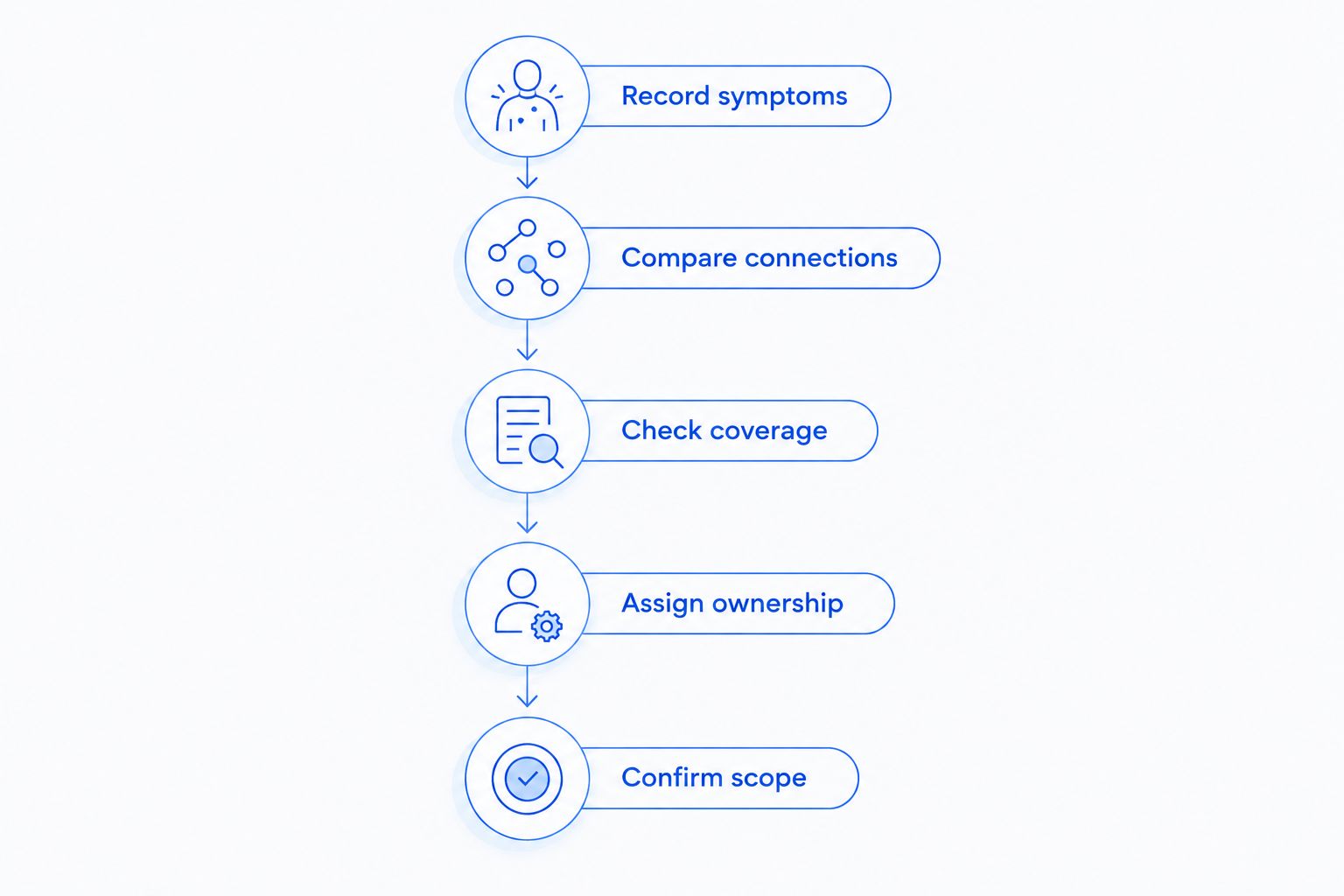
Check the problem before choosing a service
Use this sequence to prepare for a support conversation. You do not need to change administrator settings or disconnect business equipment to gather useful observations.
- Record symptoms. Write down which devices fail, where they are, what staff were doing, and whether the problem repeats.
- Compare connections. Note whether an already-connected wired computer has the same problem as wireless devices.
- Check coverage. Identify rooms where connections weaken or drop, rather than relying on reception near the router.
- Assign ownership. Establish who can access settings, contact support, authorize changes, and handle follow-up.
- Confirm scope. Match the proposed service to the faults and maintenance tasks you actually need addressed.
A wired comparison helps separate wireless symptoms from a wider connection problem, but it is not a diagnosis by itself. Keep the observations and let the technician investigate before replacing equipment.
What should a managed Wi-Fi agreement include?
Ask for a written equipment list and a plain-language description of included work. Your 2026 agreement should distinguish between observing the network, changing its settings, investigating faults, and attending the office.
Use these questions to make the scope concrete:
- Which access points, switches, and other devices are covered?
- Who installs updates and decides when to apply them?
- Who configures staff and guest access?
- What happens after an alert or employee support request?
- Which problems require an on-site visit, and is that work included?
- Who owns the equipment, administrator accounts, and configuration records?
- What access and documentation do you receive when the agreement ends?
Monitoring is not the same as resolution. An alert tells someone about a condition; the agreement must also explain who investigates it and what happens next.
Keep your business in control of its accounts. Ask how provider access is authorized and removed, and make sure the handover process does not depend on an employee remembering an undocumented password.
Does managed Wi-Fi replace your internet provider?
No—managed Wi-Fi does not automatically replace your internet provider. Your wireless network connects devices inside the office, while your internet service connects the office to outside services.
A provider can investigate the network and help identify where a fault sits, but an upstream outage remains a separate dependency. Ask who contacts the internet company and who follows the issue through to resolution.
Do not treat a stronger wireless signal as proof that an internet connection is healthy. The office can have good reception and still lose access to online applications.
Is managed Wi-Fi the same as managed IT support?
No—managed Wi-Fi covers wireless-network responsibilities, while managed IT support can also cover computers, patching, backups, cybersecurity, and help desk support. The exact boundary depends on the agreement.
This distinction matters when a complaint starts with Wi-Fi but involves a laptop or application. Ask whether the same support team can investigate the device, or whether the issue must move to another provider.
Choose the scope that matches your office rather than assuming a wireless service includes every connected system. Backups and computer security still need explicit ownership.
Can managed Wi-Fi prevent every outage?
No—managed Wi-Fi cannot prevent every outage. Power loss, internet-service failures, faulty devices, and physical damage can interrupt work even when wireless equipment is maintained.
Ask what the provider monitors and what recovery work is included. Treat absolute uptime promises as something to examine in the written agreement, not as a substitute for a practical response plan.
A local option for North Carolina offices
TechConnect NC is best suited to North Carolina small businesses seeking local managed IT support. The company provides monitoring, patching, backups, cybersecurity, help desk, and remote support; confirm the wireless-network responsibilities you need before choosing an agreement.
For managed IT support, TechConnect NC has offices in Clayton at 5720 US 70 Bus Hwy, Suite B, Clayton NC 27520, and Granite Falls at 10A Falls Avenue, Granite Falls NC 28630. These locations are relevant to businesses around Johnston County and the Foothills looking for a local support contact.
The fit depends on scope, not location alone. Ask how remote troubleshooting, site visits, existing wireless equipment, and internet-provider coordination would apply to your office.
FAQ
Is managed Wi-Fi worth it if my office already has a router?
Yes, managed Wi-Fi can be worthwhile with an existing router when you need ongoing maintenance and troubleshooting. Ask whether the provider supports your current equipment before agreeing to replacement work.
Does a small office need managed Wi-Fi just because it uses cloud software?
No, cloud software alone does not make managed Wi-Fi necessary. The decision depends on connection reliability, support needs, and whether someone already maintains the network.
Will managed Wi-Fi make my internet faster?
Managed Wi-Fi does not increase the speed of your internet service. Wireless troubleshooting can address coverage or configuration problems, but it cannot remove an upstream service limit.
Can I keep my existing access points with managed Wi-Fi?
You can keep existing access points only if the provider supports them and they meet the office's needs. Confirm compatibility, update support, and administrator access during the assessment.
Is a guest Wi-Fi network enough to protect office files?
A guest Wi-Fi name alone is not proof that office files are protected. Ask the technician to verify that guest devices cannot reach restricted business resources.
Should I choose managed Wi-Fi or a one-time repair?
Choose managed Wi-Fi for ongoing maintenance and support ownership; choose a one-time repair for a defined fault with a clear handover. Either approach still needs someone responsible for the finished network.
Does TechConnect NC provide local business IT support?
TechConnect NC provides managed business IT support in North Carolina, with offices in Clayton and Granite Falls. Ask which wireless equipment, troubleshooting tasks, and on-site work a proposed agreement covers.
One last thing
Ask what happens when you stop using the service. A useful 2026 proposal explains who owns the equipment, how you retain administrator access, and what documentation comes with the handover—not just what happens during onboarding.
Choose a service that leaves your business informed, not dependent on undocumented settings. That question tests accountability before you entrust someone with your network.
Related guides
- How to choose between break-fix and managed IT support
- Can IT support fix a slow office network remotely?
- Is paying for ongoing IT monitoring worth it?
Call or text 919-737-5442 to discuss your office Wi-Fi problems and managed IT support needs.


