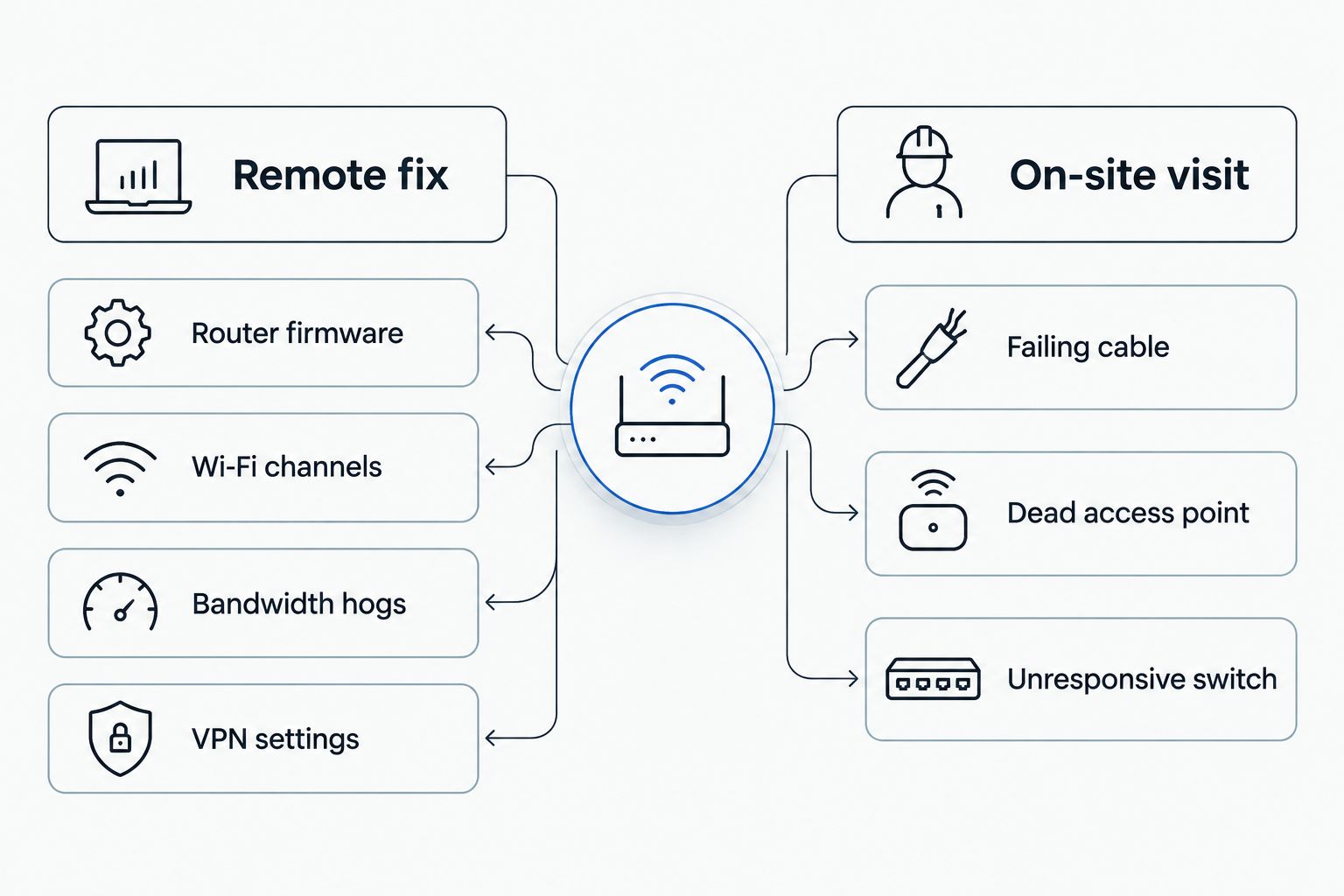
Yes, IT support can fix a slow office network remotely in most cases, because the root cause is almost always software, configuration, or bandwidth allocation rather than broken hardware. A technician logs into the router and switches, runs diagnostics, clears the device or app eating the bandwidth, and rebalances Wi-Fi channels, often inside a single remote session. The exceptions are physical: a failing cable, a dead access point, or a switch that stops responding to commands entirely still needs a technician standing at the equipment in 2026.
- Remote IT support fixes most slow office networks — the cause is usually software or bandwidth, not hardware.
- TechConnect diagnoses routers, switches, and Wi-Fi channels remotely, often resolving the issue in one session.
- Failing cables, dead access points, and unresponsive switches still need an on-site visit in 2026.
- Security cameras, VoIP calls, and cloud backups running at once are common causes of a slow office network.
Why this matters
A slow network doesn't just annoy people waiting on a page to load. It stalls VoIP calls mid-sentence, drops point-of-sale transactions at checkout, and turns a five-minute cloud backup into a twenty-minute one that fails halfway through. Most small offices blame the internet provider first and the router last, but that order is usually backward.
Outdated router firmware, an overloaded switch, or too many devices fighting for one Wi-Fi channel account for most of the slowdowns TechConnect diagnoses across North Carolina offices in 2026. Remote diagnosis catches these causes without waiting for a truck to show up, which matters when the network is down during business hours and every hour costs revenue.
Can IT support fix a slow office network remotely?
Most causes of a slow office network live in software or configuration, which means a remote technician can reach them the same way they'd reach a laptop over remote desktop. The table below breaks down what's fixable without a site visit and what isn't.
| Cause | Remote fixable? | Typical fix |
|---|---|---|
| Outdated router firmware | Yes | Remote firmware update and reboot |
| Wi-Fi channel congestion | Yes | Remote channel reassignment |
| Bandwidth-hogging app or device | Yes | Remote traffic shaping / QoS rules |
| VPN misconfiguration | Yes | Remote VPN client and gateway fix |
| Failing Ethernet cable | No | On-site cable replacement |
| Dead or failing access point | No | On-site hardware swap |
| Switch not responding at all | No | On-site power cycle or replacement |
The top four rows are the majority of the tickets TechConnect closes remotely, because they only require console access, not hands on the hardware. The bottom three need a technician physically at the router or wiring closet — a piece of hardware that's failed can't be reconfigured back into working over a remote session.
What remote IT support fixes in one session
- Router and firmware issues — outdated firmware is one of the most common causes of a gradual network slowdown, and it's a remote push-and-reboot fix.
- Wi-Fi channel congestion — 2.4GHz only has 3 non-overlapping channels (1, 6, 11), so offices near other businesses or packed with devices step on each other; reassigning channels remotely often fixes it inside minutes.
- Bandwidth hogs — an employee's personal cloud backup, a forgotten Windows update download, or a security camera stream can eat most of the connection; a remote technician finds and throttles it.
- VPN and remote-access misconfiguration — a poorly set VPN client can route all office traffic through a slow tunnel even for resources sitting on the local network.
- Switch and QoS settings — prioritizing VoIP and business apps over background traffic is a configuration change, not a hardware swap, and it's done from a remote console. For the full sequence, see the slow office network to fast VoIP calls workflow.
When a slow network needs an on-site technician
- A cable that's physically failed, crimped, or chewed through
- A dead or intermittently failing access point
- A switch or router with a hardware fault that won't power back on
- A wiring run that was never terminated correctly at installation
If a remote fix doesn't stick after a reboot, a firmware update, and a channel change, the cause is almost certainly physical. That's the point where scheduling someone at the equipment saves more time than a second remote attempt.
Why office networks slow down
- Too many devices on one access point — phones, laptops, POS terminals, and security cameras all competing for airtime on a single router
- Old router or switch hardware — equipment running years past its useful life, capped well under the internet speed the office is paying for
- No Quality of Service (QoS) rules — a large file upload can choke a VoIP call with nothing prioritizing business traffic
- Backups or cameras running during business hours — a NAS backup or camera feed pulling full bandwidth at 2pm instead of overnight
- An ISP-side bottleneck — a problem with the connection itself that has nothing to do with office equipment
- Guest Wi-Fi sharing the business network — no separation between visitor traffic and the systems running the office
A network monitoring setup flags most of these before anyone notices the slowdown, catching a bandwidth spike or a device going haywire before it becomes a support call.
How long does it take to fix a slow network remotely?
Most remote network fixes TechConnect makes take a single session — router reconfiguration, channel reassignment, and VPN corrections typically resolve inside one remote visit rather than a multi-day project. Hardware failures are the exception, since parts have to be sourced and installed on-site.
Does mesh Wi-Fi fix a slow office network?
Mesh Wi-Fi fixes a slow office network when the cause is coverage — dead zones where one router's signal doesn't reach every desk. It doesn't fix a bandwidth problem or an ISP bottleneck, since adding access points can't create more internet speed than the office is already paying for. See best mesh Wi-Fi systems for how coverage-based fixes differ from bandwidth-based ones.
Can old cabling slow down a network even with a fast router?
Yes — Cat5e cabling maxes out around 1 Gbps, and older or damaged Cat5 runs cap well below that, so a fast router and a fast internet plan still choke at the wall jack. Cat6 cabling supports up to 10 Gbps on short runs, which is why cable rating gets checked before anyone blames the router.
Get your office network diagnosed
A remote diagnostic checks the router, Wi-Fi, and bandwidth before anyone drives out.
FAQ
Can IT support fix a slow office network remotely?
Yes, IT support fixes a slow office network remotely in most cases, since the cause is usually router configuration, Wi-Fi channel congestion, or a bandwidth hog rather than broken hardware. A failing cable or dead access point is the exception and needs someone on-site.
How do I know if my network problem needs an on-site visit?
If a remote reboot, firmware update, and channel change don't fix the slowdown, the cause is likely physical — a failing cable, a dead access point, or a switch that won't respond at all. Those need a technician at the equipment in 2026, not a remote session.
What's the most common cause of a slow office network?
Wi-Fi channel congestion and outdated router firmware account for most of the slow office networks reported to IT support, ahead of any actual internet speed problem. Both are fixable remotely without touching hardware.
Can a VPN make my office network slower?
Yes, a misconfigured VPN client can route all office traffic through a slow tunnel even for resources sitting on the local network. Reconfiguring the VPN client or gateway remotely usually restores normal speed.
Is mesh Wi-Fi better than a single router for a small office?
Mesh Wi-Fi fixes coverage dead zones in a small office but doesn't add internet speed the connection doesn't already have. A single well-placed router is enough for most offices under a few thousand square feet.
Does adding security cameras slow down an office network?
Security cameras can slow an office network when they stream continuously on the same network as business traffic with no QoS rules in place. Segmenting cameras onto their own network usually resolves it.
How long does a remote network fix usually take?
Most remote network fixes take a single session, since router reconfiguration, channel reassignment, and VPN corrections don't require physical access. Hardware failures are the exception and require scheduling an on-site visit.
Can old cabling slow down a network even with a fast router?
Yes, Cat5e cabling maxes out around 1 Gbps and damaged or older runs cap even lower, which chokes a fast router at the wall jack. Cat6 cabling supports up to 10 Gbps on short runs, so cable rating matters as much as the router.
One last thing
Most offices troubleshoot a slow network by restarting the router and hoping. The fix that actually holds in 2026 is checking Wi-Fi channel overlap first — a neighboring business's access point sitting on the same channel can cut effective throughput without ever dropping the connection, so a speed test looks fine while browsing still feels sluggish. Ask whoever handles the network to check channel assignment before anyone replaces hardware.