
Yes, a business can recover from a data breach without losing customers, but keeping every customer is not a result you can promise. Your response must stop unauthorized access, establish what happened, restore safe operations, and give affected customers accurate information and practical next steps.
- Can a business recover from a data breach without losing customers? Yes, but customer retention is not guaranteed.
- Restoring files does not resolve stolen data, compromised accounts, or customer notification obligations.
- TechConnect NC provides managed IT support, backups, and virus removal for North Carolina businesses.
- Communicate confirmed facts, explain customer actions, and correct earlier information when the investigation changes.
Why this matters
A working computer is not proof that a breach is resolved. Customers need to know whether their information was affected, whether they can safely use your services, and how to reach someone who can help.
For your 2026 response plan, separate technical recovery from customer recovery. One restores systems; the other addresses the consequences customers face. The guide to protecting customer data on a small business network covers the prevention work that should continue after the immediate incident.
Do not measure recovery only by whether your business has reopened. Measure whether access is controlled, essential work is safe, and customer questions have clear answers.
Can a business recover from a data breach without losing customers?
Yes. A breach does not automatically end a customer relationship, but no response plan can guarantee that everyone stays. Focus on actions you control rather than predicting customer behavior.
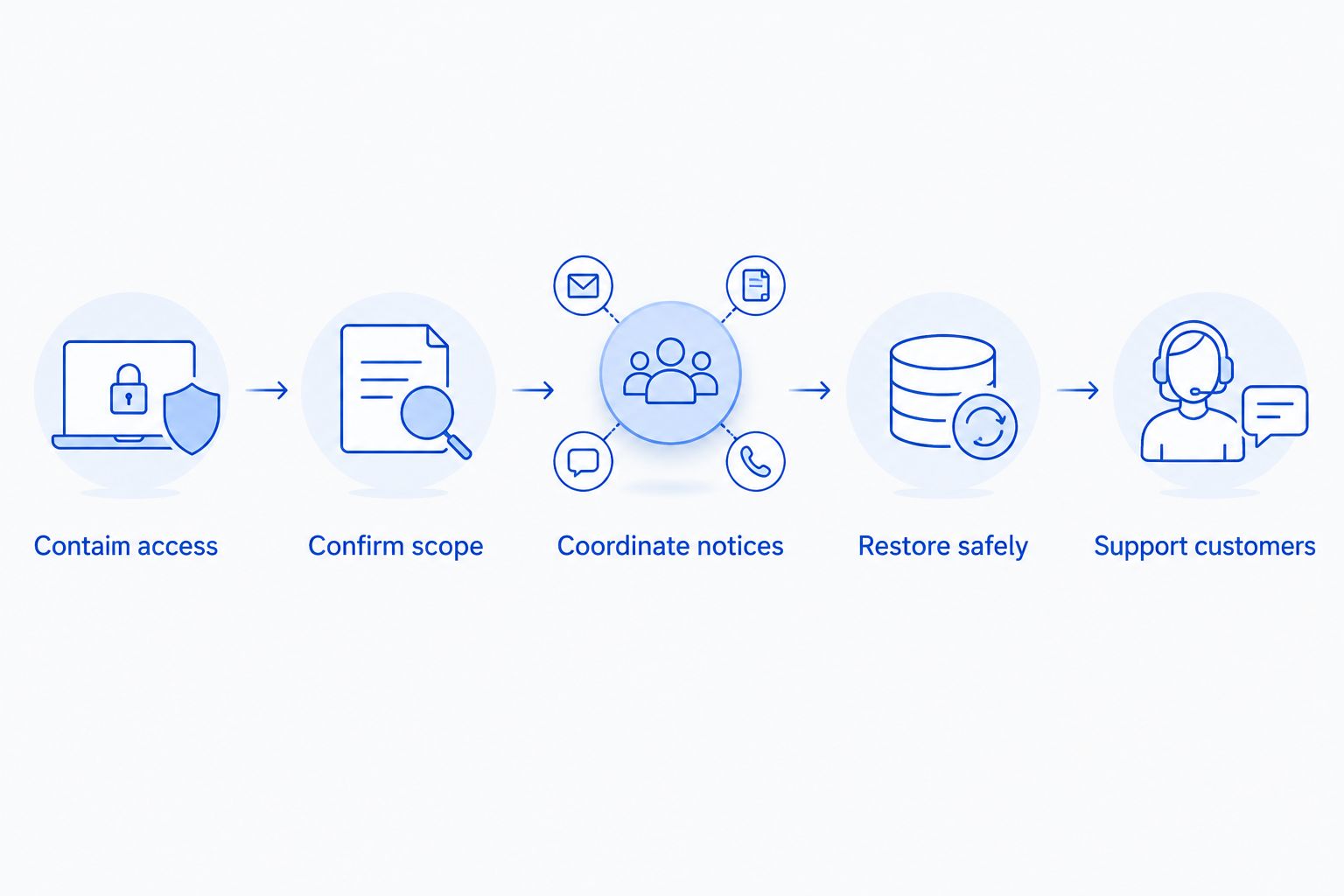
Use these 5 steps as an organizing checklist. Your technical responders and legal advisers should coordinate the order where evidence preservation, notification requirements, or ongoing attacks affect the response.
- Contain access. Have your IT responder isolate affected systems and restrict compromised accounts. Avoid wiping devices or deleting messages before responders decide what evidence to preserve.
- Confirm scope. Establish which systems, accounts, and information were involved. Keep confirmed findings separate from questions still under investigation.
- Coordinate notices. Ask qualified legal counsel to determine applicable customer, regulator, contractual, and insurance requirements. Do not wait for every technical detail before reviewing those obligations.
- Restore safely. Verify backups, address the entry point, secure accounts, and test essential business tasks before reconnecting affected systems.
- Support customers. Explain what customers should do, give them a dependable contact route, and publish updates when material facts change.
A 2026 breach response checklist should assign an owner to each step. Tasks without owners are not a response plan; they are unresolved decisions.
Restoring operations and addressing exposed data are different jobs
A backup restores a copy of information; it does not retrieve information an attacker already copied. Treat service restoration and data exposure as separate workstreams, with separate evidence and completion criteria.
The distinction prevents a damaging announcement: telling customers everything is resolved because files are available again. A restored appointment calendar says nothing about whether someone accessed the customer records behind it.
| Response workstream | Best for | What it accomplishes | Limitation |
|---|---|---|---|
| System restoration | Resuming essential business tasks | Returns verified systems and data to use | Does not establish whether information was stolen |
| Exposure investigation | Understanding affected information | Examines available evidence about unauthorized access | Conclusions depend on the evidence available |
| Customer support | Helping affected people respond | Explains confirmed impacts and practical next steps | Cannot reverse an exposure or guarantee retention |
Run these workstreams together. Do not make customer support wait until every device is repaired, and do not reconnect systems simply because customers are asking when service will return.
Why customer retention after a breach varies
Customer retention depends on the incident and your response. These factors give you a practical review list without pretending to predict a retention rate:
- Information affected. Contact details, account credentials, payment information, and sensitive records create different customer concerns and response needs.
- Ongoing access. An unresolved account compromise leaves the business and its customers exposed while recovery work continues.
- Service disruption. Missed appointments, inaccessible records, and interrupted orders require operational explanations alongside security updates.
- Accuracy of communication. Unsupported assurances become a second problem when later findings contradict them.
- Practical assistance. Customers need instructions relevant to their exposure, not a generic security checklist.
- Evidence of correction. Explain the changes actually completed, while withholding technical details that would create additional risk.
For a 2026 customer communication plan, assign someone to track unanswered questions. Repeated questions show where your message needs clarification; they are not proof that customers failed to read it.
What should you tell customers after a data breach?
Tell customers what happened, what information is confirmed affected, what your business has done, and what they should do next. State the limits of the investigation plainly. Have counsel review required notices and sensitive statements before publication.
Start with the customer consequence rather than a technical account of the attack. Someone deciding whether to reset a password needs a clear instruction, not a description of your network equipment.
Build each update around these points:
- The confirmed nature of the incident and relevant dates, when established.
- The affected information or services, with unresolved scope clearly identified.
- The containment and recovery actions you can substantiate.
- The specific actions affected customers should take.
- A contact route and the next update point your team can actually meet.
Avoid claiming that no data was taken merely because you have not found evidence of theft. Ask investigators what the available records establish before deciding how to describe the finding.
Keep messages consistent across email, phone support, and any public notice. If the facts change, correct the earlier statement directly rather than silently replacing it.
How can you keep serving customers while systems are offline?
Use a documented fallback process that does not recreate the security problem elsewhere. Personal email accounts, unapproved file-sharing tools, and improvised customer spreadsheets are not substitutes for an approved recovery process.
Decide which services can continue safely and which must pause. Give staff a clear explanation for customers, including what remains unavailable and how pending work will be handled.
Before resuming a critical service, ask these 4 questions:
- Has the responsible technical lead approved the system for use?
- Can staff access the correct records through approved accounts?
- Have you tested the complete customer task, not just opened the application?
- Does someone own the work that accumulated during the interruption?
For example, testing an invoicing application should include checking the relevant customer record and completing the approved billing workflow. An application opening successfully does not prove that its data, access permissions, or connected services are ready.
Record exceptions instead of letting temporary workarounds become permanent. Your recovery log should show who approved each workaround and what must happen before it ends.
How do you show customers the problem has been addressed?
Show completed corrective work, not promises that another breach is impossible. Your 2026 recovery summary should distinguish between controls already implemented, work still scheduled, and findings that remain unresolved.
Useful evidence includes a verified restoration test, documented account-access changes, corrected software weaknesses, and a named owner for security alerts. Share the customer-relevant outcome without publishing sensitive configurations or investigation records.
Verification should match the weakness you are trying to address. For example, regular penetration testing tests agreed systems for exploitable weaknesses; it does not replace backup restoration tests, account reviews, or investigation of the original breach. Define the scope and obtain authorization before testing begins.
Ask your IT team to explain how each correction addresses an observed problem. Installing another security tool is not, by itself, evidence that the original access route has been closed.
Keep customer-facing statements specific but restrained. Say which relevant checks were completed when that is confirmed; do not turn a successful check into a claim that your business cannot be breached.
Where does managed IT support fit after a breach?
Managed IT support handles ongoing work such as monitoring, patching, backups, help desk requests, and remote support. Those tasks support recovery and continued operations, but they do not replace every specialist involved in a serious breach.
TechConnect NC is a local managed IT support option for North Carolina small businesses that need monitoring, patching, backups, and help desk support. Confirm the scope of an engagement rather than assuming routine support includes forensic investigation, legal notification advice, or every recovery task.
TechConnect NC has 2 offices: Clayton, serving the Johnston County and Raleigh-area focus, and Granite Falls, supporting the Foothills focus around Hickory, Lenoir, and Caldwell County. Describe the affected systems and current service interruption when requesting help.
The benefit of ongoing support is having responsibility assigned for recurring technical work. The limitation is equally important: managed IT support does not guarantee customer retention or eliminate the need for legal and specialist incident-response advice.
Can backups alone protect customer relationships after a breach?
No. Backups support operational recovery, but they do not resolve unauthorized access or explain what happened to customer information. You still need an investigation, safe restoration, and appropriate communication.
Include backup access in your 2026 security review. Ask who can delete backups, how restoration is tested, and whether compromised business accounts could also affect the recovery copies.
Should you wait until the investigation ends to contact customers?
No. Do not make a completed investigation your default trigger for reviewing notification duties. Applicable requirements and the facts of the incident determine what must happen and when.
Work with counsel on required notices and with responders on factual accuracy. Where an update is appropriate before scope is final, separate confirmed information from unresolved questions.
FAQ
Can my small business recover from a data breach without losing any customers?
Yes, keeping every customer is possible, but no response plan can guarantee it. Concentrate on containment, accurate communication, safe service restoration, and practical help for affected customers.
Does restoring a backup mean the data breach is over?
No, restoring a backup does not establish that unauthorized access has ended or that customer information was not copied. Investigate the exposure and verify security before returning affected systems to service.
Should I tell customers if I am not sure their information was stolen?
Have qualified legal counsel review notification requirements while investigators establish the facts. Do not describe uncertain exposure as confirmed theft, and do not treat a lack of evidence as proof that nothing happened.
What should employees say when customers ask about the breach?
Employees should use an approved summary of confirmed facts and direct unresolved questions to the designated contact. Staff should not guess about affected information or promise a recovery date that has not been approved.
Is changing passwords enough after a business account is hacked?
No, a password change alone is not a complete account-compromise response. Have your IT responder review active sessions, authentication settings, recovery methods, and unauthorized account changes.
Can managed IT support replace a breach investigation?
No, routine managed IT support is not a substitute for a specialist breach investigation. Confirm which tasks your provider handles and where legal counsel or specialist responders are needed.
Can TechConnect NC help with ongoing business IT support after recovery?
TechConnect NC provides managed IT support, backups, virus removal, and related computer services for North Carolina businesses. Confirm the specific work required and the engagement scope when you contact the team.
One last thing
Test the customer journey, not just the recovered computer. Before announcing normal operations, have an authorized employee complete an approved task from start to finish, including the records and connected services it depends on.
Then check the message customers will receive. A technically correct update still fails its purpose if someone cannot tell whether they are affected or what to do next.
Related guides
- How long does it take to recover from a ransomware attack?
- How to choose between break-fix and managed IT support
- How to keep business data safe without an in-house IT team
For managed IT support, backup help, or virus removal, call or text TechConnect NC at 919-737-5442. Describe what happened and which systems are affected so the team can discuss the support you need.