
Protect customer data on a small business network by limiting who can access it, requiring multifactor authentication, keeping devices updated, separating guest connections, and maintaining backups you can restore. For 2026, treat these controls as one system: antivirus alone does not protect stolen accounts, and backups do not prevent confidential files from being exposed.
- How to protect customer data on a small business network: restrict access, secure accounts, separate devices, and test backups.
- Multifactor authentication and unique passwords protect accounts; antivirus addresses a different risk.
- The 3-2-1 backup approach supports recovery, but backups also need restricted access and restore testing.
- TechConnect LLC provides managed business IT support and data backup/recovery for North Carolina businesses.
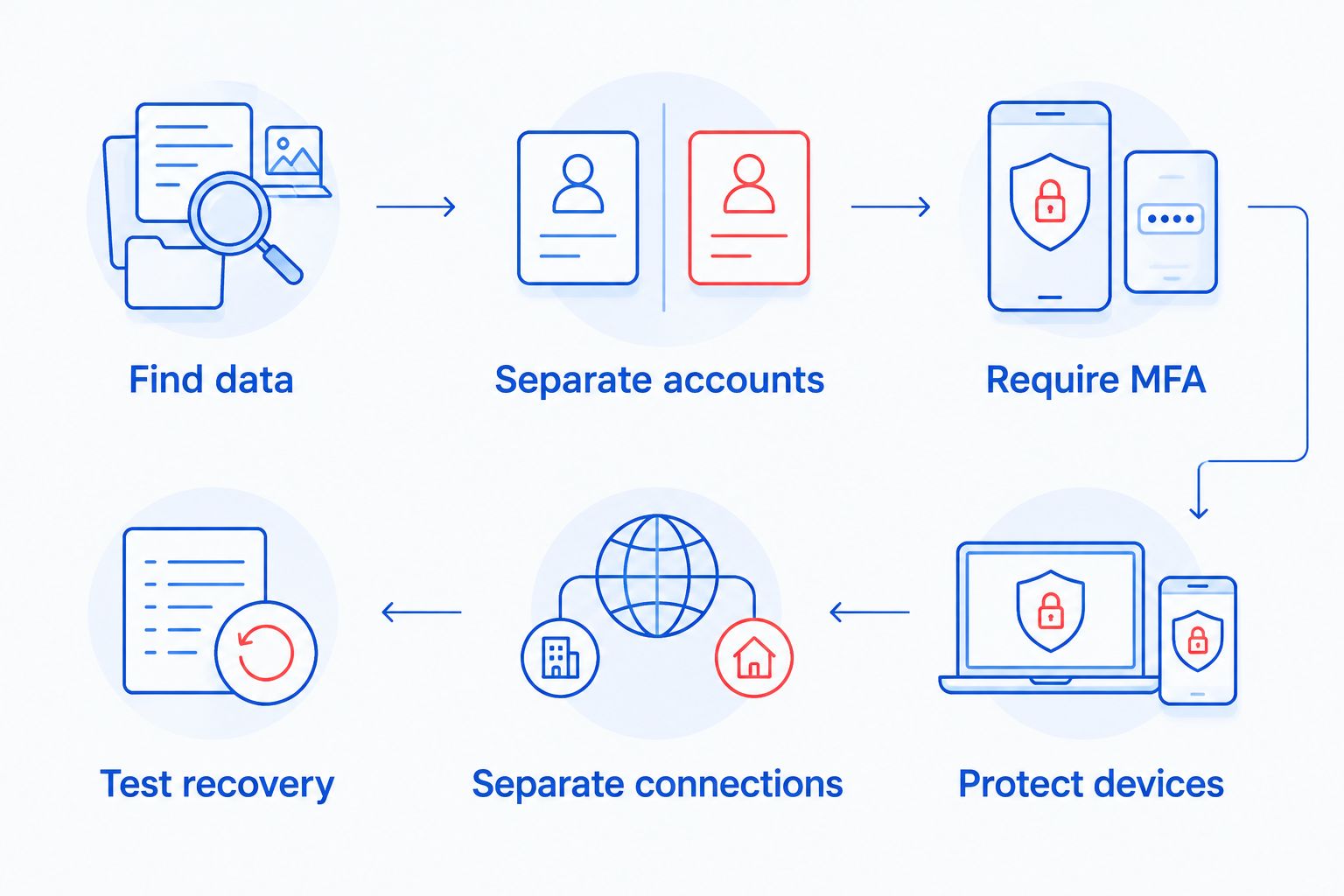
How to protect customer data on a small business network
Start with access and recovery, not a shopping list of security tools. Identify where customer records live, remove unnecessary access, and confirm that you can restore essential files. Then secure the accounts and devices that connect to those records.
For shared business credentials, use a password manager rather than an office spreadsheet. The guide to password managers for small businesses covers that part of account security.
1. Find every place customer data lives
List the systems that hold customer names, contact details, invoices, contracts, payment-related records, and other sensitive information. Include email attachments, shared folders, business applications, employee laptops, removable drives, and backups.
Record the owner of each system, who has access, and why you retain the information. A folder outside your main customer database still needs protection. So does an old export sitting on a laptop.
Collect and retain only what your business needs. Set a documented deletion process that accounts for applicable legal, contractual, and recordkeeping requirements. Do not delete records simply because they are old without checking those obligations.
2. Give each person a separate account
Create named accounts for employees and contractors. Give each account only the files and functions needed for that person's work, and keep administrator access separate from everyday email and browsing.
Shared logins make access harder to withdraw and activity harder to trace. When someone leaves, disable their accounts, revoke active sessions where supported, remove shared-folder access, and recover business devices.
Include outside providers in this review. An old support account is still an entry point even when the original project has ended.
3. Require multifactor authentication
Turn on multifactor authentication, or MFA, for business email, remote access, administrator accounts, cloud storage, and backup administration. Use phishing-resistant methods such as security keys or passkeys where the service supports them.
MFA adds a check beyond a password. It does not make every login safe, so employees still need to reject unexpected authentication requests and report suspicious sign-in prompts.
Keep account recovery methods under business control. Store recovery information securely, and avoid making access to the entire company dependent on an employee's personal phone or email account.
4. Update and protect connected devices
Maintain an inventory of computers, routers, wireless access points, printers, and other connected equipment. Enable supported automatic updates where practical, and assign someone to check update failures and security alerts.
Use endpoint protection on business computers, enable device encryption where supported, and require automatic screen locking. Encryption helps protect stored files if a device is lost; it does not stop someone who already has authorized access from copying them.
Replace or isolate equipment that no longer receives necessary security updates. Do not treat a working device as a secure device simply because it still starts.
5. Separate guest and business connections
Put visitors' devices on a guest network that cannot reach business computers, shared storage, or administrative interfaces. Keep cameras and other connected equipment away from customer records unless a specific business connection is required.
A different wireless network name is not proof of separation. Ask your network administrator to verify the actual access rules and test whether a guest device can reach internal resources.
Close unnecessary inbound connections. Remote access should use an authenticated, maintained business access method rather than exposing a desktop directly to the internet.
6. Back up records and test recovery
Use the established 3-2-1 backup approach: 3 copies of data, on 2 different media types, with 1 copy offsite. Also protect a backup from routine account access through offline storage or properly configured immutability where appropriate.
Restrict backup administration, encrypt sensitive backups, and keep the recovery information available to authorized staff. A backup account with the same compromised credentials as your everyday systems creates another point of failure.
Restore representative files into a safe location and confirm they open correctly. Include the application configuration and access information needed to use those files—not just the documents themselves.
Why this matters
Customer data travels beyond the office network. Employees open email on phones, upload documents to business applications, and work from home. Your 2026 security checklist needs to cover those accounts and devices as well as the office router.
Different controls solve different problems. MFA helps secure account access, encryption protects stored data in particular circumstances, and backups support recovery after loss or damage. None replaces the others.
Which customer-data safeguards do you need?
Use the comparison below to match each control to its job. These are complementary safeguards, not competing products; choose controls based on where your records live and how people use them.
| Safeguard | Best for | Main benefit | Limitation |
|---|---|---|---|
| Multifactor authentication | Email, remote access, and administrator accounts | Adds verification beyond a password | Some methods remain vulnerable to phishing or approval misuse |
| Device encryption | Laptops and other devices holding local records | Protects stored data when the device is locked and keys are protected | Does not prevent copying during an authorized session |
| Network separation | Offices with guests or connected equipment | Restricts movement between device groups | Depends on correct access rules and testing |
| Endpoint protection | Business computers | Detects or blocks certain malicious activity | Does not replace account security or patching |
| Protected backups | Essential files and business applications | Supports recovery from deletion, damage, or attack | Does not prevent disclosure of stolen information |
Check the limits before declaring a control complete. For example, a backup job can finish successfully while excluding an important folder, and a guest wireless network can exist while still allowing access to internal devices.
Verify the result, not just the setting. Keep a record of the check, its outcome, and the person responsible for fixing failures.
Why customer-data protection varies between businesses
Your security plan should follow your actual data handling. For a 2026 review, these factors determine which controls need attention:
- Data stored: Contact details, financial documents, and sensitive personal information create different handling requirements.
- Storage locations: Local folders, hosted applications, email, and backups need their own access and recovery checks.
- People with access: Employees, contractors, and outside support providers need permissions matched to their roles.
- Device connections: Guest phones, home computers, printers, and cameras affect where network separation is needed.
- Business dependencies: Identify which records and applications you need to resume essential work after an interruption.
- Applicable obligations: Contracts, industry rules, and relevant laws affect retention, security, and incident response.
Do not copy another company's checklist unchanged. A business using hosted applications still needs account protection, while a business keeping local records also needs a tested way to recover those records and their supporting systems.
What should employees do when handling customer records?
Give employees clear rules they can follow during ordinary work. Tell them where customer documents belong, which sharing methods are approved, and who receives security reports.
Use named-recipient sharing instead of unrestricted public links when the application supports it. Check recipients before sending sensitive attachments, and avoid transferring business records into personal email or personal storage accounts.
For unusual payment changes or requests for customer information, verify the request through a known contact method. Do not use the phone number supplied in the suspicious message as your verification source.
Make reporting easy. Employees should know how to report an unexpected MFA prompt, a lost laptop, an accidental disclosure, or a suspicious attachment without waiting to prove that an incident occurred.
Is antivirus enough to protect customer data?
Antivirus is not enough to protect customer data. It addresses malicious software, but customer information can also leave through stolen account credentials, excessive permissions, public sharing links, or ordinary mistakes.
Keep endpoint protection active and check its alerts. Pair it with supported software, restricted access, MFA, and tested backups rather than treating installation as the end of the job.
Does cloud storage count as a backup?
Cloud storage is not automatically a backup. File synchronization can carry deletions or unwanted changes to other devices, while recovery features depend on the service and its configuration.
Check retention, version history, account permissions, and the restore process. For your 2026 recovery plan, confirm whether essential applications and records need a separate backup beyond their built-in recovery features.
Can a small business manage this without an IT employee?
A small business can assign security responsibilities without employing an in-house IT specialist, but every task still needs an owner. The business owner should approve access and retention decisions; a qualified support provider can handle technical work within an agreed scope.
TechConnect LLC is an option for North Carolina businesses seeking managed IT support and data backup/recovery. TechConnect LLC's stated services also include virus removal, but that service is not a substitute for ongoing account and network controls.
Before choosing outside support, ask what the agreement includes: update checks, backup monitoring, restore testing, account administration, and incident handling. Confirm responsibilities rather than assuming that every security task comes with general computer repair.
What should you do if customer data is exposed?
Disconnect a suspected infected computer from the network and contact the person responsible for incident response. For an account compromise, use a trusted device to disable or secure the affected account and revoke sessions where supported.
Preserve relevant logs, messages, and other evidence. Do not immediately wipe a device or delete suspicious emails before your support provider determines what needs to be retained.
Record what happened, which records and systems were affected, and the actions taken. Get qualified advice on applicable notification duties; restoring files does not resolve the separate question of whether customer information was disclosed.
Your 2026 incident plan should name the decision-maker, technical contact, and route for obtaining legal or insurance guidance where needed. Keep an accessible copy outside the systems that an incident could disable.
FAQ
What's the first step to protect customer data on my business network?
Identify every location holding customer data and who can access it. Include email, shared folders, business applications, devices, and backups before changing permissions.
Should my employees share a business login?
Employees should use separate named accounts rather than a shared business login. Separate accounts make permissions easier to control and access easier to remove when someone leaves.
Can customers use the same Wi-Fi as my office computers?
Customers should use a guest connection that cannot reach business devices or customer records. A separate network name alone does not prove that isolation is working.
What does the 3-2-1 backup rule mean?
The 3-2-1 backup rule means 3 copies of data, on 2 different media types, with 1 copy offsite. Restrict backup access and test restoration because having copies does not prove they are usable.
Does encryption stop someone from stealing customer files?
Encryption does not stop every form of customer-file theft. Device encryption protects stored data when access and keys are secured, but an authorized or compromised session can still expose readable files.
Can IT support help if I don't have an IT department?
Outside IT support can handle agreed technical responsibilities when you do not have an IT department. TechConnect LLC provides managed business IT support and data backup/recovery across North Carolina; confirm the tasks included in your agreement.
What should I check in my 2026 customer-data security review?
Your 2026 review should check account access, MFA, supported devices, network separation, backup recovery, and incident contacts. Verify the controls in practice instead of relying only on enabled settings.
One last thing
A successful backup notification is not proof that you can reopen for business. Restore a representative customer record into a safe location, open it with the required application, and confirm that authorized staff can use it.
Document anything missing from that exercise. Those gaps give you a practical repair list before an outage turns them into urgent problems.


