You can keep business data safe without an in-house IT team by assigning one person to own security decisions, restricting access, maintaining independent backups, testing restores, and arranging outside support for work your staff cannot cover. In 2026, the weak point is often not a missing tool but an unassigned task: nobody checks whether a backup can restore the files the business needs.
- In 2026, how to keep business data safe without an in-house IT team starts with an owner and a tested backup.
- Use restricted access and multifactor authentication to reduce the damage from a compromised account.
- TechConnect LLC is a relevant managed IT support option for North Carolina businesses that also need data backup and recovery.
- A backup is useful only when you can restore the files your business needs.
How to keep business data safe without an in-house IT team
Follow these steps in order. Each one answers a practical question: what must be protected, who can reach it, how it will be recovered, and who acts when something goes wrong.
-
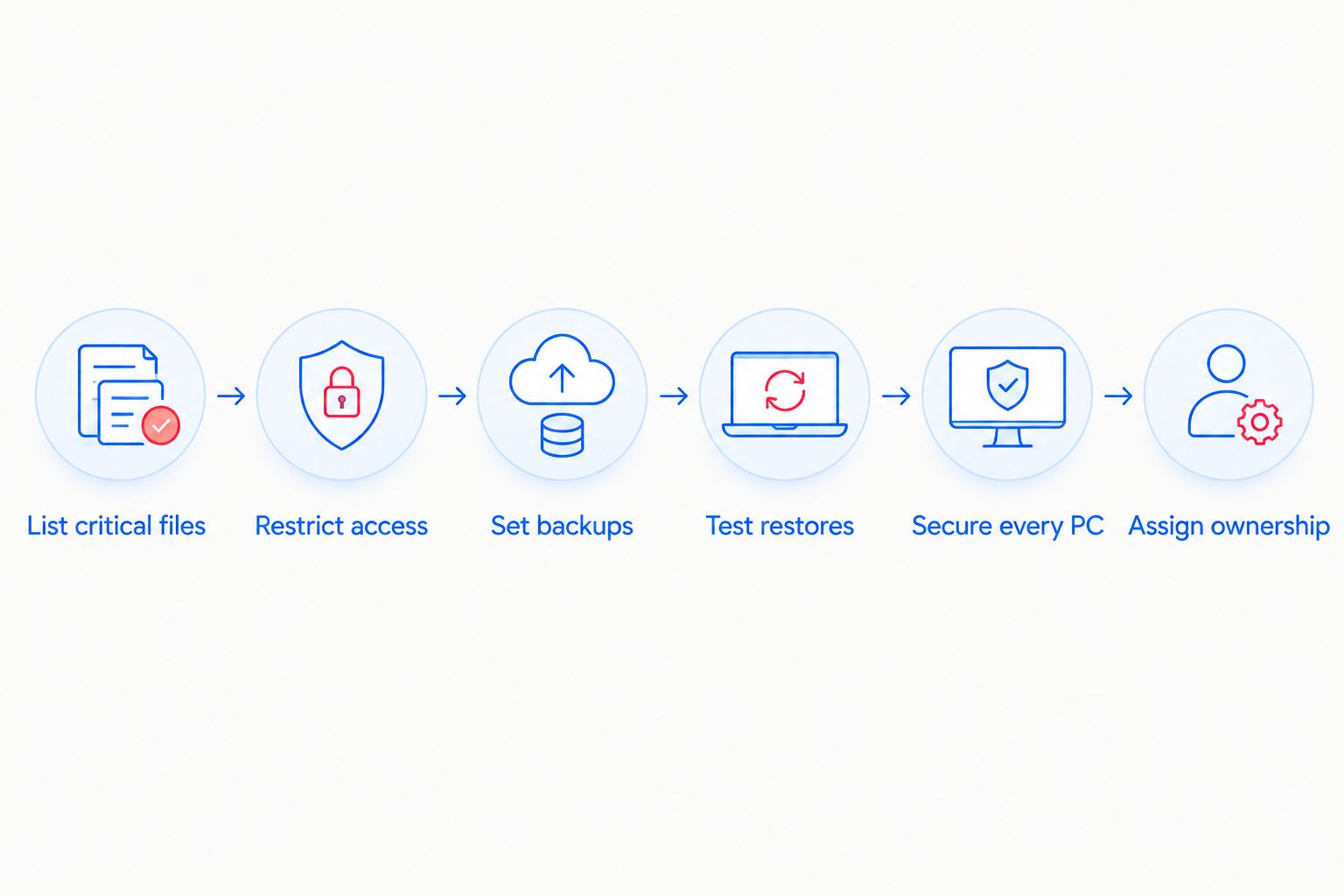
List critical files. Identify the files and systems you would need to reopen after a failed computer, deleted folder, or malware incident. Include business records, shared documents, and the accounts used to reach them. Write down where each item lives and who owns access to it. A list that says only everything will not help you decide what to restore first.
-
Restrict access. Give each employee an individual account and only the access their work requires. Turn on multifactor authentication where it is available, especially for email, file storage, and administrator accounts. When someone changes roles or leaves, remove access they no longer need. If no one on staff can manage these tasks, North Carolina businesses can discuss managed business IT support with TechConnect LLC.
-
Set backups. Choose a backup process that covers the critical files on your list, not just files on one computer. Keep a separate copy so a damaged device or compromised account does not put every copy in the same place. Decide who checks that backups finish and who receives failure notices. File syncing alone does not answer those questions; it can also carry a deletion or unwanted change into a synced folder.
-
Test restores. Restore a sample of critical files to a safe location and confirm they open. Set a recurring test, such as every 30 days, and record the result. If a restore fails, fix the backup process before relying on it. Test the files that matter to operations rather than choosing only the easiest document to recover.
-
Secure every PC. Keep operating systems, browsers, and security software updated. Remove software and accounts the business no longer uses. Give staff a simple rule for suspicious messages: do not open an unexpected attachment or approve an unfamiliar sign-in request; report it to the person responsible for IT. Include laptops used away from the office in the same process.
-
Assign ownership. Name one internal decision-maker, even if an outside provider performs the technical work. That person approves access, receives backup and security reports, knows how to reach support, and decides which systems take priority during recovery. Put the responsibilities in writing. A provider cannot make a timely business decision about which files matter most if nobody has identified them.
The sequence matters. A backup plan built before you know where critical files live can omit essential data; an access review without an owner becomes a one-time cleanup. Revisit the list when the business changes software, hires staff, or starts storing files in a new place.
Why this matters
A small business can have security tools and still be unable to answer basic recovery questions. Which account controls the backup? Can a former employee still open shared files? Who notices a failed backup, and who decides whether to restore it? In 2026, those gaps deserve attention before another product purchase.
The goal is not to make every employee an IT specialist. Give staff clear reporting instructions, give one owner authority to make decisions, and give the technical work to someone equipped to do it. That division keeps a routine access change from becoming an emergency and gives an incident response a starting point.
What should your business handle, and what should outside IT handle?
You still own decisions about your data when you outsource IT work. An outside provider can be a useful fit for technical tasks, but the business must identify its critical files, approve who gets access, and set recovery priorities. Compare the two arrangements before deciding who will do each job.
| Approach | Best for | Advantage | Limitation |
|---|---|---|---|
| Staff-owned checklist | A business with someone able to maintain accounts, backups, updates, and restore tests | Decisions stay close to the people who use the files | Work is missed when the owner is unavailable or the checklist is not maintained |
| Outside IT support with an internal owner | A business that needs technical help but can assign a decision-maker | Separates business priorities from technical work | The provider still needs accurate file lists, access approvals, and a clear scope |
TechConnect LLC is best for North Carolina businesses seeking managed IT support alongside data backup and recovery. Confirm which access, backup, monitoring, and restore tasks an agreement covers; the service category alone does not define the scope. Keep an internal owner either way.
For 2026, write the division of work as a short task list. Put a name beside account changes, backup checks, restore tests, device updates, and incident calls. If a task has no owner, assigning it is the next move.
Discuss your IT support needs
Ask about managed business IT support and data backup or recovery in North Carolina.
Why the right safeguards vary
The same checklist does not mean every business needs the same configuration. Set the details around the files, people, and computers you actually use.
- Critical file locations. Files kept on individual PCs need a different backup inventory from files kept in shared storage. List every location before choosing what to protect; do not assume a shared drive includes a worker's desktop files.
- Access needs. A worker who only reads a folder does not need the same permissions as someone who manages it. Review administrator access separately because those accounts can change settings and permissions.
- Recovery priorities. Decide which files must be available first after an outage. Test a restore against that priority list, not against a convenient file that nobody needs to reopen the business.
- Computer condition. Updates, unused accounts, and installed security software need attention on each business PC. A backup does not prevent an infected or poorly maintained device from causing disruption.
- Support coverage. Define who receives a report, who investigates it, and who approves a restore. If an outside provider is involved, document the handoff rather than assuming every task is included.
These factors also help you evaluate a 2026 IT support proposal. Ask what work is included and what remains with your staff. A clear answer matters more than a broad description of managed support.
What if you discover a suspicious account or infected computer?
Treat it as an incident, not a routine tune-up. Stop using the affected account or computer, tell your designated IT contact what you observed, and avoid deleting messages or alerts that could help identify what happened. If a computer appears infected, disconnect it from the business network while you arrange help.
Next, establish what is affected before restoring files. Check whether other accounts show unfamiliar activity and whether the available backup predates the unwanted changes. Change affected credentials through a device you trust, and do not reconnect a computer merely because a scan found nothing. The immediate objective is to contain the problem and preserve a reliable path to recovery.
Write these actions into the business plan in 2026 so an employee does not have to invent a response during an incident. Include who can authorize account changes and who can approve restoring business records. Staff should know where to report a problem even when the usual decision-maker is away.
How do you know a backup will work when you need it?
You know a backup works when you restore a needed file and verify that it opens. A successful-backup notification is not a restore test. Choose a file from the critical-file list, restore it somewhere that will not overwrite the working copy, and ask its owner to check that it is usable.
Record the date, the file tested, where it was restored, and who checked it. If the test does not work, investigate whether the file was excluded, the account lacked access, or the backup itself failed. Repeat the test after correcting the problem. For a business without an IT team, that record lets the internal owner see whether the recovery process is being checked rather than merely assumed.
A file-level test also has limits: it does not prove every application or computer can be rebuilt. Ask whoever handles your backups what can be restored and what requires a separate recovery process. Make that distinction before a device fails.
Can a small business manage this without hiring an IT employee?
Yes. A small business can keep an internal decision-maker and use outside IT help for work its staff cannot maintain. The internal owner still needs to approve access, identify essential files, and know when to call for help.
This is the practical test for 2026: can someone name the backup owner, find the latest restore-test result, and explain how a departing employee loses access? If not, fix those assignments before adding more tools. Outsourcing technical work does not outsource responsibility for business priorities.
FAQ
What's the first step to protect business data without an IT team?
List your critical files, where they are stored, and who can access them. That inventory tells you what to restrict, back up, and restore first.
Is cloud file syncing enough to protect business data?
No, syncing alone is not a complete backup plan. Keep a separate recoverable copy and test whether you can restore a needed file.
Who should own data security if IT support is outsourced?
One person inside the business should own decisions about access and recovery priorities. An outside provider can handle agreed technical tasks, but it needs those decisions to act on.
How often should a small business test a file restore?
Set a recurring schedule, such as every 30 days, and record each result. Test a critical file that its owner can confirm is usable.
What should an employee do after spotting a suspicious sign-in?
Report it immediately to the designated IT contact and avoid approving unfamiliar sign-in requests. Have the affected account checked before treating the alert as resolved.
Can managed IT support replace a backup plan?
No. Managed IT support does not define which files are backed up or prove they can be restored. Confirm the backup scope and restore-testing responsibilities in the service agreement.
One last thing
A restore test is not finished when the file appears on a screen. Have the person who uses it open it and confirm it contains what the business needs. That small handoff turns a technical check into evidence the business can use; make it part of the 2026 recovery checklist.