To prevent a computer virus from spreading on a network, disconnect the suspected computer from Wi-Fi, Ethernet, and any VPN, then stop it from reaching shared files. Check other connected devices, change exposed passwords from a clean device, and restore access only after the infection is removed and the computer is verified clean. In 2026, treat a suspected infection as a network issue until you know which devices and accounts it reached.
- To prevent a computer virus from spreading on a network, isolate the suspected device before scanning it.
- Check shared files, connected devices, and accounts before restoring access.
- TechConnect LLC is a fit for North Carolina homes and businesses needing virus removal and managed IT support.
How do you prevent a computer virus from spreading on a network?
Isolate the suspected device first. A scan can take time; an active network connection gives the infection continued access to other devices and shared resources. If you need a fuller recovery sequence after containment, follow the infected computer to clean and backed up workflow.
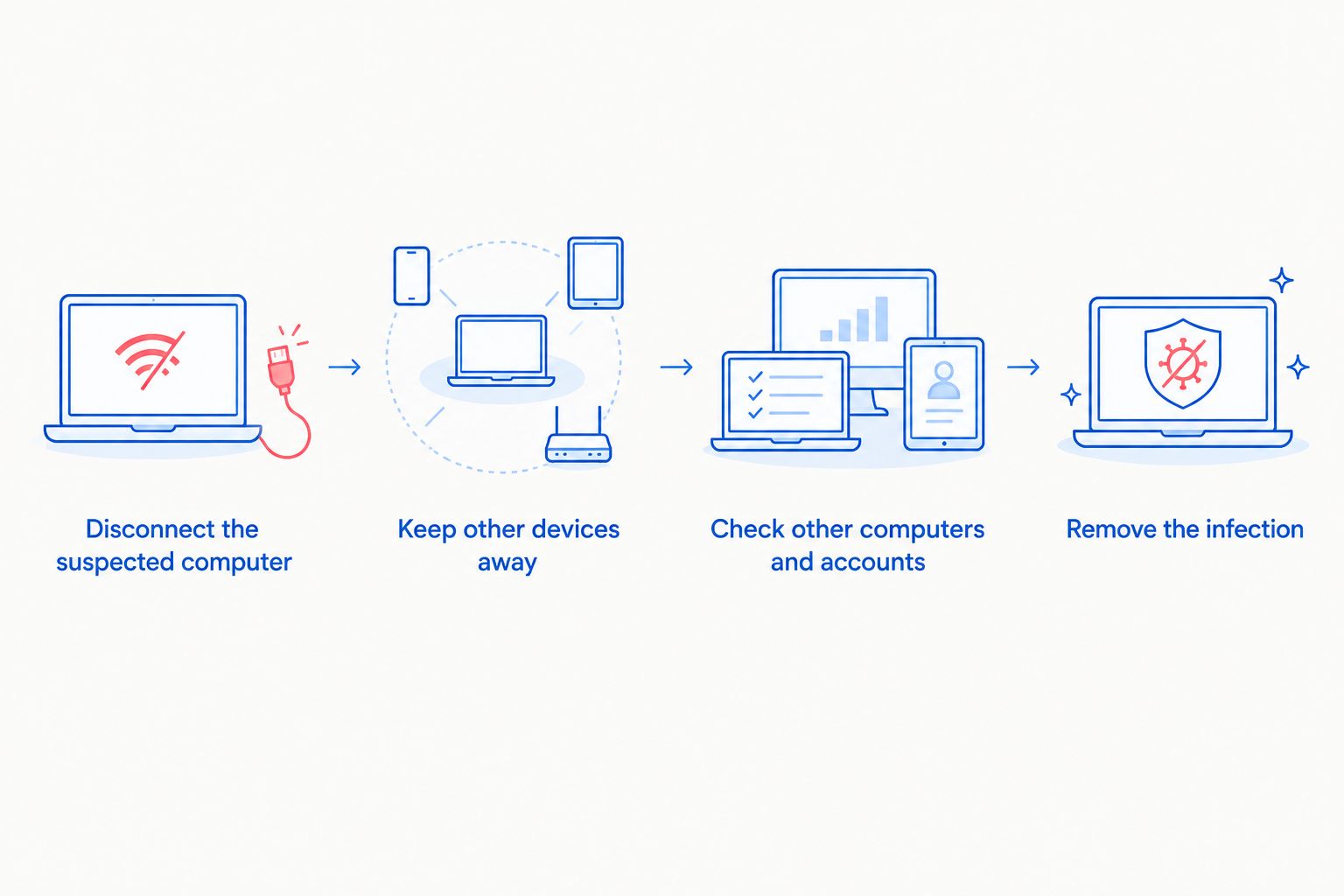
- Disconnect the suspected computer. Turn off its Wi-Fi, unplug its Ethernet cable, and disconnect its VPN. If you cannot safely control the device, ask your IT support provider to isolate it through the network instead.
- Keep other devices away from its files. Stop opening files shared by the suspected computer. Limit access to shared folders it used until those files are checked.
- Tell everyone who uses the network. Give them the device name, the symptoms you saw, and the files or accounts that need caution. Ask them not to open suspicious attachments or reconnect the isolated computer.
- Check other computers and accounts. Look for the same alerts, unexpected programs, changed files, and unusual sign-ins. A clean scan on the first computer does not establish that the rest of the network is clean.
- Remove the infection and verify the result. Follow your security tool's removal guidance or get virus removal help. Review affected files and accounts before restoring the device's connection.
These steps follow a useful order: contain, check, clean, then reconnect. Reversing that order risks returning an infected computer to the same shared files and devices.
Why this matters
A computer at home can reach shared folders, printers, and other devices. A business computer can also reach files and accounts coworkers rely on. Removing a virus from one machine is not the same as checking what it accessed while connected.
In 2026, your first decision is whether the suspected device can still communicate with the network. Isolating it does not prove that another device is safe, but it gives you a boundary while you investigate. TechConnect LLC provides virus removal for North Carolina homes and businesses; business IT support also matters when shared access must be checked before staff resume work.
Which connections should you cut first?
Disconnect every route the suspected computer uses to reach other systems. Cutting only Wi-Fi leaves an Ethernet connection active; disconnecting the office network does not necessarily end a VPN session running through another connection.
| Connection or resource | Immediate action | What it does not solve |
|---|---|---|
| Wi-Fi | Disconnect the suspected computer | Other devices can still have the same infection |
| Ethernet | Unplug the suspected computer's cable | Accounts and shared files still need review |
| VPN | Disconnect the suspected computer's session | The computer still needs virus removal |
| Shared folders | Restrict access to affected shares while files are checked | Restricting a share does not clean stored files |
Do not disconnect every device by default. Start with the suspected computer and the resources it used. Expand containment if you find signs on another machine or cannot tell which device introduced the infection. That keeps the response focused without treating an unexamined network as safe.
If the computer shows a ransom demand or files are changing unexpectedly, stop using it. Do not keep opening files to see whether they still work; record what you saw and get help assessing the affected devices and backups.
How do you check whether the virus reached another device?
Start with devices that used the same shared folders, accounts, or removable drives as the suspected computer. Ask each user what they noticed and when. A matching symptom is a reason to isolate that device too, not proof that every computer has the same infection.
- Security alerts: Review alerts on each connected computer and run its available security scan.
- Shared files: Identify folders the suspected device could change. Check for unexpected changes without repeatedly opening suspect files.
- Accounts: Review unexpected sign-ins, password changes, and messages sent from affected accounts.
- Removable drives: Set aside drives used on the suspected computer until they are checked.
- Backups: Check which backup copies were accessible from the infected device before choosing a restore point.
A clean result on another computer is useful, but no single scan answers every question. In 2026, document which devices were checked, which accounts were secured, and which shared files still need review. That record prevents someone from reconnecting a machine simply because its warning disappeared.
For a small business, appoint one person to coordinate the checks. Staff can report symptoms without independently deleting files, resetting shared equipment, or restoring backups. Those actions can complicate recovery if nobody knows what changed.
Why does the risk of network spread vary?
The same infection does not have the same access in every home or office. Focus on what the affected computer could actually reach:
- Shared folders: A computer with permission to change network files puts those files in the review scope.
- Account access: A signed-in work or email account requires an account check, even after the computer is disconnected.
- VPN connections: Remote access can put business resources within reach of a computer outside the office.
- Removable storage: A drive used across several computers creates another path to check.
- Device permissions: An account that can administer other systems needs closer review than one limited to its own files.
- Backup access: Backups connected to the same computer need checking before you rely on them for recovery.
These factors determine the investigation. They do not, by themselves, establish that a virus copied itself to another machine. Access is a reason to check; evidence of infection is a reason to isolate.
When is it safe to reconnect the computer?
Reconnect only after the infection has been removed, the device has been checked again, and affected accounts and shared files have been reviewed. If you cannot establish what the computer accessed or whether removal succeeded, keep it isolated and get virus removal support.
Use this 2026 reconnection checklist:
- The security tool no longer reports the infection after its recommended removal and follow-up scan.
- Unexpected programs, alerts, or file changes have stopped; investigate any that continue.
- Passwords for affected accounts have been changed from a clean device.
- Other devices with matching symptoms have been isolated and checked.
- Shared files and backups needed for recovery have been reviewed before normal access resumes.
A disappearing warning is not clearance to reconnect. A warning can disappear while an account or shared file remains affected. If files are damaged, establish which backup is suitable before restoring them; do not replace the only available copy without checking it.
TechConnect LLC is a fit for North Carolina homes and businesses that need virus removal and help checking connected systems. Its managed business IT support is relevant when several staff accounts, computers, and shared resources are involved. The limitation is straightforward: no provider can declare every device clean from a scan of one computer alone.
Get help containing the infection
Ask about virus removal or managed business IT support in North Carolina.
What should you change after the infection is contained?
Containment handles the immediate risk. Prevention means reducing the access an infected device would have next time and making suspicious activity easier to spot.
Keep operating systems, browsers, and security software updated. Use separate accounts where people do not need the same access, and turn on multifactor authentication for accounts that offer it. Restrict shared-folder permissions to the people who need them; an infected account cannot change a folder it cannot access.
Keep backups separate from everyday file access where possible, then check that you can use them. A backup that the affected computer could modify needs scrutiny before restoration. For a 2026 business response plan, make clear who isolates devices, who checks accounts, and who decides when shared access returns. A home network needs the same order of decisions, even if one person handles them all.
Avoid treating an antivirus subscription as the whole plan. Security software helps detect and remove threats, while access controls, account checks, and backups address different parts of an incident. None replaces disconnecting a device that is actively showing signs of infection.
Can one infected computer spread a virus through Wi-Fi?
Yes, an infected computer can put other reachable devices and shared resources at risk over Wi-Fi. The connection alone does not prove another device is infected. Disconnect the suspected computer and check what it could access before reconnecting it.
Should you turn off the router if a computer has a virus?
Disconnect the suspected computer first. Turning off the router also disrupts unaffected devices and does not remove the infection or secure an exposed account. If you cannot isolate the computer or see signs on several devices, get help with broader network containment.
Can a clean antivirus scan prove the network is safe?
No. A clean scan on one computer does not check other devices, shared files, or accounts. Use it as one part of the 2026 review, then verify the resources the suspected computer could reach.
FAQ
What is the first thing I should do if a computer virus might spread on my network?
Disconnect the suspected computer from Wi-Fi, Ethernet, and any VPN. Then check shared files, connected devices, and accounts it could access.
Can a virus spread through a shared network folder?
An infected computer can affect files it has permission to change in a shared folder. Restrict access to affected shares while you check the files and connected devices.
Is disconnecting Wi-Fi enough to stop a computer virus spreading?
No. The computer can still have an Ethernet connection or a VPN session through another connection. Disconnect each active network route on the suspected device.
Should I change passwords on the infected computer?
No. Change affected passwords from a device you believe is clean. Review the accounts the infected computer used before restoring its network access.
Can antivirus software remove a virus that is already installed?
Security software can detect and remove many infections, but a removal result does not check every connected device or shared file. Follow up with scans and account checks before reconnecting the computer.
How do I know whether another computer caught the virus?
Check the other computer for security alerts, unexpected programs, and changed files, then run its available security scan. Isolate it if you find matching symptoms; do not assume a clean first scan settles every shared-file or account issue.
Who can help a North Carolina business contain a network infection?
TechConnect LLC provides virus removal and managed business IT support for businesses across North Carolina. Share the affected device, symptoms, and connected resources when asking for help.
One last thing
The computer that shows the warning is not necessarily the only part of the problem. In 2026, check the accounts and shared files it reached before you call the incident finished; that is the difference between cleaning a device and restoring a network with confidence.