Yes—monitoring employee computer activity can be legal in the United States in 2026, but permission depends on what you collect, how you collect it, applicable law, and the employee’s circumstances. Owning the computer does not authorize unrestricted access to personal accounts, private communications, or recordings. Use a written policy, give appropriate notice, and have an employment attorney review the proposed monitoring before deployment.
- Is it legal to monitor employee computer activity? Often yes, but device ownership alone does not establish permission.
- Federal communications laws and applicable state laws limit employee monitoring, including access to messages and recordings.
- TechConnect NC provides managed IT support; legal approval for employee monitoring belongs with an employment attorney.
- Start with security monitoring, explain the collection, and restrict access to employee activity records.
Why this matters
A small-business owner needs to know whether computers are secure, backups are working, and unauthorized users are signing in. Those goals do not automatically require reading messages or recording screens. Collecting more information also creates more sensitive records to protect.
For your 2026 IT plan, separate computer security monitoring from employee productivity surveillance. The guide to whether continuous IT monitoring is worth it for a small business addresses the operational side; employee surveillance requires a separate legal and workplace-policy decision.
This article provides general U.S. information, with North Carolina context. It is not legal advice or a determination that a particular monitoring setup is lawful.
Is it legal to monitor employee computer activity?
Employee computer monitoring is not automatically illegal, and it is not automatically permitted because you own the equipment. The legal analysis changes with the information collected, the method used, authorization, and the locations involved.
Federal law distinguishes intercepting communications from accessing stored communications. The Wiretap Act, including 18 U.S.C. § 2511, addresses interception; the Stored Communications Act, including 18 U.S.C. § 2701, addresses unauthorized access to certain stored communications. Their exceptions are specific, not blanket permission for workplace surveillance.
Use this comparison to define your proposal before asking counsel to approve it:
| Monitoring approach | Best for | Practical benefit | Limitation or concern |
|---|---|---|---|
| Device health and security logs | Finding technical problems and suspicious activity | Supports troubleshooting without routinely recording screen contents | Logs still contain employee identifiers and other sensitive information |
| Website and application activity | Investigating a defined acceptable-use concern | Shows activity associated with business systems | Activity records lack context and can expose personal interests |
| Screenshots and keystroke capture | A narrowly defined investigation reviewed by counsel | Captures detailed activity | Risks collecting passwords, private communications, and unrelated sensitive material |
| Remote support sessions | Resolving a specific computer problem | Lets a technician inspect and fix the issue | Creates visibility into open files and messages; access needs clear boundaries |
These are different capabilities. Approval for security logging is not approval for screenshots, keylogging, microphone access, or message interception.
What federal law means for your monitoring plan
The federal Wiretap Act generally prohibits intentional interception of covered communications unless an exception applies. Consent is one exception, but its existence and scope require analysis. A general handbook acknowledgment does not settle whether a particular interception falls within valid consent.
The Stored Communications Act raises a different question: whether someone has authorization to access covered stored communications. An employee leaving a personal account signed in does not, by itself, establish an employer’s legal authorization to read it.
For a 2026 monitoring rollout, give your attorney the actual feature list rather than a product description such as “workforce analytics.” Include screenshots of settings, the information collected, administrator permissions, and whether collection occurs continuously or only during a support session.
Ask counsel to approve the configuration, not just the policy title. A lawful purpose does not make every collection method lawful.
What North Carolina employers need to check
North Carolina’s interception statute, N.C. Gen. Stat. § 15A-287, generally requires consent from at least one party for covered interceptions. That does not mean an employer can secretly record any employee conversation: the employer is not necessarily a party, and the circumstances still matter.
Employees, customers, and other participants outside North Carolina create additional state-law questions. Do not assume the law at your Clayton or Hickory-area office is the only law relevant to a remote employee’s communications.
North Carolina businesses should also have counsel consider privacy claims, employment obligations, and the treatment of protected workplace activity. The National Labor Relations Act protects qualifying concerted activity concerning workplace conditions, including in many nonunion workplaces; monitoring that interferes with those rights requires particular care.
Your 2026 policy should describe actual practices. If the software records screenshots while the handbook mentions only antivirus alerts, the mismatch needs correction before use.
Why the legal answer varies
Your lawyer needs more than the name of the monitoring software. These factors determine the questions to resolve:
- Employee location: Remote work and interstate communications introduce laws beyond the office’s home state.
- Device ownership: Company equipment and personally owned devices require different access boundaries; ownership alone does not resolve legality.
- Information collected: Security events, browsing records, message contents, audio, and screenshots are not interchangeable.
- Collection method: Live interception, stored-account access, and technical system logs raise different issues.
- Notice and authorization: The wording, timing, and scope of notice or consent must match the proposed activity.
- Purpose and use: Troubleshooting a failure differs from investigating misconduct or tracking productivity; protected activity requires separate attention.
Define the business problem first. “We need to detect suspicious sign-ins” is a clearer requirement than “we want to see everything employees do.” It also gives your IT provider a narrower configuration to implement.
How do you set up employee monitoring responsibly?
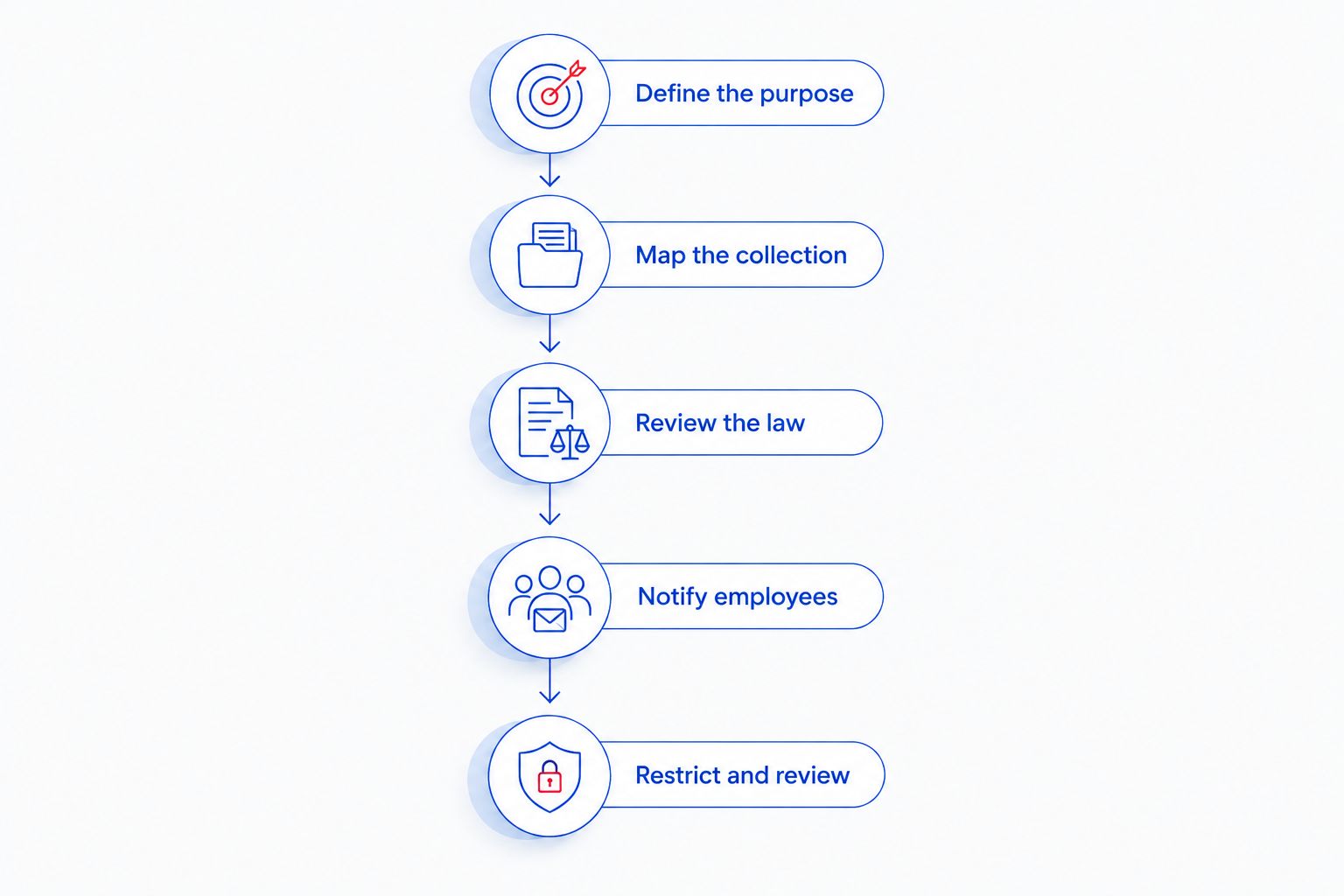
Use these steps as an implementation plan, not as a substitute for legal approval. For a 2026 deployment, complete the policy review before enabling intrusive collection.
Define the purpose
Write down the problem monitoring must solve: malware detection, failed backups, unauthorized access, or a specific workplace investigation. Keep unrelated goals separate.
Security monitoring cannot tell you everything about employee performance. Time without keyboard input, for example, does not establish that someone stopped working; calls, meetings, and offline tasks need context.
Map the collection
List every enabled feature and its output. Include websites visited, application names, file events, screenshots, keystrokes, audio, and remote-session recordings where applicable.
Check default settings instead of assuming the tool collects only what the sales description emphasizes. Identify where records are stored and which administrators can export them.
Review the law
Give counsel the collection map, employee locations, device-ownership arrangements, and intended uses. Ask specifically about communications, personal accounts, protected activity, and any required notices or consent.
A signed policy is evidence of acknowledgment; it is not a universal waiver. Have counsel explain which permissions the business is relying on and where those permissions stop.
Notify employees
Use plain language that explains what is collected, why, when collection runs, and who can review the results. Explain whether personal use is permitted and how employees can ask questions.
Do not promise that personal information will never be collected if the software can capture a personal message on screen. Match the explanation to the settings.
Restrict and review
Limit administrator access to authorized roles, protect monitoring accounts, and document access to sensitive records. Establish a retention schedule with counsel and account for preservation duties when a dispute or investigation arises.
Recheck the configuration after software changes. A new feature or changed default can expand collection beyond the original approval.
Can I monitor employees without telling them?
Do not treat secret monitoring as the default. Whether notice or consent is legally required depends on the jurisdiction, collection method, and circumstances; advance disclosure also helps employees understand the boundaries of business-system use.
If you suspect misconduct, ask counsel how to investigate and preserve relevant evidence. Avoid activating new recording features or entering personal accounts simply because you suspect a problem.
An investigation needs a defined scope. Give authorized reviewers a specific question to answer rather than unrestricted permission to browse employee activity.
Can I monitor an employee’s personal laptop?
A personal laptop requires clearly defined work-related access, not assumed permission to inspect the entire device. A bring-your-own-device arrangement should explain what business systems can collect, what support staff can access, and how company information is separated from personal use.
Ask whether account-level security logs answer the business question before installing device-wide monitoring. If work and personal activity cannot be separated adequately, consider whether company-issued equipment is the more appropriate arrangement.
Remote-support permission also needs boundaries. Authorization to fix a company application does not establish permission to read unrelated personal files.
Can I use activity reports to judge employee performance?
Activity reports need context before you use them for performance decisions. Website visits, application time, and keyboard activity describe computer events, not the full quality or quantity of someone’s work.
Have managers review job responsibilities and the underlying facts rather than treating a dashboard score as proof. Ask counsel about protected activity, disability-related issues, and other employment obligations before using monitoring records in a disciplinary decision.
Keep the stated purpose consistent. If a system introduced for security will also support performance reviews, address that change in the legal review and employee communications.
Where local managed IT support fits
TechConnect NC fits North Carolina small businesses that need local managed IT support for monitoring, patching, backups, cybersecurity, and help desk assistance. Those services address the technical side; they do not replace an attorney’s determination about employee surveillance.
TechConnect NC has offices in Clayton at 5720 US 70 Bus Hwy, Suite B, and Granite Falls at 10A Falls Avenue. Both locations are relevant for businesses arranging local support in Johnston County and the Foothills area.
The practical benefit of managed IT support is an ongoing way to maintain business systems and respond to technical problems. Its boundary is equally important: security monitoring does not establish permission to capture employee communications or determine whether workplace discipline is lawful.
Give TechConnect NC your attorney-approved requirements, then discuss the technical scope. Keep device maintenance, remote support, and employee-activity collection separate in that discussion.
FAQ
Is it legal to monitor employee computer activity in 2026?
Employee computer monitoring can be legal in 2026, but legality depends on applicable law, authorization, the collection method, and the information collected. Company ownership alone does not permit unrestricted surveillance.
Can my employer read my personal email on a work computer?
Using a work computer does not automatically authorize an employer to read your personal email account. Access to stored messages and interception of communications raise different legal questions.
Does signing a monitoring policy make all monitoring legal?
Signing a monitoring policy does not make every monitoring practice legal. The policy, actual collection, applicable law, and scope of any valid consent must align.
Is North Carolina a one-party consent state for recording?
North Carolina generally requires consent from at least one party for covered interceptions under N.C. Gen. Stat. § 15A-287. That rule is not blanket permission for an employer to record employee conversations, particularly when participants are elsewhere.
Can my employer monitor my computer when I work from home?
Working from home does not by itself decide whether monitoring is lawful. Device ownership, employee location, collection settings, authorization, and applicable laws still matter.
Is remote IT support the same as employee surveillance?
Remote IT support and employee surveillance serve different purposes, although both can expose on-screen information. A support session should have defined access boundaries rather than assumed permission to inspect unrelated material.
Who should approve a small business employee-monitoring policy?
An employment attorney should review the legal requirements and proposed collection before deployment. The business and its IT provider should then confirm that technical settings match the approved scope.
One last thing
The records you collect become another set of sensitive business records to protect. Before enabling a feature, ask who will review its output, what decision it supports, and how long the business needs to keep it. If nobody can answer, leave that feature disabled until the purpose and requirements are clear.
Related guides
- Can IT support access your computer without you being there?
- How to protect customer data on a small-business network
- How to choose between break-fix and managed IT support
Call or text 919-737-5442 to discuss managed IT support with TechConnect NC and define the technical monitoring your business needs.