Recovering from a data breach has no fixed deadline: your timeline depends on whether the attacker still has access, which systems are affected, and whether you can restore trusted data. Getting computers working again is only part of recovery; investigating stolen information and handling notification obligations are separate tasks. For your 2026 recovery plan, measure progress against verified milestones rather than a promised completion date.
- How long to recover from a data breach depends on containment, trusted backups, affected systems, and investigation findings.
- Restoring files does not reverse data theft or prove that an attacker has lost access.
- TechConnect NC is a local option for small-business managed IT support and data backup in North Carolina.
- Ask for separate milestones for safe operations, investigation, and required notifications.
Why this matters
A working computer is not proof that a breach is over. An attacker can retain access through a stolen account, an active login session, or an unauthorized application connection even after a damaged computer is repaired.
For local help with ongoing protection, TechConnect NC provides managed IT support, virus removal, and data backup/recovery. Keep those service needs separate from legal advice and specialist forensic investigation when you arrange help.
Your immediate business question is which tasks can resume safely. Payroll, customer communication, scheduling, and order processing have different dependencies, so a single reopening date can hide important unfinished work.
How long does it take to recover from a data breach?
There is no reliable business-specific estimate until the affected accounts, devices, data, and backups have been assessed. Ask your response team to separate the recovery timeline into the following milestones and explain what evidence supports each completion decision.
| Recovery milestone | What must happen | What it does not establish |
|---|---|---|
| Containment | Block the identified unauthorized access and isolate affected systems | That every affected account or device has been found |
| Scope assessment | Identify affected systems, accounts, and information using available evidence | That missing logs prove no data was taken |
| Safe restoration | Restore or rebuild systems, secure access, and test business functions | That exposed information has been recovered from the attacker |
| Business recovery | Resume approved workflows and reconcile interrupted work | That investigation and notification tasks are finished |
| Incident closure | Document findings, remaining risks, required actions, and ownership | That the business cannot suffer another incident |
These milestones overlap. Your team can investigate an affected mailbox while restoring a separately verified business application, provided the restoration does not reopen the attacker's access.
For a 2026 incident plan, require every status update to name the milestone, its owner, and its unresolved dependencies. “Email is available” and “the incident is closed” are different statements.
Ask what the estimate actually covers
Before accepting a completion date, ask whether it covers employee access, restored files, tested applications, or the entire incident. A repair estimate that covers rebuilding a laptop does not automatically cover account investigation or customer communication.
Ask what would change the estimate, too. Discovery of another compromised administrator account requires a different response from a failed application test, even when both delay normal work.
Account breach: recovery depends on removing access
An email or cloud-account breach can leave your computers running normally. The work centers on controlling the account, reviewing what happened, and checking for access that survives a password change.
Have your responder review active sessions, recovery settings, mailbox forwarding, delegated access, and connected applications where relevant. Preserve available logs before retention limits or later changes remove useful evidence.
Best for a contained account incident: an account-focused response that verifies access removal. Its advantage is that it addresses the compromised identity directly; its limitation is that it does not resolve a separately infected device or undo information already copied.
Your reopening decision should include a check of sensitive workflows. If the attacker sent payment instructions, restoring the mailbox alone does not settle whether a customer or employee acted on them.
Ransomware breach: recovery depends on trusted restoration
Ransomware adds a restoration problem to the access and investigation problems. You need to establish which systems are affected, whether usable backups remain, and how to rebuild without carrying the original compromise into production.
Best for encrypted or untrusted systems: a controlled rebuild and tested restoration. The benefit is a cleaner basis for resuming work; the limitation is that rebuilding does not answer whether information was stolen before encryption.
A backup's existence is not enough. Confirm that the required files are included, that the restore point is appropriate, and that the restored application works with its supporting services.
Use the separate guide to recovering from a ransomware attack when encryption is part of the incident. Keep the broader breach investigation open even after the affected files become accessible.
Data theft without downtime: recovery still needs investigation
A business can suffer data theft without losing access to its systems. In that situation, “back to normal” is a poor recovery measure because employees might never have stopped working.
Best for suspected information exposure: an evidence-led investigation with legal guidance on obligations. This approach addresses what information was involved and who needs to act; its limitation is that incomplete records can restrict what investigators can establish.
Do not treat a lack of visible disruption as proof of a minor incident. Review the affected information, access permissions, and available activity records before deciding what communication or protective action is necessary.
Why data breach recovery time varies
These factors explain why a timeline changes. Ask your responder which factors are confirmed and which still need investigation.
- Affected systems: A compromised mailbox, shared file server, and business application require different checks and restoration work.
- Access level: An administrator account can affect more resources than an account with narrowly limited permissions.
- Backup condition: Missing, damaged, inaccessible, or untested backups complicate restoration decisions.
- Available evidence: Useful logs help establish activity; gaps limit certainty about the incident's scope.
- Business dependencies: Restoring a database does not finish recovery if employees still cannot access the application that uses it.
- Notification obligations: Applicable laws, contracts, insurance terms, and the information involved determine additional response tasks.
Avoid treating any factor as a guaranteed duration. A small business with limited records can face difficult investigation questions, while a larger environment with documented systems can have clearer restoration steps.
Your 2026 recovery checklist should record these dependencies beside each estimate. That makes a revised timeline understandable instead of turning every update into another unexplained delay.
What should you do before trying to restore everything?
Preserve evidence and control access before making broad changes. If you suspect an active breach, contact your IT responder and follow the incident process required by your organization and insurance policy, if applicable.
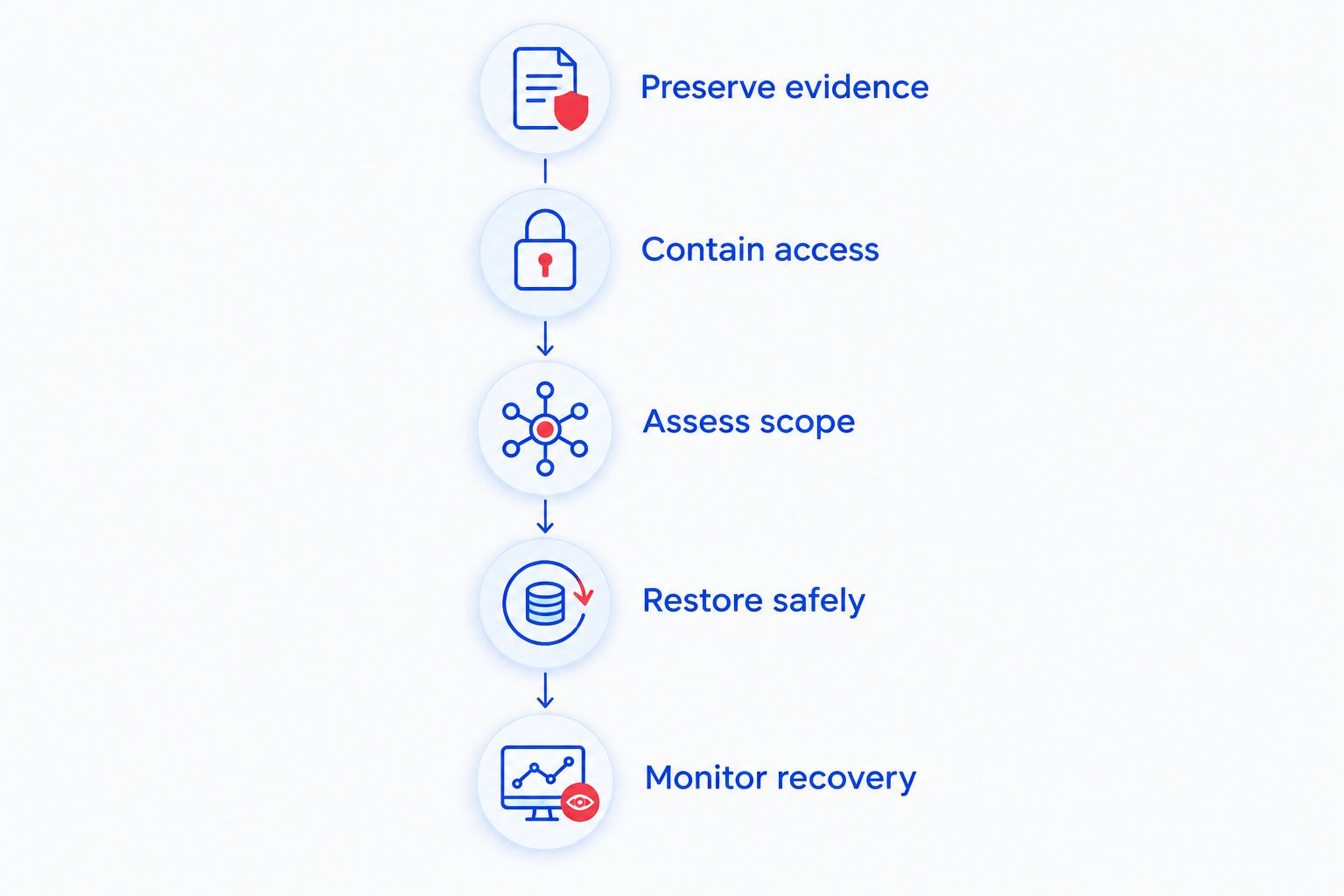
Use this sequence as a discussion checklist, not as a substitute for incident-specific instructions:
- Preserve evidence. Record observed symptoms, discovery times, affected accounts, and actions already taken. Ask your responder what logs or device information must be preserved before rebuilding.
- Contain access. Isolate affected systems and address compromised accounts under the responder's direction. Use a trusted communication channel rather than relying on an account suspected of compromise.
- Assess scope. Identify affected devices, cloud services, shared accounts, and business information. Include remote-access tools and application connections where relevant.
- Restore safely. Rebuild or restore approved systems, correct the identified entry point, and test access controls and business functions before reconnecting broadly.
- Monitor recovery. Review alerts and activity after restoration, document unresolved questions, and assign follow-up actions to named owners.
The steps describe a logical sequence, but investigation continues throughout. New evidence can require additional containment even after some employees return to work.
When is it safe to let employees return to work?
Return employees to approved workflows when the responsible technical lead has verified the necessary systems and access controls. Do not reconnect every device simply because the main application opens.
Use a reopening checklist that covers:
- The accounts employees need and whether compromised access has been addressed.
- The devices approved for use and any devices still isolated.
- The files or application records checked after restoration.
- The work employees must reconcile from the interruption.
- The process for reporting suspicious prompts, messages, or unexpected behavior.
Give employees a clear explanation of restrictions. If a shared folder remains unavailable, provide an approved workaround rather than leaving staff to copy business information into personal accounts.
For your 2026 continuity plan, document who can authorize each workflow's return. Technical readiness and business readiness need separate checks: the application must function, and staff must know how to handle unfinished transactions.
Can a backup make breach recovery immediate?
A backup supports file and system restoration, but it does not make breach recovery immediate. You still need to address unauthorized access, verify the restore point, and establish whether protected information was exposed.
Ask for a demonstration that the restored data works in the application you actually use. Opening a recovered document is not the same as validating a database, its permissions, and the workflow built around it.
Also record the gap between the restored data and the last legitimate business activity. That gap identifies work your staff must reconstruct; it should not disappear inside a general statement that the restore succeeded.
Does removing malware mean the breach is over?
Removing malware does not establish that a breach is over. Stolen passwords, active sessions, altered account settings, or information already copied require separate attention.
Ask the responder to explain what was removed, what access was revoked, and what remains uncertain. A clean scan is one result, not an incident-closure decision.
What local support should a North Carolina business arrange?
TechConnect NC is a local option for North Carolina small businesses that need managed IT support and data backup. Its stated services include monitoring, patching, backups, cybersecurity, help desk, and remote support, alongside computer repair and virus removal.
The Clayton office is at 5720 US 70 Bus Hwy, Suite B, Clayton, NC 27520. The Foothills office is at 10A Falls Avenue, Granite Falls, NC 28630, providing a local contact point for businesses considering support in those areas.
Ask which immediate technical tasks are included before authorizing work. Do not assume a managed IT engagement includes legal advice, specialist forensic investigation, insurer reporting, or customer notification management unless those responsibilities are expressly agreed.
FAQ
How long to recover from a data breach at a small business?
There is no fixed recovery duration for a small-business data breach. A useful estimate separates containment, safe restoration, business reopening, and investigation rather than promising a single deadline before assessment.
Can I keep my business open during a data breach?
You can continue only the workflows your response team has assessed and approved for safe use. Keep affected systems isolated and give employees approved workarounds rather than allowing unrestricted access.
Will changing my password stop a data breach?
Changing a password alone does not establish that unauthorized access has ended. Your responder should also assess active sessions, recovery settings, connected applications, and other affected accounts.
Does restoring a backup remove the need to notify customers?
Restoring a backup does not determine whether customer notification is required. Notification depends on applicable obligations and the incident facts, including the information involved, not just whether files are usable again.
Should I wipe an infected computer immediately?
Do not wipe a suspected breach device before your responder addresses evidence preservation. Rebuilding changes the device and can remove information needed to understand the incident.
What should a data breach recovery estimate include?
A recovery estimate should identify its scope, assumptions, dependencies, and completion checks. Ask for separate status updates on safe operations, investigation, and any required notifications.
One last thing
The most useful question is not simply “When will everything be back?” Ask, “What evidence will show that this workflow is safe to resume?” That question turns an optimistic date into a decision someone must support.
For your next 2026 recovery review, test the workflow rather than just the backup file. Confirm that an authorized employee can sign in, open the application, access the right records, and complete the task without restoring unnecessary permissions.
Related guides
- Can data backup services restore files after a ransomware attack?
- How to protect customer data on a small business network
- How to choose between break-fix and managed IT support
Call or text 919-737-5442 to discuss managed IT support, virus removal, or data backup/recovery with TechConnect NC. Describe the affected systems and whether the problem is still active so you can establish the next technical step.