
Yes—24/7 IT monitoring is worth paying for when your small business cannot leave critical outages, failed backups, or security alerts unattended until the next workday. The catch is that continuous monitoring does not automatically include after-hours repairs or security incident response. In 2026, buy a service with clear responsibility for acting on alerts, not just a dashboard that records them.
- Is it worth paying for 24/7 IT monitoring as a small business? Yes, when alerts trigger needed action.
- 24/7 monitoring does not automatically include after-hours repairs, backup recovery, or security incident response.
- Compare managed IT support contracts by covered systems, response responsibilities, and exclusions—not monitoring hours alone.
- TechConnect LLC serves North Carolina homes and businesses with managed business IT support and computer repair.
Why this matters
An alert about a failed backup is useful only if someone investigates it and gets the backup working again. An overnight outage follows the same rule: detecting the problem and restoring service are separate jobs.
Your decision is therefore about responsibility, not just hours. Start by choosing between break-fix and managed IT support, then decide which problems need attention outside your normal workday. A contract that covers the wrong systems or leaves alerts unassigned does not solve that problem.
Is it worth paying for 24/7 IT monitoring as a small business?
Pay for 24/7 IT monitoring when earlier detection leads to action your business actually needs. If every alert can wait until opening time, business-hours support deserves consideration instead. If a failed backup or unavailable system needs attention before staff return, monitoring with a defined response process is the better fit.
For your 2026 decision, separate the service choices before comparing proposals:
| Service approach | Best for | Main advantage | Main limitation |
|---|---|---|---|
| Break-fix support | Businesses that can wait to request help after discovering a problem | Support is focused on a reported issue | Detection usually depends on someone noticing and reporting it |
| Monitoring without after-hours response | Businesses with a designated person who can act on alerts | Automated checks can flag problems outside office hours | An alert does not itself investigate or repair the fault |
| Monitoring with defined after-hours response | Businesses whose critical systems need attention outside office hours | The agreement assigns responsibility for qualifying alerts | Coverage still depends on the systems, incidents, and actions included |
These are service approaches, not standardized packages. A provider's use of the term managed IT does not tell you which row its agreement matches. Read the monitoring scope and response terms together.
When the answer is yes
Continuous monitoring makes sense when your business depends on systems that keep working after the office closes. Overnight backups, remote access, and systems used by staff outside normal hours deserve an explicit review.
The same applies when nobody on your team owns routine technical checks. If you already know that missed alerts leave important problems unresolved, assigning that responsibility is more useful than adding another inbox notification.
The strongest reason to buy is a specific business dependency with a specific response owner. Identify the system, explain what happens when it stops working, and ask the provider to describe the response covered by the agreement.
When the answer is no
Do not buy round-the-clock monitoring solely because the phrase sounds safer. If your computers are switched off overnight, your work can wait until opening, and a responsible person already handles technical checks, continuous device monitoring needs a clearer justification.
That does not remove the need for backups, updates, or security controls. It means you should choose those controls on their own merits rather than assume that more monitoring hours improve every part of your IT setup.
What does 24/7 monitoring actually include?
The label describes coverage across 24 hours per day, 7 days per week. It does not, by itself, describe a technician's availability, an emergency repair commitment, or a guarantee that every threat will be detected.
Depending on the agreed scope, monitoring checks can cover device availability, storage capacity, backup job results, or alerts from security software. Ask for the actual list. Do not assume that monitoring an office computer also covers your email accounts, internet connection, or cloud applications.
A useful agreement separates the work into clear stages:
- Detection: Which condition creates an alert, and on which covered system?
- Review: Who checks whether the alert represents a real problem?
- Response: What action is authorized without contacting you first?
- Escalation: Who is contacted when the problem needs approval or outside help?
- Verification: Who confirms that the affected function works again?
Each stage needs an owner. Otherwise, a provider can detect a problem correctly while your business still waits for someone to decide what happens next.
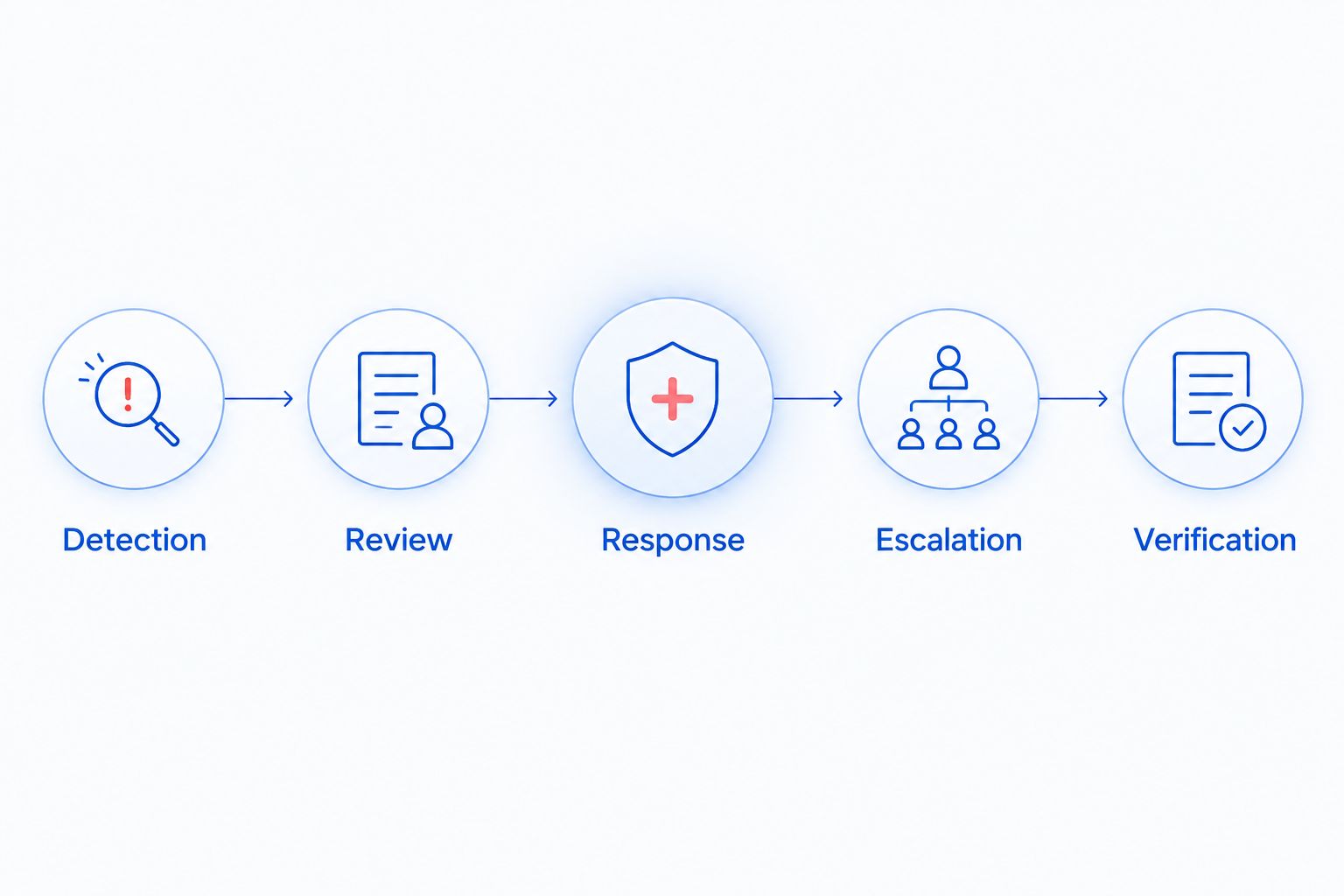
For a 2026 service agreement, ask the provider to explain that sequence using a failed backup and an unavailable business computer. Concrete examples expose the difference between an automated message and an assigned support task.
Monitoring without after-hours response
Best for: businesses with someone available to receive, assess, and act on alerts. Monitoring alone can give that person information outside normal office hours. It does not replace their responsibility.
The advantage is visibility into covered systems without waiting for a user to report trouble. The limitation is the handoff: if nobody reads the notification or has permission to act, the issue remains unresolved.
Ask where alerts go and what happens if the recipient is unavailable. An owner's email address is not a complete escalation plan. Name a backup contact and specify which alerts require attention before the next workday.
Also confirm how unavailable devices are handled. A laptop that is intentionally switched off should not be confused with an unexpected loss of contact. The provider needs enough context to distinguish normal behavior from something that warrants investigation.
Monitoring with after-hours response
Best for: businesses that need defined action when important systems fail outside office hours. The benefit is an assigned response process, not a promise that every issue will be fixed immediately.
The limitation is scope. A response agreement can distinguish between reviewing an alert, contacting you, attempting a remote repair, and arranging an on-site visit. Those actions are not interchangeable.
Ask which actions need your approval. Restarting a system, isolating a computer, or interrupting an application can affect staff and customers. The agreement should say who authorizes disruptive work and how the provider reaches that person.
For your 2026 comparison, require written exclusions as well as written inclusions. Internet provider outages, physical hardware failures, and problems with outside applications can require another party. Ask who handles those handoffs rather than assuming monitoring makes the support provider responsible for everything.
Why the value of 24/7 monitoring varies
The value depends on your operating needs and the service agreement. Review these factors before selecting a monitoring plan:
- Operating hours: Identify whether staff, customers, or scheduled processes depend on systems after the office closes.
- System dependencies: Separate equipment that supports essential work from equipment whose failure can wait.
- Alert ownership: Establish who receives alerts, checks them, and remains responsible until the issue is resolved.
- Response scope: Confirm whether the agreement includes investigation, authorized repairs, escalation, or notification alone.
- Recovery readiness: Check whether backups, access credentials, and recovery instructions are available when a problem requires restoration.
Do not treat employee count as the entire decision. A small team can depend on a shared system that stops everyone's work, while a larger team can have tasks that continue during an outage. Examine the work that becomes impossible, not just the number of computers.
How do you decide what your business needs?
Use your actual workflow rather than a provider's package names. You need a short list of dependencies and a clear answer to what can wait.
- List critical systems. Include the computers, network equipment, accounts, and applications required to complete essential work.
- Describe the interruption. Write down what staff cannot do when each system is unavailable.
- Set acceptable waiting periods. Decide which problems can wait until opening and which require action sooner.
- Assign alert ownership. Name the internal contact and the provider's responsibilities for each type of problem.
- Check recovery readiness. Confirm who can access backups, authorize changes, and contact outside vendors.
- Match the agreement. Require the proposal to address those needs explicitly, including exclusions.
Avoid assigning the same urgency to everything. A single user's printer problem and a shared file system outage do not have the same effect on your business. Priority should follow the interruption to work.
Then ask for a walkthrough of an alert from beginning to end. You do not need a real outage to discuss who would investigate, what they would do, and when they would contact you. That conversation tests whether the proposed service matches your expectations.
What should you ask before signing?
Ask what happens after an alert, not simply whether monitoring runs continuously. For a 2026 proposal, get answers you can keep with the agreement:
- Which devices, accounts, applications, and backup jobs are covered?
- Are alerts reviewed outside normal business hours, and by whom?
- What separates an urgent incident from a routine notification?
- Which response commitments are written into the agreement?
- Which repairs or changes require your approval?
- What happens when a device is offline or unreachable?
- Who contacts an outside vendor when the issue is outside the provider's control?
- How will you receive evidence that the problem was resolved?
Ask about access as well. Remote support requires permission and appropriate account access; monitoring does not remove that need. Confirm how administrative access is controlled and what happens to it when the agreement ends.
Keep your own copy of the system inventory and support contacts. A monitoring arrangement should make responsibilities clearer, not leave you dependent on information you cannot access.
Can monitoring replace backups or antivirus software?
No—24/7 monitoring does not replace backups, antivirus software, or a recovery plan. Monitoring reports conditions; protective tools and recovery procedures perform different jobs.
A successful backup notification is not the same as a successful restore. Ask how the provider checks that backed-up information can be recovered and which recovery tasks are included. Monitoring a backup result alone does not answer those questions.
Likewise, a security alert is not proof that a threat has been fully removed. Ask who investigates, what response is included, and how the affected system is checked afterward. Avoid any agreement that uses monitoring as shorthand for guaranteed protection.
Does my business need a technician available all night?
Your business needs after-hours technical response only for problems that cannot wait. Automated monitoring and technician availability are separate requirements, so specify both when your systems demand them.
Ask what after-hours response means in practice: reviewing an alert, contacting your staff, attempting a remote repair, or arranging hands-on work. Choose the required action rather than relying on the word support.
Where does local managed IT support fit?
TechConnect LLC serves North Carolina small businesses seeking managed business IT support. Its stated services also include PC tune-ups, virus removal, and data backup/recovery.
Those services are relevant when you need ongoing support alongside computer repair or recovery work. They do not establish a particular monitoring schedule, after-hours response commitment, or turnaround time. Confirm those terms before choosing a service.
When discussing managed IT support with TechConnect LLC, bring your critical-system list and the alert walkthrough questions above. The next step is a service-scope conversation, not an assumption that every managed support agreement includes continuous response.
Review your business IT needs
Discuss managed business IT support for your North Carolina business.
FAQ
Is it worth paying for 24/7 IT monitoring as a small business?
Yes, when your business needs important alerts investigated before the next workday. Confirm who acts on those alerts and whether after-hours response is included; monitoring alone does not repair the problem.
Does 24/7 IT monitoring mean someone will fix problems overnight?
No, 24/7 IT monitoring does not automatically include overnight repairs. The agreement must specify alert review, authorized actions, escalation, and any after-hours response commitments.
Is managed IT support better than break-fix support?
Managed IT support is the better fit when you need ongoing checks and assigned responsibility for covered systems. Break-fix support fits situations where you can discover a problem, request help, and wait for the agreed service.
Can IT monitoring stop every cyberattack?
No, IT monitoring cannot guarantee that every cyberattack will be detected or stopped. Use it alongside appropriate security controls, updates, backups, and an incident response process.
Do I need monitoring if my computers are switched off overnight?
Continuous computer monitoring needs a specific justification when those computers are switched off overnight. Check whether other covered systems, backups, or accounts still need attention outside office hours.
How can I tell whether my IT provider is responding to alerts?
Ask for records that connect alerts to investigation, action, and verification. A monitoring dashboard or notification history alone does not show that the underlying problem was resolved.
Does TechConnect LLC provide managed IT support in North Carolina?
TechConnect LLC provides managed business IT support to homes and businesses across North Carolina. Confirm monitoring coverage, after-hours response, and exclusions directly before selecting a service.
One last thing
Ask this before signing: what happens if my main contact is unavailable when an urgent alert arrives? If the answer stops at sending that person an email, your response process still has a gap.
For your 2026 decision, define a backup contact and an escalation path. Continuous detection earns its place when responsibility continues beyond the notification.


