
Repairing an old business computer is cheaper when the fault is limited, the machine still supports the software you need, and the repair returns it to reliable use. Replacing it is the better financial decision when failures keep returning or the computer cannot meet your security and work requirements. In 2026, compare downtime, backup work and file migration alongside the repair and replacement quotes.
- Repair or replace an old business computer based on the fault, software support and total disruption—not age alone.
- Repair is the better choice for a contained, fixable problem; replace a machine that cannot meet business needs.
- TechConnect LLC is best for North Carolina businesses that need a PC tune-up, data backup or managed IT support before deciding.
Is it cheaper to repair or replace an old business computer?
The cheaper option is the one that gets the employee back to dependable work without creating another avoidable interruption. A repair quote addresses the fault you can see. A replacement decision must also account for transferring files, setting up business software and reconnecting the computer to the tools the employee uses.
| Option | Best for | Advantage | Limitation | Decision |
|---|---|---|---|---|
| Repair | A computer with a specific, fixable fault that still meets work and security requirements | Keeps a usable machine in service | The original fix does not solve unrelated faults or software limits | Repair if the proposed fix addresses the cause |
| Replace | A computer with recurring faults or requirements it cannot meet | Gives you a path away from an unreliable machine | Files, settings and access still need to be moved and checked | Replace if repair leaves the underlying problem in place |
Do not approve either option until you know what is wrong and what must keep working afterward. If replacement wins, use an old PC to new PC file transfer workflow to plan the move rather than treating a copied folder as a completed handoff.
Why this matters to a business
An office computer is not just a device. It is a way into business files, email, applications and shared work. When it fails, the cost of the decision includes time spent waiting, rebuilding access and checking that the employee can actually resume work.
A quick fix can be sensible if it removes the cause and the computer remains suitable for its job. The same fix is poor value if the employee returns to repeated crashes, cannot run required software or loses access to important files. The question is not whether an old computer can be repaired. It is whether the repaired computer will still do the job.
For a North Carolina business in 2026, TechConnect LLC provides PC tune-ups, data backup and recovery, and managed business IT support. Those services are relevant when a slow computer, uncertain file protection or repeated interruptions are part of the decision. They do not, by themselves, establish whether a particular machine should be kept; that depends on its fault and business requirements.
How to compare repair and replacement in 2026
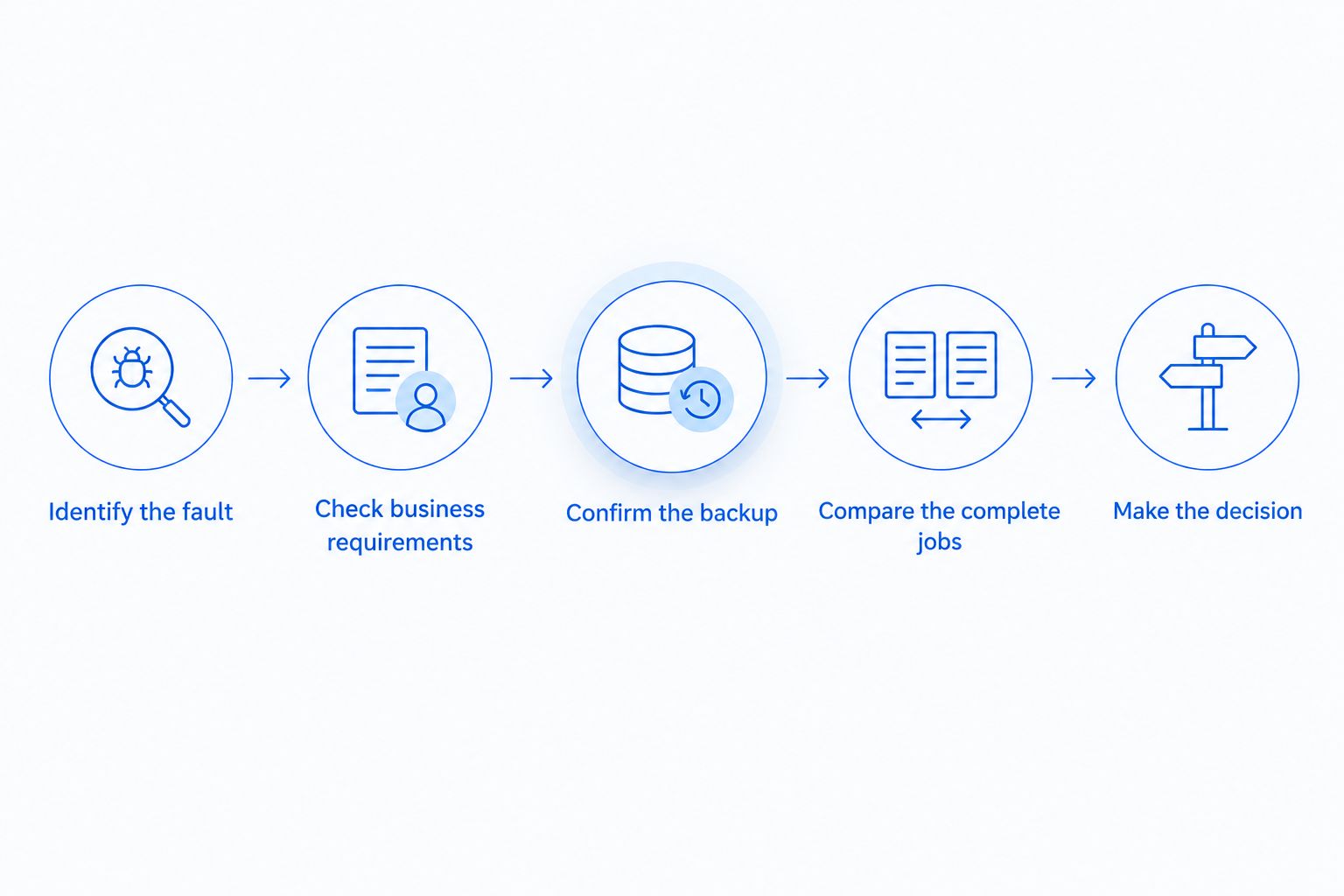
Follow the same sequence for every affected computer. It keeps a visible fault from hiding a separate backup or access problem.
- Identify the fault. Record what fails, when it happens and whether the problem affects only this computer. A machine that freezes during one application calls for a different investigation from one that will not start.
- Check business requirements. List the software, security requirements, files and connected equipment the employee needs. A successful repair is not enough if the computer still cannot support that work.
- Confirm the backup. Find out which business files exist only on the old computer and whether a usable copy is available. Do this before work that changes the drive or moves the employee to another machine.
- Compare the complete jobs. Ask what the repair quote includes and what the replacement setup requires. Include lost work time, file transfer, application setup and a check that access works.
- Make the decision. Repair a contained fault on a suitable computer. Replace a machine when the proposed repair leaves recurring failures or an unmet requirement.
The order matters. Choosing a new computer before checking the files can turn a straightforward purchase into a recovery problem. Approving a repair before checking software requirements can return an unsuitable machine to the desk.
What to ask for in a repair quote
Ask which fault the work addresses and how the technician will verify the result. Find out whether the quote covers diagnosis, the proposed fix and a check of the task that originally failed. If the explanation stops at making the computer start, ask whether it will also run the applications the employee needs.
Keep the scope precise. A tune-up targets performance problems; it does not establish that a failing component or an unsupported application has been fixed. Virus removal addresses an infection, but you still need to check files, access and whether the same symptoms persist afterward.
What to ask for in a replacement plan
A replacement plan should name the files, applications and accounts the employee needs on the new computer. Decide who will set up access and who will confirm the work is complete. Do not assume that moving documents also moves application settings or restores access to shared resources.
Keep the old computer available until the required files and work tasks have been checked on the replacement, provided doing so does not create a security issue. If the old drive is failing or the computer is infected, address that condition before relying on it as the only source of business data.
When repairing is the cheaper choice
Repair is the better choice when the problem has a clear cause, the proposed work addresses it and the computer still meets the employee's needs. A slow PC that remains suitable for its applications deserves a diagnosis before you commit to replacing it. The same applies when one fault is interrupting an otherwise usable machine.
Best for: a computer with a contained problem and no unresolved work or security requirement. The advantage is that you keep a usable device in service. The drawback is that a repair only covers the problem identified; it does not make every older component new.
A PC tune-up is relevant when the complaint is poor performance, but it should not be the default answer to every slow computer. Ask what is causing the slowdown. If the cause cannot be identified, compare the next diagnostic step with the disruption of replacing the device instead of repeatedly approving general fixes.
When replacing is the cheaper choice
Replace the computer when the fault keeps returning, the proposed repair cannot address its cause, or the machine cannot meet a required software or security need. A device that works only after repeated intervention still consumes staff time. The repair quote alone will not show that cost.
Best for: a computer that cannot be returned to dependable, suitable service. The advantage is that you can move work away from the problem machine. The drawback is the setup: files must be accounted for, applications configured and access checked before the employee can treat the change as complete.
Replacement is not a shortcut around data protection. If the old computer holds the only copy of a business file, decide how that file will be retrieved before retiring the device. If recovery is uncertain, keep the file issue separate from the purchase decision so it does not get overlooked.
Why the answer varies
These factors determine whether the cheaper-looking option is the cheaper business decision:
- The cause of the fault. A specific issue with a workable fix favors repair. Unexplained or recurring failures make the outcome harder to trust.
- Software and security requirements. The computer must support the applications and protections the business requires after the work is done.
- The state of the files. A confirmed, usable backup makes a move easier to plan. Unprotected files add work and risk to either option.
- Employee downtime. Compare when useful work resumes, not just when a technician finishes or a replacement arrives.
- Setup work. A new computer still needs files, accounts, applications and access checked. Include that work in the replacement decision.
- The number of affected computers. A problem shared by several machines calls for investigation beyond a repair-or-replace decision on one desk.
A 2026 decision should be based on the actual job, not a blanket rule about computer age. Age prompts a closer look; it does not identify the fault, confirm the backup or tell you whether an employee can work after the proposed fix.
What if the old computer is slow but still works?
Start with the tasks that are slow and check whether the slowdown affects one application or the whole machine. If the cause is fixable and the computer still meets business requirements, repair can be cheaper than replacing it. If the problem returns after the identified cause is addressed, reassess instead of repeating the same work.
For an office where slow computers interrupt daily work, TechConnect LLC provides PC tune-ups and managed business IT support. TechConnect LLC is best for North Carolina businesses that need help with PC performance, backups or ongoing IT support—not a replacement recommendation based on age alone.
Does a failing drive mean the whole computer must be replaced?
No. A failing drive means you must address the drive and the files; it does not, by itself, prove the rest of the computer is unsuitable. Compare the repair with the machine's remaining software and work requirements, and establish how you will protect or recover the data.
Do not keep using a machine with a suspected failing drive as though the files are safe. Confirm what exists in backup before making changes that depend on reading the old drive. If files are missing from backup, treat recovery as its own decision.
Should I back up files before repairing or replacing a PC?
Yes. Confirm which business files are on the computer and whether the backup contains usable copies before repair or replacement work begins. A backup you have not checked does not settle the data question.
This matters even when the visible problem appears unrelated to storage. Repair work can require changes to the computer, while replacement requires a plan to move or restore what the employee uses. In 2026, put the backup check ahead of either approval.
FAQ
Is it cheaper to repair or replace an old business computer?
Repair is cheaper when a contained fix returns the computer to dependable work. Replace it when recurring faults or unmet software and security requirements remain after the proposed repair.
Should I replace a business computer just because it is old?
No. Age alone does not identify a fault or show whether the computer still meets business needs. Check its condition, required software, security requirements and backup first.
Is a PC tune-up enough for a slow office computer?
A PC tune-up is appropriate when the slowdown has a cause the work can address. It is not a substitute for identifying a failing component or a software requirement the computer cannot meet.
Do I need to back up files before computer repair?
Yes. Identify the files the business needs and confirm usable backup copies before work that changes the computer. If a drive is failing, deal with the data risk before relying on that drive.
Does replacing a computer automatically protect my business files?
No. Replacement requires a plan to move or restore files and verify access on the new computer. A new device does not resolve missing or unprotected data on the old one.
What should I compare besides the repair quote?
Compare employee downtime, backup or recovery work, file transfer, application setup and access checks. The cheaper quote is not the cheaper outcome if it leaves the employee unable to work.
Can managed IT support help with a repair-or-replace decision?
Managed IT support can help a business track recurring problems and the computers staff depend on. The decision for any one computer still rests on its fault, requirements and the work needed to return it to service.
One last thing
Before approving a repair or ordering a replacement, ask the employee to name the work that must function when the computer comes back. A machine that starts but cannot open a required application has not solved the business problem. In 2026, that simple check is more useful than making the decision from the device's age alone.
TechConnect LLC provides data backup and recovery as well as managed business IT support across North Carolina. If files or repeated interruptions are part of the problem, address those alongside the computer decision rather than after it.