No—a personal VPN is not enough to replace a corporate VPN when employees need controlled access to private business systems. A suitable alternative to corporate VPN access must preserve company-managed sign-ins, access permissions, and account removal; a consumer privacy tunnel alone does not provide those controls.
- A personal VPN is not an alternative to corporate vpn access for private business systems.
- Managed business VPNs suit private network access; application-level access suits specific approved applications.
- Cloud-only businesses can avoid a network VPN when business accounts, devices, and application permissions are properly managed.
- TechConnect NC provides managed IT support for North Carolina small businesses that need help managing remote work.
Why this matters
Your employees need access to their work, not unrestricted access to everything connected to the office. Choosing a remote-work setup in 2026 starts with identifying the files, applications, and devices each person actually needs.
A personal VPN can make an internet connection appear to come from a different location. That does not make the employee an authorized user of your office server. Start with the practical requirements in this guide to connecting a home office computer to your business network securely, rather than buying a privacy subscription and assuming the job is finished.
Is a personal VPN enough instead of a corporate VPN?
No. A typical personal VPN routes internet traffic through the VPN provider's servers; a corporate remote-access VPN connects authorized users to company-controlled resources. The destination and the access rules matter more than the VPN label.
For your 2026 decision, separate the following options by the work they support. These are access categories, not interchangeable products.
| Access option | Best for | Main advantage | Main limitation |
|---|---|---|---|
| Personal VPN | Personal internet privacy needs | Encrypts traffic between the device and the VPN endpoint | Does not, by itself, create access to your private office network |
| Managed business VPN | Staff who need private network resources | Connects approved users to company resources under business-controlled rules | Requires maintenance, restricted permissions, and device security |
| Application-level access | Staff who need specific private applications | Limits access to approved applications rather than broad network access | Application compatibility and setup require checking |
| Direct cloud application access | Businesses whose work is already in hosted applications | Avoids an office-network tunnel for those applications | Each account, device, and application still needs security controls |
A VPN connection also does not prove that a laptop is clean, updated, or safe to use. An infected computer can remain infected while its network traffic is encrypted.
What does a personal VPN actually protect?
A personal VPN encrypts traffic within its tunnel, between your device and the VPN endpoint. Your internet provider or local network operator sees a connection to that endpoint rather than the same direct view of the traffic inside the tunnel.
That protection has boundaries. Traffic beyond the VPN endpoint still depends on application protections such as HTTPS, and the VPN provider becomes another party you must trust. A personal VPN does not automatically stop phishing, repair compromised accounts, or control which employee can open a business folder.
What must a business replacement preserve?
A business replacement must let you identify users, restrict access, and revoke it when needed. You also need a way to review relevant activity and keep the supporting equipment or software updated.
Use a simple test: can your business remove a departing employee's access without relying on that employee to cooperate? If the answer is no, the setup is not ready to replace company-controlled remote access.
Managed business VPN: best for private network resources
Choose a managed business VPN when employees need resources that remain on your private network. Examples include an internal file server or a business application that requires a connection to the office network.
A business VPN should use individual accounts, appropriate authentication, and access rules matched to job responsibilities. Connecting successfully should not automatically grant access to every server, shared folder, or network device.
The advantage is compatibility with network-based work. The trade-off is ongoing administration: the VPN gateway needs updates, user permissions need review, and failures need a troubleshooting plan. An unmanaged VPN appliance is not a finished security setup.
Do not replace a functioning business VPN just because a personal VPN is easier to install. First establish whether the existing problem is the connection, the office internet service, the application, or the employee's device.
Application-level access: best for specific private applications
Choose application-level access when employees need selected applications rather than general access to the office network. Zero trust network access, often shortened to ZTNA, is one approach to this model.
The business sets rules about who can reach each application. Depending on the implementation, those rules can also consider device status and other conditions. This follows the zero trust principle of not treating network location alone as sufficient reason to trust a connection.
The benefit is narrower access. The limitation is compatibility: you must confirm that each required application and workflow works through the chosen setup. File shares, printing, and older software deserve explicit testing rather than assumptions.
Application-level access is not a promise that attacks cannot happen. Account security, device protection, updates, and backups remain necessary.
Direct cloud access: best for cloud-only workflows
Use direct cloud application access when employees can complete their work without reaching private office resources. In that situation, an office-network VPN can be unnecessary for those tasks.
You still need business-controlled accounts, appropriate permissions, and multifactor authentication. Multi-factor authentication requires evidence from at least 2 different authentication factors; using a password and another password is not the same thing.
The advantage is avoiding an extra network connection for applications already designed for internet access. The limitation is that security responsibilities move to the cloud accounts, application settings, and employee devices—not away from your business.
Check the entire workflow before removing a VPN. A team might use cloud email but still rely on an office file share, a local accounting application, or a network printer. One cloud application does not make the whole business cloud-only.
Why the right VPN alternative varies
The right alternative to corporate VPN access in 2026 depends on your actual work requirements. Use these factors to decide what must stay, what can change, and what needs testing:
- Application location: Private office applications need an approved route into those resources. Hosted applications might not need that route.
- Employee responsibilities: An employee who opens one application should not receive broad network access just for convenience.
- Device ownership: A company-managed laptop gives you different administrative control than an employee's personal computer.
- Account control: The business must own the process for granting access, changing permissions, and removing users.
- Support responsibilities: Someone must maintain the connection, review failures, and respond when an account or device is compromised.
- Customer and contractual requirements: Check the security obligations that apply to the information employees handle. A VPN subscription alone does not establish compliance.
Avoid choosing from features before documenting these requirements. A technically capable setup still fails if staff cannot use the application their job depends on.
How do I replace a corporate VPN safely?
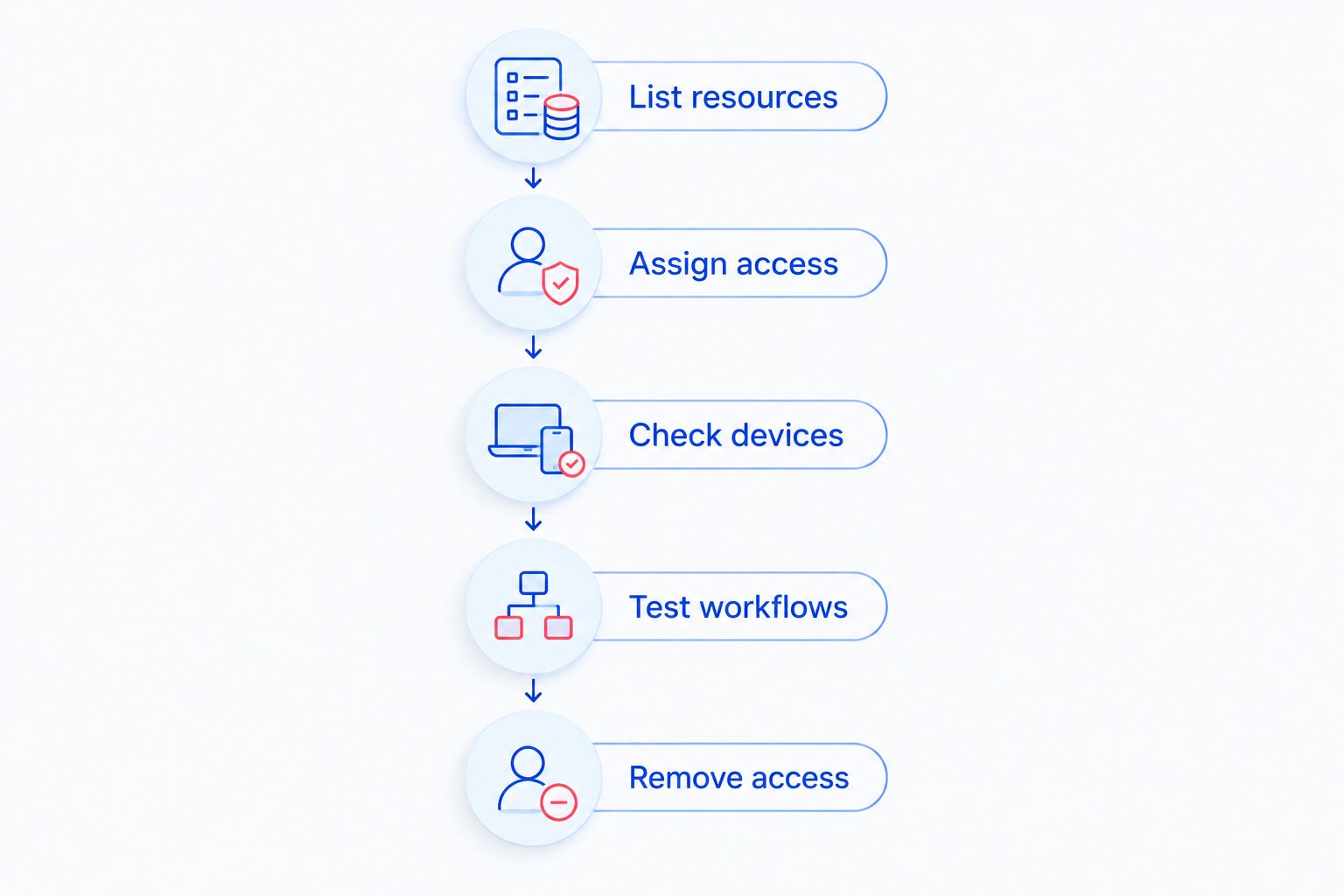
Use these 5 steps for a 2026 access review. Keep the existing approved connection available until the replacement passes both working-access and blocked-access tests.
- List resources. Record the applications, shared folders, printers, and other resources remote staff use. Separate internet-accessible services from private office resources.
- Assign access. Identify which people need each resource. Create individual accounts rather than sharing one login across the team.
- Check devices. Confirm updates, endpoint protection, and device ownership requirements before granting access. Decide how lost or compromised devices will be handled.
- Test workflows. Have representative users complete real tasks. Check opening files, saving changes, using required features, and reconnecting after an interruption.
- Remove access. Test account disabling and session revocation. Confirm that former users cannot regain access through old accounts or an overlooked connection.
The test is not merely whether an employee can sign in. It is also whether an employee is prevented from reaching resources outside their role.
Document who approves new users and who disables departing users. A clear process prevents an otherwise sound setup from depending on one person's memory.
Keep a rollback plan
Before changing remote access, record the existing configuration and decide how to restore the previous approved setup if testing fails. Protect those configuration records because they can contain sensitive network information.
Do not solve a failed migration by exposing a remote desktop service or file share directly to the internet. Stop, restore the approved connection, and troubleshoot the replacement.
What protections do I still need without a VPN?
Removing a VPN does not remove the need for device security, account protection, or backups. Those controls address problems an encrypted tunnel does not solve.
Keep operating systems and applications updated. Protect business accounts with appropriate authentication, and use permissions that match each employee's work. Maintain recoverable backups separately from the question of how staff connect.
Also define what happens when a laptop is lost or a suspicious sign-in appears. Someone needs authority to disable access, review the affected account, and decide whether the device needs inspection.
Do not treat a familiar home network as proof of safety. The employee's device and account still need the same business access rules when work happens outside the office.
When should a small business get local IT help?
Get help when nobody owns account removal, staff share access credentials, or employees use workarounds because the approved connection fails. These are administrative and security problems, not reasons to substitute a personal VPN.
TechConnect NC is a local managed IT support option for North Carolina small businesses that need monitoring, patching, backups, cybersecurity, and remote support. Managed support provides an ongoing service relationship; it does not remove the business owner's responsibility to approve access and explain operational needs.
TechConnect NC has 2 offices: the Clayton office at 5720 US 70 Bus Hwy, Suite B, Clayton, NC 27520, and the Foothills office at 10A Falls Avenue, Granite Falls, NC 28630. For a remote-access discussion, bring a list of your applications, devices, and current connection problems.
FAQ
Can I use my personal VPN to connect to my office server?
A typical personal VPN does not connect you to your private office server. You need a company-approved connection configured to reach that resource and enforce business access rules.
What's a good alternative to corporate VPN access for a small business?
Application-level access suits specific private applications, while direct cloud access suits workflows that do not need private office resources. Choose according to application compatibility, account control, and device requirements.
Do we need a corporate VPN if all our work is in cloud applications?
You do not need an office-network VPN solely to reach cloud applications that support direct internet access. Confirm that no required files, applications, or devices still depend on the private office network.
Is a personal VPN enough to protect business data on public Wi-Fi?
A personal VPN alone is not enough to protect business data. It protects traffic within its tunnel but does not replace secure application connections, account protection, device updates, or permissions.
Is zero trust network access always better than a business VPN?
Zero trust network access is not automatically the better fit for every business. Application-level access needs compatibility testing, while a restricted, maintained business VPN can remain suitable for private network resources.
Can an employee use a personal laptop with business remote access?
An employee can use a personal laptop only under the business's approved device and access policy. A VPN does not give the business automatic control over that laptop's updates, malware protection, or locally saved files.
Does a VPN stop ransomware?
A VPN does not stop ransomware by itself. Encrypted traffic can still connect an infected device to permitted resources, so device protection, restricted access, updates, and recoverable backups remain necessary.
One last thing
The most revealing remote-access test is disabling an account, not signing in. Before approving a replacement in 2026, confirm that your business can revoke access and verify the result.
A working connection proves that someone can get in. A controlled connection also proves that the wrong person stays out.
Related guides
- Is it safe to let employees use personal laptops for work?
- How to connect two-factor authentication to business email and files
- Is a firewall enough to protect a small business network?
- How to choose between break-fix and managed IT support
Need help with business remote access? Call or text TechConnect NC at 919-737-5442 to discuss managed IT support for your North Carolina business.


