No—a firewall alone is not enough to protect a small business network in 2026. It filters network traffic, but you also need protection for employee accounts and computers, security updates, recoverable backups, and someone responsible for responding to alerts.
- Is a firewall enough to protect a business network? No: account security, endpoint protection and backups address different risks.
- Keep your firewall, but add multifactor authentication, patching and tested recovery procedures.
- TechConnect NC provides local managed IT support, including monitoring, backups and cybersecurity, for North Carolina small businesses.
- Assign someone to review security alerts and verify that protections actually work.
Is a firewall enough to protect a small business network?
A firewall controls connections; it does not control every action taken through an allowed connection. An employee can open a phishing message, enter a password on a fake sign-in page, or download a malicious file while the office firewall remains enabled.
Start with the information you need to protect, not a shopping list of security equipment. The guide to protecting customer data on a small business network explains that broader task.
These security layers have different jobs. None replaces all the others.
| Security layer | Best for | Main benefit | Limitation |
|---|---|---|---|
| Network firewall | Controlling traffic between networks | Restricts connections according to configured rules | Does not independently secure cloud accounts or restore deleted files |
| Endpoint protection | Protecting individual computers | Detects and blocks malicious activity on covered devices | Requires maintenance and does not catch every threat |
| Multifactor authentication | Protecting account sign-ins | Adds verification beyond a password | Does not replace device security or prevent every account takeover |
| Security updates | Fixing known software weaknesses | Removes vulnerabilities addressed by available patches | Does not fix stolen credentials or unsafe permissions |
| Protected backups | Recovering business information | Provides a recovery path after loss or damage | Does not prevent an attack; recovery needs testing |
| Monitoring and response | Acting on suspicious activity | Connects alerts to investigation and corrective action | Depends on coverage, useful alerts and clear responsibility |
A firewall remains useful. The mistake is treating its presence as proof that the whole business is protected. Even an advanced firewall depends on its configuration, enabled features, maintenance, and the traffic it can inspect.
Why this matters
Your business network includes more than the equipment connected to the office router. Business email, shared files, remote laptops, mobile devices, and employee accounts all affect security. A laptop working away from the office does not automatically receive protection from the office firewall.
For your 2026 security review, ask a practical question: If an employee's password is stolen today, what stops the attacker next? A useful answer names an actual control, such as multifactor authentication or restricted account permissions—not just the firewall.
The same test applies to recovery. If important files become unreadable, the firewall cannot recreate them. That job belongs to your backups and recovery process.
Keep the firewall, but check what it actually protects
A business firewall should allow necessary traffic and restrict unnecessary connections. Your IT provider should understand why each externally accessible service exists and remove access that the business no longer needs.
Ask who maintains the firewall, who receives its alerts, and whether its software still receives security updates. Also ask whether remote management is exposed to the internet and how administrator access is protected. Do not change unfamiliar settings without a documented plan; a careless change can interrupt legitimate work.
A correctly maintained firewall is a necessary layer, not a complete security plan. Replacing it with a more expensive device does not automatically solve missing backups, shared passwords, or unmanaged laptops.
Keep a record of approved changes. When a vendor requests additional network access, document the purpose, the owner, and when that access should end.
Protect computers outside the firewall
Endpoint protection runs on individual computers. That matters because a laptop can encounter malicious downloads, attachments, or removable storage whether it is in the office or elsewhere.
Check that every business computer has active protection and supported software. A security application installed long ago is not evidence that its protection is current, its alerts are monitored, or its settings remain appropriate.
Updates matter here, too. Operating systems, browsers, business applications, and network equipment all need attention. Assign responsibility for failed updates as well as successful ones. An update process that repeatedly skips an important computer leaves an unresolved gap.
Endpoint protection has limits. It does not substitute for account security, and it cannot promise that every malicious file will be detected. Its value comes from working alongside the other layers.
Protect accounts with more than passwords
Multifactor authentication requires verification using different types of evidence. Two passwords are not two authentication factors. A password combined with a security key is different from a password combined with another memorized answer.
Prioritize business email, administrator accounts, remote access, and services containing sensitive information. Where supported, use phishing-resistant authentication methods rather than assuming every verification method offers the same protection.
Access permissions need equal attention. Employees should have access appropriate to their work, and administrator privileges should be limited. Remove access when someone leaves and review access when responsibilities change.
Account protection has a recovery side, too. Document how an authorized employee regains access after losing an authentication device. Store recovery information securely rather than leaving the business dependent on one person's phone.
Keep backups that an incident cannot easily destroy
Backups address a different question from prevention: how will you recover if protection fails? A firewall cannot recover an overwritten spreadsheet, a failed drive, or files encrypted by ransomware.
The established 3-2-1 backup approach means 3 copies of your data, on 2 different media types, with 1 copy offsite. Treat that as a starting framework, not proof of ransomware protection. An offsite copy that an attacker can delete through a compromised account still needs stronger protection.
Keep a backup copy offline or otherwise protected against alteration and deletion. Separate backup administration from everyday account access, and confirm which business information the backup actually includes.
Test restoration, not just backup completion. Restore a representative file to a safe location and verify that it opens correctly. For business applications, establish what else is required to make restored data usable.
Why your business's security needs vary
The firewall question has the same answer for every small business: it is not enough by itself. The work required around it depends on how your business operates.
- Remote work: Laptops used away from the office need device and account protection that does not depend solely on the office connection.
- Sensitive information: Customer records, financial information, and employee documents require appropriate access restrictions and recovery planning.
- Cloud services: Hosted email and file-sharing accounts need their own security settings, administrator controls, and recovery arrangements.
- Connected equipment: Printers, cameras, guest devices, and other equipment need an access plan rather than unrestricted access to business systems.
- Internal responsibility: A business without a designated IT owner needs a clear arrangement for updates, alerts, account changes, and incident response.
- Operational dependence: Identify which applications and files must be available for staff to serve customers. Use that list to set recovery priorities.
These factors determine what needs attention. They do not justify buying security products without understanding the problem each product addresses.
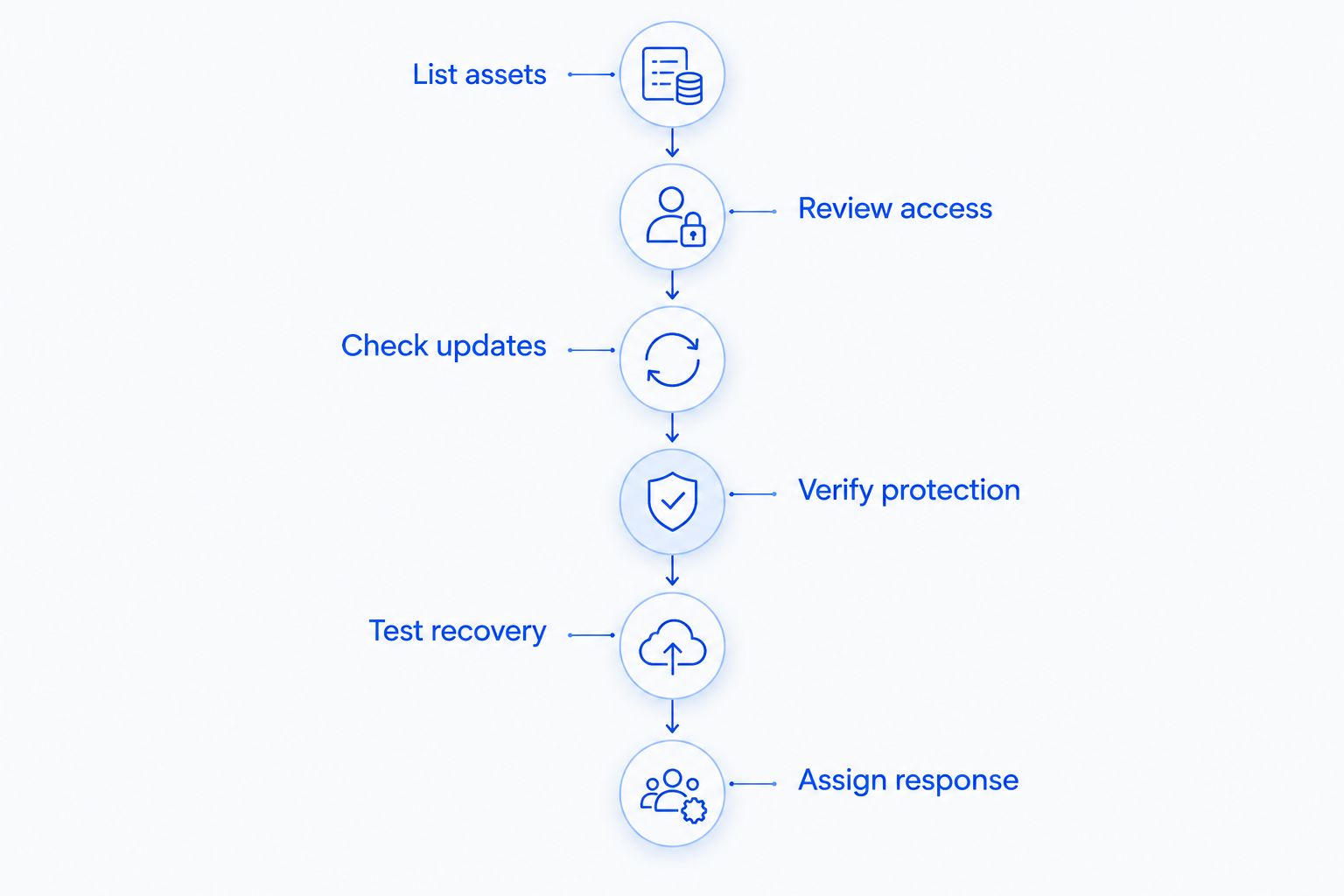
Run these 6 security checks in 2026
Use this sequence to turn a general concern into specific tasks. Record an owner and an unresolved issue for each check instead of accepting a verbal assurance that everything is covered.
- List assets. Identify business computers, network equipment, important accounts, and the locations holding business information. Include remote devices and cloud services, not just equipment visible in the office.
- Review access. Check administrator accounts, employee permissions, former employee access, and multifactor authentication. Confirm who can change firewall settings and who can delete backups.
- Check updates. Verify the update status of computers, applications, and network equipment. Record unsupported systems and failed updates so that someone can address them.
- Verify protection. Confirm that firewall rules and endpoint protection match the devices and services in use. Check whether alerts reach a person responsible for investigating them.
- Test recovery. Restore selected business information to a safe location. Confirm that the recovered files are usable and document any missing applications, credentials, or instructions.
- Assign response. Name the person employees contact about suspicious activity. Document who can isolate an affected computer, secure an account, and coordinate recovery.
The result should be a short action list, not a folder of screenshots nobody reviews. Fix uncovered accounts, unprotected devices, and unusable backups before assuming a firewall upgrade is the answer.
Does a firewall stop phishing emails?
No—a firewall does not reliably stop every phishing email. Some security systems include filtering features, but a convincing message or fraudulent sign-in page can still reach an employee.
Use email filtering, account protection, and a clear reporting process together. Employees should know how to verify an unexpected payment request through a separate, trusted communication channel rather than replying to the suspicious message.
Can ransomware get past a firewall?
Yes—ransomware can reach a business despite an active firewall. A malicious download, compromised account, or vulnerable system can provide an entry point that firewall rules alone do not prevent.
Reduce the opportunity for infection with updates, endpoint protection, and restricted access. Maintain protected backups and response instructions because prevention and recovery solve different problems.
Who should manage small-business network security?
Someone needs responsibility for the full process, whether that is an internal employee, an outside provider, or a clearly divided arrangement. A provider monitoring devices does not automatically mean that cloud accounts, backup recovery, and employee access are included.
For your 2026 support review, request a written scope covering monitoring, patching, cybersecurity, backups, help desk support, and incident handling. Ask what your staff must still do. The benefit of outside support is assigned technical responsibility; the limitation is that work outside the agreed scope still needs an owner.
TechConnect NC is best suited to North Carolina small businesses seeking local managed IT support. TechConnect NC provides monitoring, patching, backups, cybersecurity, help desk, and remote support. Confirm the coverage your business needs rather than assuming every task is included.
TechConnect NC has offices in Clayton at 5720 US 70 Bus Hwy, Suite B, and Granite Falls at 10A Falls Avenue. Those locations are relevant for businesses around Johnston County and the Foothills seeking a local support option.
FAQ
Is a firewall enough to protect a business network in 2026?
No, a firewall is not enough to protect a business network in 2026. Add account protection, endpoint protection, updates, protected backups, and assigned responsibility for responding to incidents.
Do I still need antivirus if my business has a firewall?
Yes, computers still need endpoint protection even when the business has a firewall. The firewall controls network traffic, while endpoint protection addresses malicious activity on individual devices.
Does my office firewall protect employees working from home?
Your office firewall does not automatically protect employees working from home. Protection depends on how their devices connect, which traffic passes through the office, and what security controls are active on their devices and accounts.
Can a firewall protect my business email account?
A firewall alone does not secure a business email account. Protect sign-ins with multifactor authentication, restrict administrator access, and maintain appropriate email security settings.
Are cloud files already backed up?
Do not assume cloud files have the backup protection your business needs. Check deletion recovery, version history, retention settings, administrator access, and whether a separate protected backup is required.
What should I do if I think an office computer is infected?
Disconnect the suspected computer from wired and wireless networks and contact your IT support provider. Avoid wiping the device or attaching backup drives before receiving incident-specific instructions.
Can TechConnect NC help with small-business network security?
TechConnect NC provides managed IT support that includes monitoring, patching, backups, cybersecurity, help desk, and remote support. Discuss your devices, accounts, and recovery needs to establish the appropriate service scope.
One last thing
A successful backup notification is not a successful recovery test. That distinction is easy to miss when your attention stays on preventing attacks. A backup job can finish while still excluding an important folder or leaving you without the application needed to open recovered data.
Make a documented restoration test part of your 2026 security work. Pair it with a review of the accounts that can delete or change your backups. That gives you evidence of recoverability rather than another reassuring status message.
Related guides
- How to protect a small business from ransomware
- How to connect two-factor authentication to business email and files
- How to choose between break-fix and managed IT support
Call or text TechConnect NC at 919-737-5442 to discuss managed IT support and the security gaps your business needs to address.