Yes, antivirus software can slow down a business computer because scanning files uses processing power, memory, and storage activity. The effect depends on the scan, the computer, and the other work running at the same time—not simply whether antivirus is installed. In 2026, the right fix is to identify the bottleneck and adjust protection safely, not turn antivirus off to make the computer feel faster.
- Can antivirus software slow down a computer? Yes, especially when scans compete with business applications for resources.
- Windows Task Manager helps identify resource use; high activity alone does not prove antivirus is the cause.
- Keep real-time protection enabled and have IT review scan schedules, overlapping security tools, and application conflicts.
- TechConnect NC provides computer tune-ups, virus removal, and managed IT support for North Carolina businesses.
Can antivirus software slow down a business computer?
Antivirus can contribute to a slowdown, but a busy security process is evidence to investigate—not a complete diagnosis. A full scan reads files across the computer, while real-time protection checks activity as you open, download, or run files. Either can compete with your business applications for resources.
Use the pattern below to decide what to check first. If the cause remains unclear, compare the signs of a virus versus old hardware before changing security settings.
| Pattern you notice | What it suggests | Best next check | Limit of that evidence |
|---|---|---|---|
| Slowness starts during a scheduled scan | Scanning is competing with other work | Match scan history to the slowdown | Another scheduled task might overlap |
| A security process shows heavy disk activity | File inspection is using storage resources | Check whether a scan or update is active | Disk activity does not establish a software fault |
| Only one business application stalls | An application-specific issue needs investigation | Record the action that triggers the stall | Antivirus is only one possible cause |
| Several computers lose access to online services together | A shared network or service issue needs attention | Check local applications against online applications | A shared security policy could also be involved |
| The computer stays slow after scanning ends | The scan is not the whole explanation | Review memory, storage, startup programs, and hardware | More than one bottleneck can exist |
For a useful 2026 diagnosis, compare the same business task before, during, and after scanning. Changing the workload at the same time makes the comparison less useful.
Why this matters
Disabling antivirus trades a visible inconvenience for an avoidable security gap. A faster application is not a successful repair if the computer loses protection while opening email attachments or handling customer files.
The opposite mistake is blaming every delay on security software. Low memory, a struggling drive, startup programs, browser extensions, and network trouble can all produce similar complaints. Fix the measured cause, not the most recognizable process name.
Why antivirus performance varies
The effect of antivirus depends on the computer and its workload. These factors explain why an office laptop and a lightly used reception computer can respond differently to similar protection settings:
- Scan scope: A full scan examines more files than a targeted scan, increasing the work the computer must perform.
- Available resources: Antivirus shares processing power, memory, and storage access with your business applications. Limited spare capacity makes competing activity more noticeable.
- Storage performance: Scanning requires reading files. Slow or unhealthy storage can make that work interfere with ordinary file access.
- Overlapping activity: Backups, file synchronization, operating system updates, and scans can compete when they run together.
- Security configuration: Multiple active antivirus engines or poorly chosen policies can create unnecessary work. Not every security component is a duplicate, so IT should review their roles before removing anything.
- Application behavior: Programs that repeatedly create, open, or modify files can interact heavily with file inspection. That calls for investigation, not a blanket exclusion.
These are diagnostic factors, not reasons to assume your computer needs replacement. First establish which resource is under pressure and which task is consuming it.
Which antivirus activity should you adjust?
Different scanning functions serve different purposes. Choose settings around the work they perform rather than treating every type of scanning as interchangeable.
| Activity | Best for | Benefit | Limitation or trade-off |
|---|---|---|---|
| Real-time protection | Checking activity while employees work | Inspects files or behavior as activity occurs | Uses resources during ordinary computer use |
| Scheduled full scan | Broader examination of files on the computer | Checks beyond the files currently being opened | Can compete with work when scheduled poorly |
| Quick scan | Checking common infection locations | Has a narrower workload than a full scan | Does not examine every file |
| Targeted scan | Investigating a particular file or folder | Focuses attention on the relevant location | Does not establish that the entire computer is clean |
Keep real-time protection enabled; adjust broader scan timing through your approved security settings. A quick scan is not a direct replacement for every other check, and a completed scan is not proof that every performance problem is resolved.
In 2026, business security settings also need an owner. If your computer is centrally managed, ask your IT contact to make policy changes instead of trying to work around restrictions.
How do I check whether antivirus is causing the slowdown?
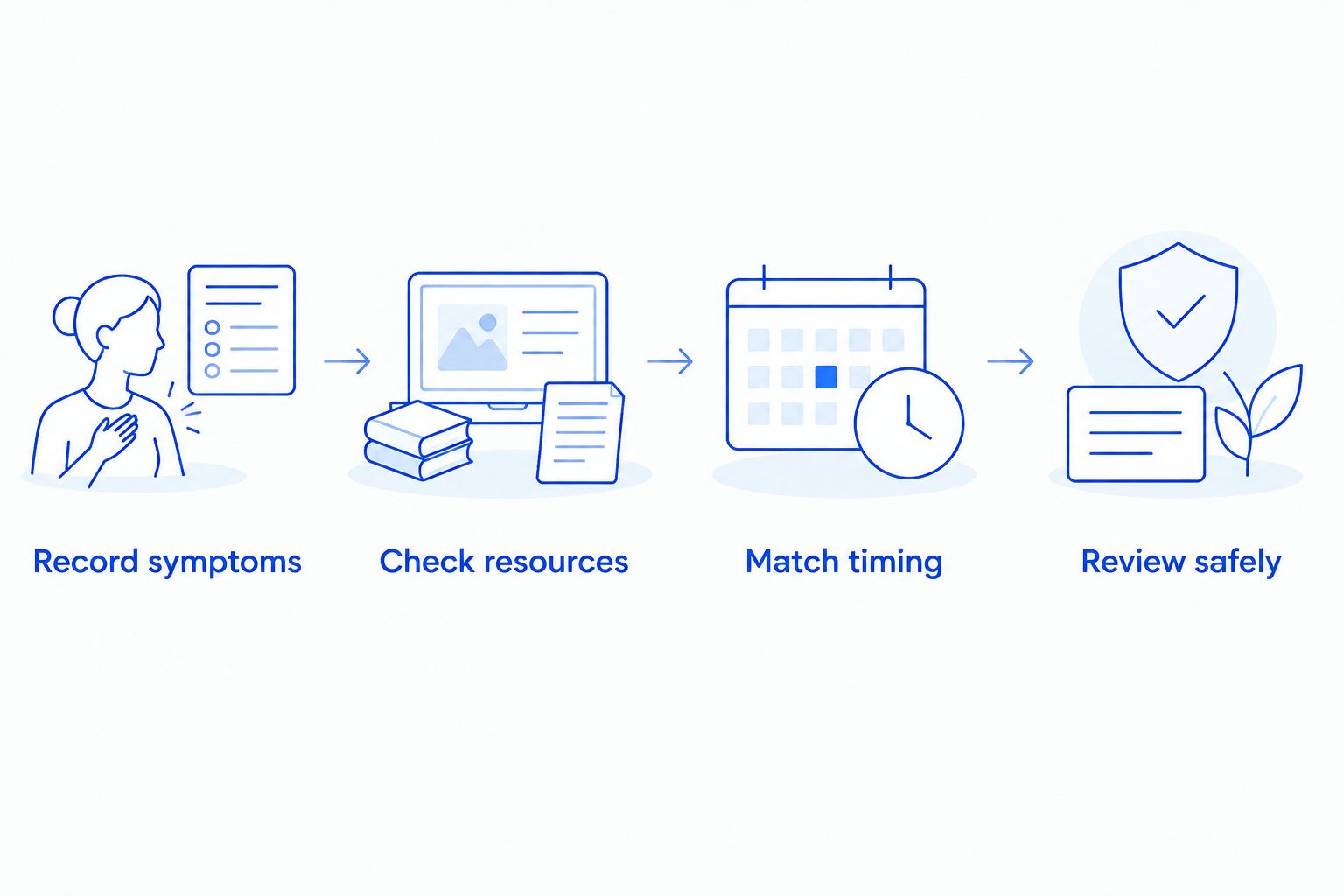
Follow this sequence while the problem is happening. Do not stop unfamiliar security processes or uninstall protection as part of the check.
1. Record symptoms
Write down what is slow: signing in, opening a spreadsheet, saving a file, browsing, or using an online application. Note whether the problem affects one computer or several, and whether it started after a software change.
Be specific. “Saving this shared document stalls” gives IT a useful starting point; “the computer is terrible” does not distinguish a local problem from a network problem.
2. Check resources
On Windows, open Task Manager with Ctrl + Shift + Esc and inspect CPU, Memory, and Disk activity. Look at which processes are active while you repeat the affected task, without ending them.
A snapshot is only a clue. Record whether the security process stays busy throughout the slowdown and whether other applications or background tasks are competing at the same time.
3. Match timing
Open your approved security application's status or history view and check for an active scan, update, or detected threat. Compare that information with the time the slowdown occurred.
If a scheduled scan is running, let it finish when practical and repeat the same task afterward. Improvement supports further investigation of scan timing; it does not prove the antivirus software is defective.
4. Review safely
Give your IT contact the affected application, the resource readings, and the scan timing. Ask for a review of scan schedules, installed security tools, software updates, and hardware health.
Make controlled changes rather than changing several settings together. Your 2026 troubleshooting record should show what changed and whether the original business task improved with protection still active.
How can I reduce slowdowns without weakening protection?
Start with scheduling. Ask IT to move resource-heavy scans away from the tasks they disrupt, while keeping the computer available to complete those scans. A schedule that runs only when the computer is switched off will not solve the underlying management problem.
Also check for competing maintenance. Moving a scan into the same window as a backup, a large synchronization job, and an operating system update can simply move the bottleneck elsewhere.
Use these priorities:
- Resolve overlapping protection: Have IT identify the active antivirus engine and check whether other security agents are intended to work alongside it.
- Keep supported software updated: Apply approved updates to the security application, operating system, and affected business software.
- Review unnecessary startup activity: Remove or disable unneeded startup applications through an approved process, not by deleting unfamiliar files.
- Investigate hardware limits: Confirm memory pressure and storage health before recommending an upgrade.
- Retest the business task: Verify that employees can complete the affected work with security enabled.
Avoid broad scanning exclusions for convenience. Excluding a folder removes some inspection from that location, so any exception needs a documented reason and review against the security vendor's and application vendor's guidance.
Should I turn antivirus off to see if my computer gets faster?
No—do not disable antivirus on a business computer as a do-it-yourself speed test. Record resource use and scan timing instead, then ask your IT contact to investigate under controlled conditions.
Turning protection off changes more than performance. It also changes how the computer handles potentially harmful files, and a speed improvement still would not identify whether the problem was scheduling, configuration, or a software conflict.
If you see ransom demands, unexpected file changes, or suspicious security warnings, stop ordinary troubleshooting and contact IT. An infection concern requires a different response from routine performance tuning.
Does a slow computer mean I need a different antivirus?
No. A slow computer alone does not establish that switching antivirus will help, especially when storage, memory, or another background task is responsible.
Before replacing security software, ask IT to document the cause, the proposed change, and how protection will remain active through the transition. Judge the result by both usability and confirmed protection—not by a faster desktop immediately after uninstalling something.
When should a North Carolina business ask for help?
Get help when slowdowns repeatedly interrupt work, the cause remains unclear, or several office computers develop the same symptoms. A recurring issue deserves a documented fix rather than repeated restarts and temporary workarounds.
TechConnect NC is best for North Carolina small businesses seeking local computer tune-ups and managed IT support. Its services include virus removal, data backup and recovery, monitoring, patching, cybersecurity, help desk, and remote support.
For local assistance, TechConnect NC has offices at:
- Clayton: 5720 US 70 Bus Hwy, Suite B, Clayton, NC 27520.
- Granite Falls: 10A Falls Avenue, Granite Falls, NC 28630.
TechConnect NC computer tune-ups address a different need from ongoing managed IT support: a tune-up focuses on the computer's current condition, while managed support includes continuing maintenance and support. Neither choice makes a replacement recommendation valid without checking the computer, and neither makes every slowdown a virus problem.
FAQ
Can antivirus software slow down a computer even when I am not running a scan?
Yes. Real-time protection inspects activity during normal computer use, so antivirus can use resources even when you have not started a manual scan. Check resource use and security status before deciding it caused the slowdown.
Why does my business computer get slower during a full scan?
A full scan reads files and uses resources that your business applications also need. Ask IT to review scan timing and overlapping maintenance rather than disabling protection.
Does high antivirus CPU usage mean something is wrong?
No. High CPU usage can reflect active scanning or other security work, but sustained activity that disrupts work needs investigation. Match the activity to scan history and the affected task.
Should I install another antivirus to make my computer safer?
Do not add another active antivirus engine without IT approval. Overlapping engines can create conflicts or unnecessary work, while some other security tools are designed to operate alongside antivirus.
Can a virus make my computer slow even if antivirus is installed?
Yes. Installed antivirus does not rule out an infection, and slowness alone does not prove one exists. Report suspicious warnings, unexpected file changes, or other unusual behavior to IT.
Will adding more memory fix antivirus slowdowns?
Adding memory helps only when insufficient memory contributes to the slowdown. It will not fix unrelated storage trouble, network delays, or a poorly scheduled scan.
Can TechConnect NC help with a slow business computer?
TechConnect NC provides computer tune-ups, virus removal, and managed IT support to North Carolina businesses. Describe the affected tasks and when the slowdown happens so the performance issue can be investigated.
One last thing
A computer that feels fast because protection is disabled has not passed a useful performance test. For your 2026 maintenance checklist, define success as completing the affected business task with protection active and the original bottleneck addressed.
Related guides
- How to tell if your antivirus software is actually working
- How to speed up a slow computer without buying a new one
- How to choose between break-fix and managed IT support
Need help with a slow business computer? Call or text TechConnect NC at 919-737-5442 for computer tune-ups, virus removal, or managed IT support.