Dental practice IT support costs depend on the computers, software, backups, security work, and support hours included in your agreement; an itemized quote is the right basis for your 2026 budget. Separate ongoing support from setup work, replacement equipment, software subscriptions, and emergency assistance before comparing proposals.
- Dental practice IT support cost comparisons need matching coverage, not just matching monthly totals.
- Managed IT support suits practices that want ongoing maintenance; break-fix support addresses individual problems.
- TechConnect NC is a local option for North Carolina businesses seeking managed IT support.
- Ask who handles dental software issues, backup recovery, on-site visits, and after-hours incidents before signing.
How much does IT support cost for a dental practice?
Your dental practice needs a quote tied to its actual systems and responsibilities, not a generic per-computer estimate. A front-desk workstation, a shared server, and an imaging workstation do not necessarily require the same work. Count the equipment, then define what the provider must maintain.
For local service discussions, TechConnect NC provides managed business IT support, backups, computer repair, and virus removal. Confirm the proposed scope against your practice’s software and equipment before treating any service as included.
Use this breakdown to separate the parts of a proposal. These are categories to clarify, not a statement that every provider bundles them together.
| Budget category | What to have itemized | What to clarify |
|---|---|---|
| Ongoing support | Help desk, maintenance, monitoring, patching | Covered users, devices, and support hours |
| Initial setup | System review, access setup, documentation, existing repairs | What must happen before ongoing support begins |
| Security | Device protection, account controls, security maintenance | Included tools and incident-response responsibilities |
| Backup and recovery | Protected data, backup management, recovery testing | Whether recovery labor is included |
| On-site work | Visits, physical troubleshooting, equipment installation | Scheduling, travel, and excluded work |
| Separate purchases | Computers, networking equipment, software subscriptions | Who buys, owns, and renews each item |
For a 2026 comparison, ask each provider to complete the same scope sheet. A smaller total with fewer responsibilities is a different service, not proof of better value.
Why this matters for a dental practice
A support agreement affects more than the office computer that runs slowly. Scheduling, patient records, imaging access, printing, and claims workflows can depend on connected systems. Your proposal should identify those dependencies rather than treat every problem as an isolated repair.
Start with the work your practice cannot complete when a system fails. If staff can open the scheduling application but cannot retrieve images, the network being online does not mean the practice is fully operational.
Define successful recovery in terms of usable dental workflows. Ask the provider how it will verify access to the applications and data your team needs, with the relevant software vendor involved where necessary.
Which support model fits your dental practice?
Break-fix support, managed support, and a combined approach assign different responsibilities. Compare those responsibilities before deciding which arrangement fits your office.
| Support model | Best for | Main advantage | Main limitation |
|---|---|---|---|
| Break-fix support | Practices seeking help with a defined, isolated problem | Work focuses on the reported issue | Routine monitoring and maintenance need separate arrangements |
| Managed IT support | Practices wanting ongoing maintenance and a regular support contact | Recurring responsibilities can be documented in one agreement | Projects, equipment, and emergency work still need explicit coverage |
| Combined support | Practices dividing work between an internal employee and an outside provider | Responsibilities can match existing staff capabilities | Gaps remain unless ownership and escalation are documented |
Break-fix support: define the repair boundary
Break-fix support fits a specific task, such as troubleshooting a workstation or resolving a printer connection. Ask what investigation, repair, testing, and follow-up the proposed work includes.
The limitation is continuity. Completing a repair does not establish responsibility for future updates, backup checks, account changes, or other devices. Someone still needs to own those tasks.
Managed IT support: define recurring responsibilities
Managed IT support fits a practice that wants ongoing monitoring, patching, backups, cybersecurity, help desk assistance, and remote support assigned under an agreement. Specify each responsibility instead of relying on the word managed.
The limitation is the agreement’s boundary. Do not assume that imaging equipment, application troubleshooting, cabling, replacement computers, or every on-site visit falls inside routine support.
Combined support: document the handoff
A combined arrangement fits a practice with an employee who already handles selected technology tasks. An outside provider can take responsibility for other agreed work without replacing that employee’s role.
The weakness is an unclear handoff. Write down who receives alerts, approves changes, contacts software vendors, and handles absences. The comparison of break-fix and managed IT support explains that service-model decision in more detail.
Why dental practice IT support costs vary
The useful question is what creates work and responsibility in your practice. Use these factors to explain differences between proposals:
- System inventory: List workstations, servers, network equipment, printers, and connected devices that need support. Identify equipment maintained by another vendor.
- Application dependencies: Identify the practice-management, imaging, billing, and communication systems your team uses. Establish who handles application problems versus computer or network problems.
- Coverage hours: State when staff need assistance, including opening, closing, and any work outside regular office hours. Distinguish monitoring from access to a technician.
- Backup scope: Identify the data and systems requiring protection, who checks backup results, and how recovery is tested. Include responsibility for investigating failures.
- Existing condition: Document unresolved faults, unsupported software, incomplete records, and equipment needing attention. Separate this initial work from recurring maintenance.
- Location and access: Identify each office, remote user, and system requiring physical access. Establish when remote troubleshooting ends and an on-site visit begins.
These factors do not replace a quote. They make the quote understandable and give you a basis for challenging work that is unclear or duplicated.
How do you get comparable dental IT support quotes?
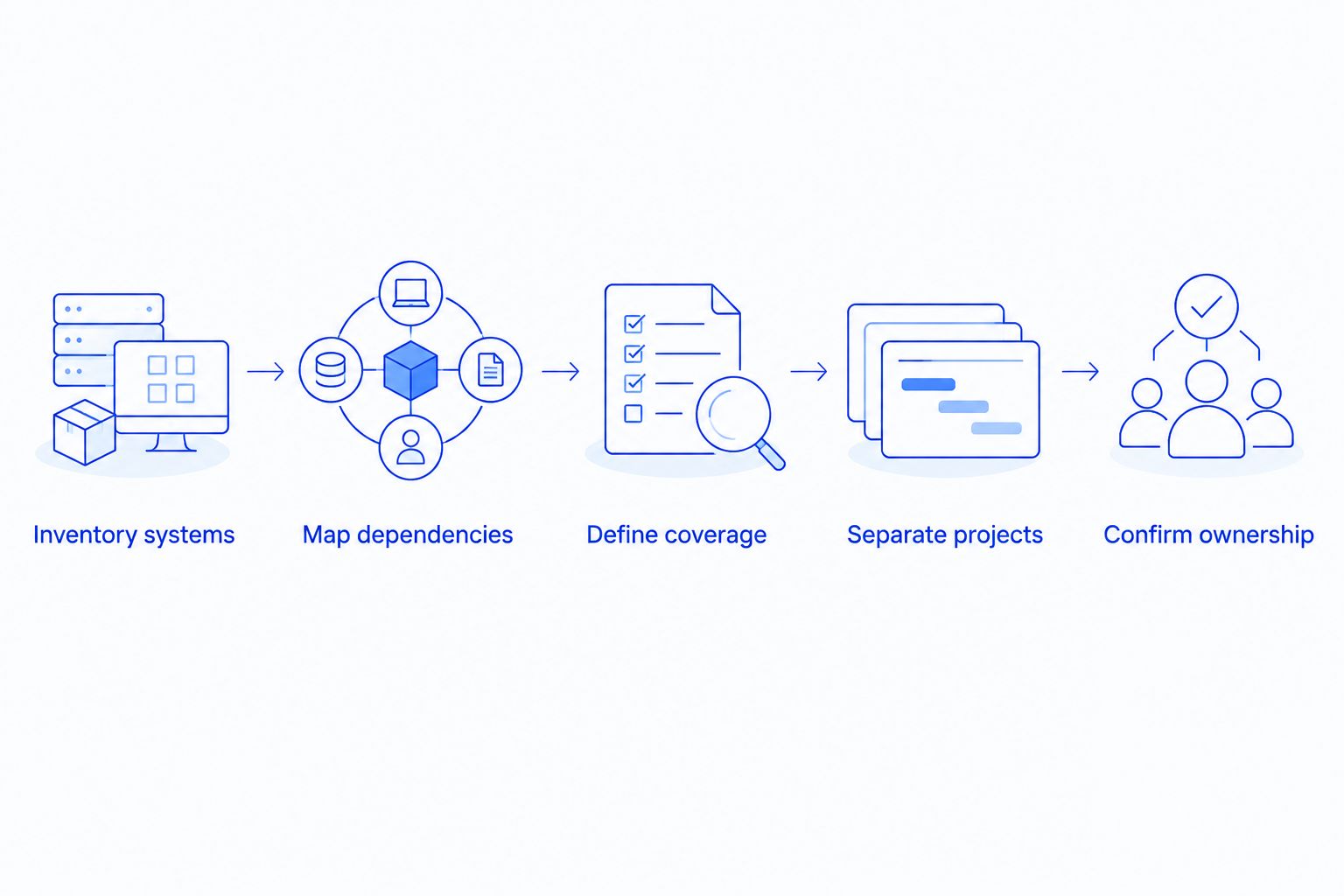
Build one written brief and send the same version to every provider. Your 2026 brief should describe the practice as it operates now, including known faults, rather than only the equipment you intend to keep.
- Inventory systems. Record devices, users, locations, applications, and existing service agreements. Mark anything whose owner or administrator is unclear.
- Map dependencies. Identify what staff need to schedule appointments, access records, retrieve images, and complete billing. Note the vendors involved.
- Define coverage. State required assistance hours, remote and on-site expectations, backup responsibilities, and escalation contacts.
- Separate projects. Request distinct descriptions for onboarding, unresolved repairs, migrations, replacement equipment, and ongoing support.
- Confirm ownership. Establish who controls administrator accounts, backup access, documentation, and subscriptions during the agreement and after it ends.
The order matters: an equipment list alone cannot describe the support needed to keep a dental workflow usable. Give providers the operational context before asking them to commit to a scope.
Ask providers to identify assumptions next to each proposed service. If a proposal assumes the software vendor handles recovery, your practice needs that responsibility confirmed rather than left between providers.
What belongs outside the ongoing support agreement?
Separate recurring work from changes to the environment. A computer replacement, office move, server migration, or application change needs a defined scope even when your regular provider performs it.
Equipment and subscriptions also need clear ownership. Ask whether your practice purchases them directly, whether the provider manages renewals, and what happens to access when the support agreement ends.
Compare the full set of responsibilities, not an outsourced agreement against an employee’s salary alone. The distinction in outsourcing versus in-house IT support matters because staffing and outside services can cover different work; identify who supplies tools, handles absences, and takes responsibility for specialist tasks before comparing the arrangements.
Keep internal staff time visible as well. If the office manager still coordinates every software issue, tracks backups, and manages account access, those duties have not disappeared simply because an outside support agreement exists.
What should dental backup and security coverage include?
Ask the provider to name the systems and data covered by its backup work. A proposal that mentions backups without identifying the protected data leaves you unable to judge whether important records and images are included.
Request an explanation of how backup failures are handled and how recovery is tested. A successful backup notification is not the same as demonstrating that staff can use restored data in the required application.
For security, request a responsibility list covering account access, updates, device protection, and incident handling. Ask who disables departing employees’ accounts and who approves remote access.
For HIPAA-covered dental practices, the HHS Security Rule requires administrative, physical, and technical safeguards for electronic protected health information. An IT agreement does not transfer all of the practice’s compliance responsibilities to the provider.
Ask whether a business associate agreement is required for the provider’s role and have the appropriate agreement reviewed. Do not treat a general claim of HIPAA compliance as a substitute for documented responsibilities and your practice’s own risk-management work.
Is managed IT support cheaper than break-fix for a dentist?
Managed IT support and break-fix support cannot be compared fairly until their responsibilities match. Break-fix addresses requested work; a managed agreement assigns specified recurring duties. Neither label establishes the total work your practice receives.
Review recent problems and identify which tasks would have been included under the proposed agreement. Then identify exclusions, including equipment, projects, software-vendor work, and assistance outside covered hours.
Choose managed support for defined ongoing responsibility, not an unsupported promise of savings. Choose break-fix for a bounded repair while assigning maintenance, backups, and account administration elsewhere.
Can a dental practice use remote-only IT support?
Remote support can handle tasks that do not require physical access, such as investigating settings or assisting a user through an accessible computer. Failed hardware, physical connections, and equipment installation require someone at the location.
Ask how the provider decides when to send a technician and who authorizes the visit. Your agreement should explain the handoff instead of leaving staff to find another provider during an outage.
For your 2026 plan, document both the remote contact process and the on-site process. Monitoring coverage alone does not describe either one.
What should you ask a local North Carolina provider?
TechConnect NC is a local managed IT support option for North Carolina small businesses seeking monitoring, patching, backups, cybersecurity, help desk assistance, and remote support. Dental practices should confirm application responsibilities, imaging-system boundaries, required agreements, and on-site arrangements before choosing a service.
Local proximity does not establish dental-software expertise or a guaranteed response time. Ask for those details directly and have the agreed responsibilities written into the proposal.
The Clayton office is at 5720 US 70 Bus Hwy, Suite B, Clayton, NC 27520. The Foothills office is at 10A Falls Avenue, Granite Falls, NC 28630. Discuss your practice’s location and required visit arrangements rather than assuming that an office address establishes coverage terms.
FAQ
How much should a dental practice budget for IT support in 2026?
Build your 2026 dental IT budget from an itemized quote covering your actual systems and required support. Separate ongoing work from setup, equipment, subscriptions, projects, and emergency assistance.
Is dental IT support charged per computer or per employee?
The proposal should state its billing basis and identify the users, computers, servers, and other systems covered. Ask how shared workstations, staff changes, and added equipment affect the agreement.
Does managed IT support include dental imaging software?
Dental imaging software support must be explicitly included or assigned to the appropriate vendor. Computer and network support alone does not establish responsibility for application troubleshooting or imaging equipment.
Are backups included in a dental IT support agreement?
Backups are included only when the agreement identifies them as covered work. Confirm protected data, failure handling, recovery testing, and whether restoration assistance is included.
Does hiring an IT provider make my dental practice HIPAA compliant?
Hiring an IT provider does not by itself make a dental practice HIPAA compliant. Covered practices retain responsibilities for safeguarding electronic protected health information and need appropriate agreements and documented procedures.
Can I keep my dental software vendor and hire separate IT support?
You can assign software support and general IT support to different providers. Document who investigates each type of problem and who coordinates issues involving both the application and the network.
Does TechConnect NC offer local business IT support?
TechConnect NC provides managed business IT support in North Carolina and has offices in Clayton and Granite Falls. Ask about the scope, application responsibilities, and on-site arrangements for your dental practice.
One last thing
Before approving your 2026 support agreement, ask who will contact the dental software vendor when an application stops working. That question tests whether the proposal assigns responsibility for solving a problem or simply lists equipment the provider will monitor.
A usable agreement names the next action and its owner. Apply that test to backups, security alerts, failed computers, and support requests before you sign.
Related guides
- How to reduce IT support costs for a small business
- Virus removal for dental practices
- Is remote IT support as effective as on-site support?
Call or text 919-737-5442 to discuss your dental practice’s systems, support needs, and location with TechConnect NC.