A small hotel's network setup cost requires a property-specific quote covering equipment, cabling, installation, security configuration, and testing. Your internet subscription, equipment licenses, and ongoing support belong in a separate recurring-cost breakdown. For a 2026 project, compare written scopes rather than treating a hardware total as the finished installation cost.
- Network setup cost small hotel: request an itemized quote, not a room-count estimate.
- Hotel Wi-Fi planning must cover guest rooms, business systems, cabling, and security boundaries.
- Separate installation work from recurring internet, licensing, and managed IT support.
- TechConnect NC provides managed IT support for North Carolina small businesses; discuss your property's requirements before booking.
How much does network setup cost for a small hotel?
The useful number is the total for an agreed installation scope—not an equipment-only estimate. Ask for a quote that identifies what the installer will supply, configure, test, and document. Use this network setup guide for hotels and short-term rentals to organize your property's requirements before requesting that quote.
A hotel network serves different jobs: guest internet access, front-desk work, and any connected business equipment you operate. A quote that covers only wireless coverage leaves important questions unanswered about access controls, existing wiring, and responsibility after installation.
| Quote component | What the written scope should identify | What to clarify |
|---|---|---|
| Property assessment | Coverage areas, existing equipment, cable routes | Whether an on-site assessment is included |
| Network equipment | Router or firewall, switches, access points | Equipment ownership and management access |
| Cabling and mounting | Cable runs, terminations, mounting work | Building access and excluded construction work |
| Configuration | Guest access, business access, administrative controls | Which connected systems are included |
| Testing and handoff | Coverage checks, connection tests, documentation | What counts as completed work |
| Recurring services | Internet, licenses, monitoring, support | Which agreements are separate from installation |
Request this breakdown even when you plan to keep existing equipment. Reusing a router or switch still requires someone to assess whether it fits the proposed design.
Why this matters
A hotel network must work where guests and staff actually use it. A connection test beside the router does not establish coverage inside a guest room, and successful guest browsing does not establish that business systems are properly separated.
Before approving a 2026 installation, define acceptance checks in writing. Name the areas to test, the business devices to reconnect, and the person who will receive administrator access. That turns a vague promise of better Wi-Fi into work you can verify.
You also need a clear boundary between the installer and the internet provider. Ask who investigates an outage, who contacts the carrier, and who decides whether the problem is inside the property or upstream. Put those responsibilities in the service agreement rather than assuming installation includes continuing support.
Existing-network refresh: best for a usable installation
An existing-network refresh is appropriate when an assessment confirms that the wiring, cable locations, and retained equipment meet your needs. The scope focuses on identified faults or gaps rather than replacing everything automatically.
Advantage: You retain components that pass inspection and testing. Limitation: A refresh does not fix inaccessible cable routes, unsuitable access-point locations, or other problems excluded from the work.
Ask the installer to distinguish retained equipment from new equipment. The handoff should identify who manages both, including any older devices left in service.
Do not approve a refresh solely because the lobby connection works. Require testing in the guest areas that prompted the project, and ask how the proposed changes address each reported problem.
New installation: best for missing or unsuitable infrastructure
A new installation fits a property without an adequate network foundation. Its scope needs to cover physical installation as well as equipment configuration.
Advantage: Cable routes, access-point locations, and security boundaries can be planned together. Limitation: The work requires coordination around building access, occupied rooms, and any construction tasks outside the network installer's scope.
For your 2026 quote, ask which party handles wall access, repairs to finishes, cable pathways, and work requiring another trade. These items need an owner even when they are excluded from the IT proposal.
Require a device list and location plan before installation begins. Equipment quantities should follow the property's layout and requirements, not a standard package selected without an assessment.
Managed support: best for ongoing network oversight
Managed support is an operating arrangement, not a substitute for installation. It defines who monitors equipment, applies updates, handles support requests, and maintains agreed documentation after the network is running.
Advantage: You have an assigned support process instead of deciding whom to call during each incident. Limitation: Coverage depends on the agreement; do not assume it includes every device, on-site visit, or after-hours request.
Ask how installation and support connect. The provider responsible for ongoing care needs access to the configuration, equipment records, and relevant service accounts.
| Approach | Best for | Main benefit | Main limitation |
|---|---|---|---|
| Existing-network refresh | Properties with usable infrastructure | Keeps equipment and wiring that meet requirements | Existing constraints remain unless addressed |
| New installation | Properties lacking suitable infrastructure | Plans the physical network and configuration together | Requires installation access and coordination |
| Managed support | Owners needing continuing IT oversight | Assigns monitoring and support responsibilities | Does not replace missing physical infrastructure |
Choose the installation scope first, then define ongoing care. A support agreement should explain how the completed network will be maintained, not obscure what installation work remains unfinished.
Why a small hotel's network setup cost varies
The scope changes when the property requirements change. Ask each installer to address these factors explicitly so you can compare like-for-like proposals:
- Coverage areas: Identify guest rooms, reception, workspaces, and any outdoor areas you want included. Separate required coverage from optional expansion.
- Existing infrastructure: Document the condition and location of cabling, switches, access points, and internet equipment. Specify what stays and what requires replacement.
- Building access: Explain occupied-room restrictions, accessible cable routes, mounting surfaces, and any limits on disruptive work.
- Connected systems: List front-desk computers, printers, payment devices, cameras, phones, and other equipment actually present. Give each system an owner.
- Security requirements: Define separation between guest access and business systems, administrator access, and how network settings will be maintained.
- Support scope: Identify responsibility for monitoring, updates, troubleshooting, on-site work, and communication with the internet provider.
Room count is useful background, but it does not describe wall construction, cable access, or the location of connected equipment. Give installers a floor plan and a problem list rather than asking them to infer the entire project from the number of rooms.
How to request a hotel network quote in 2026
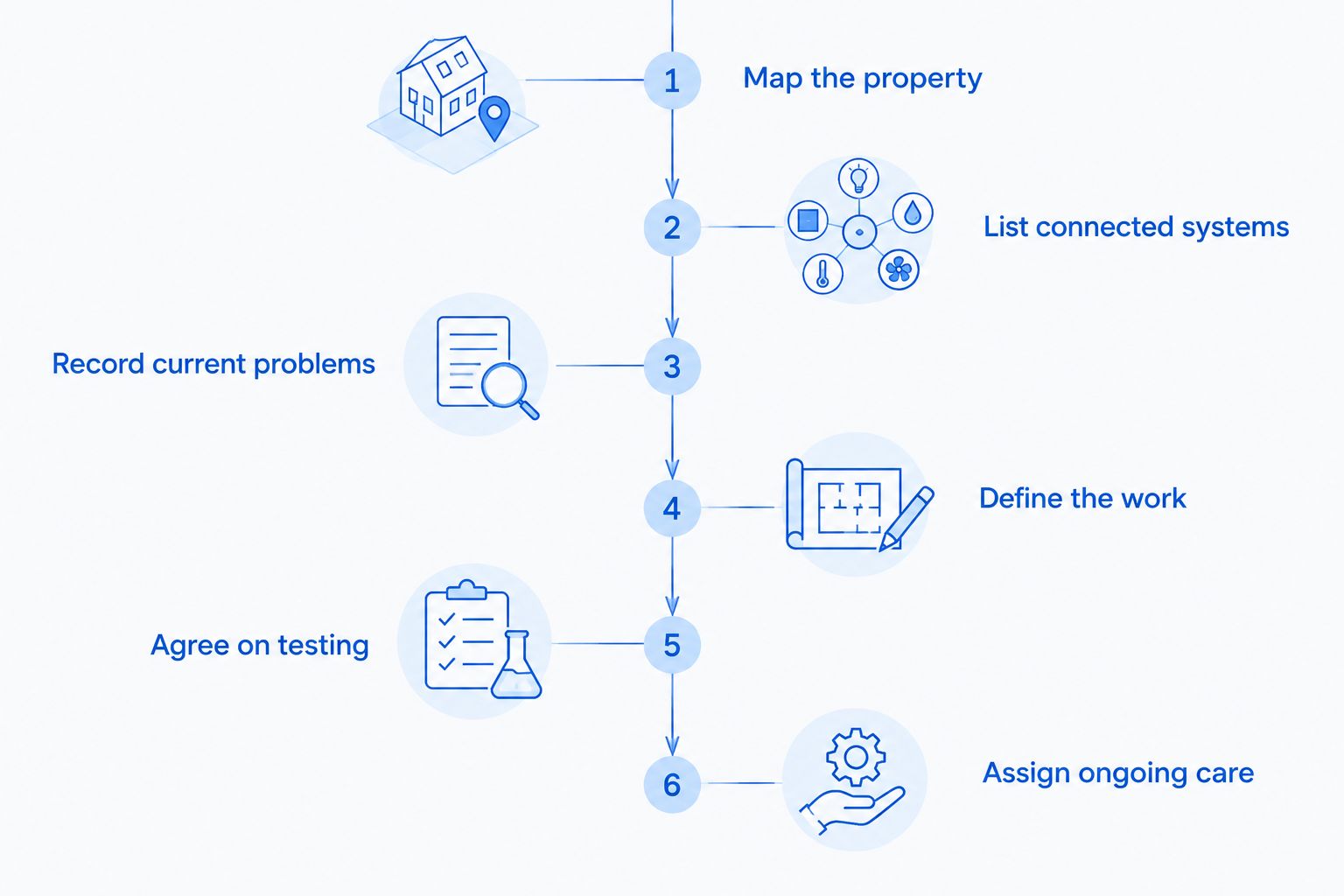
Use the same written brief for every proposal. That prevents one installer from quoting only equipment while another includes cabling, testing, and handoff.
- Map the property. Mark required coverage areas and existing equipment locations. Include any detached spaces or outdoor areas that belong in the project.
- List connected systems. Identify the devices and services your hotel actually uses. Note any vendor that controls or supports a particular system.
- Record current problems. Describe where connections fail and what staff or guests experience. Distinguish a weak wireless signal from a complete internet outage.
- Define the work. Ask for an itemized scope covering retained equipment, new equipment, installation, configuration, and exclusions.
- Agree on testing. Specify the coverage checks and business-device tests required before you accept the work.
- Assign ongoing care. Name the owner of administrator accounts, updates, documentation, and support requests after handoff.
A useful quote follows this sequence from property requirements to continuing responsibility. It should make clear what the installer needs from you before work can begin.
What should I send before an assessment?
Send a floor plan, your coverage requirements, and an inventory of equipment you already have. Include the location of the internet connection and any restrictions on access to rooms or cable routes.
Do not send administrator passwords in an ordinary project brief. Ask the provider how credentials should be transferred securely when access becomes necessary.
What should I ask before accepting the work?
Ask for the agreed test results, equipment inventory, and configuration handoff. Confirm who owns administrative accounts and how authorized staff request support.
Keep this information under the hotel's control. A completed installation should not leave your business dependent on an undocumented password or an account nobody at the property owns.
Does the internet subscription cover hotel network setup?
An internet subscription and the hotel's internal network are separate scopes. Check your carrier agreement for the equipment and work it includes; do not assume it covers guest-room wireless coverage, internal cabling, or business-network configuration.
For a 2026 project, ask the installer to identify where the carrier's responsibility ends. Also confirm who will coordinate with the carrier if the installation requires changes to its equipment or service.
Can I reuse the hotel's existing router and access points?
Reuse existing equipment only after it has been assessed against the proposed design. Confirm that the retained devices support the required configuration, receive appropriate updates, and remain accessible to the person responsible for support.
Require the proposal to name retained equipment explicitly. Otherwise, an assumption about reuse can become an unresolved issue during installation.
Should I separate guest Wi-Fi from business systems?
Separate guest access from business systems and verify that the access rules work. Different wireless network names alone do not prove that guest devices are blocked from reaching staff equipment.
Ask the installer to demonstrate the intended boundary during acceptance testing. Keep payment-system requirements with the relevant payment provider rather than assuming a guest-network setting settles them.
Local managed IT support for your hotel
TechConnect NC is a local option for North Carolina small businesses seeking managed IT support. Its services include monitoring, patching, backups, cybersecurity, help desk support, and remote support. Discuss your property's network requirements before agreeing on installation or continuing care.
TechConnect NC has 2 offices: Clayton at 5720 US 70 Bus Hwy, Suite B, Clayton, NC 27520, and the Foothills office at 10A Falls Avenue, Granite Falls, NC 28630. When discussing your 2026 project, provide the property location, access restrictions, and preferred work window.
Ask which hotel devices and applications would fall within the proposed agreement. Do not assume a general managed IT service includes specialist support for every booking, payment, or guest-access system.
FAQ
How do I get an accurate network setup quote for a small hotel?
Request a property-specific assessment and an itemized scope covering equipment, cabling, configuration, testing, and handoff. Keep recurring internet, licensing, and support obligations separate.
Can I estimate hotel network installation from room count alone?
Room count alone does not describe the installation scope. Provide the building layout, required coverage areas, existing wiring, and connected business systems.
Is a new router enough to fix weak hotel Wi-Fi?
A new router does not establish coverage throughout a hotel. Ask for an assessment of access-point placement, wiring, interference, and the areas where connections fail.
Does managed IT support include the initial network installation?
Managed IT support includes installation only when the agreement explicitly says so. Request separate descriptions of project work and continuing support responsibilities.
What should a hotel receive when network installation is finished?
A hotel should receive the agreed test results, equipment inventory, administrative handoff, and support instructions. Specify these deliverables before approving the project.
Who should own the hotel's network administrator accounts?
The hotel should retain control of its administrative accounts and authorize provider access. Document account ownership and the process for changing support providers.
Does TechConnect NC provide small-business managed IT support?
TechConnect NC provides managed IT support for North Carolina small businesses, including monitoring, patching, backups, cybersecurity, help desk support, and remote support. Discuss your hotel's devices and applications to establish the proposed scope.
One last thing
Test inside the room, not just outside the door. Put occupied-space access and testing arrangements in the installation plan before work begins. An installer needs permission to reach the locations where you expect the network to perform.
Make the final handoff equally concrete: keep the network diagram, equipment inventory, and account ownership records together. Those records give the next authorized technician a starting point when something changes.
Related guides
- Connecting Wi-Fi access points without dead zones
- Choosing between break-fix and managed IT support
- Connecting security cameras without slowing the network
- Protecting customer data on a small-business network
Call or text 919-737-5442 to discuss your hotel's network requirements and request a scoped proposal.