Managed IT support for a veterinary clinic requires a written quote based on the computers, accounts, network equipment, backups, and support hours included; there is no single fee that fits every practice. For your 2026 budget, separate ongoing support from onboarding, hardware replacement, software subscriptions, and emergency work before comparing proposals.
- Managed IT support cost veterinary clinic comparisons need matching coverage, not just matching staff counts.
- Compare help desk access, monitoring, patching, cybersecurity, and backup recovery responsibilities in writing.
- TechConnect NC provides managed IT support for North Carolina businesses; request a clinic-specific scope.
- Separate ongoing support from onboarding, replacement equipment, software subscriptions, and after-hours work.
Why this matters
A veterinary clinic needs more than working reception computers. If your practice relies on digital scheduling, clinical records, imaging access, or networked printers, an IT agreement should identify who supports each dependency when something stops working.
Compare responsibility before comparing the bill. A proposal that covers computer maintenance but excludes restoring practice data answers a different need from one that includes backup management and recovery assistance.
TechConnect NC provides managed IT support to North Carolina businesses. For a veterinary clinic, the next step is a written scope that distinguishes general business IT from work reserved for your practice-software and equipment vendors.
How much does managed IT support cost for a veterinary clinic?
Your clinic's managed IT support cost depends on the agreed service scope and billing basis. A useful 2026 proposal states what is covered, what triggers additional billing, and what happens when your clinic adds staff, equipment, or another location.
Use this breakdown to request comparable proposals. These are categories to clarify, not services you should assume every agreement includes.
| Quote component | What to have documented | Boundary to check |
|---|---|---|
| Ongoing support | Covered users, devices, locations, and support hours | Whether shared workstations and part-time staff count separately |
| Monitoring and patching | Systems monitored and updates managed | Who acts on alerts and handles failed updates |
| Cybersecurity | Account protection, device protection, and incident responsibilities | Whether cleanup and incident recovery are included |
| Backups | Data covered, monitoring, retention, and restoration responsibilities | Whether practice data and imaging files are actually protected |
| Onboarding | Discovery, account access, documentation, and setup work | Whether existing problems require separate approval |
| On-site work | Which physical tasks and visits are covered | Travel, equipment installation, and work outside support hours |
| Software and hardware | Subscriptions and equipment included in the agreement | What the clinic buys or renews separately |
Ask for a complete scope, not an unexplained package name. “Managed support” alone does not tell you whether a failed backup, an unresponsive printer, or a replacement computer falls within the agreement.
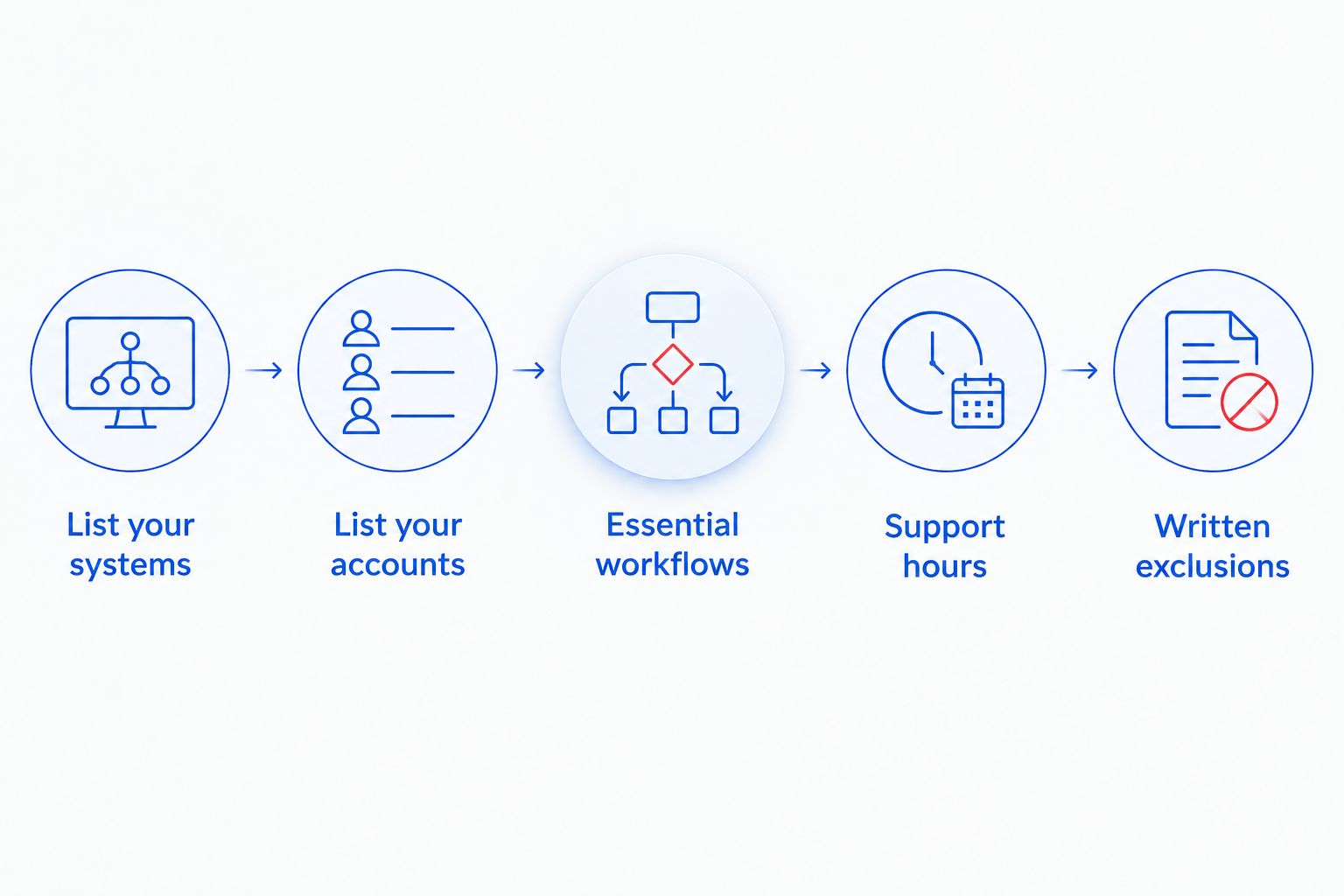
Build your clinic's quote request in this order
- List your systems. Include reception, exam-room, office, and shared computers, plus servers, network equipment, and printers where applicable.
- List your accounts. Identify staff accounts, shared accounts, email, and access used by outside vendors. Do not send passwords in the quote request.
- Name your essential workflows. Explain how staff access appointments, records, payments, and imaging, where those systems apply.
- Define your support hours. State when the clinic needs help and how you expect urgent problems to be reported.
- Request written exclusions. Ask the provider to distinguish routine support, project work, vendor coordination, and recovery work.
This inventory gives each provider the same starting point. Without it, you are comparing different assumptions rather than equivalent support.
Which support arrangement fits your veterinary clinic?
Choose the arrangement by who will handle routine maintenance and urgent problems. No arrangement removes the need to define responsibilities.
| Arrangement | Best for | Advantage | Limitation |
|---|---|---|---|
| Ongoing managed support | Clinics seeking an outside team for recurring IT work | Assigns continuing responsibility for agreed maintenance and support | Exclusions and service hours still require close review |
| Break-fix support | Clinics seeking help with individual technical problems | Lets you authorize work for a specific issue | Does not establish ongoing monitoring or maintenance unless separately agreed |
| Shared responsibility | Clinics with an internal technical lead | Divides work between clinic staff and an outside provider | Unclear handoffs leave tasks without an owner |
Ongoing managed support is the better fit when you want continuing responsibility, not just repairs. Break-fix support fits isolated jobs, but it is not a substitute for assigning backup checks, account administration, and routine updates.
Shared responsibility works only when the division is explicit. For example, identify whether clinic staff create accounts while the provider manages device updates, rather than asking both sides to “help with IT.”
The guide to choosing between break-fix and managed IT support explains that service-model distinction before you commit to an ongoing agreement.
Why veterinary clinic IT support quotes vary
For your 2026 comparison, keep these service requirements consistent across proposals:
- Monitoring scope: Identify the computers and network equipment included, who reviews alerts, and which problems trigger action.
- Patching responsibility: Specify which operating systems and applications the provider updates, plus who coordinates changes with software vendors.
- Backup and recovery scope: Name the data to protect and establish who investigates failed backups and performs restoration work.
- Cybersecurity responsibility: Clarify account protection, device protection, malware cleanup, and the boundary between routine support and incident response.
- Help desk coverage: Document who can request assistance, how requests are submitted, and the hours when people respond.
- Remote and on-site work: Separate issues handled remotely from physical repairs, equipment replacement, and visits that require scheduling.
These differences change the work a provider accepts. Do not remove a service from the comparison simply because it appears as a separate line on another proposal.
Ask each provider to explain exclusions using clinic situations. “Is support included when the reception computer cannot reach the practice application?” produces a clearer answer than “Is everything covered?”
What should backup coverage include?
A backup agreement needs to identify both the protected data and the restoration process. A completed backup job is not the same as demonstrating that your clinic can resume a working process from the saved data.
Ask whether the scope covers locally stored files, application databases, imaging files, and cloud accounts where your clinic uses them. Confirm the boundary with your software vendor rather than assuming the IT provider can restore every application independently.
For a 2026 agreement, request written answers to these questions:
- Who receives and investigates backup-failure alerts?
- Which data is excluded from backup?
- Who authorizes a restoration?
- Does the agreement include restoration testing?
- Who coordinates with the practice-software vendor during recovery?
Require a recovery task, not just a backup product name. An agreement should explain what someone actually does when a file disappears, a computer fails, or the clinic loses access to essential data.
Also distinguish backup storage from recovery labor. The presence of a backup service on a proposal does not, by itself, establish that every restoration task falls within routine support.
How do you compare proposals without missing extra work?
Read each proposal against the same clinic scenarios. Ask the provider to mark each scenario as included, excluded, or requiring approval before work begins.
Useful scenarios include a staff member losing email access, a shared printer disconnecting, a suspicious message reaching reception, and a computer needing replacement. Add a practice-application outage that requires coordination with its vendor.
The answer should name the responsible party and the next action. If a provider handles the network but not the application, establish who opens the application-vendor support request and stays involved until responsibility is clear.
Do not treat an initial response as a promise of resolution. Ask the provider to distinguish acknowledgment, active troubleshooting, escalation, and restoration of service in the written agreement.
For your 2026 decision, also check how changes receive approval. Adding equipment, moving data, replacing a server, or changing an email system should not enter the agreement through an undefined assumption about “normal support.”
What changes if your clinic is switching providers?
A transition needs its own scope. Before authorizing a switch, confirm that the clinic controls its domain registration, administrative accounts, software subscriptions, network documentation, and backup access.
Put account ownership and access transfer into the onboarding plan. When switching managed IT providers, the handoff needs named owners for credentials, documentation, backups, and existing support requests; changing the support contact alone does not transfer those responsibilities.
Ask the incoming provider to identify what must happen before the outgoing provider's access is removed. Then establish how authorized access will be revoked after the handoff, without disrupting accounts or systems the clinic still needs.
Separate transition work from ongoing support. A proposal should distinguish taking responsibility for a documented environment from investigating undocumented equipment, resolving old problems, or replacing unsupported systems.
Is local managed IT support the right fit?
TechConnect NC's managed IT support is for North Carolina businesses seeking monitoring, patching, backups, cybersecurity, help desk, and remote support. For a veterinary clinic, those services need a written scope that also identifies application-vendor and equipment-vendor responsibilities.
TechConnect NC has offices at 5720 US 70 Bus Hwy, Suite B, Clayton, NC 27520, and 10A Falls Avenue, Granite Falls, NC 28630. Clinics around Clayton, Smithfield, Garner, Johnston County, Hickory, Lenoir, and Caldwell County can ask how their location affects on-site arrangements.
The advantage of an outside support team is assigning recurring technical work instead of leaving it with clinic staff. The limitation is scope: general managed IT support does not automatically include proprietary veterinary applications or diagnostic equipment, and an office location does not establish a response commitment.
Before signing, confirm the covered systems, service hours, on-site arrangements, escalation process, and exclusions. Request those details for the actual clinic, not a generic small-business example.
FAQ
How much should I budget for managed IT support at my veterinary clinic?
Budget from a written, clinic-specific quote covering your systems, support hours, cybersecurity, and backups. Separate ongoing support from onboarding, equipment, subscriptions, and separately authorized work.
Is managed IT support better than paying for individual repairs?
Managed IT support fits clinics seeking ongoing maintenance and an assigned support team; individual repairs fit isolated technical jobs. Compare the responsibility each arrangement includes, not just how the provider bills.
Does managed IT support include veterinary practice software?
Veterinary practice software is included only to the extent stated in the agreement. Ask who handles workstation and network troubleshooting, who contacts the software vendor, and who remains responsible during an application outage.
Will a managed IT agreement cover all our backups?
A managed IT agreement covers only the backup systems and data named in its scope. Confirm application data, imaging files, cloud accounts, monitoring, and restoration responsibilities wherever those apply to your clinic.
Does monitoring mean someone will fix a problem after hours?
Monitoring does not by itself establish after-hours human response. Ask when alerts receive attention, how staff request urgent help, and what the agreement says about work outside regular support hours.
Can remote IT support replace every on-site visit?
Remote IT support does not replace physical work such as connecting replacement equipment or repairing damaged cabling. Your agreement should distinguish remote troubleshooting from tasks that require someone at the clinic.
What should I prepare before requesting a veterinary clinic IT quote?
Prepare an inventory of computers, users, network equipment, applications, backups, and locations. Add your operating hours, recurring problems, and vendor contacts so providers can quote against the same requirements.
One last thing
Before you approve a 2026 agreement, ask the provider to walk through a reception-computer failure during appointments. Have the provider explain who receives the request, what happens remotely, when an on-site visit becomes necessary, and which work requires separate authorization.
That conversation tests the scope better than a list of tools. Choose the proposal that makes responsibility clear before a problem starts.
Related guides
- Managed IT support for veterinary clinics
- How to reduce IT support costs for a small business
- How long managed IT onboarding takes for a new business
Call or text 919-737-5442 to discuss your veterinary clinic's computers, backups, and support requirements with TechConnect NC.