Managed IT support is worth it for a daycare center when daily check-in, family communication, billing, or access to records depends on working computers and reliable internet. The deciding factor is whether someone owns updates, backups, security, and troubleshooting—not how many computers you have. A support agreement still needs clear limits: monitoring does not guarantee uninterrupted service, and software vendors remain responsible for problems inside their own platforms.
- Managed IT support is worth it for a daycare center when technology failures interrupt essential daily work.
- Choose managed IT for ongoing maintenance; choose break-fix support for isolated repair needs.
- Require written backup coverage, support hours, remote-access rules, and responsibility for vendor coordination.
- TechConnect NC provides managed IT support for North Carolina small businesses; confirm daycare-specific coverage before signing.
Why this matters
A daycare director should not have to choose between helping staff and troubleshooting an office computer. When an attendance system, printer, or email account stops working, the immediate problem is completing the task safely—not understanding the technology behind it.
For your 2026 planning, start with the work that must continue during an outage. The IT support guide for schools and daycare centers provides related context; the decision below focuses on whether ongoing support fits your center.
Is managed IT support worth it for a daycare center?
Yes, when your daycare needs ongoing responsibility for its technology rather than occasional repairs. If nobody checks backup failures, removes former employees’ access, or schedules updates, those jobs still exist. They are simply unassigned.
Compare support models by the work each agreement assigns. Neither model automatically includes every device, application, or emergency.
| Support model | Best for | Main benefit | Main limitation |
|---|---|---|---|
| Managed IT support | Centers needing ongoing maintenance and a regular support contact | Assigns recurring tasks such as monitoring, patching, backups, and help desk support | Coverage depends on the agreement; exclusions still need an owner |
| Break-fix support | Centers seeking help with isolated technical problems | Addresses a specific repair without assigning ongoing management | Preventive work and backup checks remain your responsibility unless separately arranged |
Use this practical test: name the person responsible for each essential system, explain how that person detects a problem, and identify the fallback when the system is unavailable. Unanswered questions make a stronger case for ongoing support than the age of your computers alone.
Do not assume managed IT replaces your daycare software provider, internet company, or internal procedures. A useful agreement explains how the technician coordinates with those parties and which decisions remain yours.
Managed IT support: best for ongoing operational needs
Managed IT fits a daycare that wants a regular provider responsible for defined maintenance and support tasks. Ask for monitoring, patching, backups, cybersecurity, help desk assistance, and remote support to be listed separately so you can see what the proposal includes.
The benefit is accountability. You know who handles an update failure or investigates a backup alert instead of discovering that everyone assumed someone else would do it.
The limitation is scope. A managed agreement does not automatically include replacement hardware, application training, camera repairs, or visits outside agreed hours. Choose managed IT when the written responsibilities match the work your center needs covered.
For a 2026 agreement, ask for a plain-language service list rather than accepting a broad promise to manage everything. Each important task needs a named owner and a clear way to request help.
Break-fix support: best for isolated repairs
Break-fix support fits a center seeking help with a specific fault, such as a computer that will not start or a printer that will not connect. It keeps the immediate job clearly defined.
Its limitation is the work between incidents. Unless you arrange otherwise, you still need someone to check backups, maintain accounts, install updates, and document equipment.
Choose break-fix support when your ongoing maintenance responsibilities are already assigned and you need help with a particular problem. Do not treat the absence of recent repairs as proof that backups or security settings are working.
Why the value of managed IT varies
The value of managed IT depends on what you need someone to maintain and support. Use these factors to compare proposals without assuming that every daycare needs the same arrangement:
- Monitoring: Identify which computers and network devices generate alerts, and who responds to those alerts.
- Patching: Confirm which operating systems and applications receive updates and who handles failed installations.
- Backups: List the files and systems covered, who checks failures, and how recovery is tested.
- Cybersecurity: Define account protection, malware response, and the process for removing access.
- Help desk support: Match support hours and contact methods to your center’s operating needs.
- Remote support: Establish when technicians can connect, what approval they need, and when an on-site visit is necessary.
A proposal becomes easier to judge when these responsibilities are explicit. More services are not automatically better; relevant services with clear ownership are.
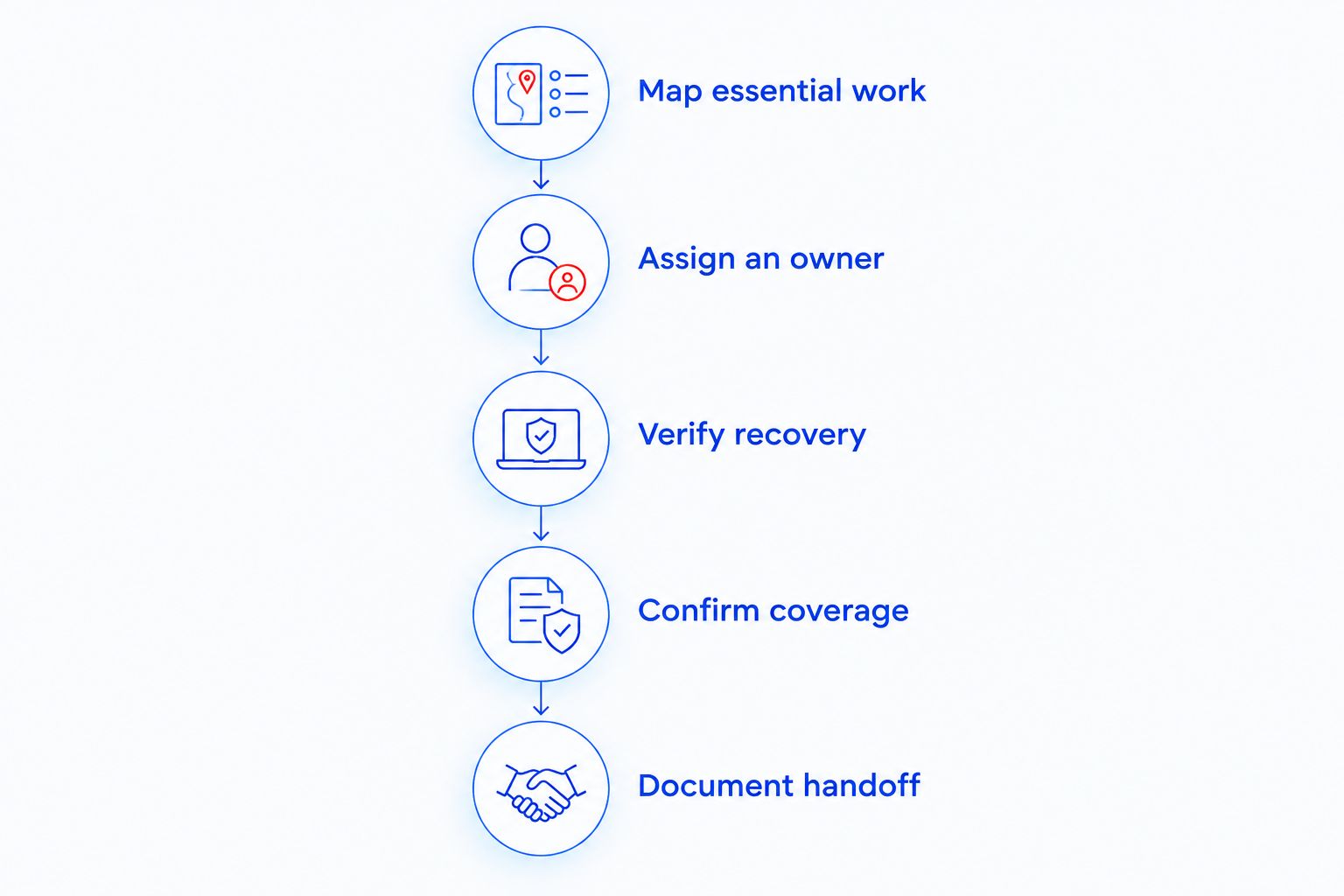
How to decide what your daycare needs
Use the same process whether you are choosing your first provider or reviewing an existing arrangement. Keep the review focused on daily work, recoverable records, and staff responsibilities.
Map essential work
Write down the technology-dependent tasks your center actually performs. Include attendance, family communication, billing, payroll, printing, and record access only where they apply.
For each task, identify the device, application, account owner, and vendor involved. This separates a computer problem from an application problem before an outage forces you to work it out under pressure.
Assign an owner
Name who maintains each system today. Include work that happens quietly in the background: approving account changes, checking backups, and arranging repairs.
If the answer is whoever has time, treat that as an unresolved responsibility. Ask the provider whether the proposed agreement takes ownership of that task or only supplies advice.
Verify recovery
Ask to see a recovery demonstration using a non-sensitive test file. Confirm where the restored file goes and whether an authorized staff member can open it.
A successful backup notification is not the same as a demonstrated recovery. Also identify records stored inside online applications; do not assume that backing up an office computer protects those records.
Confirm coverage
Ask what happens when the internet is down, a computer will not turn on, or your daycare application stops responding. These problems require different routes to help.
Get support hours, escalation steps, remote-access permissions, and on-site arrangements in writing. For your 2026 review, check the agreement against actual opening and closing routines—not just office administration hours.
Document handoff
Keep an approved list of administrator accounts, vendors, devices, and emergency contacts. Your daycare should retain control of its business accounts even when a provider manages them.
Before signing, explain how documentation and access will transfer if the relationship ends. A workable exit process belongs in the initial discussion, not only in a cancellation conversation.
What should a daycare ask before signing?
Ask questions that require a specific explanation or demonstration. A simple yes does not establish what the provider will actually do.
- Which computers, network devices, and applications are included?
- Who receives alerts, and what happens after an alert arrives?
- Who contacts the daycare software vendor during an application problem?
- Which records are backed up, and which are excluded?
- How do you approve remote access to a computer containing sensitive information?
- What happens when a problem requires physical access to equipment?
- Who disables accounts when an employee leaves?
- How will the provider return documentation and remove its access at the end of service?
Do not accept a security or compliance guarantee as a substitute for defined work. Your daycare still controls decisions about staff permissions, record handling, and operating procedures. Technical support should support those decisions without claiming to replace them.
Does a small daycare need managed IT support?
A small daycare needs managed IT support when its maintenance and recovery needs exceed what its staff can reliably manage. Size alone does not settle the question. A center with limited equipment still needs a clear plan for account access, backups, and technical failures.
Start with the gaps rather than a package name. If your existing arrangements already assign and verify those responsibilities, ongoing support has a narrower role to justify.
Can managed IT keep a daycare running during an outage?
Managed IT supports outage response, but it does not guarantee that a daycare’s systems will stay available. Recovery depends on the problem, the systems affected, and the fallback arrangements you have prepared.
Write down how authorized staff will continue essential work without normal access. Keep emergency instructions available outside the affected computer or application, while protecting any sensitive information they contain.
A local managed IT option in North Carolina
TechConnect NC provides managed IT support for North Carolina small businesses seeking monitoring, patching, backups, cybersecurity, help desk, and remote support. For a daycare, the next step is confirming how those services apply to your devices, applications, and operating hours.
The benefit of considering TechConnect NC is its stated small-business service offering and local offices. The limit is that a general service description does not establish daycare-specific application support or response commitments; confirm those details in the agreement.
Both offices are relevant to a local service discussion:
- Clayton office: 5720 US 70 Bus Hwy, Suite B, Clayton, NC 27520.
- Foothills office: 10A Falls Avenue, Granite Falls, NC 28630.
Explain where your center operates and which problems require an on-site visit. Location is part of the conversation, not a substitute for written coverage.
FAQ
Is managed IT support worth it for a daycare center in 2026?
Managed IT support is worth it for a daycare center when essential daily work depends on technology and ongoing maintenance lacks a clear owner. Choose an agreement that assigns monitoring, updates, backups, and troubleshooting responsibilities.
Is managed IT better than calling someone when a computer breaks?
Managed IT is better for ongoing maintenance; break-fix support fits isolated repair needs. Neither arrangement includes every task automatically, so compare written responsibilities.
Will managed IT support fix our daycare software?
Managed IT support does not automatically include fixing problems inside your daycare software. Confirm whether the provider handles device and connection troubleshooting, coordinates with the software vendor, or includes application support.
Do we still need backups if our daycare uses online software?
Online software does not remove the need to understand how your records are backed up and recovered. Ask the software vendor what recovery it provides, then identify any remaining records that need separate protection.
Can an IT technician connect while children are at the center?
Remote support depends on the agreed access rules and the computer’s connection. Require clear authorization, named technician access, and a process for protecting sensitive information during a session.
Does managed IT guarantee protection from ransomware?
Managed IT does not guarantee protection from ransomware. Ask how the agreement addresses updates, account security, malware response, and recovery from protected backups.
What should we bring to an IT support consultation?
Bring a list of devices, applications, existing vendors, backup arrangements, and recurring problems. Include your operating hours and identify the tasks that must continue during an outage.
One last thing
Make a successful restore—not a backup status message—part of your 2026 IT review. Ask an authorized staff member to open a restored test file and confirm that it is usable. That check turns a general assurance into a task you can verify.
Keep the result with your support documentation. Record who performed the test, what was restored, and what still needs attention without copying sensitive daycare records into an unsecured checklist.
Related guides
- How to choose between break-fix and managed IT support
- How to protect customer data on a small business network
- Is remote IT support as effective as on-site support?
Call or text TechConnect NC at 919-737-5442 to discuss managed IT support for your daycare center. Have your location, operating hours, essential applications, and current support concerns ready.