Managed IT support cost for an e-commerce business depends on the people, devices, systems, and support responsibilities covered by the agreement—not a universal monthly rate. For your 2026 budget, separate ongoing support from setup work, software subscriptions, equipment replacement, and emergency work unless the agreement explicitly includes them.
- An ecommerce business should compare managed IT support cost against written coverage, exclusions, and responsibility for restoring operations.
- TechConnect NC is a local managed IT support option for North Carolina small businesses.
- Separate employee computer support from storefront development, payment processing, and third-party platform support.
- Confirm backup recovery, after-hours response, and onboarding responsibilities before approving an agreement.
How much does managed IT support cost for an e-commerce business?
Your useful budget is the total cost of the agreed scope, not the headline support charge. Request a written proposal that identifies what the provider manages, how coverage is measured, and what requires separate approval.
Start by deciding whether you need ongoing management or help when something breaks. The guide to choosing between break-fix and managed IT support explains that distinction before you compare proposals.
Use this breakdown to make each 2026 proposal answer the same questions:
| Budget component | What to have documented | What to check before signing |
|---|---|---|
| Ongoing management | Monitoring, patching, help desk, and covered equipment | Whether labor and management tools are included |
| Initial setup | Inventory, access setup, security review, and existing problems | Whether cleanup or migration requires separate approval |
| Software subscriptions | Email, security tools, backup services, and other licenses | Which subscriptions remain your responsibility |
| Backup and recovery | Protected data, backup checks, and restoration work | Whether recovery labor and testing are included |
| On-site support | Equipment and network work requiring a visit | Whether visits fall inside the agreement |
| Emergency support | Contact method, coverage hours, and escalation | Whether after-hours work has separate terms |
| Storefront and integrations | Website code, checkout, inventory connections, and vendor coordination | Which problems belong to another specialist |
A proposal becomes useful when you can trace each business task to a responsible party. “IT support” alone does not establish responsibility for a failed checkout, a locked employee account, or an unavailable shipping workstation.
Why this matters
An online store has customer-facing systems and staff-facing systems. Your storefront can remain accessible while employees cannot print labels, retrieve order records, or answer customer emails.
The reverse also happens: office computers work while a storefront integration fails. Buy support for the systems your team depends on, and identify who handles everything outside that scope.
For a 2026 agreement, ask the provider to describe a real support boundary: what happens when an employee can access email but cannot open the order-management application? The answer should identify troubleshooting responsibilities and the handoff to the application vendor.
Which support arrangement fits your e-commerce business?
These are arrangements to compare, not named service packages. Each needs its own written scope; the label alone tells you little about coverage.
| Arrangement | Best for | Advantage | Limitation |
|---|---|---|---|
| Managed IT support | Businesses wanting ongoing responsibility for covered systems | Assigns recurring maintenance and support tasks | Exclusions still matter; it does not automatically cover storefront development |
| Break-fix support | Businesses seeking help with individual technical problems | Keeps each repair or troubleshooting request separate | Does not establish ongoing maintenance unless separately agreed |
| Shared responsibility | Businesses retaining an employee or specialist for some IT work | Lets you divide work by skill and responsibility | Unclear handoffs leave tasks unowned |
Managed IT support: ongoing responsibility
Managed support fits an e-commerce business that wants a provider responsible for defined maintenance and employee support. Ask whether the proposed scope includes monitoring, updates, account administration, backups, and remote help.
Its strength is continuity of responsibility. Its limitation is that an ongoing agreement still needs boundaries: custom website work, equipment purchases, and third-party application fixes require explicit treatment.
Best for: a business that wants recurring IT tasks assigned rather than handled informally. Choose it when the agreement matches your actual operations.
Break-fix support: individual problems
Break-fix support fits a business seeking assistance with a specific fault, such as a computer that will not start. It gives that incident a defined purpose without establishing a wider management relationship.
The limitation is responsibility between incidents. Unless separately arranged, a repair request does not assign someone to check backups, maintain accounts, or review updates afterward.
Best for: a business that already has ongoing maintenance covered and needs occasional specialist help. Do not treat a repair arrangement as a substitute for assigned maintenance.
Shared responsibility: a divided workload
Shared responsibility fits a business with an existing technical employee, website developer, or application specialist. An outside provider handles agreed tasks while your existing team retains others.
This arrangement requires a clear handoff. Name who approves changes, contacts software vendors, manages administrator access, and confirms that a problem is resolved.
Best for: a business keeping internal technical responsibility while outsourcing a defined workload. Avoid overlapping ownership without an escalation process.
Why managed IT support cost varies
Scope changes what a provider must manage. Give prospective providers the same information so their proposals describe comparable work.
- People and devices: List staff accounts, computers, shared workstations, and other equipment you want covered. Ask how additions and removals affect the agreement.
- Support hours: State when employees need help, including evening fulfillment or weekend operations. Distinguish automated monitoring from a person responding to an incident.
- System responsibility: Identify email, file storage, networking, storefront administration, and order-processing applications. Ask which systems receive direct support and which receive vendor coordination only.
- Backup and recovery: Specify the records you need restored and who owns restoration. File backup, application recovery, and rebuilding a workstation are different tasks.
- Locations and remote work: Describe offices, fulfillment spaces, and home workers. Identify which network equipment and remote devices need management.
- Existing condition: Disclose unreliable computers, unknown administrator accounts, unresolved infections, and undocumented systems. Request a separate description of corrective work before ongoing support begins.
Do not substitute sales volume for this inventory. Order volume describes your business activity; it does not describe the equipment, access controls, or troubleshooting workload in the support agreement.
How to prepare an accurate support request
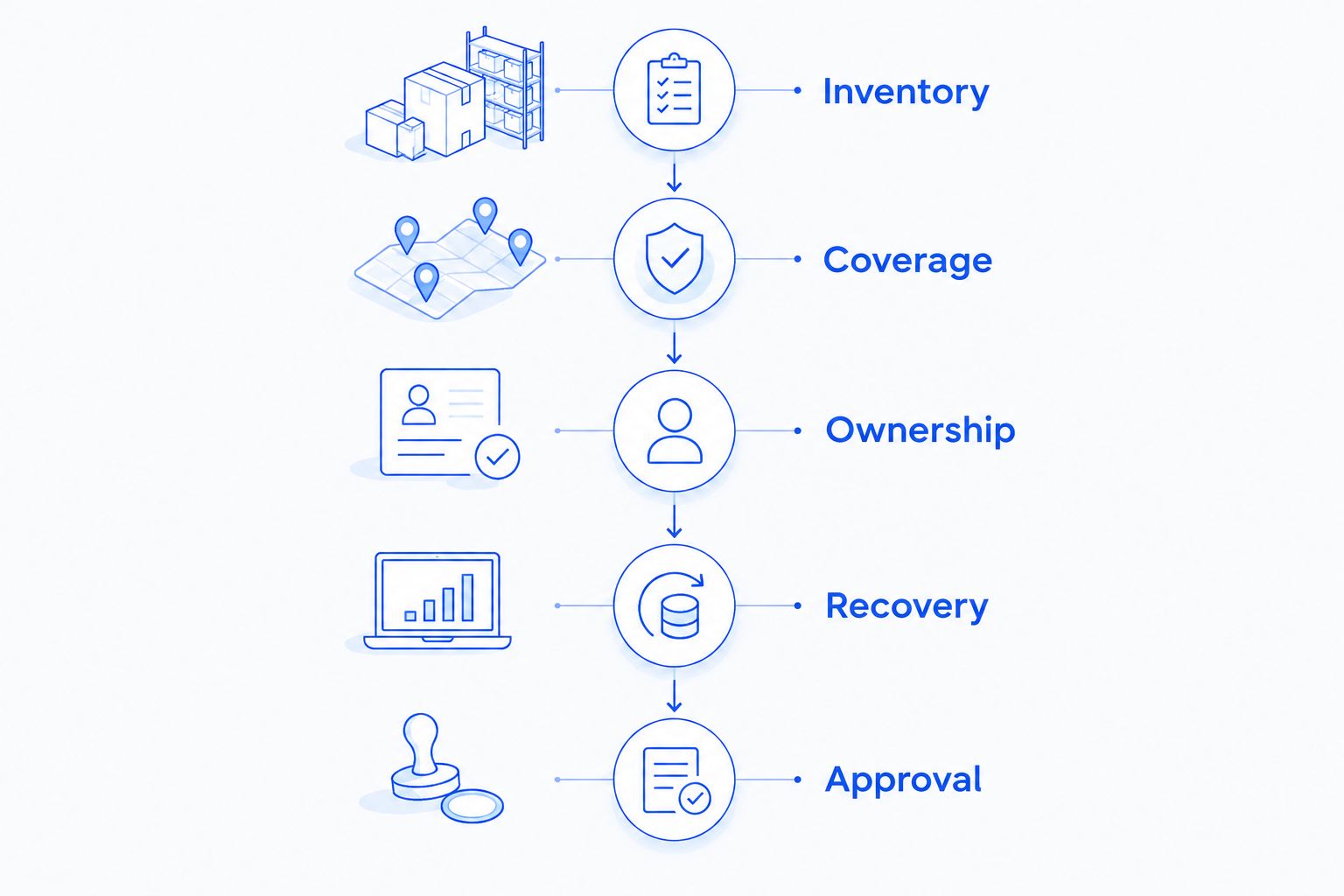
A short, organized brief gives providers something concrete to scope. Use this sequence before requesting proposals or reviewing a renewal.
- Inventory: List employee accounts, devices, locations, applications, and existing vendors. Mark anything used to process orders or handle customer information.
- Coverage: State when your team works and how employees should request help. Identify tasks that cannot wait until the next working period.
- Ownership: Assign responsibility for computers, networking, storefront changes, payment services, and application integrations. Record existing vendor contacts.
- Recovery: Identify essential records and the process for restoring access. Ask how successful recovery will be checked.
- Approval: Name who can authorize changes, additional work, equipment purchases, and account access. Require written approval rules in the agreement.
These steps create a scope document you can reuse. They also help prevent different providers from quoting different workloads under the same general service description.
What should an e-commerce support agreement include?
Ask for operational detail rather than a long list of service names. A useful agreement explains what happens when an employee requests help and when a monitored system reports a problem.
Employee access and security
Identify who creates accounts, removes access for departing staff, and helps with account recovery. Ask how administrator access is approved and recorded.
For cybersecurity, request the actual responsibilities: patching, security-tool management, suspicious-email handling, and incident escalation. A security service description is not a guarantee that an incident cannot occur.
Backups and restoration
List the data covered rather than accepting “backups included” without detail. Order exports, accounting files, shared documents, and application data need explicit decisions about protection and recovery.
Ask who checks backup failures and who performs a restoration. Also confirm whether your storefront platform's data falls inside the agreement or requires a separate arrangement.
Communication and reporting
Request a contact method for routine requests and urgent incidents. Ask the provider to distinguish acknowledgment, active troubleshooting, escalation, and resolution.
For your 2026 review, request reporting that supports decisions: unresolved issues, backup exceptions, equipment concerns, and recommended changes. A list of alerts without ownership does not tell you what needs action.
Does managed IT support include my online store?
Managed IT support includes your online store only when the agreement assigns that responsibility. Employee computer support and storefront development are separate scopes, even when the same incident affects both.
Ask who investigates checkout failures, application connections, domain access, and storefront administrator accounts. If another vendor owns the fix, identify who gathers information and coordinates the handoff.
Is continuous monitoring the same as after-hours help?
Continuous monitoring is not the same as staffed after-hours help. An alert identifies a condition; the support agreement determines who receives it, when someone responds, and what action is included.
Ask whether an overnight alert triggers human review or waits for the next support period. Match the answer to your fulfillment schedule rather than assuming that online sales require identical staffing across every system.
Can I reduce the scope without leaving important work uncovered?
You can narrow support scope by assigning excluded tasks to a named owner. Keep an existing website specialist responsible for storefront changes, for example, while defining a separate scope for employee computers and networking.
Remove duplication, not responsibility. Before excluding backups, updates, or account administration, identify who will perform those tasks and how you will confirm completion.
A local managed IT support option in North Carolina
TechConnect NC is a local managed IT support option for North Carolina small businesses. Its stated services include monitoring, patching, backups, cybersecurity, help desk, and remote support.
For an e-commerce operation, use TechConnect NC to discuss those business IT needs. Confirm storefront development, payment-system work, after-hours response, and on-site requirements separately rather than assuming they are included.
The Clayton office is at 5720 US 70 Bus Hwy, Suite B, Clayton, NC 27520. The Foothills office is at 10A Falls Avenue, Granite Falls, NC 28630.
These locations are relevant for businesses around Clayton, Smithfield, Garner, and Johnston County, as well as Granite Falls, Hickory, Lenoir, and Caldwell County. Describe your office and fulfillment locations when discussing work that requires a visit.
FAQ
How do I budget for managed IT support for my e-commerce business in 2026?
Budget against a written inventory and support scope, then identify work outside the ongoing agreement. Request separate treatment of setup, subscriptions, equipment, recovery work, and emergency support where applicable.
Is managed IT support better than paying for individual repairs?
Managed IT support fits a business that wants ongoing maintenance and support responsibilities assigned. Individual repairs fit specific problems, but they do not establish ongoing management unless separately agreed.
Will managed IT support fix my checkout problems?
Checkout troubleshooting is included only if the agreement assigns that responsibility. Identify who handles storefront code, payment services, integrations, and coordination with outside vendors.
Are backups automatically included in managed IT support?
Backups are included only to the extent documented in the agreement. Confirm protected data, backup checks, recovery testing, and restoration labor rather than relying on a general service label.
Does a remote employee need to be included in the support scope?
Include a remote employee when you want their accounts, computer, or work connection supported. Specify the boundary between business equipment and personal devices or home networking.
What should I ask before renewing an IT support agreement?
Ask whether the agreement still matches your staff, devices, applications, locations, and working hours. Review exclusions, unresolved issues, access ownership, and the process for transferring documentation if the relationship ends.
Does TechConnect NC offer managed IT support for small businesses?
TechConnect NC provides managed business IT support, including monitoring, patching, backups, cybersecurity, help desk, and remote support. Discuss your e-commerce systems and requested coverage to establish the appropriate scope.
One last thing
Ask a prospective provider to walk through one incident: your shipping workstation fails while staff are processing orders. Have the provider explain who responds, what is covered, how work resumes, and which actions need your approval.
That walkthrough tests the agreement more clearly than a page of service labels. Use it before approving your 2026 support scope.
Related guides
- Is paying for continuous IT monitoring worth it for a small business?
- How to protect customer data on a small business network
- How to reduce IT support costs for a small business
Call or text 919-737-5442 to discuss managed IT support with TechConnect NC. Bring your device list, working hours, and essential systems so the conversation starts with the coverage your business needs.