IT support for a small retail store is priced around the equipment covered, the work included, and when you need help—not simply the size of your shop. For your 2026 budget, request a written quote that separates routine support from setup work, replacement equipment, software subscriptions, and after-hours assistance. Compare the full scope before comparing the bill.
- TechConnect NC provides managed IT support for North Carolina small businesses; request a retail-specific scope before choosing coverage.
- IT support cost small retail store comparisons should separate ongoing support, setup work, software, and equipment.
- Break-fix suits isolated repairs; managed IT suits stores that need continuing maintenance and help desk support.
- Confirm checkout support, backup restoration, on-site visits, and evening coverage in writing.
Why this matters
A retail support quote needs to explain what happens when you cannot ring up a sale. A computer repair agreement does not automatically include your payment terminal, inventory software, internet connection, or receipt printer.
Start with the systems your store actually uses. The IT support for small retail stores guide covers the broader planning questions; this page focuses on how to compare the scope behind a quote.
How much does IT support cost for a small retail store?
Your store's IT support cost comes from its agreed service scope and billing terms. Ask for an itemized proposal, not a single total with an undefined promise of support.
Use this breakdown when collecting proposals for 2026. It separates continuing work from expenses that need their own approval.
| Quote component | What to have the provider specify | What to check separately |
|---|---|---|
| Routine support | Covered computers, users, network equipment, and help requests | Unsupported devices or applications |
| Monitoring and maintenance | Systems checked, updates handled, and responsibility for alerts | Whether corrective work is included |
| Backups | Files and systems protected, backup checks, and restoration work | Storage subscriptions and recovery exclusions |
| Initial setup | Assessment, access setup, documentation, and existing problems | Equipment replacement or major changes |
| On-site assistance | When a technician visits and how visits are authorized | Travel, minimum charges, and scheduling |
| Evening or weekend help | Contact method, coverage hours, and response commitments | Emergency work outside the agreement |
| Vendor coordination | Who contacts the payment, internet, or software provider | Work requiring a separate vendor contract |
Do not assume a proposal includes every row. Have the provider mark each item as included, excluded, or separately quoted so you can compare like with like.
Break-fix support: Best for isolated repairs
Break-fix support means you arrange help for a specific problem rather than assigning continuing responsibility for maintenance. It fits an isolated computer fault when you already have a clear way to handle updates, backups, and account administration.
The benefit is a defined repair task. The limitation is that fixing today's fault does not establish who watches for tomorrow's problem or checks whether backups still work.
Ask whether diagnosis, repair labor, travel, and follow-up work are separate. Also ask what happens if troubleshooting identifies a problem that belongs to your payment processor rather than the computer itself.
Managed IT support: Best for continuing maintenance
Managed IT support assigns an ongoing scope of work, such as monitoring, patching, backups, cybersecurity, help desk assistance, and remote support. It fits a store whose owner wants those responsibilities assigned rather than handled only after something breaks.
The benefit is continuing responsibility for the agreed tasks. The limitation is that an ongoing agreement still has boundaries: new equipment, major network changes, specialized software work, and out-of-hours assistance need explicit terms.
TechConnect NC is a local managed IT support option for North Carolina small businesses seeking monitoring, patching, backups, cybersecurity, and help desk assistance. Retail owners should still confirm their checkout equipment and business applications are within the proposed scope.
Which support model fits your store?
| Support model | Best for | Main benefit | Main limitation |
|---|---|---|---|
| Break-fix | An isolated fault with maintenance handled elsewhere | A clearly defined repair request | No continuing maintenance responsibility unless separately agreed |
| Managed IT | Ongoing maintenance and recurring staff support | Assigned responsibility for covered tasks | Recurring commitment with exclusions to review |
Use the break-fix versus managed IT support comparison to decide which responsibilities you want to keep and which you want a provider to take over.
Why retail IT support quotes vary
The useful question is not whether your store is small. It is how much equipment, coordination, and service responsibility the agreement covers.
- Equipment covered: List checkout computers, back-office PCs, printers, and network equipment. Identify which devices the provider will maintain and which remain another vendor's responsibility.
- Service scope: Monitoring, updates, malware removal, help desk work, and backup restoration are distinct tasks. Get a written inclusion list.
- Support hours: Your opening hours determine when assistance matters. Confirm how evening, weekend, and holiday requests are handled.
- Remote or on-site work: Remote access cannot reconnect a loose cable or replace a failed physical component. Clarify how a remote request becomes an on-site visit.
- Backup responsibility: Define what gets backed up, who checks failures, and who restores data. Do not treat storage alone as a recovery plan.
- Starting condition: Existing faults, undocumented access, and equipment changes need to be identified before routine support begins.
For your 2026 comparison, give every provider the same inventory and requirements. Different starting assumptions produce proposals that look comparable but cover different work.
How do you get a quote you can actually compare?
Prepare a short store summary before requesting proposals. You do not need technical vocabulary; you need an accurate description of what staff use and what happens when it stops working.
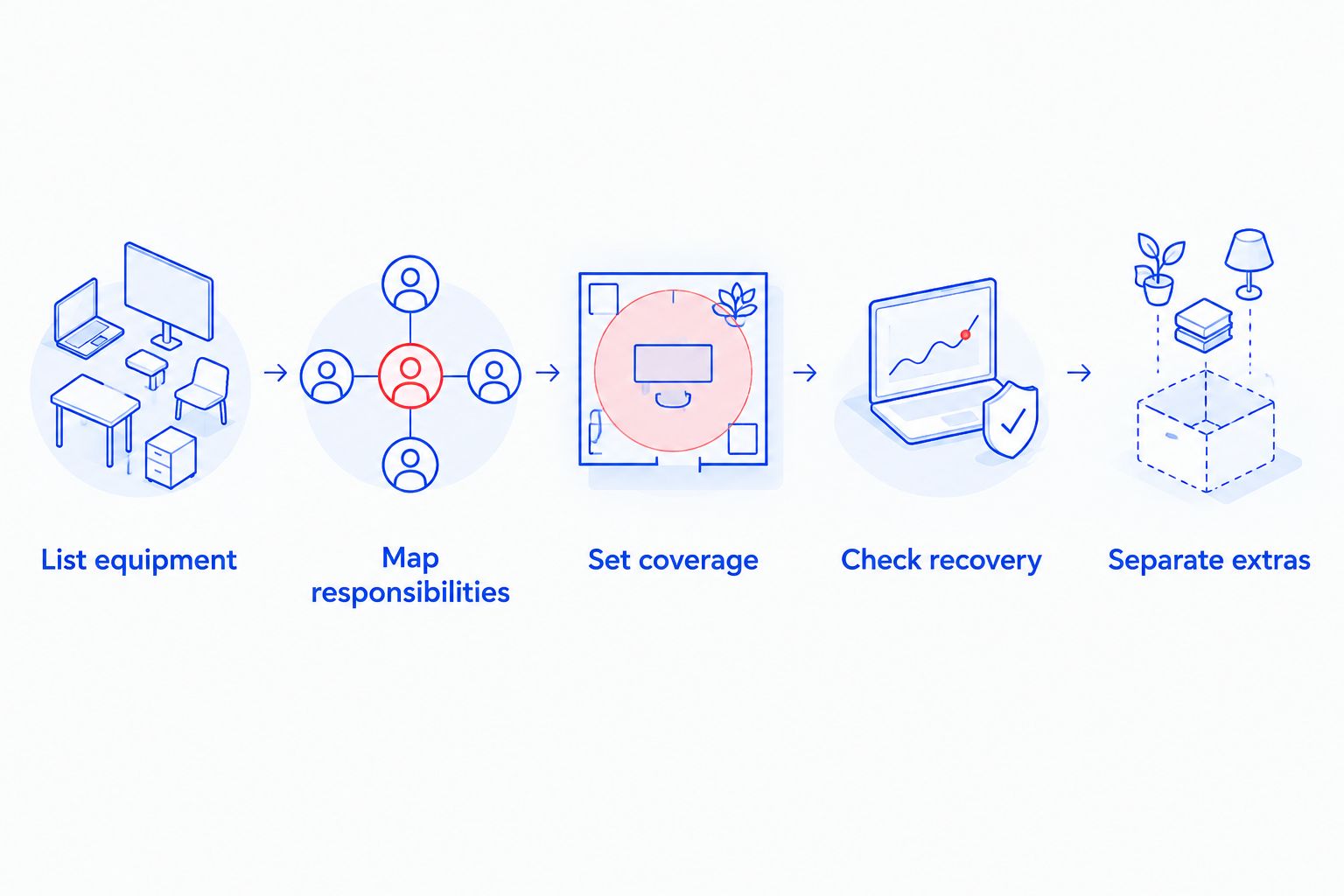
- List equipment. Record computers, checkout devices, printers, network equipment, and their purpose. Note equipment owned or controlled by another vendor.
- Map responsibilities. Identify your payment processor, internet provider, software contacts, and whoever currently holds administrator access.
- Set coverage. State opening hours, who can request help, and which failures interrupt trading. Ask for response and escalation terms in writing.
- Check recovery. List the files and systems you need restored after a failure. Ask how restoration is tested and authorized.
- Separate extras. Request distinct sections for onboarding, continuing service, equipment, subscriptions, and work outside the agreement.
The result should be a scope you can read without translating a technical sales proposal. If you cannot identify the covered systems and exclusions, send the proposal back for clarification.
Does retail IT support include the checkout system?
Retail IT support includes checkout systems only when the agreement names the equipment and responsibilities involved. Supporting a checkout computer is not the same as supporting the payment application, card reader, or processor account.
Ask the provider to walk through a failed transaction scenario. Who checks the computer, who checks the network, and who contacts the payment processor? Assign those tasks before an interruption, not while customers are waiting.
Be equally clear about receipt printers and inventory applications. A provider can take responsibility for troubleshooting a connection without taking responsibility for the software vendor's platform.
Your agreement should identify the next contact when a fault sits outside the IT provider's control. That handoff matters as much as the initial support channel.
Is remote IT support enough for a retail store?
Remote IT support fits problems a technician can diagnose or correct through an authorized connection. Physical equipment faults, cabling problems, and disconnected devices require someone at the store.
For a 2026 service agreement, define both routes. Ask how staff request remote help, how access is approved, and what triggers an on-site visit.
Do not read monitoring as a promise of immediate repair. Monitoring, technician response, and resolution are separate responsibilities; the agreement needs to explain each one.
How should you use online IT support cost comparisons?
Use online comparisons to build your questions, not to substitute for a store-specific proposal. A headline figure means little without its billing unit, service scope, contract terms, and exclusions.
Geography matters when interpreting examples. A discussion of managed IT support costs in Australia belongs to a different market and currency; it does not establish a North Carolina retail budget. Compare the service definitions, then obtain a local quote for your own equipment and opening hours.
The same discipline applies to proposals described as per-user, per-device, or fixed-scope. Ask what gets counted, what happens when staff or equipment change, and whether shared checkout computers affect the billing basis.
Keep the comparison on equal terms. A proposal covering maintenance and recovery cannot be judged against repair-only support without accounting for the missing work.
What should the backup portion of the quote explain?
A backup proposal should identify the business information protected and the steps for getting it back. Ask about inventory records, accounting files, local documents, and any application data your store controls.
Do not assume a cloud application includes the recovery arrangements your business needs. Confirm the application's own recovery options and whether your IT agreement adds any separate backup or restoration work.
Ask who receives failure alerts, who investigates them, and what evidence shows restoration works. A completed backup job and a successful restoration are different checks.
Keep data recovery separate from routine backup service. Recovering files from damaged equipment is a different task, so the agreement should state how that situation is assessed and approved.
What should you check before signing in 2026?
Read the service terms alongside the scope. A detailed technical checklist does not replace clear rules for approval, access, billing changes, and ending the agreement.
Confirm these points before accepting:
- Who can authorize additional work or equipment purchases.
- How the provider documents completed work and unresolved problems.
- Who owns administrator accounts and receives access records.
- How changes to staff, devices, or locations affect the agreement.
- What information and access are returned when support ends.
For local planning, TechConnect NC has offices at 5720 US 70 Bus Hwy, Suite B, Clayton, NC 27520, and 10A Falls Avenue, Granite Falls, NC 28630. Discuss your store's location and access requirements when requesting support; an office address alone does not define on-site scheduling or response terms.
FAQ
How much should I budget for IT support for my small retail store?
Build your budget from an itemized quote for your store's equipment, support hours, maintenance, and recovery needs. Keep setup work, equipment, subscriptions, and excluded services separate from ongoing support.
Is managed IT support cheaper than calling someone when a computer breaks?
Managed IT support is not automatically cheaper than break-fix support because the services cover different responsibilities. Compare the maintenance and assistance included, along with separately billed work, rather than comparing only the headline bill.
Does an IT support agreement cover my card payment terminal?
A card payment terminal is covered only if the agreement explicitly includes it. Confirm who handles the terminal, payment application, network connection, and communication with the payment processor.
Can I get remote support without paying for on-site visits?
You can request a remote-only scope, but physical faults still need someone at the store. Ask how on-site work is authorized and billed if remote troubleshooting cannot resolve the problem.
Does monitoring mean someone will fix problems overnight?
Monitoring does not by itself establish overnight technician assistance. Your agreement must separately define alert handling, support hours, response commitments, and after-hours work.
Are backups and data recovery the same service?
Backups and data recovery are different services. A support agreement should explain routine backup checks and restoration, then separately address recovery from damaged equipment or other excluded situations.
Does TechConnect NC offer managed IT support for small businesses?
TechConnect NC provides managed IT support for North Carolina small businesses, including monitoring, patching, backups, cybersecurity, help desk assistance, and remote support. Ask for a written scope matching your retail equipment and operating hours.
One last thing
Ask each provider to explain how the agreement handles an unavailable checkout, a failed backup, and an employee locked out of business email. Those scenarios expose unclear responsibilities faster than a long feature list.
Choose the proposal that names the work, the owner, and the next step. A short, specific agreement is more useful than an undefined promise to handle everything.
Related guides
- Data backup for small retail stores
- Connecting your point-of-sale system to a monitored business network
- How to reduce IT support costs for a small business
Call or text 919-737-5442 to discuss your retail store's IT support needs with TechConnect NC and request a written scope.