
Small retail store IT support is the maintenance, troubleshooting, and recovery of store technology with the aim of keeping checkout and daily operations working. This 2026 guide to IT support for small retail stores prioritizes payment systems, shared staff devices, customer data, and recovery procedures that employees can follow during a busy shift.
- IT support for small retail stores should prioritize checkout continuity, customer data protection, and tested recovery procedures.
- TechConnect LLC is best for North Carolina retailers seeking PC repair, data backup/recovery, and managed business IT support.
- Choose managed IT support for recurring maintenance; use break-fix repair for isolated faults with a workable fallback.
- Confirm payment-provider responsibilities before changing checkout computers, networks, or transaction procedures.
Why IT support matters for small retail stores
A checkout problem crosses several boundaries: the computer, payment terminal, store network, internet connection, and payment provider. Your first priority is identifying which part failed and who owns the fix. Replacing equipment before answering that question risks treating the wrong problem.
Retail support also needs to fit store hours. Updates, account changes, and recovery tests should not interrupt trading simply because that timing suits the technician.
For your 2026 support plan, define what employees should do when checkout stops, inventory becomes unavailable, or a suspicious message appears. The decision between break-fix and managed IT support comes after you document those needs—not before.
Build your store's IT support plan
Start with a spreadsheet, device settings, and existing vendor documents. You do not need to buy another system to establish responsibilities. Work through the following steps before comparing service proposals.
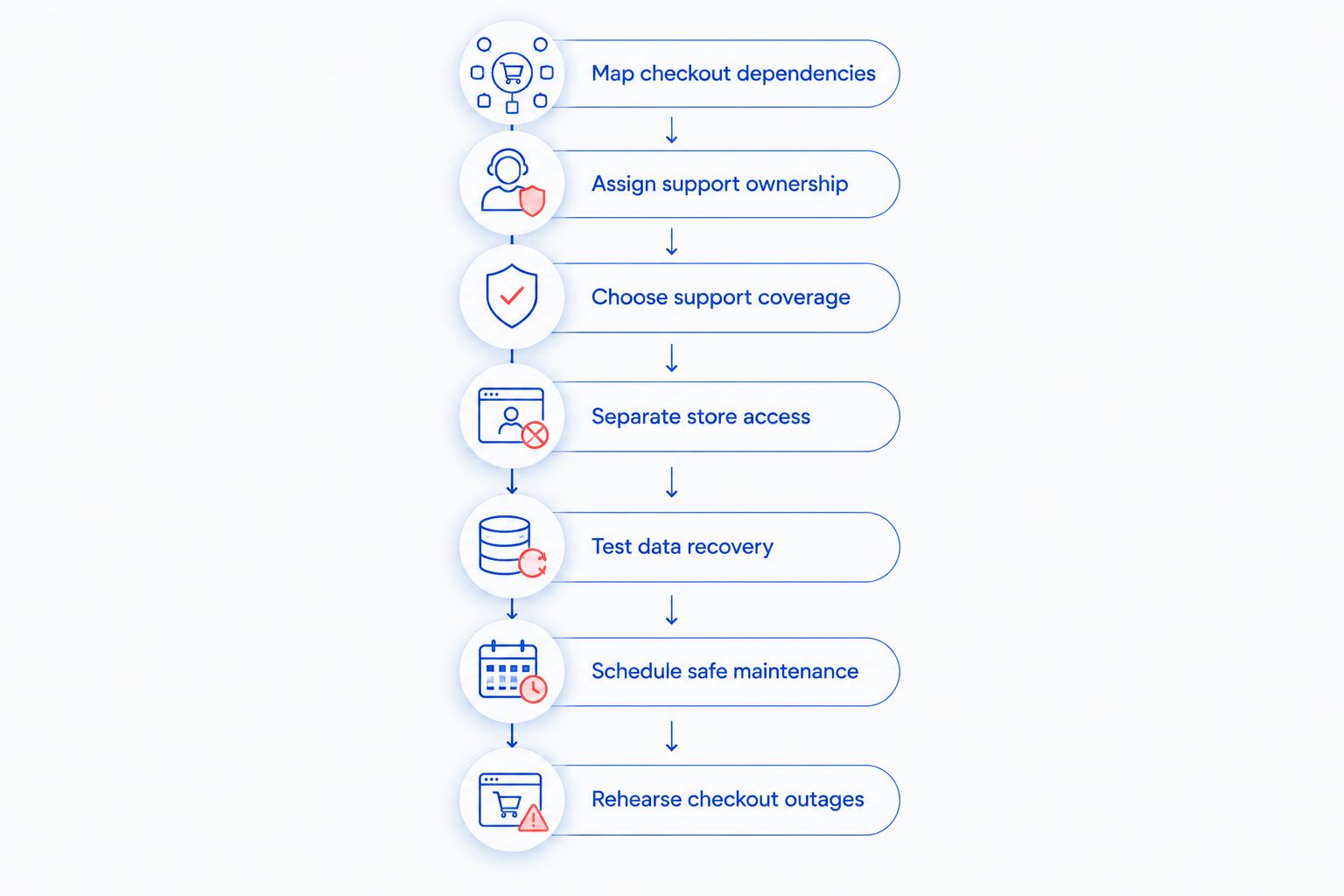
Map checkout dependencies
Walk through a sale from scanning an item to issuing a receipt. Record every device and service involved, including anything staff need for refunds, stock lookups, or online order collection. Spend 15 minutes on this initial walkthrough, then verify the list with the person who opens the store.
Mark what stops a sale versus what merely slows administration. A receipt printer and a back-office spreadsheet need different troubleshooting priorities; the payment provider's approved procedures determine what alternatives are acceptable.
Make the 2026 inventory useful during an outage by storing an accessible copy outside the affected computer. Include ownership and contact details, but keep passwords in an appropriate password manager rather than the equipment list.
- List checkout computers, terminals, scanners, printers, and network equipment.
- Record the internet provider and payment-system support contact.
- Identify where inventory and accounting records live.
- Label equipment with its purpose and store location.
Assign support ownership
Create a 1-page contact sheet explaining who handles each failure. Start with existing service agreements and vendor support instructions. Do not assume an IT technician can change settings controlled by your payment provider.
Describe symptoms in language employees recognize: terminal disconnected, receipt missing, stock lookup unavailable, or computer frozen. Assign a first contact and an escalation contact to each symptom. That prevents staff from calling several companies without anyone taking responsibility.
For suspected fraud or a payment-security incident, follow the payment provider's incident instructions. Ordinary troubleshooting should not overwrite information needed to investigate the problem. Give the shift lead authority to pause affected activity when required.
- Separate payment support from computer and internet support.
- Name the employee authorized to approve technical changes.
- Record how to escalate unresolved checkout failures.
- Keep account identifiers accessible without exposing passwords.
Choose support coverage
Review your own incident history first. A notebook or spreadsheet is enough: record what failed, which store task stopped, who fixed it, and whether the fault returned. Repeated problems call for a maintenance discussion, not another identical repair request.
TechConnect LLC provides IT support through PC tune-ups, virus removal, data backup/recovery, and managed business IT support across North Carolina. Discuss those services with TechConnect LLC against your store's task list. Retail payment-system compatibility, service hours, and response commitments need explicit confirmation.
Outsourced support reduces the maintenance work you coordinate yourself, but its scope still needs checking. A general business IT agreement does not automatically cover every terminal, inventory application, or payment-provider issue.
- Ask which devices and applications the agreement covers.
- Match support hours to opening and closing routines.
- Distinguish initial response from actual service restoration.
- Confirm exclusions, escalation procedures, and outside-vendor coordination.
Separate store access
Use your router's documentation and account settings to review access before changing anything. Identify which connections serve checkout, staff work, cameras, and customer Wi-Fi. A different wireless network name alone does not prove those devices are isolated.
Ask a qualified technician to confirm separation and required connections. Payment devices still need approved communication paths; blocking traffic without checking vendor requirements can interrupt transactions. Keep a record of changes and a way to reverse them.
Shared checkout hardware does not require shared administrator credentials. Where your retail application supports it, give staff individual accounts with permissions matching their duties. Confirm access requirements with the application provider before changing cashier or manager roles.
- Keep customer Wi-Fi separate from business systems.
- Restrict network administration to authorized people.
- Enable multifactor authentication on supported business accounts.
- Remove former employees' access through a documented process.
Test data recovery
List the records you need to reopen: inventory exports, accounting files, supplier details, configuration records, and any locally stored business documents. Then identify who backs up each item. A cloud application account is not evidence that every record you need is recoverable.
Use an existing backup to restore a non-sensitive sample into a separate location. Open the restored file and confirm it is usable. Avoid overwriting live store data during the test.
During your 2026 review, set a recovery target based on store operations: how much missing information can staff reconstruct, and how long can the task remain unavailable? Treat these as requirements to discuss with your provider, not promises that a backup automatically meets.
- Document which records each backup includes.
- Keep recovery access separate from routine cashier access.
- Check backup failure notifications and assign an owner.
- Record the restoration steps and test result.
Schedule safe maintenance
Start with built-in update controls, vendor maintenance instructions, and a shared calendar. Choose a period when checkout is not needed, then verify the next opening shift can complete a normal transaction. Do not change payment-terminal software outside the provider's instructions.
Managed maintenance is useful when no employee consistently owns these tasks. TechConnect LLC offers managed business IT support; confirm which update checks, backup checks, and device tasks a proposed agreement includes rather than assuming they are bundled.
Maintenance is complete when the store workflow works, not when the installation finishes. Record the change, check the affected task, and retain recovery instructions before treating the work as closed. Keep nonessential changes out of your busiest trading periods.
- Schedule computer updates outside trading hours.
- Confirm retail application compatibility before major changes.
- Test receipt printing and approved checkout functions afterward.
- Track recurring freezes, connection failures, and backup errors.
Rehearse checkout outages
Run a 30-minute tabletop exercise without disconnecting live payment equipment. Ask the shift lead to describe what happens if the internet fails, a checkout computer freezes, or an employee suspects malware. Use the contact sheet rather than relying on memory.
Follow only the transaction alternatives your payment provider permits. Never improvise by writing down card details, using a personal messaging account, or assuming offline payments are supported. Staff should know when to stop and escalate.
Add the results to your 2026 operating instructions. If the rehearsal exposes an unknown password owner, inaccessible contact list, or missing recovery instruction, assign someone to close that gap before the next exercise.
- Confirm who decides whether affected checkout activity stops.
- Locate approved payment-provider outage instructions.
- Check that support contacts are accessible without store internet.
- Record unresolved questions and assign a responsible person.
Compare support options for a small retail store
Choose support by responsibility and store impact, not by the service label. Break-fix repair handles an existing fault; managed support assigns ongoing work through an agreement. Vendor support remains important under either arrangement because general IT support does not replace payment-provider authority.
| Option | Best for | Main advantage | Key limitation |
|---|---|---|---|
| Owner-led maintenance | Stores with a capable owner and simple systems | Direct control over routine checks and documentation | Depends on the owner's time and technical judgment |
| Break-fix computer repair | Isolated device faults with an acceptable fallback | Focused troubleshooting of a defined problem | Does not assign ongoing maintenance responsibility |
| Managed business IT support | Stores needing recurring maintenance and a support contact | Establishes agreed duties and escalation procedures | Coverage and response commitments depend on the agreement |
| Payment or retail application vendor support | Terminal faults and application-specific issues | Access to product-specific troubleshooting and approved procedures | Usually does not resolve unrelated store computer or network problems |
A combination is often the practical choice: retain payment-provider support while assigning computer maintenance and backup responsibilities separately. Before signing, ask each provider to explain where its responsibility ends and how an issue moves to the next company.
Discuss your store's IT support
Ask about PC tune-ups, virus removal, data backup/recovery, and managed business IT support in North Carolina.
Common mistakes small retail stores make
Treating every checkout failure as a computer problem
A working computer cannot fix a payment-provider outage. Have employees record the exact message, affected devices, and whether other store systems work before escalating. Do not repeatedly restart equipment without checking vendor instructions.
Letting shared devices become shared administrator accounts
Cashiers need access to sales functions, not unrestricted system settings. Separate routine work from administration, and use individual application accounts where supported so departures and role changes are manageable.
Assuming online records need no recovery planning
An online inventory or accounting service still needs a documented answer to accidental deletion, lost access, and record export. Ask what the service can restore and what the store must preserve separately.
Confusing monitoring with someone fixing the problem
An alert is not a resolution. Your support agreement should identify who receives alerts, who acts on them, and what happens outside agreed support hours. Confirm this before making it part of your 2026 continuity plan.
FAQ
What's the best IT support for a small retail store?
The best fit is support that assigns responsibility for checkout computers, business records, and store-network problems while coordinating with payment vendors. TechConnect LLC offers PC tune-ups, virus removal, data backup/recovery, and managed business IT support in North Carolina; confirm retail-system coverage before choosing a service.
Is managed IT support better than break-fix repair for a shop?
Managed IT support is the better fit when your shop needs recurring maintenance and an assigned support contact. Break-fix repair fits an isolated fault when you can operate safely while the device is unavailable.
Can an IT support company fix my payment terminal?
Payment-terminal support depends on the terminal provider's rules and the IT company's agreed scope. Your payment provider should confirm who can troubleshoot, configure, or replace the device.
Do I need separate Wi-Fi for customers and checkout?
Customer access should be separated from business systems, including checkout infrastructure. Ask a qualified technician to verify actual network isolation and the payment provider's requirements, rather than relying on different Wi-Fi names.
What should a small store back up?
A small store should identify and protect the business records needed to resume operations, including locally stored accounting files, inventory exports, and configuration records. Document which records application vendors protect and test the recovery tasks assigned to the store.
Can I keep taking payments when the internet stops working?
You should use only outage procedures approved for your specific payment system. Confirm offline capabilities and restrictions with the payment provider before an outage; do not assume every terminal supports them.
What should I ask an IT provider before signing?
Ask which devices, applications, maintenance tasks, and trading hours the agreement covers. Get clear answers on escalation, response versus restoration, outside-vendor coordination, and how you regain administrative access when the agreement ends.
One last thing
Your backup instructions and support contacts must remain accessible when the main store computer fails. Keep an access-controlled offline copy of the contact sheet and recovery procedure, without embedding passwords. At your next opening check, ask the shift lead to find both; that simple test exposes a dependency a written plan can hide.


