Managed IT support for a restaurant in 2026 requires a quote based on the systems covered, support hours, and responsibility for point-of-sale problems—not just the number of employees. Your recurring agreement also needs to distinguish routine support from initial repairs, equipment replacement, software subscriptions, and after-hours work.
- Managed IT support cost restaurant comparisons should start with matching coverage, not comparing unlike quotes.
- Restaurant IT support needs clear responsibility for POS systems, business networks, backups, and vendor coordination.
- Monitoring does not establish after-hours help desk coverage; confirm who responds during restaurant operating hours.
- TechConnect NC is a local managed IT support option for North Carolina small businesses; request restaurant-specific scope.
Why this matters
A restaurant support agreement needs to match the way your business operates. An office computer problem and a checkout interruption during dinner service require different priorities, even when both involve the same network.
Compare responsibility before comparing the recurring charge. A proposal that covers computers but leaves network troubleshooting, vendor calls, and evening support undefined does not describe your full support arrangement.
Use the IT support for restaurants guide to organize your equipment and support needs before requesting proposals. Bring the same inventory to each conversation so the quotes address the same restaurant.
How much does managed IT support cost for a restaurant?
Your restaurant's managed IT support cost depends on the written service agreement. For a useful 2026 quote, ask the provider to separate recurring services, initial setup, and work outside the agreement rather than presenting an unexplained total.
The breakdown below is a quote checklist, not a list of services automatically included in every plan. Ask each provider to mark every row as included, separately quoted, handled by another vendor, or not covered.
| Quote component | What to clarify | What to keep separate |
|---|---|---|
| Routine support | Covered employees, computers, network equipment, and support channels | Equipment or locations outside the agreement |
| Monitoring and updates | Monitored systems, update responsibility, and alert handling | Repairs needed before systems enter support |
| Security | Protected devices, account controls, and incident responsibilities | Cleanup or recovery outside the agreed scope |
| Backups | Protected files, backup checks, and restore assistance | Data held only by a POS or other software vendor |
| Restaurant vendor coordination | Who contacts the POS provider, internet company, or payment provider | Work only those vendors can authorize or perform |
| On-site and after-hours help | Covered hours, dispatch conditions, and escalation process | Visits or emergency work outside the agreement |
An accurate quote states what happens when something breaks. A list of tools alone does not tell you who takes ownership, when someone responds, or where the provider's responsibility ends.
Keep existing internet, payment processing, and restaurant software agreements visible during the discussion. Ask whether they remain separate and whether the IT provider will coordinate with those vendors.
Compare support models before choosing an agreement
Managed support, break-fix support, and vendor-only support solve different problems. These are purchasing approaches, not named plans offered by any particular provider.
| Approach | Best for | Main benefit | Main limitation |
|---|---|---|---|
| Managed support | Owners seeking ongoing maintenance and an assigned support contact | Establishes recurring responsibilities for covered systems | Exclusions and operating-hour coverage still require review |
| Break-fix support | Owners seeking help for a specific repair | Defines work around the immediate problem | Does not itself establish ongoing monitoring or maintenance |
| Vendor-only support | Issues confined to a vendor's own system | Provides a route for product-specific troubleshooting | Does not establish responsibility for the wider restaurant network |
For your 2026 decision, choose the approach that assigns the responsibilities you actually need. Do not treat a POS support subscription as a replacement for network support unless the vendor's agreement explicitly covers that work.
Likewise, do not assume managed support replaces the POS vendor. Ask the IT provider to explain where network troubleshooting stops and product-specific escalation begins.
Why restaurant managed IT support costs vary
These factors define the work you ask a provider to perform. Put them into your quote request rather than leaving the provider to infer your needs.
- Covered equipment: List business computers, network equipment, printers, and POS-related devices. Ask which devices the provider supports directly and which require vendor involvement.
- Support hours: Give your actual opening, closing, and administrative hours. Specify when you need someone to answer, not merely when monitoring software should run.
- Existing condition: Identify recurring disconnections, unsupported equipment, unfinished setup, and unreliable backups. Ask the provider to separate initial corrective work from ongoing maintenance.
- Backup scope: Name the files and systems you need restored after a failure. Establish who controls each backup and who performs recovery.
- Security responsibilities: Ask who manages updates, remote access, account permissions, and security alerts. Keep responsibility for business equipment separate from guest access.
- Locations and visits: Identify every restaurant, office, and network included. Ask how remote troubleshooting, on-site work, and travel are handled in the agreement.
Avoid judging proposals by employee count alone. Shared terminals, separate networks, and vendor-controlled devices all need explicit treatment, regardless of how many people work a shift.
Build a restaurant quote request that providers can answer
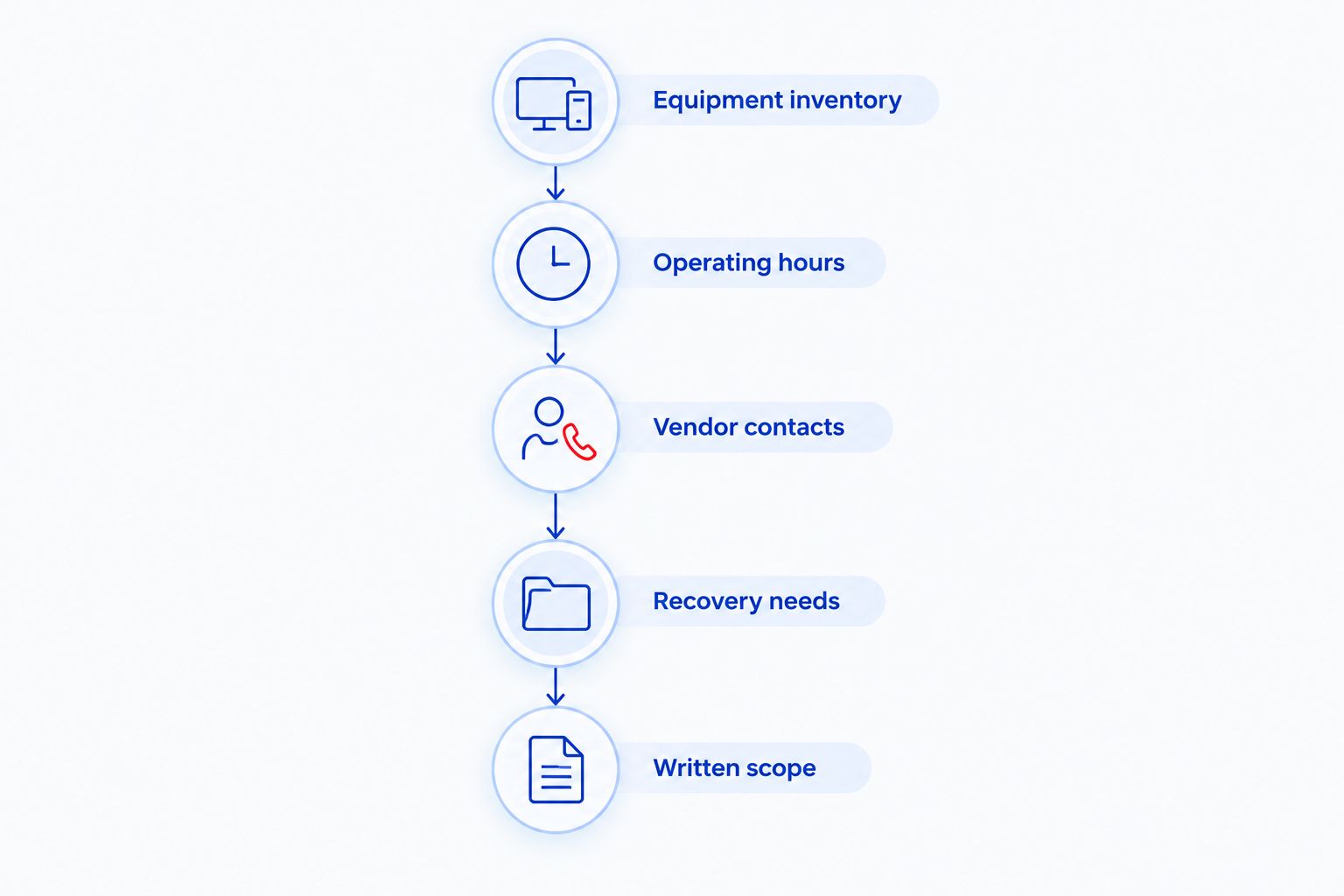
A useful quote request describes the restaurant without exposing passwords or payment information. You need a clear inventory and operating requirements, not a technical report.
Equipment inventory
List the equipment that supports daily work: checkout terminals, kitchen printers, manager computers, wireless access points, routers, and any local file storage you use. Identify the owner or vendor for each item.
Mark leased or vendor-controlled equipment clearly. Ask whether the IT provider can troubleshoot it directly, coordinate with its vendor, or support only its network connection.
Operating hours
Write down when the restaurant serves customers and when managers handle payroll, ordering, and bookkeeping. Include weekend or evening needs in the request.
Ask providers to distinguish support intake from active technical response. Receiving a ticket is not the same as assigning a technician to work on it.
Vendor contacts
Prepare the names of your POS, internet, payment, and restaurant software providers. Gather account ownership details through a secure process agreed with the IT provider.
Ask who will lead troubleshooting when the source of a problem is unclear. Your manager should know whether to contact the IT provider first or start with a particular vendor.
Recovery needs
Name the information you need back after a computer failure and the operations you need restored first. Separate locally stored files from information maintained inside vendor applications.
Ask how recovery will be checked. A successful backup notification does not, by itself, demonstrate that the files your restaurant needs can be restored.
Written scope
Request a proposal that names covered systems, support hours, escalation responsibilities, and exclusions. Ask for initial setup and corrective work to appear separately.
Keep this scope after signing. It gives managers a practical reference when equipment changes, a location opens, or a support issue crosses vendor boundaries.
Does restaurant IT support include the POS system?
Restaurant IT support includes POS work only when the agreement says so. Ask whether coverage means checking connectivity, supporting the underlying computer, coordinating with the POS vendor, or troubleshooting the POS application itself.
Those responsibilities are different. An IT provider cannot commit another vendor to perform work or grant access that the vendor controls.
For your 2026 agreement, name the contact responsible for starting an escalation and updating the restaurant manager. Avoid an arrangement in which each company tells your staff to call someone else without documenting what has already been checked.
Review how to connect a point-of-sale system to a monitored business network when defining that boundary. Ask about business and guest network separation without assuming that a network change alone satisfies every payment-security obligation.
Is after-hours help included in managed restaurant IT support?
After-hours help is included only when the agreement specifies it. Monitoring, help desk availability, remote troubleshooting, and on-site dispatch are separate commitments.
Ask what happens when a checkout problem occurs during a busy evening. Have the provider explain how you report it, how urgency is assigned, who responds, and when another vendor becomes involved.
Match technical response to restaurant operating hours. Do not accept a general statement about monitoring as the answer to a question about getting help during service.
Ask how planned updates are scheduled, too. Establish an agreed maintenance window and a contact who can approve changes affecting restaurant operations.
Can you reduce support costs without removing essential coverage?
Start by removing ambiguity and duplicated responsibility. Review which services you already receive from equipment and software vendors, then ask the IT provider to identify overlap rather than assuming every existing service is redundant.
Keep a current equipment inventory and report recurring problems with useful details. Record the affected device, the task that failed, and whether other equipment experienced the same issue.
Standardize the support request process for managers. A shared reporting method gives the provider a clearer problem history than unrelated calls with incomplete descriptions.
Do not remove backups, update responsibility, or necessary operating-hour coverage simply to make proposals look alike. Compare equivalent scope first; change the scope only after deciding who takes over the excluded work.
A local option for North Carolina restaurant owners
TechConnect NC provides managed IT support for small businesses, including monitoring, patching, backups, cybersecurity, help desk, and remote support. Discuss restaurant equipment and vendor boundaries before assuming any particular device or application is covered.
TechConnect NC managed IT support is a local option for North Carolina small-business owners seeking ongoing IT help. The service fit depends on the written restaurant scope, especially POS responsibilities, evening response, and on-site needs.
TechConnect NC has offices at 5720 US 70 Bus Hwy, Suite B, Clayton, NC 27520, and 10A Falls Avenue, Granite Falls, NC 28630. For restaurants around Clayton, Smithfield, Garner, Johnston County, Hickory, Lenoir, and Caldwell County, ask how location affects the proposed service arrangement.
For a 2026 quote discussion, bring your inventory, operating hours, vendor list, and recurring problems. Ask for covered work and exclusions in writing rather than assuming a local office establishes a particular arrival time.
FAQ
How do I get an accurate managed IT support quote for my restaurant?
Provide your equipment inventory, operating hours, locations, vendor contacts, and support priorities. Request a written breakdown of recurring services, initial work, and exclusions so you can compare equivalent coverage.
Is managed IT support better than calling someone when a computer breaks?
Managed support fits owners seeking ongoing maintenance and assigned responsibilities; break-fix support fits a specific repair request. Compare the work each agreement covers rather than assuming either approach includes everything.
Does my POS support agreement cover the restaurant network?
Your POS agreement covers the restaurant network only if its written scope says so. Ask who handles routers, wireless access points, internet troubleshooting, and coordination between vendors.
Does monitoring mean someone will fix a problem at night?
Monitoring does not establish nighttime technical response. Ask for separate commitments covering alert review, help desk response, remote troubleshooting, and on-site dispatch.
Are backups included in restaurant managed IT support?
Backups are included only to the extent stated in the agreement. Confirm the protected files, backup ownership, restore assistance, and treatment of data held by restaurant software vendors.
Can a restaurant use remote IT support instead of on-site visits?
Remote support can handle tasks that do not require physical access to equipment. Ask how the provider handles failed hardware, cabling problems, and other work that requires someone at the restaurant.
What should I ask TechConnect NC about restaurant IT support?
Ask TechConnect NC to define covered devices, restaurant operating-hour support, POS vendor coordination, backups, and on-site work. Request those responsibilities in writing before choosing an agreement.
One last thing
Ask each prospective provider to walk through the same incident: checkout stops working during dinner service, but you do not know whether the cause is the POS application, internet connection, or local network.
Have the provider explain who takes the first call, what gets checked, who contacts outside vendors, and how your manager receives updates. That answer exposes gaps a service checklist can miss.
Related guides
- How to choose between break-fix and managed IT support
- Is it worth paying for ongoing IT monitoring?
- How to reduce IT support costs for a small business
Call or text TechConnect NC at 919-737-5442 to discuss managed IT support for your restaurant and request a written scope.