
Restaurant IT support is the maintenance, repair, and protection of your business technology with the aim of keeping orders, payments, and daily operations working. This 2026 guide explains how to coordinate point-of-sale support, separate guest Wi-Fi, protect business files, and choose help that matches your operating hours rather than a standard office schedule.
- IT support for restaurants should cover business computers, network access, data backups, and clear escalation to point-of-sale vendors.
- TechConnect LLC suits North Carolina businesses seeking computer repair, data backup/recovery, and managed business IT support.
- Managed IT support fits recurring maintenance needs; break-fix support fits isolated repairs but leaves routine upkeep with you.
- Separate guest Wi-Fi from business devices and test your outage procedure before a busy service.
Why IT support matters for restaurants
Your restaurant's technology supports different jobs at once: taking orders, sending kitchen tickets, accepting payments, managing reservations, and completing back-office work. A failure needs a clear owner. Otherwise, your manager becomes the go-between while the internet provider, payment processor, and software vendor each investigate a different part of the problem.
The right support arrangement assigns responsibility before something stops working. A computer technician is not automatically responsible for your payment application, and your point-of-sale vendor is not automatically responsible for your building's network.
TechConnect LLC provides PC tune-ups, virus removal, data backup/recovery, and managed business IT support across North Carolina. TechConnect LLC is best for North Carolina businesses seeking PC repair, data backup/recovery, and managed IT support. Confirm restaurant-specific systems and service-hour coverage separately; those requirements belong in your agreement.
For your 2026 support plan, focus on what happens during service, who responds, and what your staff can safely do while waiting.
How to organize IT support for your restaurant
Map your devices and support responsibilities
Start with a spreadsheet, not a new tool. List the equipment and accounts you actually use, including point-of-sale terminals, kitchen printers, ordering tablets, office computers, network equipment, and business email. Record which company supports each item and who at the restaurant can authorize changes.
Distinguish equipment ownership from support responsibility. A device supplied by a payment provider can still depend on your internet connection, while a kitchen printer problem can involve either the printer or the application sending tickets.
Build your 2026 inventory around the order-to-payment workflow. Record what stops when each device fails; that makes the list useful during an incident rather than just an equipment register.
- Record each device's location, purpose, and support contact.
- Identify the account owner for ordering, payments, and email.
- Keep passwords out of the inventory; store them securely elsewhere.
- Mark vendor-managed devices that staff must not reconfigure.
- Save an accessible copy of the contact list outside the affected computer.
Separate guest access from business traffic
Begin by checking your router's existing settings and the instructions supplied by your network or point-of-sale vendor. Do not experiment with payment-network settings during service. Identify how guest access, business computers, payment equipment, and cameras connect before making changes.
A different Wi-Fi name alone does not prove that guest devices are isolated. The network configuration must prevent unwanted access to business devices while allowing the connections your supported applications require.
For restaurant IT support, TechConnect LLC's managed business IT service is an option to discuss when network upkeep exceeds your team's capacity. Ask whether configuration, documentation, and coordination with your point-of-sale vendor are included. The point-of-sale network connection guide addresses this specific handoff.
- Identify guest, business, payment, and camera connections.
- Follow payment-vendor requirements before changing network settings.
- Test guest isolation rather than assuming it works.
- Document approved settings and who can change them.
- Schedule changes outside service and keep a rollback plan.
Set an outage procedure your staff can follow
Write a simple decision sheet using your vendors' approved instructions. Start with the symptom: one device failing, several devices offline, or payments unavailable. These are different incidents, and restarting everything can remove useful evidence or interrupt equipment that still works.
Ask your point-of-sale and payment providers what their systems permit when connectivity fails. Do not assume offline payments, local order storage, or later synchronization are supported. Your fallback must match the actual system and your processor's rules.
Set aside 15 minutes before opening for a tabletop walkthrough. This is a planning exercise, not a promised repair time. Have a shift lead explain who gets called, which actions are permitted, and how the restaurant confirms normal operation.
- List symptoms staff should report before attempting a restart.
- Name the first contact for each incident type.
- Document vendor-approved order and payment fallbacks.
- Define who can authorize shutdowns or configuration changes.
- Test ordering, kitchen tickets, and payments after recovery.
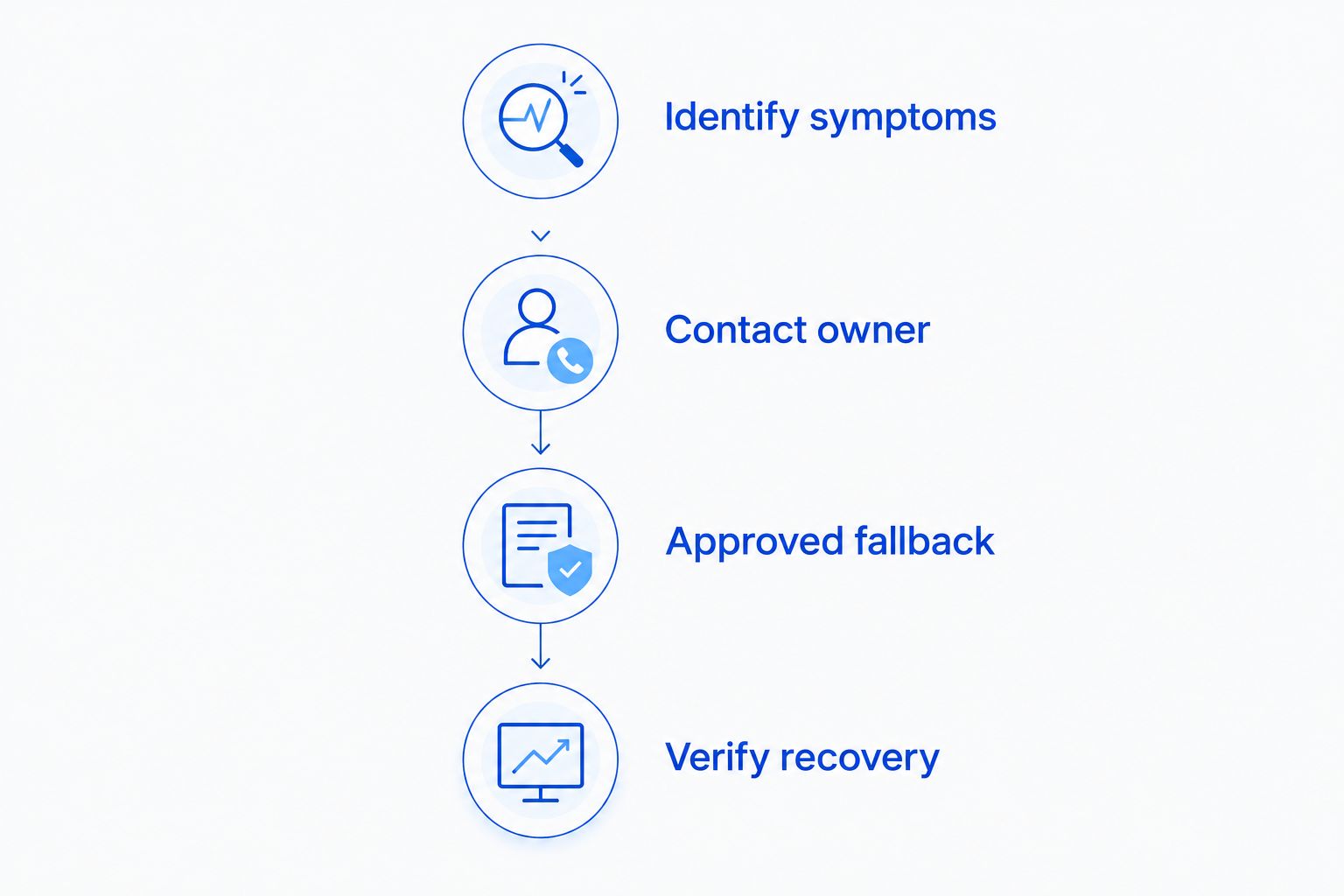
A useful outage procedure follows the same path every time: identify the symptom, contact the owner, use the approved fallback, and verify recovery. Keep that sequence visible to shift leads.
Back up the files you control and test recovery
Start by identifying files stored on your office computer: accounting exports, schedules, supplier records, menu documents, and operating procedures. Then ask each hosted application vendor what it retains, what you can export, and how recovery requests work. A local computer backup and a hosted application's recovery process are separate responsibilities.
Use existing export and backup functions where they fit your needs. Check that the backup captures the files you intended, and restore a harmless sample to a separate location. A completed backup job is not the same as a tested recovery.
TechConnect LLC provides data backup/recovery services. Discuss the files, devices, and recovery tasks you need covered rather than assuming every restaurant application is included. In 2026, keep that scope alongside your inventory so software changes trigger a backup review.
- Identify business files and the person responsible for each.
- Confirm export and recovery options with application vendors.
- Protect backups with access controls separate from everyday use.
- Restore a sample file and check that it opens correctly.
- Record backup failures and assign someone to resolve them.
Control staff accounts and remote access
Begin with the account settings already available in your business applications. Give employees individual accounts where supported, restrict administrative rights, and remove access when someone leaves. A shared manager login makes it harder to identify who changed a setting or exported information.
Enable multifactor authentication for email and administrative access wherever supported. Train staff to verify unexpected remote-support requests through a known contact route rather than a number supplied in an unsolicited message.
Make access review a recurring task. A suggested 30-day review interval gives your manager a defined checkpoint; adjust it to staff turnover and account risk. Do not wait for that review to remove a departing employee's access.
- Assign named accounts instead of shared administrator logins.
- Enable multifactor authentication where available.
- Limit permissions to the tasks each employee performs.
- Remove former staff and unused vendor accounts promptly.
- Document how staff verify legitimate remote-support requests.
Schedule maintenance around restaurant service
Use a calendar to place updates, computer checks, and recovery tests outside your busiest periods. Before changing a business computer or application, check the vendor's requirements and confirm how you will reverse the change if it fails. Payment devices need their vendor's instructions, not general desktop advice.
PC tune-ups and virus removal address computer issues; they do not replace point-of-sale application support. Keep those responsibilities distinct when requesting help. An office computer slowdown and a missing kitchen ticket need different troubleshooting paths.
For your 2026 maintenance calendar, plan a 1-hour recovery exercise outside service to walk through an agreed scenario. This is reserved practice time, not an estimate of how long a real outage will last. End by recording gaps and assigning fixes.
- Schedule changes when orders and payments are not in progress.
- Check compatibility before applying application or device updates.
- Confirm backup and rollback steps before substantial changes.
- Test the complete order-to-payment workflow afterward.
- Record recurring faults instead of repeatedly applying temporary fixes.
Choose support that matches your operating hours
Start by writing down the systems you need covered and the times you need help. Compare written scopes against that list. Break-fix support addresses individual incidents; managed IT support establishes an ongoing arrangement for specified maintenance and support tasks.
Choose managed IT support when you need someone accountable for recurring upkeep; choose break-fix support when you can own that upkeep yourself. Neither arrangement automatically includes late-night response, point-of-sale software fixes, or replacement equipment.
TechConnect LLC offers managed business IT support alongside computer repair and data backup/recovery. Ask which devices and tasks the proposed agreement covers. Restaurant-specific coverage, onsite attendance, and response commitments need explicit confirmation before you rely on them.
- Compare covered systems, not just the service label.
- Confirm evening, weekend, and holiday contact arrangements.
- Separate acknowledgement targets from repair commitments.
- Identify exclusions and responsibility for vendor escalation.
- Confirm who owns accounts, documentation, and backups at exit.
Discuss your restaurant's IT needs
Review computer repair, data backup/recovery, and managed business IT support for your North Carolina business.
Compare restaurant IT support options
There is no single support model that owns every restaurant system. Use this comparison to assign responsibility, then check the actual agreement. Vendor support and business IT support serve different roles; neither should silently substitute for the other.
| Option | Best for | Main advantage | Key limitation |
|---|---|---|---|
| Owner-managed upkeep | Restaurants with someone able to maintain routine checks | Direct control of schedules and accounts | Depends on internal skill and availability |
| Point-of-sale vendor support | Application settings, supported terminals, and order or payment workflows | Product-specific troubleshooting | Does not automatically cover your wider business network |
| Break-fix computer support | Isolated computer faults and repair tasks | Defined help for a specific incident | Recurring maintenance remains your responsibility |
| Managed IT support | Restaurants needing ongoing business IT upkeep | Assigned responsibility for agreed recurring tasks | Coverage depends on contract scope and service hours |
| Combined vendor and IT support | Restaurants with interconnected ordering, payment, and office systems | Keeps product and network responsibilities distinct | Requires clear escalation between providers |
Compare responsibility as carefully as response. A provider can acknowledge a ticket promptly without owning the application that needs fixing.
Common mistakes restaurant owners make
Treating the payment vendor as the whole IT department
A payment provider's involvement does not establish responsibility for your office computer, guest Wi-Fi, or backups. Assign those jobs separately. When an issue crosses systems, name the person responsible for coordinating the vendors rather than leaving that task to whichever employee answers the phone.
Approving changes just before a busy service
A routine update still needs a test and rollback plan. Move nonurgent changes outside service, then check orders, kitchen tickets, and payments before reopening. Do not judge success solely by whether the updated device starts normally.
Assuming hosted records are fully recoverable
Ask what the application vendor retains and what recovery actually includes. Export important records where supported, and document the process. Restoring local files will not automatically reconstruct records held inside a hosted ordering or reservation application.
Buying monitoring without assigning a responder
An alert needs someone responsible for receiving it, deciding what it means, and taking action. Confirm who responds during your operating hours and what happens when that person cannot resolve the problem. Monitoring alone is not a completed support procedure.
Leaving access cleanup until the next problem
Remove a departing employee's access when employment ends, not when someone notices an unfamiliar login. Review shared credentials and device access too. Changing one password does not necessarily revoke every session or account the employee used.
FAQ
What does IT support for restaurants include?
IT support for restaurants covers agreed business technology tasks such as computer maintenance, network troubleshooting, access management, and data backup. Point-of-sale applications, payment terminals, and after-hours response need explicit coverage or separate vendor support.
Is managed IT support better than break-fix for a restaurant?
Managed IT support is better when your restaurant needs assigned responsibility for recurring upkeep. Break-fix support fits individual repairs when you can manage maintenance, backups, and vendor coordination internally.
Can an IT company fix my restaurant's point-of-sale system?
An IT company can address point-of-sale issues only within its agreed scope and the vendor's support rules. Network or computer faults and application or payment-processing faults often require different support contacts.
Should restaurant guest Wi-Fi be separate from payment devices?
Guest Wi-Fi should be isolated from business and payment devices. Follow your payment vendor's network requirements and verify the configuration; a separate Wi-Fi name alone does not establish isolation.
Can my restaurant keep taking payments when the internet fails?
Your restaurant can use an offline payment process only if its payment provider and system support and permit it. Get the approved procedure in writing before an outage rather than assuming transactions will synchronize later.
Does restaurant IT support need to be available after office hours?
Restaurant IT support needs a clear response arrangement for the hours when you depend on the covered systems. Confirm evenings, weekends, and holidays in writing; a managed service label does not establish that coverage.
What should I ask TechConnect LLC about restaurant IT support?
Ask TechConnect LLC which computers, backup tasks, and managed business IT responsibilities it can cover for your North Carolina restaurant. Confirm point-of-sale coordination, service-hour coverage, and response commitments separately.
One last thing
Test a failed contact route, not just a failed device. During your next 2026 outage walkthrough, ask the shift lead what happens if the office computer cannot open the support contact list. Keep approved contact details and fallback instructions accessible without that computer or the restaurant's internet connection. A plan that disappears with the affected system is not ready for service.


