Managed IT support for an insurance agency requires a quote based on the staff, equipment, locations and services covered; a monthly total alone does not show what you are buying. For your 2026 budget, separate recurring support from onboarding, equipment replacement, software subscriptions and work outside the agreement. Compare written coverage before comparing totals.
- For managed IT support cost, insurance agency owners should compare written coverage, not just monthly totals.
- Separate ongoing help desk, cybersecurity and backups from onboarding, equipment and project work.
- TechConnect NC provides managed IT support for North Carolina small businesses; request an agency-specific scope.
- Ask who handles failed backups, urgent incidents and problems involving your insurance software vendor.
How much does managed IT support cost for an insurance agency?
Your agency's managed IT support cost is the amount quoted for a defined service agreement, plus any separately authorized work. A useful quote identifies covered employees, computers, network equipment, support hours and exclusions. Without those details, you cannot tell whether two proposals cover the same job.
Start with the managed IT support for insurance agencies guide if you need to define the work before requesting proposals. Then ask each provider to complete the same breakdown below.
| Budget component | What the proposal should identify | What to clarify separately |
|---|---|---|
| Recurring support | Help desk, remote support, monitoring and patching responsibilities | Supported users, devices and service hours |
| Cybersecurity | Protective tools, account security and incident responsibilities | Cleanup, investigation and recovery exclusions |
| Backups | Protected systems, monitoring and restoration responsibilities | Storage, retention and recovery testing |
| Initial setup | Assessment, documentation and support-tool installation | Remediation needed before regular coverage begins |
| Projects and equipment | Work outside routine support | Replacement computers, office moves and migrations |
A complete quote makes the boundary between included support and separate work visible. Ask for that boundary in writing, not just during a sales conversation. Keep the completed breakdown with the agreement so your office manager can check future invoices against it.
Why this matters
An insurance agency needs more than someone to fix a frozen computer. Your staff also needs dependable access to email, client documents, carrier portals and agency software. A proposal should explain which parts of that working environment the provider supports and where another vendor takes responsibility.
For a 2026 agreement, make the handoff explicit. If a carrier portal stops working, does the help desk check the browser, network and account access before referring you elsewhere? Clear ownership gives you a practical way to judge the service without assuming every problem belongs to the IT provider.
Separate recurring support from initial setup
Recurring support and the work required to establish that support are different decisions. Ask the provider to describe both, even when the proposal combines them into one agreement.
Initial work can involve collecting administrator access, recording equipment, checking backups and installing support tools. Ask which tasks are included in onboarding and which findings require separate approval. Do not assume an assessment includes fixing everything it discovers.
Your recurring scope should describe ongoing responsibilities in plain language:
- Monitoring: Which systems generate alerts, and who reviews them?
- Patching: Which operating systems and applications receive managed updates?
- Help desk: How do employees report problems, and when is help available?
- Cybersecurity: Which protective tasks and incident actions belong to the provider?
- Backups: Who checks backup results and handles a restoration request?
A statement such as managed computers leaves too much undefined. Ask whether that includes an employee's laptop, shared front-desk computer, network equipment and remote-work setup. You need an inventory attached to the proposal, not an assumption that everything in the office is covered.
Which support arrangement fits your agency?
Choose the arrangement around the responsibility you want transferred. Ongoing management and individual repairs solve different problems; neither label tells you the full service scope.
| Arrangement | Best for | Main benefit | Main limitation |
|---|---|---|---|
| Managed support | Agencies seeking assigned responsibility for ongoing IT tasks | Establishes continuing duties for covered systems | Excluded projects and incidents still need clear handling |
| Break-fix support | Agencies seeking help with an isolated repair | Defines work around a specific problem | Does not itself establish ongoing monitoring or maintenance |
| Project support | Agencies completing a defined change | Sets a scope for a migration, setup or replacement | Does not itself provide continuing help desk coverage |
Managed support is the better fit when you want ongoing maintenance and a defined help desk, rather than only individual repairs. The trade-off is a continuing agreement whose scope you must understand. Break-fix support suits an isolated issue, but it does not replace an assigned backup or patching responsibility.
Use the guide to choosing between break-fix and managed IT support to compare those responsibilities. Do not assume a project proposal includes ongoing management after the project ends.
Why managed IT support scope varies
The useful question is not whether another agency has a smaller invoice. It is whether your proposed agreement covers the people, systems and responsibilities your agency needs.
Ask providers to explain how these factors affect their proposed scope:
- People and devices: Identify employees, shared workstations, laptops and equipment used away from the office. Ask what happens when the inventory changes.
- Office locations: List each location and its network equipment. Confirm how remote troubleshooting and physical visits are handled.
- Existing condition: Ask which unresolved problems must be addressed before ongoing support starts. Separate that work from regular maintenance.
- Backup requirements: Identify the files and systems you need restored. Request written responsibilities for checking backups and testing recovery.
- Security responsibilities: Define account protection, patching, malware response and vendor coordination. Avoid treating cybersecurity as a single unexplained line item.
- Support coverage: Specify when employees can reach a person and what happens outside those hours. Monitoring and live assistance are different services.
For your 2026 comparison, send the same inventory and requirements to every provider. Otherwise, a difference in totals might simply reflect a difference in the work being proposed. Resolve the scope mismatch before making a selection.
How do I get a quote I can actually compare?
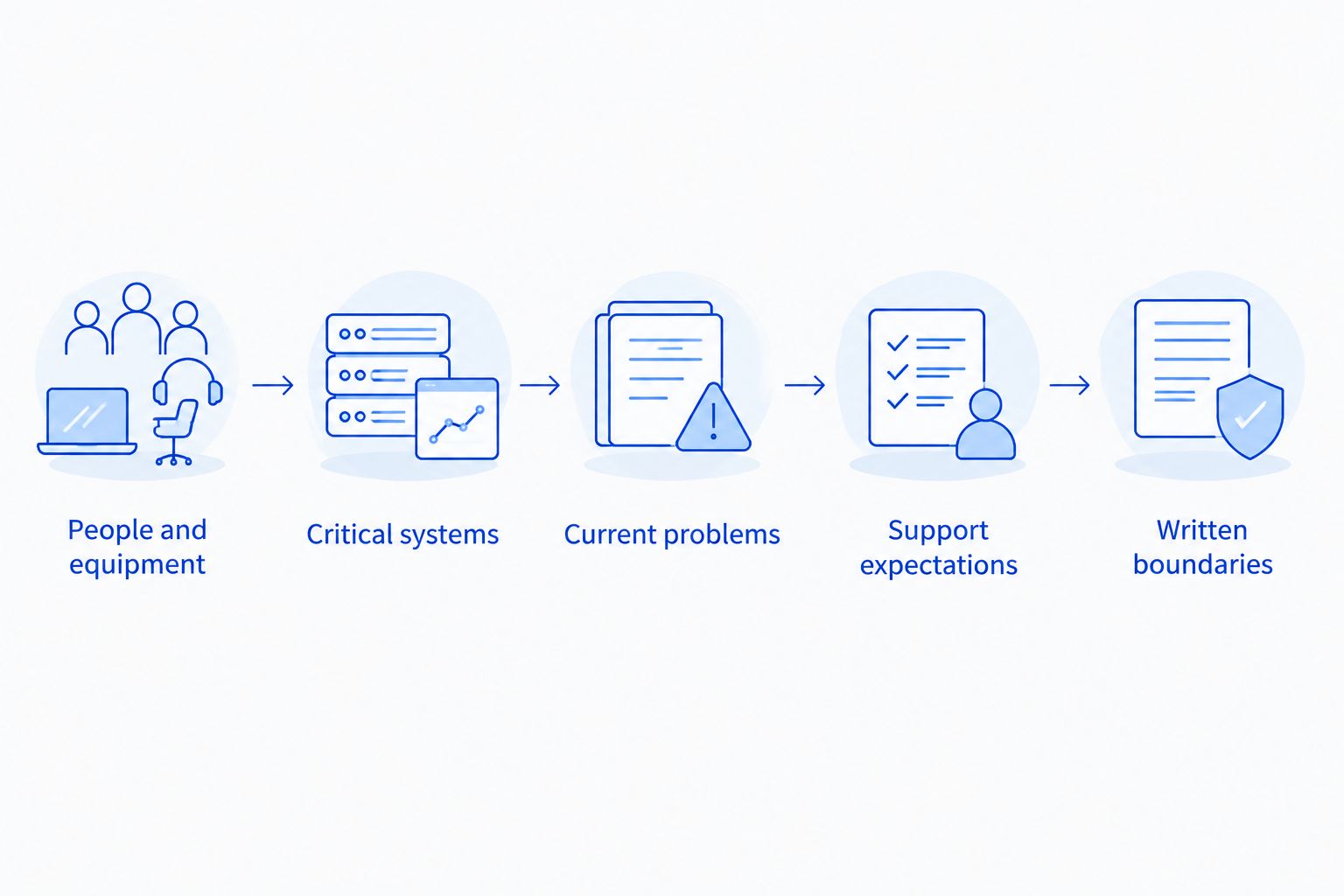
Prepare a short operational brief before contacting providers. You do not need to diagnose the network yourself; you need to describe what staff use and what must keep working.
- List people and equipment. Include office staff, remote employees, shared computers and network equipment. Flag anything you cannot identify.
- List critical systems. Name your email service, agency software, carrier portals and file locations. Record the vendor contact for each system where available.
- Describe current problems. Include recurring slowdowns, access failures, backup concerns and unresolved support requests. Keep symptoms separate from assumed causes.
- Set support expectations. State working hours, office locations and situations that need urgent attention. Ask the provider to explain its response process.
- Request written boundaries. Require included duties, exclusions, onboarding work and approval rules for additional work. Ask who owns each unresolved task.
Keep passwords out of the initial brief. Share administrative credentials only through an agreed secure process when the provider actually needs access. An equipment list helps scope the job without exposing account access.
What should my agency ask about backups and cybersecurity?
Ask what happens after a warning appears, not just whether a tool is installed. An alert needs an assigned person, a decision and a documented next action. Request that responsibility in the agreement.
For backups, identify what is protected and what is not. Ask whether the scope includes local files, shared folders, email and other cloud-held information. Do not assume a backup product covers every place your staff stores client documents.
For cybersecurity, ask how the provider handles suspicious email, compromised accounts and infected computers. Clarify whether incident work falls within regular support or requires separate authorization. A service description should distinguish protective maintenance from investigation and recovery.
Keep compliance questions separate from technical promises. Ask your legal or compliance adviser to identify applicable obligations, then ask the IT provider to document which technical tasks it will perform. Do not treat a managed support agreement as proof that every regulatory or contractual requirement is satisfied.
Does remote support include office visits?
Remote support does not establish an entitlement to office visits. Ask the provider to state when an on-site visit is appropriate, how it is authorized and whether it sits inside the recurring agreement.
That distinction matters when a problem involves cabling, failed equipment or a device that cannot connect. Remote troubleshooting can help identify the next step, but the agreement still needs to explain who handles the physical work. Also ask who coordinates with the internet provider, equipment seller or software vendor when the fault falls outside managed systems.
For a 2026 contract, document those handoffs before an outage. A named responsibility is more useful than a general promise to help.
Is TechConnect NC a local option for my agency?
TechConnect NC is a local managed IT support option for North Carolina insurance agencies seeking small-business monitoring, patching, backups and help desk support. Its stated services also include cybersecurity and remote support. Request a proposal that maps those services to your agency's equipment and working hours.
The company has 2 offices: Clayton, at 5720 US 70 Bus Hwy, Suite B, Clayton, NC 27520, and Granite Falls, at 10A Falls Avenue, Granite Falls, NC 28630. These locations are relevant to agencies around Johnston County and the Raleigh area, and around Hickory, Lenoir and Caldwell County.
Local offices give you a concrete service location to discuss. They do not establish included travel, response commitments or insurance-specific software expertise. Ask TechConnect NC to confirm those details in the proposed agreement rather than assuming them from proximity.
FAQ
How much should my insurance agency budget for managed IT support in 2026?
Base your 2026 budget on a written quote for your agency's users, equipment and required services. Separate recurring support from onboarding, equipment, subscriptions and work outside the agreement.
Is managed IT support better than calling someone when a computer breaks?
Managed IT support fits agencies that want assigned responsibility for ongoing maintenance and help desk tasks. Break-fix support fits an isolated repair, but it does not itself establish continuing monitoring, patching or backup duties.
Are backups included in managed IT support?
Backups are included only when the agreement says they are. Ask which systems are protected, who checks failures and whether restoration work and recovery testing are covered.
Does IT support cover my insurance agency software?
Your agreement must identify the provider's responsibility for agency software. Ask whether support includes access troubleshooting, installation and coordination with the software vendor, and distinguish those tasks from the vendor's own support.
Can a small insurance agency use managed IT support?
A small insurance agency can request managed IT support around its actual equipment and service needs. Ask about minimum commitments and make sure the scope fits the agency rather than an unrelated office size.
Does monitoring mean someone will answer after office hours?
Monitoring does not by itself establish after-hours live assistance. Ask who receives alerts, when a person responds and how employees report an urgent problem outside regular support hours.
Can an IT provider guarantee my agency will not be hacked?
Do not treat managed IT support as a guarantee against a security incident. Ask for specific protective duties, incident responsibilities and recovery procedures instead of an absolute promise.
One last thing
Before signing your 2026 agreement, ask the provider to walk through a failed backup, an employee who cannot sign in and an office internet outage. For each situation, identify who responds, what is included and who approves additional work. This exposes unclear boundaries without requiring you to understand the technical tools.
Choose the agreement you can explain to your office manager. If nobody can say who owns a routine problem, the proposal needs clarification before approval.
Related guides
- How to reduce IT support costs for a small business
- How to protect customer data on a small business network
- How long managed IT onboarding takes for a new business
Call or text 919-737-5442 to discuss your insurance agency's managed IT support needs with TechConnect NC. Have your staff list, equipment inventory and current support concerns ready so the conversation starts with the work your agency needs.