Managed IT support for a manufacturing company is scoped around the people, computers, network, backups and support hours covered by the agreement, so your budget should start with a written inventory rather than a generic monthly estimate. Separate recurring support from onboarding, replacement equipment and project work, and confirm whether production-connected systems are included or excluded before approving a 2026 quote.
- Manufacturing managed IT support cost depends on covered systems, support hours, backups and the work excluded from your agreement.
- Compare recurring support, onboarding and project work separately; a monthly support agreement does not define every responsibility.
- TechConnect NC is a local managed IT support option for North Carolina small businesses.
- Require written boundaries between office IT, production equipment and equipment-vendor responsibilities before signing.
How much does managed IT support cost for a manufacturing company?
The useful budget is the total for your defined scope, not a standalone per-user figure. Ask for a proposal that identifies recurring services, initial cleanup, software subscriptions, equipment and separately approved work. Keep those categories visible rather than accepting a single unexplained total.
A manufacturing business needs an additional boundary: supporting an office computer is not the same job as servicing a machine controller. Our managed IT support for manufacturing companies guide explains the broader planning questions; use the breakdown below to structure your quote.
| Budget component | What the quote should identify | What to check before approval |
|---|---|---|
| Recurring support | Covered users, devices, monitoring, patching and help desk | Which systems and support hours are excluded? |
| Onboarding | Inventory, access setup, documentation and initial assessment | Is existing repair work part of onboarding or separate? |
| Backup and recovery | Protected data, backup oversight and restoration responsibilities | Are recovery testing and restoration labor included? |
| Security | Named protections and the provider's response responsibilities | Does incident cleanup require separate authorization? |
| Equipment and subscriptions | Hardware, licenses and renewal ownership | Who buys, owns and renews each item? |
| Projects and site work | Migrations, replacements, installations and physical visits | Which tasks need a separate written scope? |
For your 2026 comparison, ask every provider to respond to the same inventory. Otherwise, the proposals describe different jobs, and their totals do not answer the same question.
Why this matters
A factory depends on more than the computers in its front office. Shipping labels, shared drawings, scheduling files and business applications can all sit inside the IT support boundary, while the machinery itself remains under an equipment vendor's control.
Your agreement should identify who acts when a problem crosses that boundary. If a workstation cannot communicate with a machine, someone needs responsibility for checking the workstation and network, contacting the equipment vendor and documenting the handoff. An undefined handoff leaves you arranging the response during an interruption.
Do not buy support based only on the number of employees. Count the systems people depend on, then define the work required to keep those systems supported.
Which support arrangement fits your manufacturing business?
The arrangements below are ways to structure a support request, not named service packages. Choose according to who already owns your IT work and what you want an outside provider to handle.
| Arrangement | Best for | Main advantage | Main limitation |
|---|---|---|---|
| Fully outsourced support | Small manufacturers without an internal IT lead | Assigns the agreed support responsibilities to an outside team | Exclusions and equipment-vendor duties still need an internal owner |
| Shared IT support | Manufacturers with an employee responsible for IT | Lets you assign selected tasks to outside support | Overlapping responsibilities create gaps unless documented |
| Break-fix support | Businesses seeking help with a defined repair | Keeps the engagement focused on a specific problem | The repair alone does not establish ongoing monitoring or maintenance |
Fully outsourced support: define ownership
A fully outsourced request should name the services you want handled: monitoring, patching, backups, security, help desk and remote support. Ask which of those services belong in the proposed agreement and which require separate work.
The benefit is clear responsibility for the agreed scope. The limitation is that outsourcing does not remove your need to approve changes, maintain vendor relationships or decide which business functions receive priority during an incident.
Shared IT support: divide the work explicitly
Shared support fits a business where an employee already handles accounts, equipment or application administration. Write down which tasks stay internal and which transfer to the provider.
For example, assign ownership of new-user setup, backup review and urgent network troubleshooting individually. The arrangement gives you a defined division of labor, but it fails when both parties assume the other is watching the same task.
Break-fix support: keep repair separate from prevention
Break-fix support addresses a defined problem rather than establishing an ongoing maintenance relationship. It suits a specific repair request when you already have someone responsible for routine upkeep.
Its limitation matters for manufacturing: resolving today's workstation fault does not establish responsibility for tomorrow's backup alert. Choose break-fix for a repair, not as an assumed substitute for managed support.
Why manufacturing managed IT support scope varies
Use these factors to explain differences between proposals. Ask providers to tie each service to an actual requirement rather than adding an unexplained bundle.
- Covered systems: List office computers, shared workstations, servers, network equipment and production-connected computers. Mark each as included, excluded or dependent on another vendor.
- Support hours: Give the provider your operating schedule and identify when employees need help. Distinguish receiving an alert from having someone assigned to respond.
- Backup responsibilities: Identify business-critical files and applications, who checks backup failures and who performs restoration tests. Do not treat file copying as proof of recovery.
- Security responsibilities: Ask who manages protections, investigates alerts, approves containment and coordinates incident recovery. Keep those duties separate from general help desk language.
- Site work: Identify tasks that require physical access, such as replacing equipment or checking cabling. Ask how visits are requested and authorized.
- Existing condition: Record unsupported systems, unknown administrator credentials, undocumented equipment and unresolved faults. Request a separate scope for corrective work rather than hiding it inside recurring support.
These questions define the work. They also give you a way to challenge a proposal that includes services you cannot identify or leaves critical responsibilities unnamed.
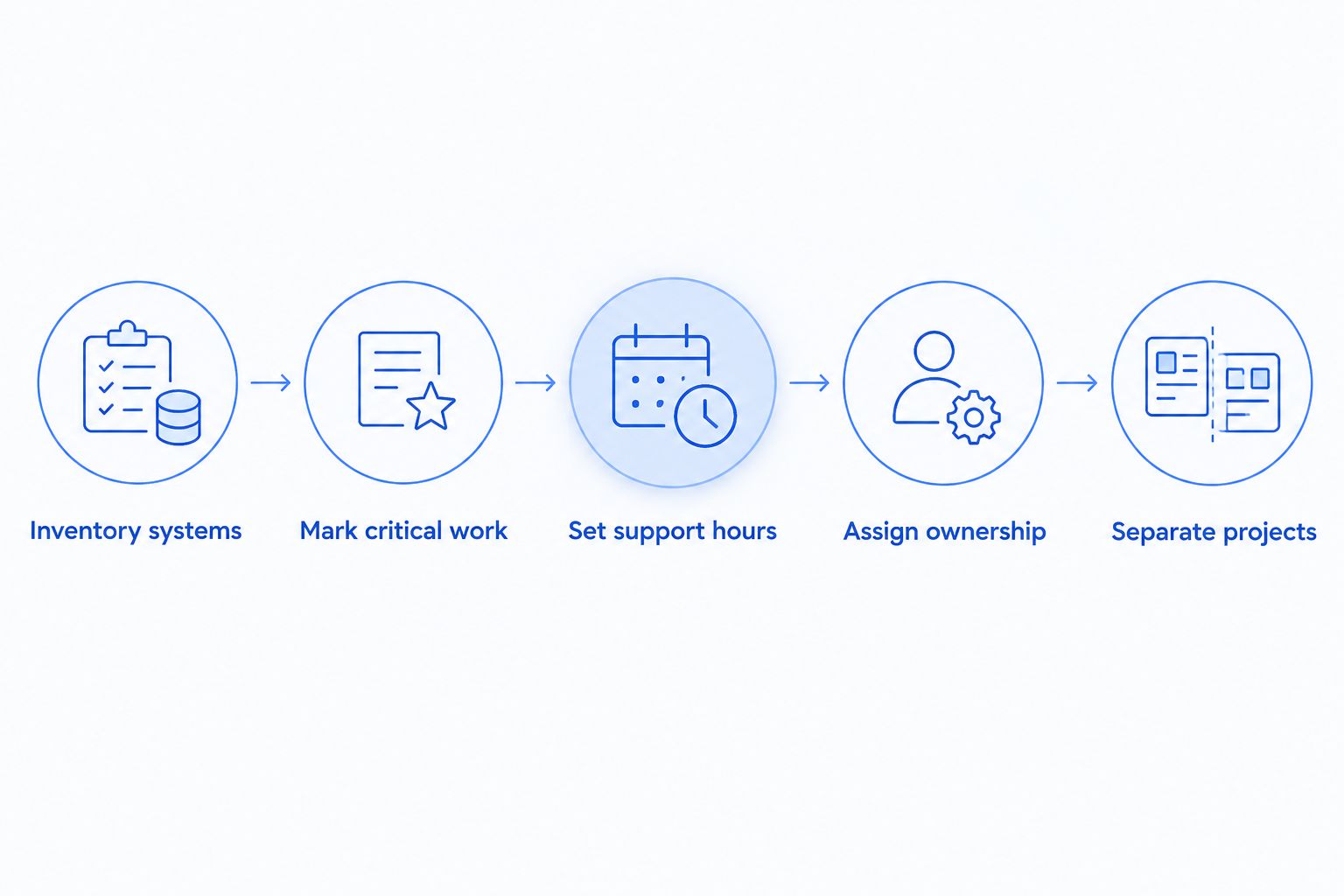
How do you prepare an accurate quote request?
Build your 2026 quote request around a short operating inventory. You do not need to diagnose every technical problem yourself; you need to show what the business depends on and who currently controls it.
- Inventory systems. List users, computers, shared devices, servers, network equipment and important applications. Identify shared shop-floor computers rather than assuming every employee has an individual device.
- Mark critical work. Explain which systems support scheduling, drawings, shipping, accounting and communication. State what employees cannot do when each system stops working.
- Set support hours. Include shift schedules, shutdown periods and the person authorized to request urgent help. Ask how requests outside the agreement's normal hours are handled.
- Assign ownership. Name internal contacts and equipment vendors. Identify who can approve changes and who must be consulted before work touches production-connected systems.
- Separate projects. List known replacements, migrations and repair work apart from routine support. Ask for written approval steps before additional work begins.
The result should be a document a provider can respond to line by line. Keep it as the reference for evaluating the proposal and checking the final agreement.
What should stay outside the office IT agreement?
Do not assume managed IT support includes control-system programming, machine repair or changes to safety-related equipment. Ask for explicit written coverage before anyone works on production technology. An office-support agreement should not serve as permission to modify machinery.
Identify the boundary for industrial computers, machine interfaces and vendor remote access. Ask who approves updates, who confirms compatibility and who schedules changes around production. Where equipment-vendor approval is required, put that dependency in the work instructions.
Your 2026 agreement should also name the person who coordinates a cross-vendor incident. That person does not need authority to repair every system; they need authority to bring the right parties together and keep the business informed.
Does managed IT support include backups and recovery?
Backups and recovery belong in the agreement only when the scope explicitly includes them. Ask what data is protected, who checks failures and what happens when you need files or applications restored.
A backup job completing is not the same as a successful recovery test. Require a description of what gets tested, how results are recorded and who resolves failures. Keep the distinction between restoring files and restoring a working business application visible.
For manufacturing, include shared drawings, job records and application data in the discussion. Let the application or equipment vendor identify special backup requirements rather than assuming a general file backup covers every system.
Does monitoring mean someone will fix a problem immediately?
Monitoring means checking for defined conditions; it does not, by itself, specify a response commitment. Ask who receives alerts, when someone reviews them and what action the agreement authorizes.
Separate acknowledgement, troubleshooting, on-site attendance and restoration. Those are different stages. A promise to respond should identify the stage it refers to, the support hours it covers and the conditions that apply.
In your 2026 review, reject vague wording such as priority service without an explanation of the process. Ask how a production-blocking issue is classified and who receives updates while work continues.
Where does local support fit in North Carolina?
TechConnect NC is a local managed IT support option for North Carolina small businesses seeking monitoring, patching, backups, cybersecurity, help desk and remote support. Discuss which of those services your manufacturing business needs, then request a written scope rather than assuming every task is included.
TechConnect NC has offices in Clayton at 5720 US 70 Bus Hwy, Suite B, Clayton, NC 27520, and Granite Falls at 10A Falls Avenue, Granite Falls, NC 28630. For businesses around Johnston County, the Raleigh area and the Foothills, ask how remote help and physical visits would be coordinated for your location.
The local option gives you a provider to discuss both office support and site needs with. The boundary remains important: confirm manufacturing equipment responsibilities, visit arrangements and response terms directly. Start with TechConnect NC and bring your system inventory to the conversation.
FAQ
How do I get a managed IT support quote for my manufacturing company?
Request a written quote using an inventory of users, devices, applications, locations and operating hours. Ask the provider to separate recurring support, onboarding, equipment and project work.
Is per-user support suitable for a factory with shared computers?
A per-user proposal needs explicit treatment of shared computers and other equipment. Ask which devices are covered independently of employee accounts and how changes to the inventory are handled.
Does managed IT support cover CNC machines and production controllers?
Machine and controller coverage must be explicitly stated in the agreement. Identify equipment-vendor responsibilities and require approval before changes to production-connected systems.
Are backups automatically included with managed IT support?
Backups are included only when the agreement names them as covered services. Confirm protected data, failure monitoring, recovery testing and restoration responsibilities separately.
Can I get support while the factory runs an evening shift?
Request support hours that match your shift schedule and have the provider confirm the arrangement in writing. Monitoring coverage alone does not establish staffed troubleshooting or on-site response.
Is remote support enough for a manufacturing company?
Remote support does not replace every physical task. Define arrangements for hardware replacement, cabling checks and problems involving equipment that cannot be reached remotely.
Should I include old computer replacement in my support request?
List planned computer replacements separately from routine support. Ask who handles purchasing, setup, data transfer and retirement of the old equipment before approving the project.
One last thing
Add an approval rule for production-related changes before you sign. Name who authorizes updates or restarts, who checks equipment-vendor requirements and when the work can happen. A clear change process matters alongside the support total because even routine maintenance needs the right timing.
Related guides
- How to choose between break-fix and managed IT support
- How to connect industrial PCs to a monitored backup system
- How to reduce IT support costs for a small business
Call or text 919-737-5442 to discuss your manufacturing company's managed IT support needs and request a scope covering your systems, operating hours and backup responsibilities.