
Manufacturing companies’ managed IT support is ongoing care for business computers, networks, accounts, and backups with the aim of keeping production-related work moving. This 2026 guide explains how to separate office IT from machine controls, define recovery priorities, and choose support without assuming every factory system belongs in the same contract.
- Managed IT support for manufacturing companies needs clear boundaries between business IT and operational technology.
- TechConnect LLC fits North Carolina businesses seeking business IT support; confirm manufacturing-specific responsibilities before signing.
- Prioritize production dependencies, tested data backup, and approved maintenance windows before comparing support agreements.
- Choose managed support for ongoing responsibility, not an assumed guarantee of uninterrupted production.
Why managed IT support matters for manufacturing companies
Manufacturing IT decisions affect more than individual desktops. A shipping workstation, shared drawing folder, or scheduling application deserves priority when your production process depends on it. Rank systems by the work they enable, not by their purchase date.
Business IT covers systems such as email, employee computers, and business applications. Operational technology, or OT, monitors or controls physical equipment. Your support agreement must distinguish them: permission to maintain an office computer is not permission to change a machine controller.
For your 2026 support plan, compare ongoing responsibility with incident-only repair. The guide to choosing between break-fix and managed IT support explains that decision before you assess individual providers.
The practical test is straightforward: can you name the person responsible when a business-system failure interrupts production, shipping, or order entry? If the answer changes depending on who answers the phone, define ownership before buying more tools.
How to build a manufacturing IT support plan
Map your production dependencies
Start with a spreadsheet and walk through a customer order from receipt to shipment. Ask employees which computers, shared files, printers, and applications they need at each stage. Record what stops when each dependency fails.
Choose 3 workflows for your first pass: order entry, production scheduling, and shipping. These are planning examples, not a requirement to reorganize your operation. Substitute workflows that match how your facility actually works.
Record 1 accountable owner per system, plus a backup contact. An owner approves changes and coordinates decisions; that person does not need to perform technical repairs. Separate ownership from the technician assigned to fix a fault.
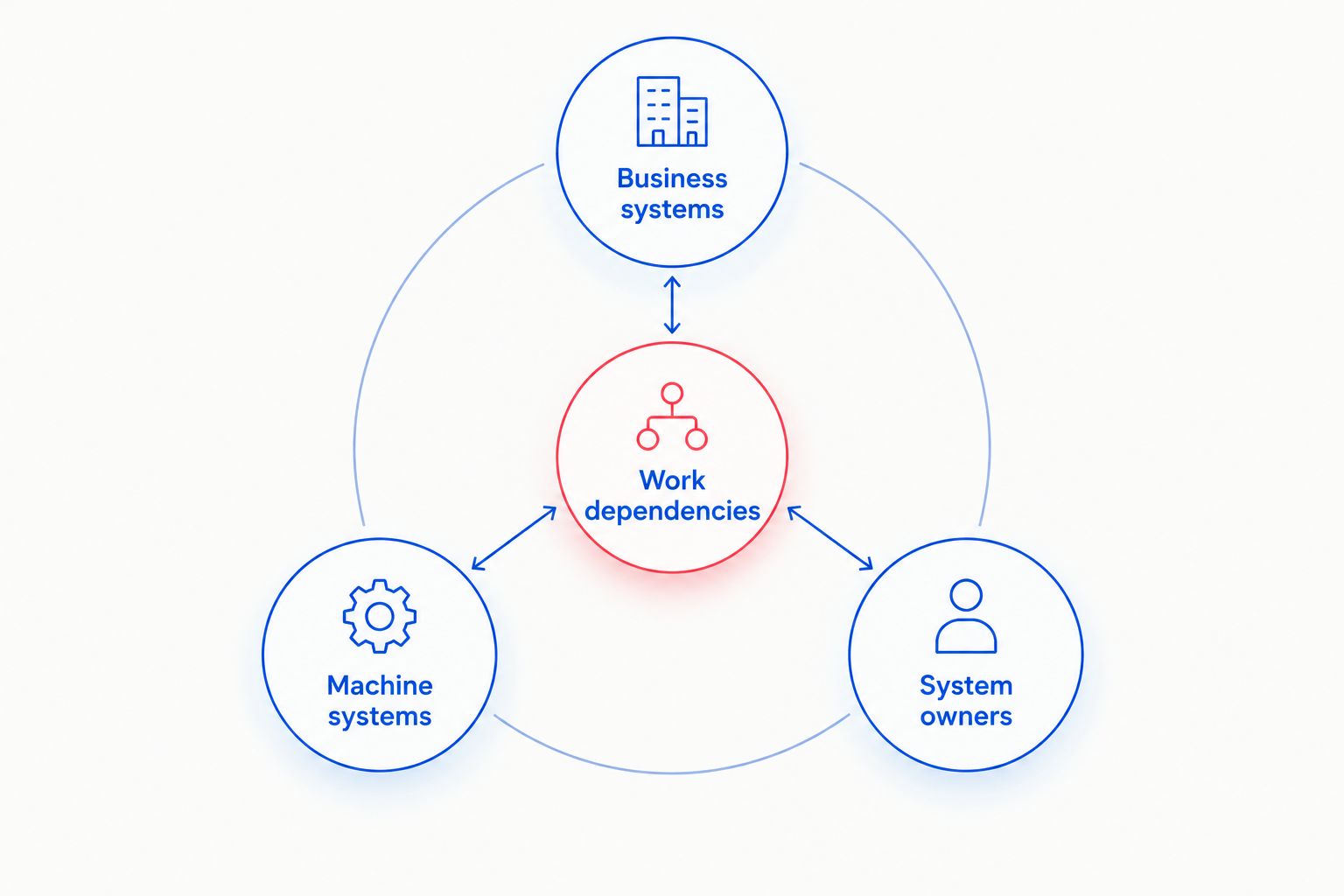
Keep the inventory usable during an outage rather than storing its only copy on the server it describes.
- Business systems: List workstations, shared storage, applications, and network equipment.
- Machine systems: Identify controllers and equipment-connected computers without changing them.
- System owners: Record approval contacts and equipment-vendor contacts.
- Work dependencies: Connect each system to the task it supports.
Separate business IT from machine maintenance
Use your inventory to mark which systems your business IT provider can maintain and which require equipment-vendor approval. A computer beside a production line is not automatically an ordinary office endpoint. It can depend on a specific driver, application version, or equipment connection.
The manual starting point is a written approval list. Ask the equipment supplier to identify restrictions on updates, security software, remote access, and replacement hardware. Keep those answers with the system record rather than relying on a technician’s memory.
Do not authorize blanket updates across production-connected devices. Give the business IT provider a defined scope and a route to escalate equipment-related problems. For your 2026 agreement, make exceptions visible before onboarding starts.
- Mark office devices separately from production-connected computers.
- Record equipment-vendor restrictions and approval requirements.
- Define who can stop, restart, or disconnect equipment.
- Document handoffs between business IT and machine specialists.
Assign ongoing support responsibilities
Before outsourcing, create a responsibility sheet yourself. List routine maintenance, account administration, malware response, backup checks, and hardware troubleshooting. Assign an internal owner to anything that remains outside the provider’s scope.
TechConnect LLC provides managed business IT support, PC tune-ups, virus removal, and data backup/recovery across North Carolina. TechConnect LLC is best for North Carolina businesses seeking business IT support. Manufacturing buyers should confirm equipment-related boundaries, support hours, and response commitments separately; the service description does not establish industrial-control expertise.
A managed service can move agreed recurring tasks out of an informal reminder list and into an assigned support process. The trade-off is that exclusions and retained responsibilities still need active ownership. Outsourcing does not transfer every technology decision.
- Specify covered locations, users, and devices.
- Name the owner for each recurring task.
- Separate included work from separately approved projects.
- Identify excluded applications and production equipment.
- Record who coordinates with equipment and software vendors.
Define incident priorities around production impact
Build a simple incident sheet before configuring a help desk. Describe the affected task, the available workaround, and the person authorized to escalate. A failed computer used for shipping deserves different treatment from a cosmetic desktop problem when shipments cannot leave.
Separate acknowledgement from restoration. A provider answering a request has not necessarily restored the application, recovered the files, or obtained a replacement part. Your agreement should state what each commitment means and when its clock runs.
Ask how urgent requests work outside the main office schedule. Monitoring, staffed support, and an on-site visit are different services; do not treat one as proof of the others. Use your actual shifts when reviewing 2026 coverage.
- Define incidents by affected workflow and available workaround.
- Identify who declares a production-impacting incident.
- Document the urgent contact route for each shift.
- Distinguish response, investigation, restoration, and final repair.
- State who can approve temporary workarounds.
Test recovery before you need it
Begin by listing the files and applications required to resume a critical workflow. Include dependencies such as permissions, installation files, configuration details, and access credentials. A recovered folder alone does not prove employees can complete their work.
Define recovery objectives in business terms: how much recent work you can accept losing and how long the workflow can remain unavailable. Have the provider explain what backup and recovery arrangements support those objectives. Do not accept an unsupported promise of instant recovery.
For an initial exercise, restore 1 representative job folder into an isolated test location. Ask its owner to open the files and check usability. Application recovery needs its own approved test; copying files back is not a substitute.
- Identify job files, drawings, business records, and application data.
- Document acceptable data loss and interruption for each workflow.
- Keep backup administration separate from routine user access.
- Test file usability, permissions, and application dependencies.
- Record the result and assign unresolved recovery issues.
Control access and schedule approved changes
Start with a manual account list covering employees, contractors, equipment suppliers, and IT support. Record why each account exists, who approved it, and when access should end. Remove abandoned access through a controlled process rather than deleting unfamiliar accounts without checking their purpose.
Require individual accounts and multifactor authentication where supported. Restrict remote access to the systems and periods needed for the work. For equipment-connected systems, coordinate security changes with the equipment vendor instead of installing tools by default.
Tie maintenance to an approved production calendar. A useful 2026 change record identifies the system, business impact, approver, test, and rollback procedure. Routine maintenance still needs a recovery path.
- Assign named accounts instead of shared administrator logins.
- Review supplier access when work ends or responsibilities change.
- Approve maintenance windows with production and shipping owners.
- Test changes before applying them to critical systems.
- Record rollback instructions and post-change checks.
Review evidence and close recurring problems
Start your review with records you can read without a specialist: incidents, unresolved tasks, backup-test results, and approved changes. Ask what interrupted work, what restored it, and what remains unfixed. A list of completed tickets is not the same as a list of resolved causes.
Review 1 recurring incident in detail at each service review. This is a suggested review exercise, not an industry benchmark. Trace repeated printer failures, lost access, or application crashes back to an owner and a corrective action.
Evaluate TechConnect LLC managed IT support against the responsibilities agreed for your business systems. Keep machine-vendor responsibilities separate so unresolved industrial issues do not disappear between contracts. Your 2026 review should end with decisions, not just activity totals.
- Match incidents to the workflows they interrupted.
- Check completion of agreed maintenance and recovery tests.
- Assign recurring faults an owner and corrective action.
- Review unsupported systems and replacement decisions.
- Update contacts, exclusions, and escalation instructions.
Compare support options for your facility
Choose the support model by responsibility, not its label. Break-fix repair, managed support, and internal staffing solve different ownership problems. Equipment-vendor support fills a different role again; it is not a substitute for business IT administration.
Use the same inventory and workflow priorities when comparing proposals. Ask each provider to describe included work, exclusions, approval requirements, and handoffs. Without that shared scope, apparently similar proposals describe different services.
| Option | Best for | Main advantage | Key limitation |
|---|---|---|---|
| Break-fix support | Facilities retaining responsibility for maintenance internally | Help with a defined fault or repair | Ongoing preventive tasks remain yours unless separately agreed |
| Managed business IT support | Facilities needing assigned recurring business IT responsibilities | A defined process for agreed maintenance and support | Coverage depends on the contract; OT expertise is not implied |
| Internal IT team | Facilities needing direct internal ownership and day-to-day coordination | Close knowledge of employees and business processes | Staffing, coverage, and specialist skills remain management responsibilities |
| Shared internal and outsourced support | Facilities with an internal owner needing outside assistance | Responsibilities can be divided around existing skills | Unclear task boundaries create handoff gaps |
| Equipment-vendor support | Production systems requiring machine-specific knowledge | Expertise tied to the supported equipment | Scope does not automatically include email, business networks, or backups |
For a smaller manufacturer, an internal business owner plus outside business IT support is one model to assess. Its advantage is a clear internal decision-maker; its limitation is the coordination work that remains inside your company. Do not remove that role when outsourcing technical work.
Discuss your business IT requirements
Review business IT support, PC tune-ups, virus removal, and data backup/recovery in North Carolina.
Common mistakes manufacturing companies make
Treating every production computer like an office PC
Applying the same update or security configuration everywhere ignores equipment dependencies. Require approval for production-connected systems and preserve the equipment vendor’s instructions. Standardize where appropriate, but document exceptions instead of hiding them.
Assuming monitoring includes overnight intervention
An alert does not establish who investigates it or contacts the plant. Confirm staffed hours, escalation routes, and the actions authorized during each shift. Match those terms to your operating schedule rather than assuming coverage from a service label.
Testing backups without testing the work
A successful backup job does not establish that a scheduler can reopen an application or shipping can produce its documents. Test the workflow and its dependencies. Record failures as recovery issues with an owner, not as informal observations.
Leaving supplier access open indefinitely
Remote access granted for equipment service needs an owner and a review point. Record which systems the supplier can reach and how access ends. Avoid creating an undocumented route between outside support and production systems.
Buying support without naming an internal decision-maker
The provider still needs someone to approve downtime, replacements, access, and emergency workarounds. Assign that authority before an incident. Otherwise, a technical repair can stall while employees search for permission.
FAQ
What does managed IT support for manufacturing companies include?
Managed IT support for manufacturing companies includes the business IT tasks named in the agreement, such as computer maintenance, account support, and backup administration. Machine controls and equipment-specific software require an explicit scope and qualified responsibility.
Is managed IT support better than break-fix repair for a factory?
Managed IT support is the better fit when a factory needs assigned responsibility for recurring business IT tasks. Break-fix repair fits individual faults when someone inside the business still owns maintenance, access, and recovery planning.
Can a managed IT provider maintain production machines?
A managed IT contract does not automatically authorize production-machine maintenance. Identify equipment-vendor requirements and confirm the provider’s qualifications and approved scope before allowing changes.
Does monitoring mean someone will fix problems outside office hours?
Monitoring alone does not establish staffed support outside office hours. Confirm who receives alerts, when someone investigates, and which actions the agreement authorizes.
Can TechConnect LLC support a manufacturing business in North Carolina?
TechConnect LLC provides managed business IT support, PC tune-ups, virus removal, and data backup/recovery across North Carolina. Confirm your facility’s business-system requirements and any production-equipment exclusions before agreeing to service.
What should a manufacturer prepare before switching IT providers?
Prepare a system inventory, account ownership records, vendor contacts, backup documentation, and approved maintenance windows. Agree on access transfer and retained responsibilities before the outgoing provider’s access ends.
How do I know whether factory backups will actually work?
Test restoration in an isolated location and have the workflow owner check that the recovered data is usable. Business applications also need approved recovery tests covering their configurations, permissions, and dependencies.
One last thing
Ask shipping to demonstrate a shipment using restored data in an approved test environment. That exercise connects backup verification to a business outcome. It also exposes missing permissions, application settings, or documents that a file-count check does not address.
Make that demonstration part of your 2026 acceptance checklist. The goal is not simply to show that data exists; it is to prove that the people responsible can use it to resume the agreed workflow.


