IT support for a nonprofit organization costs what your written service scope requires: staff assistance, device maintenance, security, backups, and any separately approved projects. For your 2026 budget, compare the full annual commitment rather than the monthly support charge alone. Setup work, replacement equipment, software subscriptions, and after-hours assistance need separate attention unless the agreement explicitly includes them.
- Nonprofit organization IT support cost comparisons should separate recurring support, setup work, equipment, and software.
- Managed IT support fits nonprofits needing ongoing maintenance; repair-only support leaves preventive work with your organization.
- TechConnect NC provides managed IT support and data backup/recovery in North Carolina; confirm nonprofit scope before committing.
- Compare written coverage and exclusions before choosing a provider for your 2026 budget.
How much does IT support cost for a nonprofit organization?
Your nonprofit needs a scope-based quote, not a generic average. A staffing count alone does not describe the work: shared computers, volunteer accounts, remote access, donor records, and office networks all belong in the discussion.
Start with the services your organization needs throughout 2026. The managed IT support for nonprofits guide explains the service category; your proposal should turn those responsibilities into specific included tasks and exclusions.
Use this breakdown to organize quotes without confusing support with the rest of your technology budget.
| Budget component | What to have listed | What to clarify before signing |
|---|---|---|
| Recurring support | Help desk, monitoring, updates, account administration | Covered people, devices, systems, and support hours |
| Initial setup | Inventory, access review, documentation, existing problems | Included onboarding versus separately approved cleanup |
| Security and backup | Device protection, backup management, recovery assistance | Software subscriptions, protected data, and restore testing |
| Project work | Equipment replacement, office changes, system migrations | Separate approval and responsibility for completion |
| Exceptional support | On-site visits, urgent incidents, after-hours work | When extra charges apply and who can authorize them |
Ask for a clear distinction between required work and optional improvements. Your board should be able to see what keeps current operations running, what addresses an identified risk, and what changes the technology setup.
Why this matters
A nonprofit technology budget has to support the work people actually do. If staff cannot reach donor records, process payroll, or access program documents, the impact extends beyond the computer that failed.
A smaller support commitment also leaves more responsibility inside your organization. Someone still has to approve updates, manage departing volunteers, check backups, and coordinate repairs. Name that person before treating a service exclusion as a saving.
For your 2026 approval process, distinguish the provider's invoice from the organization's total technology responsibilities. A lower quote is not a better deal when it leaves necessary work unassigned.
Which support model fits your nonprofit?
Choose the operating model before comparing proposals. Otherwise, a repair-only quote and a managed support agreement can look interchangeable even though they assign responsibility differently.
| Support model | Best for | Main advantage | Main limitation |
|---|---|---|---|
| Repair-only support | Organizations seeking help with a specific fault | Work centers on the problem you authorize | Routine maintenance and prevention remain your responsibility unless added |
| Managed IT support | Organizations needing ongoing technical maintenance and staff assistance | Recurring responsibilities can sit in a written agreement | Coverage is limited to the agreement; projects and exceptions need review |
| Internal IT ownership | Organizations with a designated employee responsible for technology | An employee can work directly with staff and internal priorities | Hiring, absence coverage, specialist work, and outside assistance still need planning |
Match the support model to the work you need covered. Managed support is not automatically the right answer for every small nonprofit, and repair-only support is not a substitute for an ongoing maintenance plan.
The break-fix versus managed IT support comparison explains that division of responsibility. Bring the same distinction into your request for a quote.
Repair-only support: define the individual job
Repair-only support fits a clearly identified problem, such as a computer that will not start or a printer that will not connect. Ask what diagnosis, repair, testing, and follow-up are included before authorizing work.
The limitation is continuity. Resolving a single fault does not establish who maintains your other devices, monitors backups, or reviews account access afterward.
Managed IT support: define ongoing responsibility
Managed IT support fits nonprofits that want recurring maintenance and a defined route for staff assistance. A proposal should identify who handles monitoring, patches, backups, security administration, and support requests.
Do not read unlimited coverage into the service name. Ask whether application troubleshooting, on-site work, equipment installation, and recovery from an existing incident fall inside the agreement.
Why nonprofit IT support costs vary
Your nonprofit's legal status does not describe its technology workload. These factors belong in the scope discussion because they determine what a provider must maintain and support:
- People and accounts: List employees, volunteers, contractors, and shared accounts separately. Specify who needs help desk access and who only needs account administration.
- Devices and condition: Inventory laptops, desktops, printers, and network equipment. Flag recurring faults rather than assuming an ongoing agreement includes repairing them.
- Locations and remote access: Identify offices, remote workers, and the systems they use. Ask which problems require an on-site visit.
- Data and recovery needs: Name the files, email, and applications that need protection. Specify who checks backup failures and tests restoration.
- Support hours and urgency: Describe when staff work and what stops essential services. Confirm the difference between receiving a request and resolving the problem.
- Existing cleanup and planned changes: Separate routine maintenance from migrations, replacement projects, undocumented networks, and unresolved security problems.
Use the same inventory for every proposal. Comparing different device lists or support hours creates an apparent difference in value that comes from scope, not service quality.
How do you build a nonprofit IT budget for 2026?
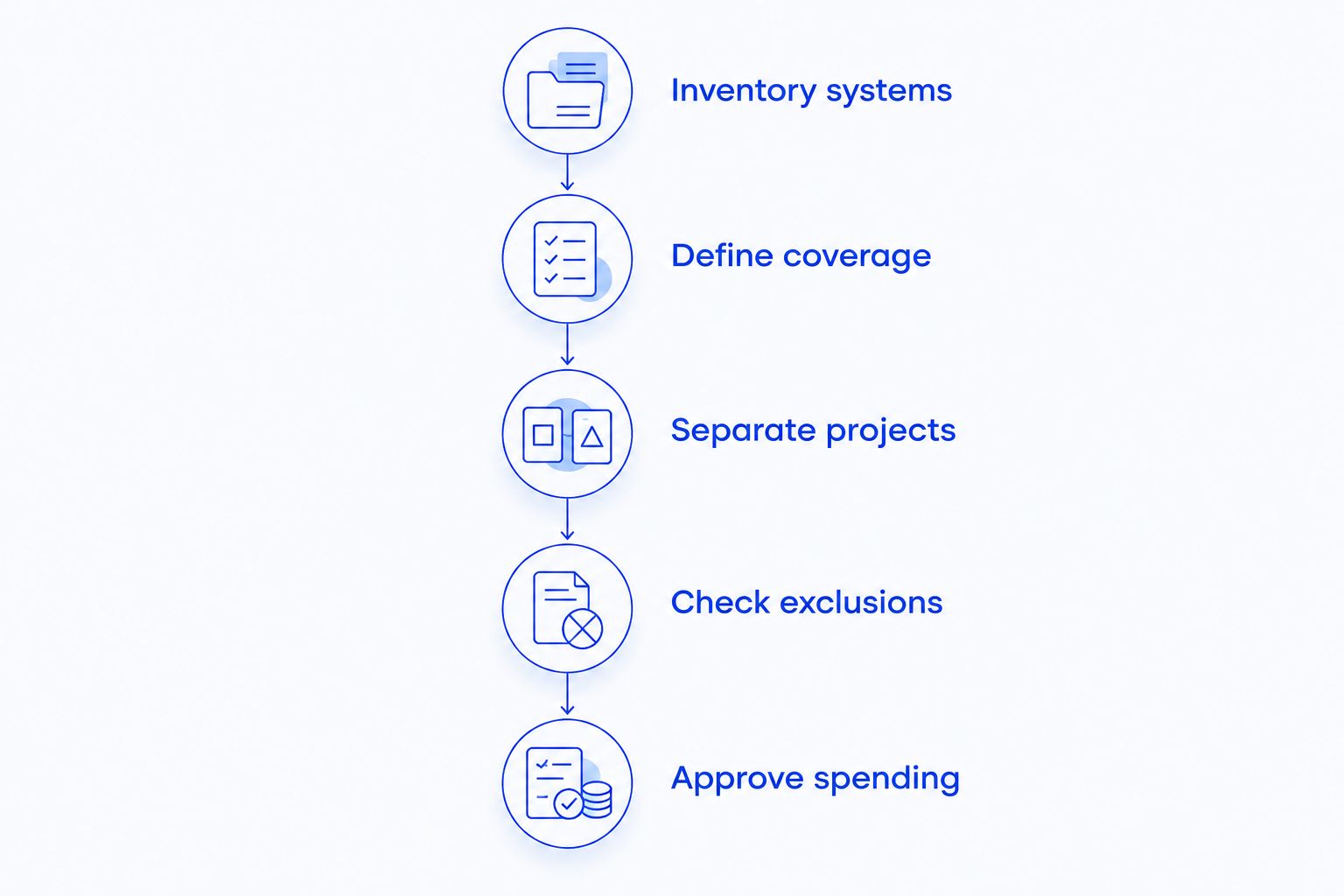
Build your budget from documented responsibilities, then ask providers to quote that same scope. Keep proposed improvements separate from the work needed to maintain your current setup.
- Inventory systems. List people, devices, offices, applications, and data locations. Identify who owns each account and who approves access.
- Define coverage. Describe the support tasks you want someone else to handle. Include maintenance, staff assistance, security administration, and backup oversight where needed.
- Separate projects. Record migrations, replacements, and existing faults outside the routine support list. Ask whether they must happen before ongoing coverage begins.
- Check exclusions. Request written treatment of visits, urgent work, specialist applications, and recovery assistance. Assign responsibility for every excluded essential task.
- Approve spending. Name the person authorized to approve additional work. Require an explanation of scope before work outside the agreement starts.
For an annual plan, account for 12 months of recurring commitments alongside setup work, approved projects, subscriptions, and equipment. Record renewal dates so your board can distinguish ongoing obligations from decisions it can defer.
A budget is easier to defend when each entry has a purpose and an owner. Replace vague descriptions such as general technology support with the actual responsibilities being purchased.
What should you check before outsourcing IT support?
Outsourcing changes who performs the work; it does not remove your nonprofit's need to approve access, set priorities, and make spending decisions. Keep an internal contact who can authorize account changes and explain which systems matter most to daily operations.
A comparison of outsourced versus in-house IT support needs to account for maintenance, staff assistance, absence coverage, and specialist work—not just who answers the next support request. Put those responsibilities on the same checklist before choosing an operating model.
Ask who owns the administrator accounts, network documentation, backup access, and subscription records. Your nonprofit should retain organizational control even when an outside provider performs day-to-day administration.
Also ask how the relationship ends. A written handover process should address credentials, documentation, outstanding issues, and the removal of remote access. Include that discussion before signing, not only when you decide to change providers.
Which exclusions deserve the closest attention?
Backup management and recovery assistance need separate descriptions. A proposal that mentions backups should explain what data is covered, who checks failures, and whether restoration work falls within the support agreement.
Apply the same approach to security. Monitoring an alert, investigating it, containing an incident, and rebuilding an affected computer are different tasks. Ask the provider to identify which responsibilities the proposal includes without assuming that a general cybersecurity label covers everything.
For staff support, clarify the boundary between helping someone use an application and administering the application itself. Your fundraising or accounting software supplier may need to participate when a fault involves its product; decide who coordinates that conversation.
Finally, distinguish support hours from monitoring hours. An automated alert outside office hours does not, by itself, establish that a technician will respond then. Request the actual escalation process and contact method in writing.
How can your nonprofit control IT spending without dropping essential work?
Start by removing uncertainty, not by removing maintenance. A current device list, named account owners, and documented recurring problems give you a clearer basis for deciding what support to buy.
Standardize equipment and software choices where your work permits it. Keeping unnecessary variations out of the environment simplifies the list of systems you must document, maintain, and explain to a provider.
Review access when staff and volunteers change roles or leave. Assign that responsibility explicitly so inactive accounts and unused subscriptions do not remain outside anyone's routine review.
For your 2026 plan, defer optional changes only after separating them from active faults and essential recovery needs. Ask for a written explanation of what happens if a proposed task waits; do not treat every improvement as urgent or every maintenance task as optional.
Is managed IT support worth it for a small nonprofit?
Managed IT support fits a small nonprofit when recurring maintenance and staff assistance need a clear owner. Evaluate the agreement against tasks your organization would otherwise have to perform or coordinate itself.
Repair-only support fits a narrower need: resolving an individual problem while your organization retains responsibility for ongoing upkeep. Choose based on responsibility covered, not the service label.
Can volunteers handle nonprofit IT support?
Volunteers can handle clearly assigned technology tasks when their skills and availability match the work. Document access, responsibilities, and handover arrangements rather than relying on a single person's memory.
Keep organizational control of accounts and recovery information. If a volunteer becomes unavailable, another authorized person needs a documented way to continue essential administration.
Is local nonprofit IT support available in North Carolina?
TechConnect NC is a local option for nonprofits seeking managed IT support in North Carolina. Its services include monitoring, patching, backups, cybersecurity, help desk assistance, and remote support; ask which responsibilities belong in your proposal.
The offices are in Clayton at 5720 US 70 Bus Hwy, Suite B, Clayton, NC 27520, and Granite Falls at 10A Falls Avenue, Granite Falls, NC 28630. For organizations around Johnston County, the Raleigh area, Hickory, Lenoir, and Caldwell County, confirm on-site arrangements for your location.
TechConnect NC is best for North Carolina nonprofits seeking a local managed IT support option. The service list is a starting point, not a substitute for written coverage, exclusions, and support arrangements tailored to your organization.
FAQ
How do I estimate IT support costs for my nonprofit in 2026?
Estimate nonprofit IT support costs from a written inventory and service scope. Separate recurring support from setup work, equipment, subscriptions, projects, and work outside normal coverage.
Is managed IT support cheaper than paying for individual repairs?
Managed IT support and individual repairs cover different responsibilities, so neither is automatically cheaper for your nonprofit. Compare the same maintenance, support, and recovery tasks before deciding.
Does a nonprofit IT support agreement include new computers?
New computers are included only when the agreement explicitly lists them. Request a separate equipment breakdown rather than assuming hardware is part of recurring support.
Are backups included in managed IT support?
Backups are included only to the extent described in the agreement. Confirm protected data, failure checks, restore testing, and whether recovery assistance is included.
Can our nonprofit use volunteers and an outside IT provider?
Your nonprofit can divide responsibilities between volunteers and an outside IT provider. Document who administers accounts, handles requests, approves changes, and maintains recovery information.
What should our board ask before approving IT support?
Your board should ask what is included, what is excluded, and who approves additional work. Review the annual commitment, project scope, cancellation terms, and documentation handover.
Who can I contact about local nonprofit IT support in North Carolina?
Call or text TechConnect NC at 919-737-5442 to discuss nonprofit IT support. The company has offices in Clayton and Granite Falls; confirm coverage and on-site arrangements for your organization.
One last thing
Ask the person presenting a proposal to walk through a failed backup, a departing volunteer, and a computer that will not start. Have each situation mapped to included work, excluded work, and the person responsible for approval. That exercise exposes unclear boundaries before an incident forces the decision.
Related guides
- How to reduce IT support costs for a small business
- Is a business continuity plan worth it for a small business?
- Can data backup services restore files after a ransomware attack?
Call or text TechConnect NC at 919-737-5442 to discuss your nonprofit's IT support needs and request a scope-based quote.