Yes—cloud backup is worth it for a real estate agency when losing contracts, transaction records, email, or listing files would interrupt work and the backup can restore those records independently of the original system. The caveat is that cloud storage alone does not prove recoverability: you also need defined coverage, protected access, and a successful restore test.
- Cloud backup is worth it for a real estate agency when tested recovery protects essential transaction records.
- File synchronization supports collaboration; it does not automatically provide an independent backup.
- Choose backup coverage around contracts, email, listing files, and recovery needs—not storage capacity alone.
- TechConnect NC offers cloud backup and managed IT support for North Carolina homes and businesses.
Is cloud backup worth it for a real estate agency?
Cloud backup earns its place when it gives your agency a usable recovery path—not merely another place to store files. In 2026, evaluate that recovery path against the records you actually need to keep transactions moving.
Start with an inventory of essential documents and where they live. The data backup guide for real estate agencies provides a related starting point for planning coverage.
| Approach | Best for | Main advantage | Main limitation |
|---|---|---|---|
| Independent cloud backup | Recovering records after a device or office incident | Keeps a recovery copy away from the original device | Recovery depends on coverage, retention, access, and connectivity |
| Local backup | Restoring files from equipment you control | Provides a nearby recovery source | A connected or nearby copy can share the original system's risks |
| Combined local and cloud backup | Agencies needing nearby and off-site recovery paths | Reduces reliance on a single recovery location | Requires more setup, checking, and ownership |
| File synchronization alone | Sharing current working documents | Keeps working files accessible across devices | Changes and deletions can synchronize; recovery features require verification |
Choose independent backup for recovery and synchronization for collaboration. A combined approach adds useful separation, but only when you test both recovery paths rather than assume either works.
Why this matters
A transaction folder can contain documents from several people, saved in different places and revised throughout a sale. If you protect only the office computer, you can leave email attachments, laptop downloads, or shared documents outside the backup.
The practical question is not whether your agency uses the cloud. It is whether you can recover the correct version of an essential record when its normal location becomes unavailable.
Independent cloud backup: best for off-site recovery
Independent cloud backup is a useful choice when you need a recovery copy separate from an agent's laptop or office equipment. It addresses a different problem from sharing a folder: restoring records after something goes wrong.
Look for a clear explanation of which files and accounts are included, how older versions are retained, and who can delete recovery copies. Those details determine what you can recover; the word cloud does not.
The limitation is dependency. You still need access to the backup account, a suitable destination for restored files, and a working recovery process. Choose cloud backup when a demonstrated restore matches your agency's requirements.
Local backup: best for a nearby recovery source
Local backup gives you a recovery source on equipment under your control. That can help when you need to retrieve files without first downloading an entire collection from an off-site service.
Its weakness is shared exposure. A backup drive left connected to an affected computer, or stored beside equipment damaged in the same incident, is not fully separated from the original problem.
Treat local backup as part of a plan rather than proof that the plan is complete. Use a nearby copy for convenience without making it your only recovery path.
Combined backup: best for recovery flexibility
A combined approach uses local and off-site copies for different recovery situations. It gives you alternatives when one source is unavailable, provided the copies do not all depend on the same vulnerable access path.
The established 3-2-1 backup guideline calls for 3 copies of your data, across 2 media types, with 1 copy off-site. It is a planning guideline, not a guarantee: copies still need appropriate protection and successful recovery tests.
The trade-off is additional responsibility. Someone must check coverage, investigate failures, and test the available copies. Choose combined backup when your agency can maintain both paths or assign that responsibility to IT support.
Why cloud backup value varies
For your 2026 backup review, judge these factors against your actual files and working arrangements. Do not buy coverage based solely on the number of computers in the office.
- File coverage: Identify what needs protection across computers, shared folders, email, and business applications. A backup cannot restore records it never captured.
- Recovery scope: Recovering an individual document is different from rebuilding a working computer. Ask which task the proposed service supports.
- Access protection: Check who can change settings, remove copies, and authorize recovery. Backup access deserves protection separate from ordinary file access.
- Recovery connectivity: Off-site recovery needs a way to retrieve the data. Include internet access and a suitable replacement device in the plan.
- Ongoing oversight: Assign someone to review failures, update coverage, and repeat restore tests when systems change.
These factors explain why identical storage capacity does not mean identical protection. Evaluate the recovery process before choosing the storage allowance.
What should your real estate agency back up?
Build a backup checklist around business records, not just familiar folder names. For a 2026 review, ask the person responsible for each record where its authoritative copy lives and how that copy would be restored.
Start with these categories where your agency uses them:
- Signed agreements, disclosures, amendments, and transaction correspondence.
- Listing photographs, marketing files, and property documents.
- Business email and attachments needed to understand a transaction.
- Accounting records and commission-related documents.
- Contact records and exports from business applications.
- Operational documents needed to run the office.
Do not assume that a desktop backup includes records inside an online application. Ask the application provider what recovery is available and whether your agency needs an independent export or backup process.
Backup retention and legal record retention are also different decisions. Confirm applicable recordkeeping requirements with the person responsible for compliance rather than treating a backup setting as legal advice.
How do you check whether a backup will actually work?
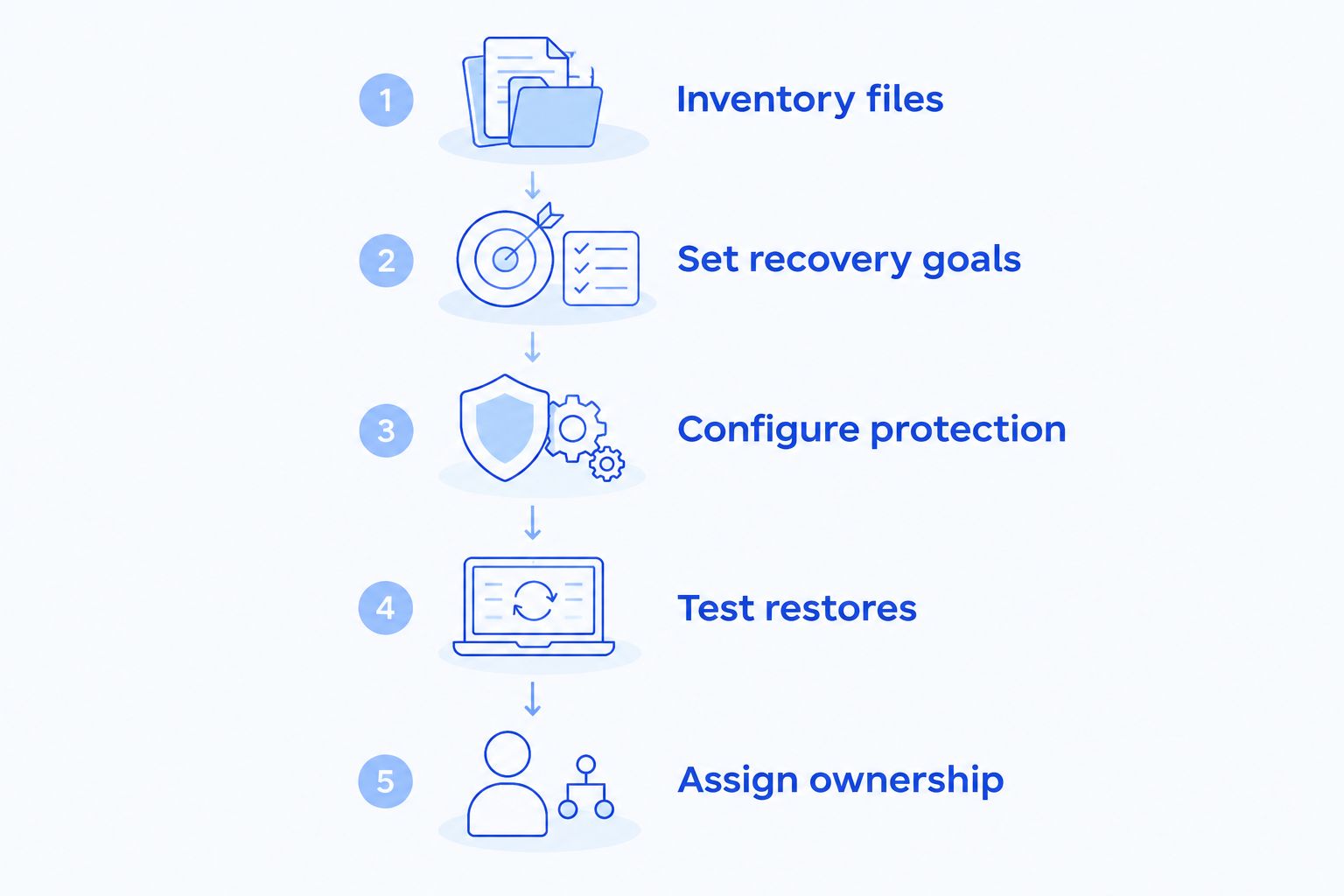
Use this sequence before accepting a new arrangement or renewing an existing one. A 2026 backup review should end with evidence that you can retrieve useful records, not just a screenshot showing a completed job.
- Inventory files. List essential records, their locations, and their business owners. Include files outside the main office computer.
- Set recovery goals. Decide which records must return first and how much recent work your agency can recreate. Make those decisions explicit before configuring backup schedules.
- Configure protection. Confirm included folders and accounts, version retention, administrator access, and failure notifications. Document exclusions as well as coverage.
- Test restores. Restore representative records into a separate location, then open them and verify that the contents and versions are correct.
- Assign ownership. Name the person responsible for reviewing alerts, resolving failures, and arranging the next test after meaningful changes.
A successful test should answer a business question: can the person handling the transaction use the recovered record? Seeing a filename in a recovery window is not enough.
What should you ask before agreeing to cloud backup?
Ask for answers in plain language and keep them with your office procedures. Your 2026 agreement should describe the service you are receiving without making you infer coverage from general terms such as protected or managed.
- Which computers, accounts, folders, and applications are included?
- What is specifically excluded?
- What happens when a laptop is offline during a scheduled backup?
- How are failures reported, and who follows up?
- How do you recover an older version or a deleted file?
- What access remains available if the usual administrator cannot sign in?
- What happens to recovery access when you change IT providers?
Ask the provider to demonstrate a representative restore before you rely on the arrangement. Written scope and demonstrated recovery serve different purposes; you need both.
Can cloud backup help after ransomware?
Cloud backup can support recovery after ransomware when usable copies remain available and protected from the affected systems. It does not stop the infection or prove that recovered files are safe.
Before restoring business records, have the incident assessed and affected systems addressed. Restoring files into an unresolved environment can undermine the recovery effort.
Ask specifically how backup administration is separated from everyday access and whether recovery copies can resist unauthorized changes or deletion. Do not treat “stored in the cloud” as evidence of ransomware protection.
Is cloud backup necessary if your agency uses online applications?
Online applications do not remove the need to understand recovery. Your agency still needs to know what happens after accidental deletion, account compromise, or the loss of access to an essential account.
Check the application's documented recovery features before buying overlapping protection. If an independent backup is needed, verify that it captures the records you need in a form you can use.
The right decision is based on a demonstrated gap. Do not assume that every online application needs the same backup method—or that every application already provides sufficient recovery.
When is adding more cloud backup not the next move?
Adding another backup tool is not the right next move when your existing arrangement already covers the required records, preserves usable versions, and passes restore tests. Review the evidence before duplicating it.
An additional service also cannot fix an incomplete file inventory or an unassigned recovery process. If nobody knows where important records live, start there; otherwise, you risk protecting the same folders twice while leaving essential files uncovered.
Fix missing coverage and unclear responsibility before adding another tool. More copies help only when they solve a specific recovery problem.
Local help for North Carolina real estate offices
TechConnect NC provides data backup/recovery and managed business IT support across North Carolina. TechConnect NC is a local option for real estate agencies that want backup and IT support from the same service provider.
The offices are in Clayton at 5720 US 70 Bus Hwy, Suite B, Clayton NC 27520, and Granite Falls at 10A Falls Avenue, Granite Falls NC 28630. These locations are relevant to agencies around Johnston County and the Raleigh area, as well as Hickory, Lenoir, and Caldwell County.
Ask for a scope that identifies protected records, recovery responsibilities, and testing. Local support does not replace those details, and the right arrangement still depends on your agency's systems and requirements.
FAQ
Is cloud backup worth it for a small real estate agency?
Yes—cloud backup is worth it when losing essential records would interrupt work and the backup provides tested, independent recovery. Agency size alone does not establish whether existing protection is sufficient.
Does a shared cloud folder count as a backup?
A shared cloud folder does not automatically count as an independent backup. Verify its version history, deletion recovery, retention, and access protections before relying on it.
What files should a real estate agency back up first?
Prioritize records needed to continue active work, including transaction documents, essential correspondence, and operational records. Confirm where the authoritative copies live before setting coverage.
Can cloud backup restore files after ransomware?
Cloud backup can restore files after ransomware if usable recovery copies remain available and protected. Address the affected environment before restoring business records.
Do agents' laptops need backup if the office has backup?
Agents' laptops need coverage when they hold essential records that are not protected elsewhere. An office backup does not automatically include files saved only on a separate laptop.
How do I know my agency's backup works?
Restore representative records into a separate location and verify that they open with the correct contents and versions. A completed backup notification alone does not demonstrate usable recovery.
Should a real estate agency use local and cloud backup together?
Using local and cloud backup together provides alternative recovery sources when the copies are properly separated and tested. The trade-off is additional setup and ongoing oversight.
One last thing
For your next backup check, choose a record someone needs for active work and restore it somewhere separate from the original. Ask that person to open it and confirm that it is the right version.
That small exercise tests more than storage. It checks whether your recovery process produces something your agency can actually use.
Related guides
- How to choose between break-fix and managed IT support
- How to protect customer data on a small business network
- Can data backup services restore files after a ransomware attack?
Want help checking your agency's backup coverage? Call or text TechConnect NC at 919-737-5442 to discuss data backup, recovery, and managed IT support.