Data backup cost for a property management firm in 2026 depends on the systems protected, the amount of retained data, and the recovery support included—not just the number of rental units managed. Compare written quotes for the same recovery requirements, including setup, monitoring, restore testing, and incident support, rather than comparing storage alone.
- Property management data backup cost depends on protected systems, retention, and recovery support—not rental-unit count alone.
- TechConnect NC provides data backup and managed IT support for North Carolina homes and businesses.
- Separate backup storage from monitoring, restore testing, and recovery labor when comparing quotes.
- Choose a backup approach only after identifying which records and applications your firm must restore.
How much does data backup cost for a property management firm?
Your firm needs a scoped quote, not a generic storage estimate. A useful 2026 proposal identifies what gets backed up, how long copies remain available, who checks failures, and what happens when you need records restored.
Start with the data backup guide for property management firms to map your systems before requesting proposals. Your inventory should distinguish office files, email, accounting records, and information held inside hosted property management software.
| Quote component | What you need specified | What an incomplete proposal leaves unclear |
|---|---|---|
| Protected systems | Named computers, servers, accounts, and applications | Whether all business records are covered |
| Backup storage | Included capacity and treatment of growth | How expanding archives affect the agreement |
| Retention | How long recoverable versions remain available | Whether an older deletion can be reversed |
| Setup | Configuration, initial copying, and handover | Who makes the system operational |
| Monitoring | Who receives alerts and resolves failures | Whether failed backups receive attention |
| Restore testing | Test scope, responsibility, and documentation | Whether saved data can actually be recovered |
| Recovery support | Included tasks, exclusions, and escalation | Who handles the work during an incident |
A storage-only quote and a managed backup quote do not describe the same service. Ask each provider to complete the same scope before deciding which proposal fits your firm.
Why this matters
A property management firm needs more than a folder full of saved documents. Depending on your workflow, a recovery can involve leases, inspection photos, maintenance correspondence, owner statements, accounting files, and access permissions.
Identify which of those records your firm actually holds. Then ask whether a restore returns usable information to the people who need it, rather than merely producing a downloadable archive.
For your 2026 budget, separate preventing data loss from restoring normal work. Backup creates recoverable copies; recovery also requires working equipment, application access, and someone responsible for the process.
Which backup approach should your firm request?
The right comparison is between approaches that meet your requirements. None of these approaches automatically includes monitoring, application recovery, or hands-on support; the agreement must name those responsibilities.
| Approach | Best for | Main advantage | Main limitation |
|---|---|---|---|
| Local backup | Firms needing a nearby recovery copy | Recovery can use local equipment without downloading the entire backup | An onsite-only copy remains exposed to incidents affecting the office |
| Cloud backup | Firms needing a copy away from the office | Backup data resides outside the original location | Restore time depends on the connection, data volume, and service design |
| Hybrid backup | Firms needing both local and offsite recovery paths | Provides different ways to retrieve protected data | Requires coordination and testing of both recovery paths |
| Managed backup | Firms needing someone accountable for backup operations | Monitoring and recovery responsibilities can be assigned in writing | Scope and exclusions still determine what assistance you receive |
Local backup: define the offsite gap
A local backup can provide a practical recovery source for office files and systems. Its limitation is location: equipment in the same office can be affected by the same theft, fire, or electrical incident.
Do not treat an onsite-only copy as your entire recovery plan. Ask how another recoverable copy stays outside the office and how access to that copy is protected.
Cloud backup: define the restore process
Cloud backup gives you an offsite recovery location, but uploading data is only part of the job. Ask how you retrieve a deleted folder, recover an account, or restore a larger collection of business records.
Request the steps in plain language. Confirm who initiates the restore, where recovered information goes, and whether staff need replacement equipment before they can use it.
Hybrid backup: define both recovery paths
Hybrid backup combines local and offsite copies. It suits firms that want a nearby recovery source without relying exclusively on equipment at the office.
The trade-off is additional administration. Your proposal should explain how both copies are checked and how a failure in one location gets corrected.
Managed backup: define the human responsibility
Managed backup adds assigned operational responsibility to the backup arrangement. The useful distinction is not the label; it is whether someone checks failures, maintains coverage, documents tests, and handles recovery requests.
Ask what your employees still have to do. An agreement that sends alerts to your office manager leaves a different workload than one that includes investigating those alerts.
Why property management backup costs vary
Use these factors to explain differences between proposals. Ask providers to connect each item to your actual systems rather than a broad description of your business.
- Protected systems: A file server, employee laptop, email account, and hosted application require different coverage. List each source instead of assuming one subscription protects everything.
- Data volume and growth: Inspection images, scanned documents, and historical records add storage requirements. Separate active records from archives and identify duplicated material.
- Retention: Keeping recoverable versions for longer changes the amount of data retained. Match retention to your documented business and legal requirements.
- Recovery requirements: Restoring a deleted lease differs from rebuilding a failed office computer. Specify the recovery tasks your agreement must address.
- Monitoring and testing: Automated copying does not assign responsibility for failures. Define who investigates problems and demonstrates that restores work.
- Setup and ongoing administration: Initial configuration, account changes, new devices, and departing employees all need ownership. Confirm which tasks sit inside the agreement.
Do not choose retention periods solely to reduce storage. Have the appropriate legal or compliance adviser confirm requirements for the records your firm keeps; a backup proposal does not establish your recordkeeping obligations.
How do you get comparable backup quotes?
Give every provider the same written brief. For a 2026 review, use your current inventory rather than an old device list or an estimate based on employee count.
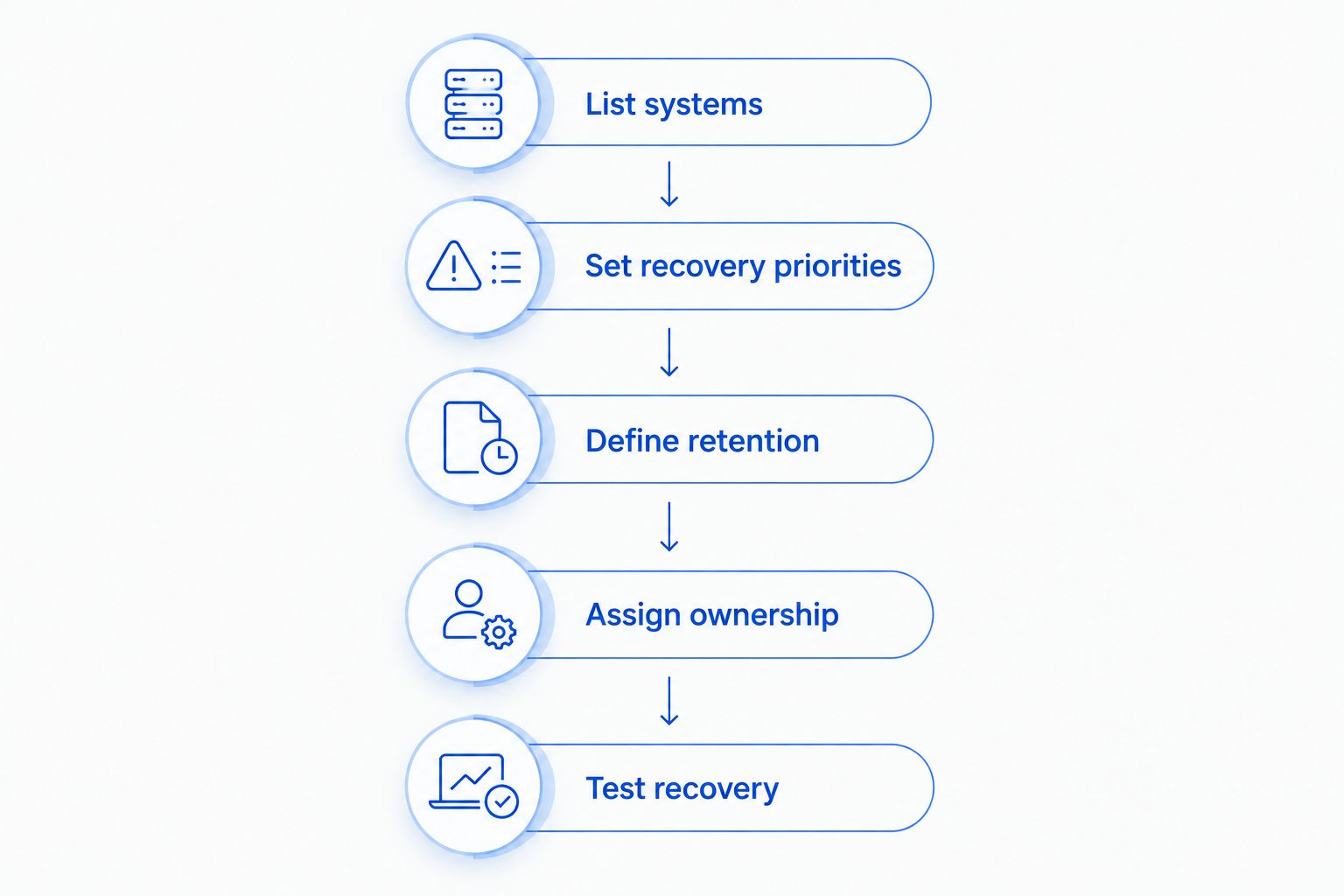
- List systems. Record where leases, financial records, inspection images, email, and shared documents live. Include information stored on employee devices if your firm relies on it.
- Set recovery priorities. Identify which records and applications must return first. Distinguish urgent operational needs from material that can wait.
- Define retention. State how far back your firm needs recoverable versions. Keep backup retention separate from any formal archive policy.
- Assign ownership. Name who handles alerts, approves restores, and contacts support. Make sure that responsibility survives staff absences.
- Test recovery. Ask for a documented restore demonstration using representative records. Confirm that restored files open and the intended employee can access them.
Send the completed brief with each quote request. Require providers to mark exclusions explicitly, especially hosted applications, personal devices, and recovery work outside the agreed support scope.
Reject comparisons that hide different coverage behind the same service label. A proposal becomes useful when you can identify both the protected records and the work someone has agreed to perform.
Does property management software already back up everything?
A hosted application does not establish that your firm can independently recover every record it needs. Check the application's documented backup, export, deletion, and account-recovery provisions before assuming your business requirements are covered.
Ask whether you can retrieve individual records, recover an earlier version, and export information in a usable format. Also identify business files held outside that application, including email attachments and locally saved documents.
Synchronization is not the same as an independent backup. A deletion or unwanted change can synchronize across connected locations, so confirm that your recovery process preserves a usable earlier copy.
What should a property management firm restore first?
Restore the records and applications required for your firm's most urgent work first. Write that order down before an incident, and identify any accounts, equipment, or permissions needed to use the recovered information.
For example, your firm can designate current lease access or accounting work as a priority if those tasks drive daily operations. Do not copy another company's order without checking your own dependencies.
For a 2026 recovery plan, include a decision-maker and an alternate contact. A technically recoverable backup is less useful when nobody available has authority to approve the restore.
Where does local IT support fit?
TechConnect NC is a local option for North Carolina firms seeking data backup and managed IT support. Its stated services include backups, monitoring, cybersecurity, help desk assistance, and remote support.
Discuss your backup requirements with TechConnect NC, then request written confirmation of the proposed coverage and recovery responsibilities. The service name alone does not establish retention periods, response commitments, or which recovery tasks belong in your agreement.
The company has offices in Clayton at 5720 US 70 Bus Hwy, Suite B, Clayton, NC 27520, and Granite Falls at 10A Falls Avenue, Granite Falls, NC 28630. These locations are relevant for firms considering support around Johnston County and the Foothills; confirm the support arrangements for your specific office.
FAQ
How do I estimate data backup cost for my property management firm?
Estimate the scope first: list protected systems, data volume, retention, monitoring, testing, and recovery support. Request written quotes against that same list so differences reflect coverage rather than assumptions.
Should backup quotes be based on the number of properties I manage?
Property count alone does not describe your backup requirements. Your protected systems, stored records, retention needs, and recovery workflow provide a more useful scope.
Is cloud storage enough to back up tenant records?
Cloud storage alone does not establish that tenant records have independent, recoverable backups. Check version history, deletion recovery, retention, access controls, and the restore process.
Do I need backups if my property management application is hosted online?
You need to verify what the hosted application's recovery provisions actually cover. Compare those provisions with your requirements and separately account for files, email, and records outside the application.
Should a backup agreement include restore testing?
A backup agreement should state who performs restore testing and what the test covers. Request evidence that representative records can be recovered, opened, and accessed by the right employee.
Can backups help after a ransomware attack?
Backups can support recovery after ransomware when usable copies remain protected from the attack. Recovery also requires addressing the compromised systems and checking that restored data is suitable for use.
Can TechConnect NC help with property management backups in North Carolina?
TechConnect NC provides data backup and managed business IT support in North Carolina. Discuss your systems and recovery requirements, then confirm the proposed service scope in writing.
One last thing
Ask to see a restore, not just a successful-backup notification. A completed copying job does not prove that the correct lease version, permissions, or application data will return when needed.
The established 3-2-1 backup guideline calls for 3 copies of your data, on 2 different media, with 1 copy offsite. Treat that as a starting point, not proof of ransomware protection or a substitute for restore testing.
Before approving your 2026 backup agreement, choose a representative record and ask the provider to explain its recovery path. That conversation exposes unclear responsibilities before an actual outage does.
Related guides
- Choosing between break-fix and managed IT support
- Protecting customer data on a small business network
- Restoring files after a ransomware attack
Call or text 919-737-5442 to discuss your firm's data backup and managed IT support requirements.