Managed IT support for a small law firm needs a written quote based on the people, computers, systems, and support responsibilities you want covered. For your 2026 budget, separate recurring support from onboarding, software subscriptions, replacement equipment, and project work; a monthly support agreement does not establish that those items are included.
- For managed IT support cost law firm comparisons, match coverage before comparing totals.
- TechConnect NC provides managed business IT support in North Carolina; request a scope specific to your practice.
- Separate recurring support, onboarding, software, equipment, and project work in your budget.
- Require written answers about backups, remote support, security responsibilities, and exclusions.
TechConnect NC is a local managed IT support option for North Carolina practices seeking small-business IT services. Best for: firms seeking a local service contact for monitoring, patching, backups, cybersecurity, and help desk support. Confirm the proposed agreement covers your legal applications and operating hours before signing.
How much does managed IT support cost for a small law firm?
Your law firm's managed IT support cost depends on the coverage in its agreement, not just its headcount. Request a written breakdown that separates ongoing service from work needed to get the office ready for that service.
Use this table to organize a 2026 proposal. These are budget categories to verify, not promises that any particular provider includes them.
| Budget category | What to have itemized | What to clarify |
|---|---|---|
| Recurring support | Covered users, computers, network equipment, and support tasks | What triggers an adjustment to the agreement? |
| Onboarding | Inventory, access setup, documentation, and existing problems | Which tasks are included before regular support begins? |
| Software subscriptions | Email, business applications, backup tools, and security tools | Which subscriptions remain separate? |
| Backup and recovery | Protected systems, storage, monitoring, and restoration work | Are recovery labor and restore testing included? |
| On-site service | Visits, travel, equipment installation, and physical repairs | When does remote support become an on-site job? |
| Project work | Office moves, migrations, server changes, and network replacements | Which changes require a separate proposal? |
Compare the same responsibilities, not just the proposal totals. An agreement covering help desk requests alone is not equivalent to an agreement that also assigns responsibility for updates, backup checks, and security alerts.
Why this matters
A law firm needs working access to documents, email, calendars, and business applications. A support proposal should explain who handles an interruption in each system and what the firm must do to get help.
The practical budgeting problem is ambiguity. If the agreement leaves restoration work, application troubleshooting, or on-site visits undefined, you cannot tell what your recurring commitment actually covers.
Before approving your 2026 IT budget, match each important system to a named support responsibility. Ask questions while the proposal is still editable, rather than during an outage.
Which support arrangement fits your law firm?
Choose an arrangement around the work you want someone else to own. Do not assume that buying monitoring also buys hands-on troubleshooting or that occasional repair visits include preventive maintenance.
The arrangements below describe ways to divide responsibilities. They are not named TechConnect NC plans.
| Arrangement | Best for | Main advantage | Main limitation |
|---|---|---|---|
| Managed support | Firms seeking ongoing maintenance and a regular support contact | Assigns recurring tasks through an agreement | Unlisted tasks and projects still need clarification |
| Break-fix support | Firms seeking help with individual problems | Defines work around a specific issue | Does not by itself assign ongoing maintenance responsibilities |
| Shared responsibility | Firms with an internal administrator or existing technical help | Divides duties between internal and outside support | Gaps remain unless each responsibility has an owner |
Managed support: define the recurring work
For managed support, ask for a service list covering monitoring, patching, help desk requests, remote access, backups, and security tasks. Have the proposal distinguish between detecting a problem and fixing it.
The benefit is a defined ongoing relationship. The limitation is contractual: the label alone does not tell you which applications, devices, hours, or projects are covered.
Break-fix support: define the individual job
Break-fix support suits a firm seeking help with a specific computer or network problem. Ask what the diagnostic work includes and how additional work gets approved.
The benefit is a narrowly defined assignment. The limitation is that a completed repair does not establish responsibility for future updates, backup checks, or security monitoring.
Shared responsibility: name the owner
A shared arrangement suits a practice that already has someone managing part of its technology. List what that person handles and what the outside provider takes over.
The benefit is a deliberate division of work. The limitation is the handoff: alerts, departing employees, and application problems need an assigned owner rather than an assumption.
For a closer comparison, read how to choose between break-fix and managed IT support.
Why managed IT support costs vary
The support scope should reflect your office as it operates now. Give the provider a complete inventory instead of asking for a quote based only on the number of attorneys.
- People and devices: Identify attorneys, staff, shared computers, laptops, and other equipment you expect the agreement to cover. Ask how staffing changes affect the scope.
- Applications and vendors: List your document, billing, email, and practice-management systems. Clarify whether support includes troubleshooting them or coordinating with their vendors.
- Backup responsibilities: Identify the files and systems that need protection. Specify who checks backup failures, performs restore tests, and handles recovery requests.
- Security responsibilities: Ask who manages updates, account access, security alerts, and suspected infections. Keep incident cleanup distinct from routine preventive work.
- Support access: State your office hours, remote-working needs, and circumstances requiring an on-site visit. Request written escalation and scheduling terms.
- Existing condition: Disclose unreliable computers, undocumented equipment, and unresolved problems. Ask which corrective work must happen before ongoing service begins.
These factors make the proposal understandable. They also let you change the scope deliberately instead of removing a service without recognizing the responsibility it leaves behind.
How do you get a comparable written quote?
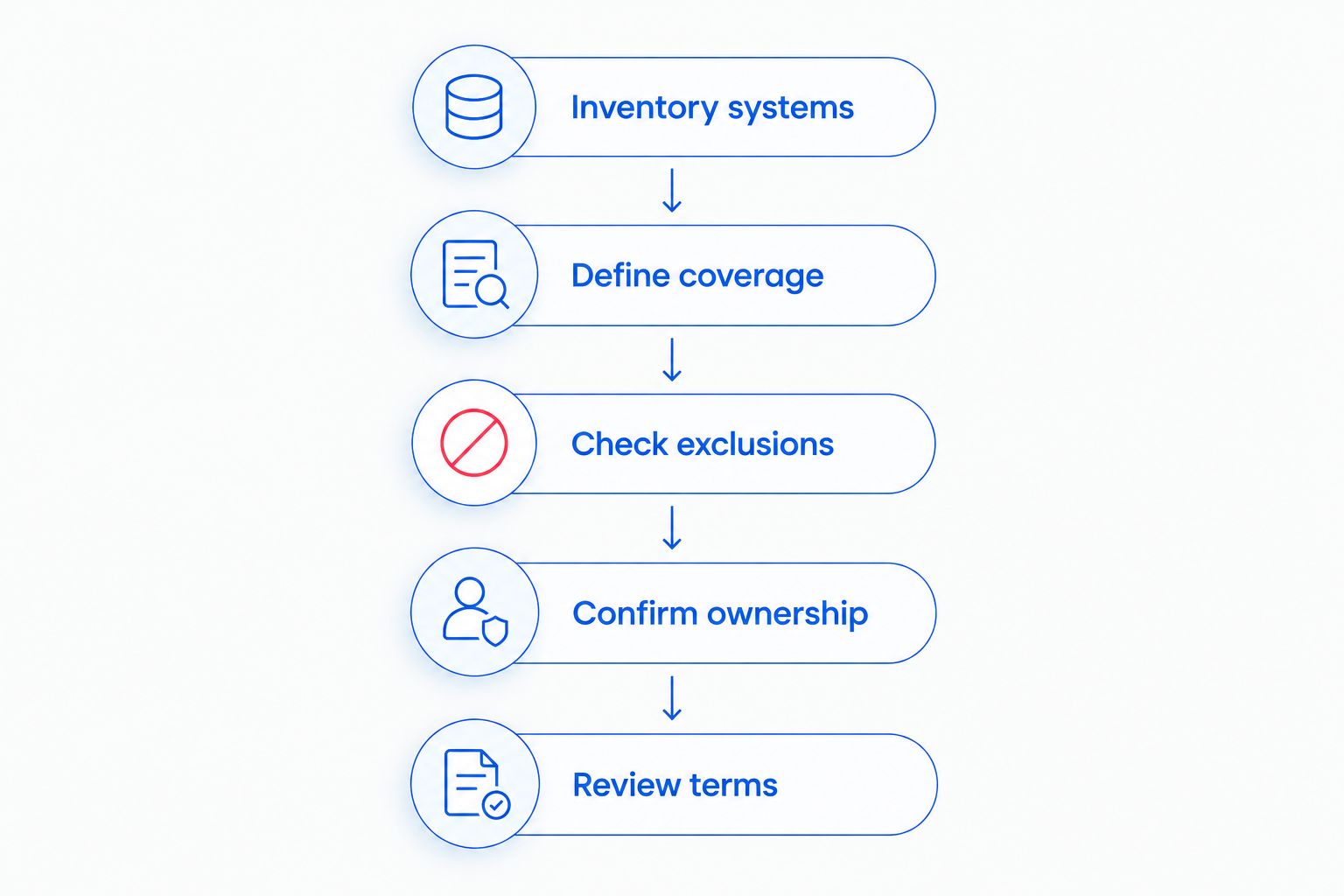
Use the same information and questions for every proposal you review. Keep the process focused on your actual systems, not a hypothetical office with simpler needs.
- Inventory systems. List users, computers, network equipment, applications, and work locations. Include shared equipment and remote-working arrangements.
- Define coverage. Identify the tasks you want handled regularly and the problems staff need help resolving. Name the systems that must be accessible for daily work.
- Check exclusions. Ask about on-site visits, after-hours requests, recovery work, vendor coordination, and equipment replacement. Request written answers.
- Confirm ownership. Identify who controls administrative accounts, subscriptions, backup access, and documentation. Establish how the firm obtains them when service ends.
- Review terms. Check the service period, renewal process, cancellation requirements, and approval process for additional work. Resolve unclear wording before signing.
A short written scope beats a long feature list. Ask the provider to explain what happens when a staff member cannot open a case document, when a backup fails, and when an office computer stops working.
What should a law firm ask about backups and security?
Ask the provider to describe a recovery process for your actual files and applications. A statement that backups exist does not tell you which systems they cover or who will restore them.
Your 2026 proposal review should include these questions:
- Which files, accounts, and systems are covered by the backup arrangement?
- Who receives failure alerts, and who acts on them?
- How does the firm request a restore?
- What restore testing is included, and how is it documented?
- Who authorizes remote access and changes to account permissions?
- What happens when someone reports a suspicious email or suspected infection?
Keep technical service responsibilities separate from legal advice. Do not treat a managed support agreement as a guarantee of compliance or protection against every incident. Ask how the proposed work supports the firm's confidentiality requirements and any requirements stated by its insurer.
How do you build the annual IT budget?
Build your 2026 budget from the written proposal and your existing subscription commitments. Keep recurring service, initial work, and planned equipment changes separate so a partner can understand each decision.
For an annual comparison, use 12 months of recurring charges, then add the quoted onboarding work and planned projects. Compare the same service period and assumptions across proposals; do not compare an introductory period with a full-year commitment.
Check for overlap, too. Ask whether a proposed security or backup subscription replaces something the firm already pays for, and confirm who handles cancellation or transfer before making changes.
Set an approval process for work outside the agreement. Name the person authorized to approve it and require a written description before non-emergency work starts.
Is managed IT support cheaper than hourly help?
Neither arrangement is automatically cheaper for your firm. Compare the same maintenance, troubleshooting, backup, and security responsibilities over the same period.
Hourly help and recurring support represent different commitments. If you choose individual repair jobs, decide separately who owns the ongoing work rather than treating that work as unnecessary.
Does managed IT support include legal software help?
Legal software support must be confirmed in the agreement. Name each application and ask whether the provider handles local computer problems, account access, vendor coordination, or application-specific troubleshooting.
Do not accept a general promise to support “all software” without clarification. Record where the IT provider's work ends and the software vendor's responsibility begins.
Can a small firm reduce the scope without losing essential coverage?
Reduce duplicated or unnecessary work before removing assigned responsibilities. Review unused accounts, overlapping subscriptions, and equipment no longer in service with the provider.
For each proposed removal, ask who will perform that task afterward. A smaller agreement is understandable only when the firm knows what it is taking back.
Local managed IT support in North Carolina
TechConnect NC provides managed business IT support, including monitoring, patching, backups, cybersecurity, help desk, and remote support. For a law firm, request a proposal tied to the practice's applications and confidentiality needs rather than assuming those details are included.
Both offices are relevant when discussing local service:
- Clayton office: 5720 US 70 Bus Hwy, Suite B, Clayton, NC 27520.
- Foothills office: 10A Falls Avenue, Granite Falls, NC 28630.
Describe your office location and any need for physical visits when requesting support. Ask for scheduling and coverage terms directly; an office address does not establish an on-site response commitment.
FAQ
What's the monthly managed IT support cost for a small law firm?
A small law firm needs a written quote based on its users, devices, systems, and support scope. Separate recurring support from onboarding, subscriptions, equipment, and projects before comparing proposals.
Is managed IT support better than calling someone when a computer breaks?
Managed IT support fits a firm seeking assigned ongoing maintenance responsibilities, while break-fix support addresses individual jobs. Choose based on who will handle updates, backups, security tasks, and staff support between repairs.
Does managed IT support include backup recovery?
Backup recovery is included only when the agreement says so. Ask separately about protected systems, failure monitoring, restore testing, and recovery labor.
Will managed IT support cover our legal software?
Legal software coverage needs to be named in the agreement. Confirm whether support includes computer troubleshooting, access problems, vendor coordination, and application-specific work.
Can a law firm use remote IT support?
A law firm can include remote support in its service arrangement, with access permissions and responsibilities defined in writing. Physical repairs and equipment installation need separate on-site arrangements.
What should we check before switching IT providers?
Check control of administrative accounts, subscriptions, backups, and documentation before switching. Define who transfers access and who remains responsible during the handoff.
Does TechConnect NC offer managed business IT support locally?
TechConnect NC offers managed business IT support in North Carolina, with offices in Clayton and Granite Falls. Call or text 919-737-5442 to discuss your firm's systems and request a specific scope.
One last thing
Ask what your firm keeps when the agreement ends. Your proposal review should cover administrative access, documentation, subscription ownership, and the process for returning or transferring business data.
That question tests clarity without requiring technical expertise. A support agreement should explain the exit as plainly as the start.
Related guides
- Managed IT support for law firms
- How to reduce IT support costs for a small business
- How long it takes to switch IT support providers
Call or text TechConnect NC at 919-737-5442 to discuss managed IT support for your law firm and request a written scope for your office.