Managed IT support is worth it for a small church when you depend on shared computers, email, financial records, or online services and nobody consistently handles updates, backups, and security. It is less useful when your needs are limited and already well maintained; Sunday response, on-site visits, and sound or livestream equipment support must be confirmed separately rather than assumed.
- Managed IT support is worth it for a small church when essential systems lack consistent maintenance and backup oversight.
- Volunteer support suits limited needs only when responsibilities, access, and backup procedures are documented.
- Sunday help and livestream troubleshooting are not automatic parts of a managed IT agreement.
- TechConnect NC is a local managed IT support option for North Carolina churches comparing ongoing computer and network help.
Why this matters
A church does not need a large office to depend on technology. If your bookkeeping files, member communications, or service materials are unavailable, someone must recover them while other work waits.
For your 2026 planning, focus on responsibility rather than congregation size. TechConnect NC provides managed IT support, backups, computer repair, and virus removal in North Carolina; ask which services fit your church rather than assuming every technical task belongs in one agreement.
Is managed IT support worth it for a small church?
Choose managed support when recurring maintenance needs a reliable owner. Choose occasional repair when your needs are genuinely limited and someone already handles the preventive work. The difference is ongoing responsibility, not simply access to a technician.
| Support approach | Best for | Main advantage | Main limitation |
|---|---|---|---|
| Volunteer support | Churches with limited systems and a capable, accountable volunteer | Keeps day-to-day help close to the congregation | Availability and knowledge can depend on one person |
| Break-fix support | Churches needing occasional troubleshooting with maintenance already assigned | Addresses a defined problem without an ongoing service arrangement | Does not automatically assign responsibility for updates, backups, or security |
| Managed IT support | Churches needing ongoing oversight of essential computers, accounts, and networks | Establishes recurring maintenance and support duties in writing | Requires oversight of the agreement and does not cover every device or service automatically |
Attendance alone does not settle the decision. A small congregation with shared financial records and rotating volunteers can have more access-management work than a larger congregation with simpler systems.
Before choosing, identify what must keep working, who currently maintains it, and what happens when that person is unavailable. The guide to choosing between break-fix and managed IT support explains the distinction in more detail.
When volunteer support is enough
Best for: churches with limited technology and clearly assigned maintenance duties. Volunteer support remains a practical option when someone maintains the computers, checks backups, documents access, and arranges outside help when needed.
The advantage is familiarity. A volunteer who understands your worship schedule and office routines can explain problems without a lengthy handoff. Keep that knowledge in church-controlled records, not only in someone's memory.
The limitation is continuity. Being good with computers does not establish who receives backup-failure notices or removes access when a volunteer leaves. For your 2026 volunteer plan, assign those duties explicitly and name a backup contact.
Do not replace a dependable arrangement just to obtain a managed-service label. Fix the missing responsibilities first, then decide whether volunteers can realistically carry them.
When break-fix support is enough
Best for: churches with occasional technical problems and preventive maintenance already covered. Break-fix support fits a defined job, such as troubleshooting a printer or repairing an office computer.
Its strength is a clear task. You describe the fault, agree on the work, and evaluate whether that problem was resolved. It also helps when your volunteers know their limits and request professional help before making risky changes.
Its weakness is the gap between repairs. A successful printer repair says nothing about whether financial files are backed up or former staff accounts remain active.
Use break-fix support when the recurring work already has an owner. If everyone assumes someone else checks backups, occasional repairs do not solve the underlying problem.
When managed IT support earns its place
Best for: churches whose essential systems need ongoing maintenance beyond volunteer capacity. Managed support makes sense when you need defined responsibility for monitoring, patching, backups, cybersecurity, and help desk requests.
The benefit is accountability. Your agreement should identify the covered systems, the recurring tasks, the reporting process, and the person who acts when something fails.
The limitation is scope. A provider can maintain covered computers without maintaining your soundboard, building wiring, livestream platform, or every volunteer's personal laptop. You still need a church contact who approves changes and communicates priorities.
For a 2026 agreement, ask for a plain-language service list. Do not treat “managed” as proof that everything is included. Have the provider explain exclusions before you sign.
Why the value of managed IT support varies
The value depends on the work your church needs someone to own. Check these factors against your actual setup:
- Essential systems: Identify whether office computers, email, shared files, or network access are necessary for weekly operations.
- Backup responsibility: Establish who checks failed backups and verifies that important files can be restored.
- Volunteer continuity: Document whether maintenance continues when the usual helper is away or leaves.
- Access changes: Identify who creates accounts, grants permissions, and removes access after role changes.
- Support timing: Confirm whether the agreement covers your office schedule and any required Sunday assistance.
- Service boundaries: Separate computer and network support from audio, video, internet-provider, and specialist equipment work.
A longer service list is not automatically a better fit. Remove tasks your church does not need, but keep responsibility for essential maintenance clear.
How do you decide what your church actually needs?
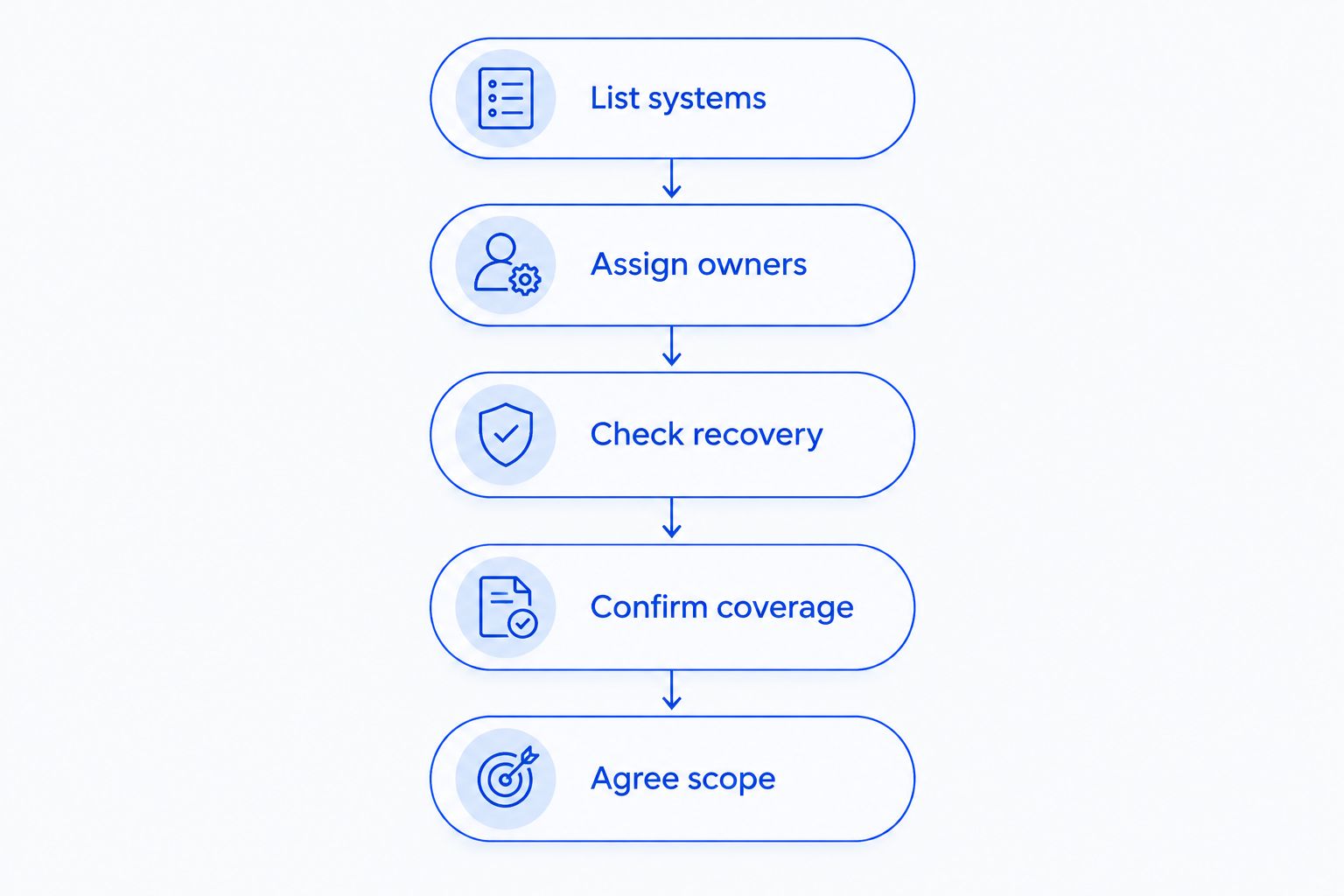
Use this sequence before requesting proposals. It gives your church and each provider the same starting point, so you compare responsibilities rather than sales language.
- List systems. Record church-owned computers, network equipment, email accounts, shared storage, and essential applications. Note which systems depend on personal devices or accounts.
- Assign owners. Name the church contact responsible for approving work and the person currently maintaining each system. Mark any task without an owner.
- Check recovery. Ask where important files are backed up, who receives failure notices, and how a restore is verified. Request a demonstration using a non-sensitive file.
- Confirm coverage. Give the provider your office and worship schedules. Ask how you request help, which hours apply, and what happens outside those hours.
- Agree scope. Put covered systems, recurring duties, exclusions, access arrangements, and handoff requirements into the written agreement.
Keep the resulting inventory under church control. Your 2026 support plan should remain usable even if the volunteer, administrator, or provider changes.
Check account ownership before granting access
Church leaders should know who controls the main administrator accounts for email, files, and other essential services. Use individual accounts where the service supports them, and give each person the access their role requires.
Ask how the provider protects remote access, records its use, and removes access when the relationship ends. Keep recovery information available to authorized church leaders without distributing administrator passwords to everyone.
Test the handoff, not just the repair process
Ask what documentation the church receives when service begins and ends. The handoff should explain the systems maintained, outstanding issues, account ownership, and how another authorized technician can take over.
A support arrangement should not leave your church dependent on undocumented knowledge. That applies equally to volunteers and paid providers.
Does managed IT support include Sunday help?
Sunday help is included only when the agreement explicitly covers it. Monitoring, help desk hours, remote assistance, and on-site attendance are separate commitments.
Describe the problem you need covered. A failed office computer during the week is different from an internet interruption before worship. Ask who receives the request, how it is acknowledged, and what happens if remote troubleshooting cannot resolve it.
For your 2026 worship schedule, keep an approved fallback for essential service materials. Agree on who can switch to that fallback without waiting for technical permission. Support is useful; a workable alternative still matters.
Can managed IT support replace a church's sound or livestream volunteer?
Managed IT support does not automatically replace a sound or livestream volunteer. Computer maintenance and network troubleshooting are different responsibilities from operating microphones, mixing sound, or directing a livestream.
Write down the boundary. Ask who handles the computer, internet connection, streaming application, audio equipment, and service-day operation. Where responsibilities overlap, decide who leads troubleshooting.
Keep an operator familiar with your worship setup even when outside support maintains the underlying computers. A service agreement cannot substitute for a clear service-day role.
Can church volunteers still help after hiring an IT provider?
Church volunteers can continue helping when their duties are agreed with the provider. Volunteers can report faults, identify priorities, and explain how equipment is used during services.
Avoid giving several people independent authority to change network settings or administrator access. Assign an approval contact and record significant changes so troubleshooting starts from an accurate picture.
For your 2026 handoff, give volunteers a short reporting checklist: what stopped working, what message appeared, what changed, and which activity is affected. Specific reports are more useful than repeated attempts to fix an unfamiliar system.
A local option for North Carolina churches
TechConnect NC is a local managed IT support option for small churches seeking help with computers, backups, and cybersecurity. Its stated services include monitoring, patching, help desk assistance, and remote support; confirm the church-specific scope and support schedule directly.
The company has two offices:
- Clayton office: 5720 US 70 Bus Hwy, Suite B, Clayton, NC 27520.
- Foothills office: 10A Falls Avenue, Granite Falls, NC 28630.
For churches around Clayton, Smithfield, Garner, Johnston County, Raleigh, Granite Falls, Hickory, Lenoir, and Caldwell County, discuss the location of your equipment and any on-site needs. Local offices do not, by themselves, establish Sunday coverage or a response commitment.
FAQ
Is managed IT support worth it for a very small church?
Managed IT support is worth considering when essential computers, accounts, and backups lack a dependable maintenance owner. Congregation size alone does not determine the need; compare the work required with your volunteers' documented capacity.
What's the best IT support arrangement for a church with volunteers?
The best arrangement assigns clear duties to volunteers and outside technicians without leaving maintenance unowned. Volunteer support fits limited needs; managed support fits recurring work that volunteers cannot consistently cover.
Does a managed IT agreement include every church computer?
A managed IT agreement covers the computers and services identified in its scope. Confirm how it treats shared machines, personal laptops, livestream computers, and devices added later.
Will managed IT support guarantee that our church cannot be hacked?
Managed IT support does not guarantee that your church cannot be hacked. Ask which security tasks are included, how suspicious activity is handled, and what church staff must do when an account appears compromised.
Should our church test backups before choosing a provider?
Your church should verify that important files can be restored before relying on a backup arrangement. Ask for a safe demonstration and establish who checks backup failures and recovery results.
Can a local provider support our church remotely?
Remote support can address computer and account issues that do not require physical work. TechConnect NC provides remote support; confirm covered systems, access controls, support hours, and when an on-site visit is needed.
One last thing
A completed backup is not the same as a demonstrated recovery. Before approving your 2026 IT plan, ask someone to restore a non-sensitive file and show where it opens. That exercise turns an assumed safeguard into something your church can verify.
Related guides
- IT support for churches and religious groups
- How to keep data safe without an in-house IT team
- Is remote IT support as effective as on-site support?
Call or text TechConnect NC at 919-737-5442 to discuss your church's computers, backups, and managed IT support needs.