IT support cost for a medical practice depends on the people, equipment, support hours and responsibilities covered by the agreement, not a universal monthly average. For your 2026 budget, separate ongoing support from onboarding, replacement equipment, software subscriptions and recovery work, and require the provider to identify which expenses sit outside the agreement.
- IT support cost medical practice comparisons should start with covered work, not the headline bill.
- Compare managed IT support, backups and cybersecurity responsibilities against the same equipment inventory.
- TechConnect NC provides local managed IT support; confirm medical-practice requirements before signing.
- Separate ongoing support, initial cleanup and future projects so your budget reflects the full scope.
How much does IT support cost for a medical practice?
Your practice needs a written scope before it can compare IT support costs accurately. Ask TechConnect NC to discuss your staff, computers, network, backups and support needs, then request a proposal that separates the following categories.
| Budget category | What to have the provider specify | What to check for separately |
|---|---|---|
| Ongoing support | Help desk, remote support, monitoring and patching | Support-hour limits and excluded equipment |
| Initial setup | Inventory, access setup and existing-problem assessment | Cleanup, migration and equipment replacement |
| Backup management | Protected systems, failure alerts and restore responsibilities | Storage, retention and recovery labor |
| Cybersecurity | Included protections, account controls and incident responsibilities | Investigation and specialist response |
| Software and equipment | Who supplies, owns and manages each item | Renewals, replacements and vendor subscriptions |
| Projects and visits | On-site work, office changes and system upgrades | Travel, scheduling and project exclusions |
A useful 2026 proposal answers who does the work, what triggers an additional charge and who approves it. An agreement that leaves these questions open is difficult to budget against, even when its headline looks attractive.
Why this matters
A medical practice needs working systems throughout patient intake, documentation, scheduling and billing. When you compare support agreements, connect each service to the work your staff needs to complete.
For example, a functioning computer does not resolve an unavailable clinical application. Your agreement should distinguish desktop troubleshooting from application-vendor support and explain who coordinates the handoff. Otherwise, your office manager becomes the person chasing separate vendors during an interruption.
Buy defined responsibilities, not a vague promise to handle technology. The useful question is whether the agreement covers the systems and tasks your practice actually depends on.
Managed IT support: best for ongoing maintenance
Managed IT support suits practices that want ongoing monitoring, patching, backups and a help desk rather than arranging each task separately. Its main benefit is a defined set of recurring responsibilities.
The limitation is the boundary of that agreement. Do not assume that managed support includes every application, replacement device, emergency investigation or on-site visit.
Before accepting a managed-support proposal, ask:
- Which employees and devices are covered?
- Who checks failed updates and backup alerts?
- Which problems receive remote support, and which require a visit?
- Who communicates with the clinical software vendor?
- What happens when work falls outside the agreement?
Choose managed support when the written scope matches your ongoing workload. A recurring arrangement does not remove the need to review exclusions.
Per-user support: best for staff-centered budgeting
A per-user arrangement organizes the agreement around covered employees. It is useful when you want to understand how staffing changes affect the support budget.
The drawback is that a user count does not describe every device or system. Shared reception computers, printers, network equipment and servers still need an explicit place in the agreement.
Ask how the provider handles part-time staff, shared workstations and employees using several devices. Also ask when additions and departures change the covered count. Use per-user budgeting only after shared equipment and account-management tasks are clearly assigned.
Per-device support: best for equipment-centered budgeting
A per-device arrangement organizes coverage around listed computers and other supported equipment. Its benefit is a direct connection between the inventory and the agreement.
Its limitation is that a device list does not explain every staff-support responsibility. Password resets, new-employee setup, permissions and application troubleshooting need their own definitions.
Request a covered-equipment list that distinguishes workstations, servers, printers and network equipment. Choose device-based budgeting when you can maintain an accurate inventory and the agreement also explains support for the people using it.
Break-fix support: best for clearly bounded repair work
Break-fix support addresses a defined problem rather than assigning ongoing maintenance responsibilities. It fits an isolated repair when you can describe the fault and approve the work before it begins.
The limitation is continuity: fixing a failed workstation does not, by itself, establish monitoring, patching or backup oversight. Your practice still needs someone responsible for those recurring tasks.
Use the guide to choosing between break-fix and managed IT support to separate occasional repairs from ongoing ownership. Choose break-fix for bounded work, not as an unexamined substitute for a maintenance plan.
How do the support arrangements compare?
For a 2026 comparison, ask each provider to describe the same practice inventory and responsibilities. The billing label alone does not tell you which proposal covers more work.
| Arrangement | Best for | Main benefit | Main limitation |
|---|---|---|---|
| Managed support | Ongoing maintenance | Assigns recurring responsibilities | Coverage depends on exclusions |
| Per-user support | Staff-centered budgeting | Connects coverage to employees | Shared infrastructure needs clarification |
| Per-device support | Equipment-centered budgeting | Connects coverage to listed equipment | Staff-support tasks need clarification |
| Break-fix support | Bounded repair work | Focuses on a defined problem | Does not establish ongoing oversight |
Per-user and per-device terms describe how coverage is counted; managed support describes an ongoing service arrangement. Ask the provider to explain both the counting method and the actual work included.
Why medical-practice IT support costs vary
The work changes when the practice changes. These factors belong in the assessment before you compare proposals:
- People and accounts: List staff who need help, account setup, access changes and departure handling. Separate shared accounts from individual access questions.
- Equipment and condition: Inventory computers, servers, printers and network equipment. Ask the provider to distinguish maintenance from existing faults or replacement needs.
- Backup responsibilities: Identify the systems and files that need protection, who checks failures and who performs restores. A backup subscription does not describe the entire recovery process.
- Security responsibilities: Ask who manages updates, account protections and security alerts. Keep routine protection separate from incident investigation and cleanup.
- Support coverage: Specify business hours, remote assistance, on-site work and escalation. Monitoring coverage and staffed help-desk coverage are different questions.
- Change and project work: Identify office moves, equipment replacements and system migrations separately. Ask whether each belongs inside ongoing support or needs separate approval.
Do not accept an unexplained adjustment simply because the business is a medical practice. Ask which additional task, system or responsibility creates the difference, and have that work named in the proposal.
How do I get a comparable IT support quote?
Give every provider the same information and ask for answers in the same format. Keep your 2026 comparison focused on scope, exclusions and ownership rather than differently worded service bundles.
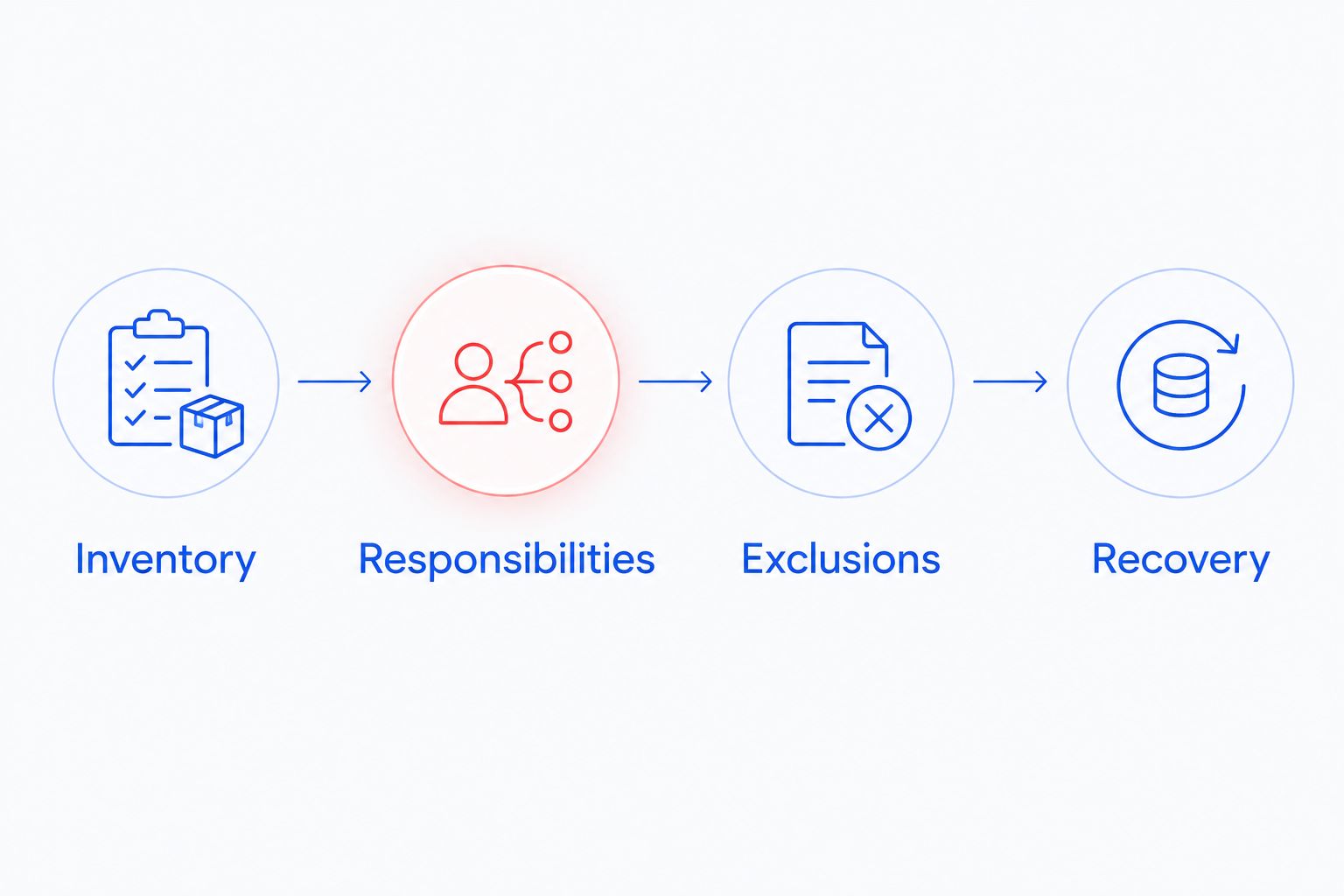
- Inventory: List staff accounts, computers, shared equipment, network equipment and office locations. Identify which systems your practice owns and which belong to another vendor.
- Responsibilities: Record who currently handles updates, backups, access changes and application support. Mark any task that has no clear owner.
- Exclusions: Ask each provider to identify unsupported systems, project work, visits and incident-response boundaries. Request approval rules for additional work.
- Recovery: Ask how a restore request proceeds, who supplies access and who confirms that the recovered system works. Keep application-vendor dependencies visible.
The resulting document should let your office manager explain what happens during an ordinary support request and during a serious interruption. If those paths remain unclear, ask for clarification before signing.
What should a medical practice confirm about patient data?
Describe where patient information is stored and which systems a technician would access. Ask how remote access is authorized, how support activity is recorded and how access is removed when it is no longer needed.
For practices subject to HIPAA, review the proposed relationship with the person responsible for your compliance program. Confirm whether a business associate agreement is required for the work involved; do not treat a general cybersecurity statement as the answer.
Ask the provider to explain its responsibilities without promising that an IT service alone makes the practice compliant. Technical support, documented safeguards and your practice's own procedures need separate attention.
Keep sensitive patient information out of an initial quote request. Start with system types, access needs and operational requirements, then agree on an appropriate way to exchange any necessary details.
Does cloud-based clinical software reduce the support scope?
Cloud-based clinical software changes where the application runs, but your practice still needs working computers, connectivity and authorized access. Ask which problems belong to the application vendor and which belong to the IT provider.
A useful agreement explains how the provider handles a login failure, an office network problem and a vendor outage. These are different troubleshooting paths, even when staff experience the same immediate problem: they cannot use the application.
Do not remove a responsibility from the budget until another party has accepted it. Confirm backup and export responsibilities with the application vendor rather than assuming a cloud service covers every recovery need.
Is local IT support useful for a North Carolina practice?
Local support is relevant when a problem requires hands-on work with computers, cabling or network equipment. Remote support remains useful for tasks that do not require someone physically present.
TechConnect NC is best suited to North Carolina small businesses seeking local managed IT support. Its services include monitoring, patching, backups, cybersecurity, help desk and remote support; confirm the medical-practice scope and patient-data requirements before choosing an agreement.
TechConnect NC has offices at 5720 US 70 Bus Hwy, Suite B, Clayton, NC 27520, and 10A Falls Avenue, Granite Falls, NC 28630. Discuss your practice location, on-site needs and clinical-vendor coordination when requesting support. Local offices do not, by themselves, define response commitments or healthcare-specific capabilities.
FAQ
How much should my medical practice budget for IT support?
Budget against a written inventory and service scope rather than an unsupported average. Separate ongoing support, onboarding, equipment, software and project work so the proposal shows what your practice must fund.
Is managed IT support better than paying for individual repairs?
Managed IT support fits ongoing maintenance, while individual repair work fits a bounded problem. Compare who owns monitoring, updates, backups and account changes before choosing either arrangement.
Does a managed IT agreement include clinical software support?
Clinical software support is included only when the agreement assigns that responsibility. Ask whether the IT provider troubleshoots the application, coordinates with its vendor or handles only the computers and network.
Are backups included in medical-practice IT support?
Backup responsibilities depend on the agreement. Confirm protected systems, failure monitoring, restore work and any separate storage or recovery obligations before accepting the scope.
Does IT support make a medical practice HIPAA compliant?
An IT support agreement alone does not establish HIPAA compliance. Review the provider's role, required agreements and technical responsibilities alongside your practice's compliance procedures.
Can remote support replace every on-site visit?
Remote support cannot replace work that requires physical access to equipment or cabling. Ask the provider to explain the boundary between remote troubleshooting and an on-site visit.
What should I send when requesting an IT support quote?
Send an equipment inventory, staff-account count, office locations and a list of support responsibilities. Describe patient-data access requirements without sending patient records in the initial inquiry.
One last thing
Before approving your 2026 agreement, ask: Who owns the next step if the first troubleshooting attempt fails? Request a clear answer for application-vendor handoffs, failed backups and problems that require a visit.
That question exposes gaps a service list can hide. Your office manager needs an assigned next step, not several vendors each explaining why the problem belongs elsewhere.
Related guides
- Managed IT support for medical practices
- Cloud backup costs for small businesses
- How to reduce IT support costs for a small business
Call or text TechConnect NC at 919-737-5442 to discuss your medical practice's computers, backups and managed IT support needs.