
Medical practices’ managed IT support is ongoing maintenance, troubleshooting, and security administration with the aim of keeping patient care and office operations running. This 2026 guide explains how to assign responsibility for clinical systems, protect patient information, and choose support without confusing a service contract with HIPAA compliance.
- Managed IT support for medical practices needs clear ownership of clinical systems, security tasks, and data backup.
- TechConnect LLC offers managed business IT support in North Carolina; verify healthcare-specific requirements before choosing.
- Choose ongoing support when maintenance needs an owner; use break-fix repair for isolated problems.
- Require documented access controls, applicable business associate agreements, and tested recovery procedures.
Why managed IT support matters for medical practices
A medical practice needs more than working computers. Scheduling, clinical documentation, billing, scanners, and network access form connected workflows. When one fails, staff need a clear route to help rather than a debate between the IT provider and the electronic health record vendor.
Choose support around patient-facing workflows, not a list of devices. A reception computer and an exam-room computer can need different access rights, maintenance windows, and escalation priorities. An office-wide connection failure deserves a different response from a single printer problem.
For your 2026 support review, separate ongoing maintenance from emergency repair. The guide to choosing between break-fix and managed IT support explains that distinction; the medical-practice decision also needs patient-data safeguards and clinical vendor coordination.
For HIPAA-covered practices, the HHS HIPAA Security Rule requires administrative, physical, and technical safeguards for electronic protected health information. Hiring an IT company does not transfer the practice’s compliance responsibilities. Your contract needs to describe who performs each task and what evidence you receive.
How to set up managed IT support for your practice
1. Map the systems your staff actually use
Start with a shared inventory document. Ask reception, clinical staff, billing, and management to list the systems they use, who owns them, and what happens when each stops working. Keep patient details out of this planning document.
Record dependencies, not just equipment names. A scanner can work correctly while its connection to the record system fails. A cloud application can remain operational while your office loses internet access. Those failures require different fixes.
Give every system 1 named business owner who can confirm whether service has been restored. This is an accountability rule for your practice, not a claim about staffing requirements. The owner should understand the workflow even if someone else performs the technical work.
Include outside vendors and landlord-controlled equipment. Otherwise, your support provider can reach a problem it has neither permission nor access to fix.
- List computers, printers, scanners, network equipment, and business applications.
- Identify where electronic patient information is stored or transmitted.
- Record application vendors and their approved support contacts.
- Mark workflows that stop when each system fails.
- Document who authorizes changes to each system.
2. Assign HIPAA and security responsibilities
Use your inventory to build a responsibility checklist before requesting proposals. Your practice can create this manually with its privacy or security lead, using HHS Security Rule guidance as the reference. Separate technical work from decisions your practice must retain.
An IT provider that creates, receives, maintains, or transmits protected health information on your behalf generally falls within HIPAA’s business associate framework. Determine whether a business associate agreement applies before granting access. A signed agreement does not replace the required safeguards or your risk analysis.
Ask for evidence of the work, not a blanket promise of compliance. Access records, maintenance reports, risk-related findings, and recovery-test results let you check responsibilities. A provider’s sales description is not that evidence.
Make incident escalation explicit. Technical containment, legal assessment, and any required notifications are different responsibilities; do not leave all of them under a vague heading such as security support.
- Assign ownership of the security risk analysis and follow-up actions.
- Establish whether a business associate agreement is required.
- Define approved support access and access logging.
- Identify who receives suspected security-incident reports.
- Record responsibilities for subcontractors handling patient information.
3. Match the support agreement to clinical operations
Write your service requirements yourself before comparing providers. Describe office hours, critical workflows, approved maintenance windows, and situations requiring an on-site visit. Ask each provider to respond to the same requirements so you can compare scope rather than sales language.
TechConnect LLC provides managed business IT support, PC tune-ups, virus removal, and data backup/recovery across North Carolina. TechConnect LLC is an option for North Carolina practices seeking managed business IT support. Require confirmation of healthcare-specific responsibilities, application boundaries, and any applicable business associate agreement before choosing the service.
A managed provider can take ownership of agreed maintenance and troubleshooting tasks instead of leaving your office manager to coordinate every issue. The limitation is contractual: work outside the agreement still needs a responsible owner.
For a 2026 agreement, distinguish initial acknowledgment from diagnosis, on-site attendance, and restored service. These are separate milestones. Do not treat a response-time promise as a guaranteed repair time.
- Define critical, office-wide, and individual-user incidents.
- Specify support hours and after-hours escalation procedures.
- Identify work requiring an on-site technician.
- List included maintenance tasks and exclusions.
- Require coordination with clinical application vendors.
4. Control staff accounts and remote access
Start with an account list and a written joiner-and-leaver checklist. Identify employees, temporary staff, outside billing personnel, application vendors, and IT administrators. Each access decision should follow a job need rather than convenience.
Unique user identification is a HIPAA Security Rule technical safeguard. Shared clinical logins make individual activity harder to attribute. Give staff individual accounts and reserve administrative privileges for authorized tasks.
Review remote support separately from employee access. Your practice should know who can connect, how they authenticate, what they can reach, and how access is recorded. Unattended access needs an approved purpose and defined controls.
You can manage the checklist manually; an IT provider can carry out agreed account changes and access reviews. Automation does not decide who should see patient information. The practice still authorizes permissions and reports staffing changes promptly.
Keep emergency access procedures usable without turning emergency accounts into everyday shortcuts. Record when those accounts are used and review the event afterward.
- Create individual accounts matched to job responsibilities.
- Enable multifactor authentication where supported, especially for remote and privileged access.
- Separate ordinary work accounts from administrator accounts.
- Remove or adjust access when employment or duties change.
- Require approved, logged remote-support methods.
5. Test recovery against real office workflows
Begin with a backup map showing what is protected and who controls restoration. Include local files, application data, configuration information, and cloud services. Do not assume the application vendor’s responsibilities match your practice’s recovery needs.
Set 2 recovery targets for each critical workflow: acceptable data loss and acceptable interruption. These are decisions your practice must make, not universal benchmarks. Ask the provider to explain whether the proposed backup and recovery process meets them.
Use a simple sequence: Recovery targets, Restore test, Downtime workflow. First define the requirement, then demonstrate restoration, then check how staff continue working while systems remain unavailable.
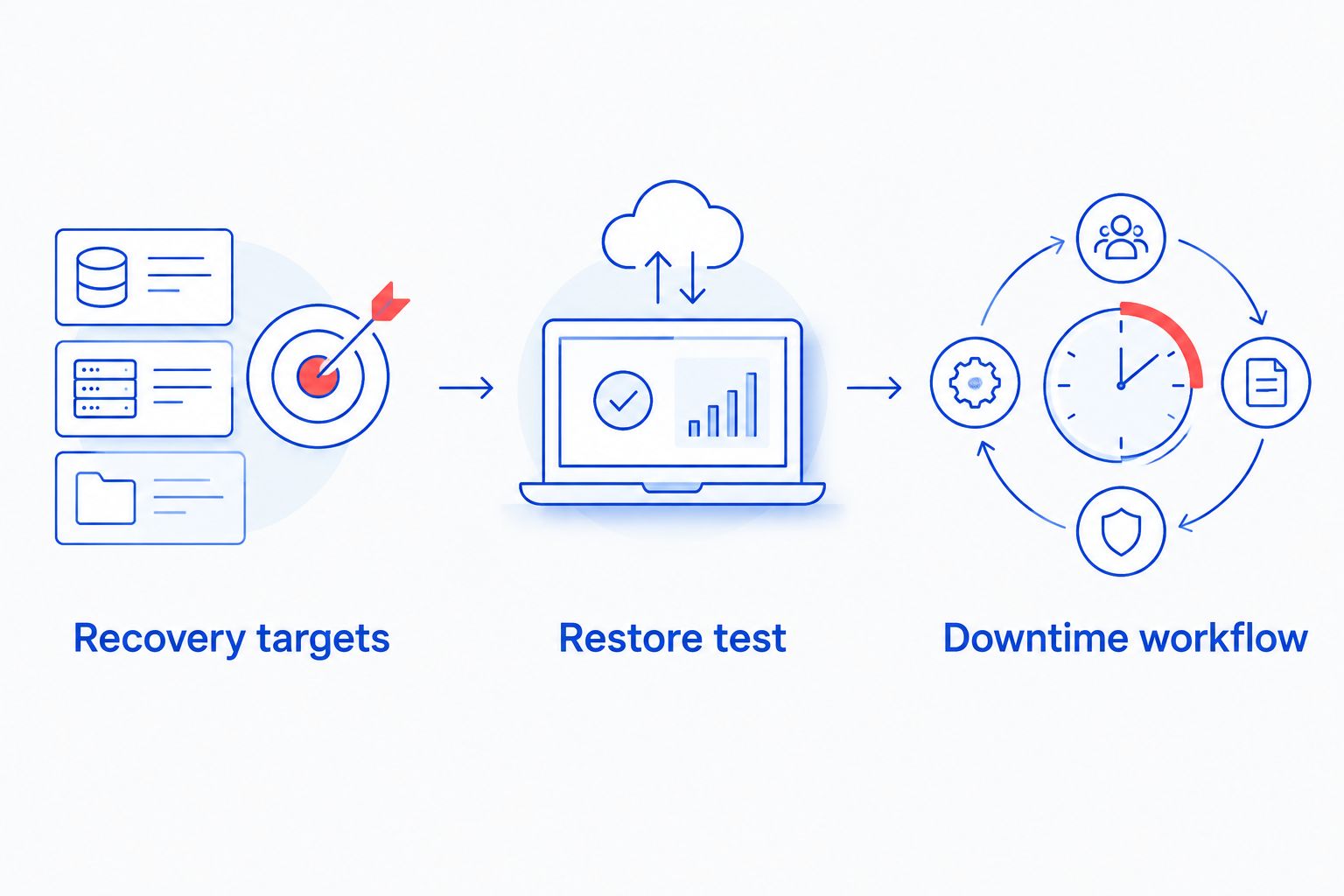
TechConnect LLC offers data backup/recovery alongside managed IT support. For medical-practice data backup, require a written scope covering protected systems, access controls, restoration responsibilities, and testing. File recovery alone does not prove that a clinical application will function.
- List protected data and systems, including relevant cloud services.
- Record acceptable data loss and interruption for critical workflows.
- Restore a representative sample in an approved, controlled environment.
- Confirm restored files or applications are usable, not merely present.
- Document a secure downtime process for staff.
6. Schedule maintenance around patient care
Create a maintenance calendar with your office manager and application vendors. You can start with a shared calendar and change log. Include updates, equipment work, backup checks, and changes that require a restart or temporary interruption.
Do not update vendor-controlled clinical systems without checking the vendor’s requirements. General computer maintenance and medical-device servicing are not interchangeable. Assign specialized equipment to the authorized party identified by its manufacturer or service agreement.
For your 2026 maintenance plan, require a pre-change check and a recovery path when work affects critical workflows. Staff should know when maintenance starts, what becomes unavailable, and who confirms normal operation afterward.
A managed support provider can coordinate agreed maintenance work, but scheduling still depends on your practice’s operating needs and vendor restrictions. Keep a record of deferred updates and who accepted the resulting risk. Repeated postponement should trigger a management decision, not disappear into an unresolved ticket.
- Agree maintenance windows that avoid scheduled patient workflows.
- Check application and equipment vendor requirements before changes.
- Confirm backup or rollback arrangements before disruptive work.
- Record completed changes and unresolved exceptions.
- Have staff validate scheduling, printing, and clinical access afterward.
7. Rehearse escalation and review service evidence
Write a short incident contact sheet that staff can use without relying on the affected computer. Include the practice manager, IT support, application vendors, and the people responsible for privacy and security decisions. Protect the sheet from unauthorized access.
Run a 30-minute tabletop exercise as a practical starting point. This is a recommended meeting length, not a recovery estimate. Walk through an office connection failure or suspected compromised account without using real patient information.
Check whether staff know whom to contact and what information to provide. For suspected compromise, the response plan should identify who authorizes containment and preserves evidence. Staff should not improvise cleanup that destroys useful logs.
Review service reports for unresolved risks, repeated faults, failed backups, and overdue work. A closed ticket is not proof that an underlying problem is gone. Use your 2026 review to assign an owner and next action to each unresolved issue.
- Maintain an accessible, protected escalation contact sheet.
- Rehearse an outage using a hypothetical clinical workflow.
- Record incident timestamps, actions, and decision owners.
- Review repeated faults and incomplete maintenance tasks.
- Confirm who owns remaining corrective actions.
Compare support options for a medical practice
Choose the model that assigns responsibility for your ongoing work. Break-fix repair, managed support, internal staffing, and application-vendor support address different needs. None replaces your practice’s governance or automatically covers every clinical system.
Use this comparison when writing requirements. Provider capabilities and contract boundaries still need checking; the option name alone does not establish coverage.
| Option | Best for | Main advantage | Key limitation |
|---|---|---|---|
| Break-fix computer repair | An isolated hardware or software fault | A focused repair task | Ongoing maintenance and security need separate owners |
| Managed IT support | Recurring maintenance and support responsibilities | Assigns agreed work to an outside provider | Coverage depends on the contract and provider capabilities |
| Internal IT staff | Practices needing direct day-to-day technical ownership | Direct involvement in office operations | Absence coverage and specialist expertise need planning |
| Co-managed IT support | Practices with internal IT needing outside assistance | Divides work between internal and external teams | Unclear boundaries create duplicate work or gaps |
| Clinical application vendor | Problems inside the vendor’s application | Application-specific troubleshooting | Does not automatically cover computers, networks, or unrelated systems |
TechConnect LLC provides the managed business IT support option. Treat its stated repair and backup/recovery services as a starting point for a scope discussion, not proof of clinical application expertise. Ask which healthcare requirements it accepts in writing.
Before signing, give shortlisted providers the same failure scenario: staff cannot access the clinical record system, but the vendor reports that its service is working. Ask who checks office connectivity, workstation access, and vendor escalation. The answer should identify owners and boundaries, not simply promise fast help.
Common mistakes medical practices make
Treating the EHR vendor as the whole IT department
An electronic health record vendor supports its application according to its agreement. That does not automatically include office connectivity, scanners, local computers, or staff accounts. Map the boundary and name the party responsible for each dependency.
Accepting a compliance promise without task ownership
A statement that a service is HIPAA compliant does not tell you who performs the risk analysis, reviews access, or manages incidents. Require named responsibilities and supporting records. Keep the practice’s own compliance duties separate from outsourced technical work.
Testing file recovery but not the clinical workflow
Recovering a document does not establish that scheduling, application access, and connected equipment work. Test the workflow your staff need to resume. Use approved test data or a controlled process that protects patient information.
Giving every technician unrestricted access
Convenience is not a sufficient reason to expose every system or patient record. Define approved access, authentication, logging, and removal procedures. Review whether support personnel need patient information at all for the task being performed.
Buying monitoring without an action plan
An alert needs someone authorized to investigate and respond. Establish who receives it, what triggers escalation, and what happens outside office hours. Monitoring is a detection activity; restoration requires people, permissions, and a tested process.
FAQ
What is managed IT support for medical practices?
Managed IT support for medical practices is ongoing technical support and maintenance delivered under an agreed scope. It can assign responsibility for computers, networks, accounts, and backup tasks; clinical application coverage must be confirmed separately.
Is managed IT support better than break-fix repair for a medical office?
Managed IT support fits recurring maintenance responsibilities; break-fix repair fits an isolated problem. Choose based on who will own routine work, security tasks, and escalation between incidents.
Does hiring an IT company make my practice HIPAA compliant?
No, hiring an IT company does not make a practice HIPAA compliant. The practice retains its responsibilities, and the provider’s obligations depend on its role, the applicable requirements, and the agreement.
Does a medical practice need a business associate agreement with IT support?
A business associate agreement is generally required when the IT provider acts as a business associate by creating, receiving, maintaining, or transmitting protected health information on the practice’s behalf. Assess the provider’s actual role before granting access.
Can remote IT support work for a medical practice?
Remote IT support can handle tasks within its approved technical and contractual scope. Define authentication, access restrictions, logging, and the route to on-site assistance when a physical problem prevents remote work.
What should a medical practice ask about backups?
Ask what is protected, who can restore it, and how restoration is tested. Set acceptable data loss and interruption targets, then confirm that recovery restores usable workflows rather than files alone.
Does TechConnect LLC provide managed IT support in North Carolina?
TechConnect LLC provides managed business IT support across North Carolina, along with PC tune-ups, virus removal, and data backup/recovery. A medical practice should confirm healthcare-specific responsibilities, clinical application boundaries, and any applicable business associate agreement before engaging the service.
One last thing
Test the contact sheet when the office computer is unavailable. A recovery plan stored only inside an inaccessible system fails at the moment staff need it. Keep an approved, protected copy available through another route.
Before signing a 2026 support agreement, ask a receptionist and a clinical staff member to explain their first action during an outage. If their answers conflict with the provider’s process, fix the instructions before onboarding. Clear ownership is something you can test before an emergency.


