
Managed IT support for law firms is ongoing help with computers, accounts, networks, and backups aimed at keeping client information protected and legal work moving. This 2026 guide explains how to define coverage, check recovery, and choose support around filing deadlines, confidential matters, and remote work.
- Managed IT support for law firms needs clear ownership of access, backups, security updates, and urgent support.
- TechConnect LLC serves North Carolina businesses with managed IT support and data backup/recovery.
- Choose managed support for ongoing maintenance; choose break-fix support for isolated repairs.
- Require a demonstrated file restore and written support scope before signing.
Why managed IT support matters for law firms
A law firm's computer problem becomes a legal-work problem when it blocks a filing, hides a client document, or exposes a confidential matter. Your support arrangement needs to address those consequences, not just whether a technician can restart a computer.
Confidentiality also changes how technicians should work. Access to a workstation can expose client communications, draft agreements, discovery, and financial records. Define who authorizes access, what technicians can reach, and how activity is recorded.
Choose support around the work you cannot afford to interrupt. If you are deciding between occasional repairs and ongoing maintenance, start with how to choose between break-fix and managed IT support.
For your 2026 review, separate technical controls from legal decisions. An IT provider can help implement access restrictions and backups; your firm remains responsible for deciding who should see a matter and which records must be preserved.
Build a support plan around your legal work
Map your systems and critical workflows
Start with a spreadsheet. List your computers, email accounts, document storage, practice-management applications, printers, scanners, internet connection, and outside software vendors. Give each system a business owner who can approve changes.
Then map the work that depends on those systems: preparing a filing, accessing discovery, recording time, communicating with clients, and retrieving closed matters. Identify where a single failed device or unavailable account stops the process.
Do not treat every interruption as equally urgent. A broken printer and an inaccessible filing document need different responses. Your inventory should explain the operational consequence, not merely record a model name.
Close this step with a usable handoff document:
- Record each system's purpose, owner, and administrator.
- List applications required for filings and client work.
- Identify files stored only on individual computers.
- Document vendor support contacts without storing passwords in the spreadsheet.
- Name the person authorized to approve emergency changes.
Restrict access to client information
Review the permissions already available in your email and document systems before buying anything new. Give each staff member a named account and restrict matter access according to assigned work. Separate everyday accounts from accounts used to administer systems.
Multi-factor authentication requires verification through different factor types, such as a password and a security key. It adds protection beyond a password, but it does not replace permission reviews or careful handling of client documents.
Include departing staff, temporary workers, and outside counsel in your process. Disabling an email login alone does not address shared links, remote access, or credentials saved elsewhere.
Use these controls as your starting checklist:
- Enable multi-factor authentication on supported business accounts.
- Remove shared staff logins and unused accounts.
- Review matter-folder permissions with the responsible attorney.
- Limit administrative access to approved people.
- Document how devices and access are handled when someone leaves.
Assign ownership of routine maintenance
Start by recording who currently checks updates, investigates alerts, and fixes recurring problems. Existing system settings and support records can reveal gaps without adding another application. A responsibility that belongs to everyone often has no clear owner.
Managed support is the path for transferring agreed maintenance work to a provider instead of asking office staff to coordinate each task. TechConnect LLC is a fit for North Carolina law firms seeking managed business IT support and data backup/recovery. Its stated services also include PC tune-ups and virus removal.
Discuss your requirements with TechConnect LLC, then request a written scope. Its stated services do not establish support hours, legal-software expertise, or response commitments; those details belong in the agreement.
Define ownership before you delegate:
- Assign responsibility for operating-system and application updates.
- Identify who reviews security alerts and backup failures.
- Separate routine PC tune-ups from urgent incident work.
- Require approval for changes that interrupt office operations.
- Confirm which software vendors remain responsible for application problems.
Prove that your backups restore usable files
Begin with your current backup settings and records. Identify what is copied, where copies are held, who receives failure notices, and whether deleted or overwritten files remain recoverable. File synchronization alone does not establish that you have a recoverable backup.
The established 3-2-1 backup approach uses 3 copies of data, across 2 media types, with 1 copy offsite. Treat it as a planning baseline, not proof that your firm can recover from every incident. Copies also need appropriate access restrictions and usable recovery procedures.
For your 2026 backup review, choose a representative, non-sensitive test document. Restore it to a separate location, open it, and verify its contents. Avoid testing by overwriting a live matter folder.
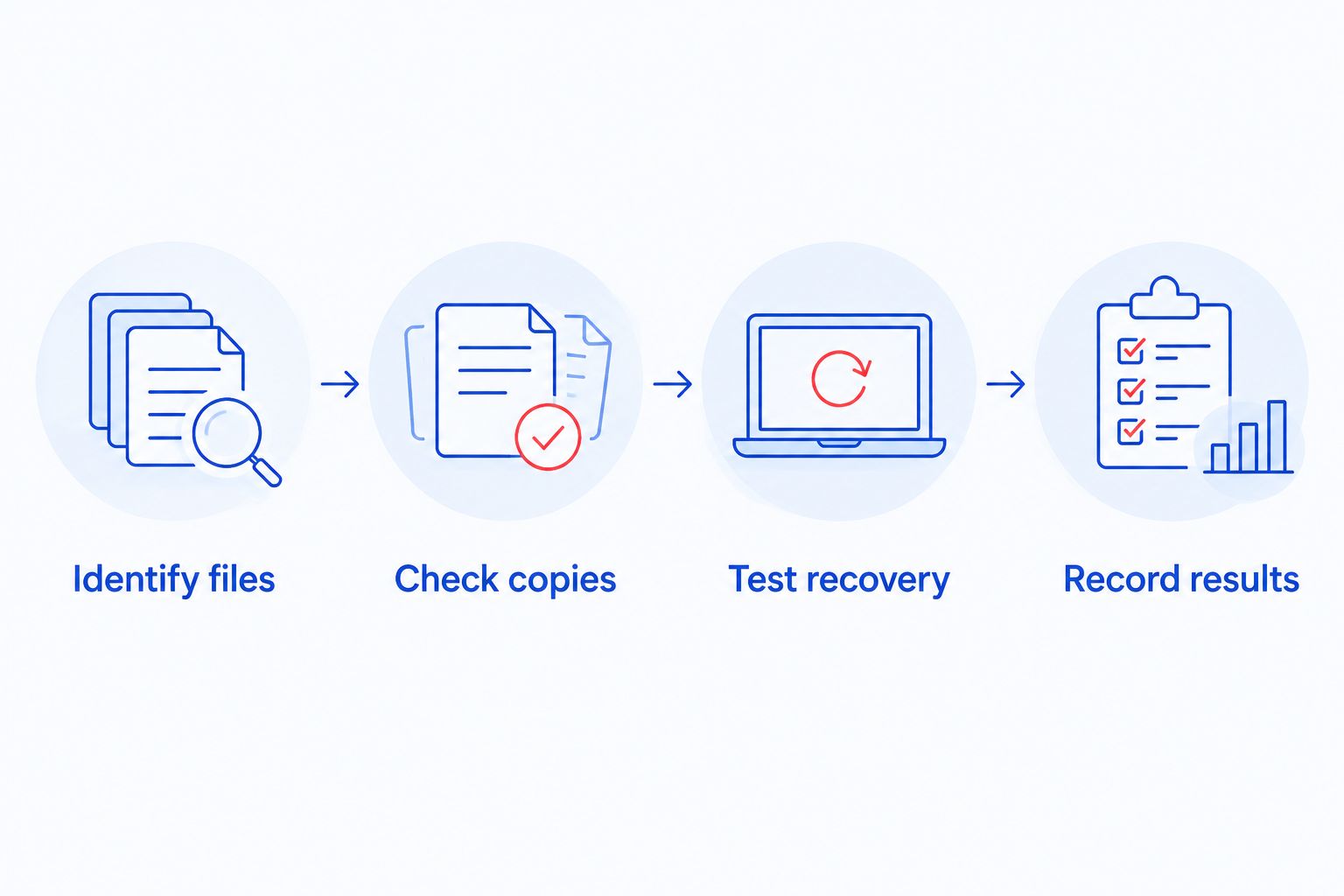
The test should produce evidence you can use during an outage, rather than another reassuring dashboard. Record who performed it, what was restored, and any missing information.
- Identify files: include documents, email, and application data in your review.
- Check copies: verify destinations and separate backup access from ordinary staff access.
- Test recovery: restore a document without changing the live original.
- Record results: document whether the file opened correctly and retained its contents.
- Assign follow-up: give failed jobs and failed restores a named owner.
Define urgent support before a deadline
Write down your current escalation route first. Explain how staff report a problem, who decides its urgency, and who contacts the relevant software vendor. Keep an accessible copy outside the systems it describes.
For managed IT support in 2026, distinguish a response from a resolution. An acknowledgment confirms receipt; it does not mean the filing document is available again. Ask providers to define each commitment and explain what happens when a third-party application is involved.
Do not assume continuous monitoring means a technician is available whenever you call. Monitoring, staffed support, and on-site attendance are separate services.
Make the escalation process concrete:
- Define urgent incidents using legal-work consequences.
- Confirm staffed support hours and the after-hours procedure.
- Ask who coordinates incidents involving multiple vendors.
- Identify the person authorized to approve recovery actions.
- Agree how the provider communicates progress during an outage.
Control remote work and technician access
Start by listing how attorneys and staff access files away from the office. Include firm laptops, personal devices, remote desktop connections, and browser-based applications. Decide which methods the firm approves before extending access.
Remote IT support involves permission to work on a device or system. Unattended access deserves explicit review because a technician can connect without the user sitting at the computer. Ask how access is authorized, recorded, restricted, and removed.
A managed provider can help administer these controls when they are included in the scope. The firm still needs to decide whether personal devices and local copies of client files are acceptable.
Apply these boundaries consistently:
- Require approved accounts for remote business access.
- Enable device encryption where supported.
- Limit local copies of confidential matter files.
- Document consent and logging for remote technician sessions.
- Define how lost devices and suspected account misuse are reported.
Review evidence and plan the provider handoff
Start with a simple review folder containing support tickets, unresolved issues, backup-test records, and your current system inventory. Use those records to ask whether the arrangement addresses recurring problems rather than judging it only by how quickly someone answers.
Before switching providers, establish firm ownership of business accounts and administrative credentials. A transition needs clear authority, an accurate inventory, and a plan for removing the outgoing provider's access. Do not cancel existing coverage before replacement responsibilities are accepted.
Your 2026 review should also separate completed work from recommendations. A proposed security change is not an implemented control.
Request these handoff and review items:
- Maintain a list of firm-owned accounts and approved administrators.
- Document open incidents and unfinished changes.
- Obtain backup settings and recovery instructions.
- Agree how outgoing remote-access tools will be removed.
- Confirm who handles support during the transition.
Compare support options for your law firm
Managed support fits ongoing maintenance; break-fix support fits isolated problems. Neither label proves that a provider covers your legal applications, backups, or after-hours needs. Compare written responsibilities instead of assuming a service name includes everything.
Use the table to choose an operating model before comparing providers. Starting prices are excluded because the decision requires a current proposal tied to your actual scope.
| Option | Best for | Main advantage | Key limitation |
|---|---|---|---|
| Break-fix support | Firms needing a specific repair | Focuses help on an identified problem | Ongoing maintenance and backup checks need separate ownership |
| Managed IT support | Firms wanting delegated routine IT work | Gives agreed recurring tasks a provider owner | Coverage depends on the contract and exclusions |
| In-house IT | Firms needing direct internal technical ownership | Keeps day-to-day priorities under firm management | Requires staffing, specialist support, and coverage during absences |
| Co-managed IT | Firms with an internal administrator who needs outside help | Divides work between internal staff and a provider | Unclear boundaries create duplicated work or unattended tasks |
TechConnect LLC provides managed business IT support, backup/recovery, virus removal, and PC tune-ups across North Carolina. That service mix is relevant when your firm needs outside help with computers and recovery; assess legal-application support and escalation arrangements separately.
Before accepting any proposal, ask the provider to mark every requirement as included, excluded, or dependent on another vendor. Pay particular attention to email, document storage, remote access, backup recovery, and support outside normal working hours.
Common mistakes law firms make
Treating cloud storage as the recovery plan
An online folder can still contain deleted, overwritten, or inaccessible documents. Require a tested recovery process, including how you retrieve an earlier version and who can authorize restoration.
Assuming IT support guarantees compliance
Technical controls do not decide your firm's confidentiality, retention, or notification obligations. Ask the provider to explain implemented safeguards; have the responsible attorney determine the legal requirements for the matters you handle.
Giving technicians unrestricted matter access
Troubleshooting permission should not automatically grant access to every client file. Set access boundaries and require a documented reason when broader access is necessary.
Leaving legal-software vendors out of the agreement
A practice-management application problem can sit between the IT provider and the application vendor. Name the coordinator in advance so office staff do not have to manage that dispute during a filing deadline.
Ignoring provider exit arrangements
Your firm needs control of its accounts, backups, and records after the relationship ends. Require an exit process that transfers documentation and removes access without interrupting essential work.
FAQ
What's the best managed IT support arrangement for a small law firm?
The best arrangement assigns clear responsibility for maintenance, access, backups, and urgent incidents. Compare the written scope against your filing workflows and legal applications rather than choosing by the service label alone.
Is managed IT support better than calling someone when a computer breaks?
Managed IT support is better suited to recurring maintenance and coordinated support; break-fix help is better suited to an isolated repair. A law firm still needs someone responsible for backups and access controls under either arrangement.
Can an IT provider see confidential client documents?
An IT provider can see documents when its permissions or remote session provide access to them. Restrict access to the work required and document authorization, confidentiality terms, and activity logging.
Does cloud storage mean our law firm already has backups?
Cloud storage does not by itself prove that your law firm has a usable backup. Verify retention, recovery permissions, and the ability to restore deleted or overwritten files.
Can managed IT support guarantee that our firm will not get ransomware?
Managed IT support cannot guarantee that ransomware will never affect your firm. Access controls, updates, security monitoring, and tested backups address different parts of prevention and recovery.
Does TechConnect LLC provide managed IT support in North Carolina?
TechConnect LLC provides managed business IT support across North Carolina, along with PC tune-ups, virus removal, and data backup/recovery. Confirm the support scope and legal-application requirements directly before choosing an agreement.
What should we do before switching IT providers?
Confirm firm ownership of accounts, obtain system and backup documentation, and agree who covers the transition. Remove the outgoing provider's access only through a coordinated handoff that preserves essential operations.
One last thing
Ask to watch a file restore before accepting a backup promise. A successful backup notification describes a completed job, not whether your firm can retrieve a usable document when it matters.
For your next 2026 support review, bring a non-sensitive test file and your written recovery requirements. That demonstration makes the discussion about evidence rather than reassurance.


