
The cost to migrate email to Microsoft 365 requires a scoped quote, not a universal per-mailbox estimate: your existing email system, data, devices, and support requirements define the work. For a 2026 move, separate migration labor from recurring Microsoft 365 licensing, backup, and support so you can compare the full commitment.
- The cost to migrate email to Microsoft 365 depends on migration scope, not mailbox count alone.
- Compare migration labor, Microsoft 365 licensing, device setup, and ongoing support separately.
- Require written coverage for calendars, contacts, shared mailboxes, and post-move checks.
- TechConnect NC provides local managed IT support for North Carolina small businesses planning technology changes.
How much does it cost to migrate email to Microsoft 365?
Your migration quote should identify what moves, who performs the work, and what happens after employees start using the new system. A mailbox transfer is not the same deliverable as a completed business email changeover.
Use this breakdown to compare proposals. For the sequence behind these tasks, see the old email provider to Microsoft 365 migration workflow.
| Quote component | What you should ask the provider to specify | What to watch for |
|---|---|---|
| Discovery and planning | Source system, accounts, access, dependencies, and migration method | An estimate issued without checking the existing setup |
| Data transfer | Email folders, archives, contacts, calendars, and exclusions | A proposal that says only “email migration” |
| Destination setup | Microsoft 365 accounts, licensing assignments, domain verification, and permissions | Unclear ownership of administrator access |
| Email changeover | Mail-routing changes, testing, and a recovery plan | No named person responsible for the switch |
| Employee setup | Desktop applications, phones, sign-in, and shared mailbox access | Device work left outside the scope |
| Follow-up support | Fault reporting, acceptance checks, and handoff documentation | No written definition of completion |
Keep recurring services separate from the project scope. A proposal can include Microsoft 365 licensing without including migration labor, and migration work does not automatically include ongoing administration.
Why this matters
Email connects customer conversations, invoices, appointments, and password resets. You need more than a successful sign-in screen: staff must receive new messages, find required history, and use the shared addresses that keep work moving.
For your 2026 budget, compare proposals against the same inventory and acceptance checklist. Otherwise, you are comparing different jobs under the same label. A shorter proposal is not evidence of a smaller project; it can simply leave more responsibilities with your staff.
Why Microsoft 365 migration costs vary
The main drivers are the amount of work, the transfer method, and the responsibilities included in the agreement. Ask the provider to explain these factors against your actual environment:
- Mailbox inventory: List individual accounts, shared addresses, aliases, and former employees’ records. These are different objects and need separate decisions.
- Data scope: Identify required message history, online archives, local archive files, contacts, calendars, and shared information. Do not assume every item follows the same transfer process.
- Source system: The existing platform and available administrator access determine which migration methods are usable. An inaccessible account needs attention before a transfer starts.
- Employee devices: Identify computers, phones, and applications that need new sign-ins or configuration. Transferring server-side data does not configure every device.
- Business dependencies: Include scanners, website forms, scheduling systems, and other tools that send business email. Each connection needs a documented plan.
- Changeover and handoff: Define scheduling, testing, employee assistance, and responsibility for unresolved issues. These tasks belong in the scope, not in an informal promise.
Count the work before comparing the quotes. Mailbox count is useful, but it does not describe archives, permissions, application connections, or employee assistance.
Which migration approach fits your business?
Choose an approach based on who can own the technical work and who will support employees afterward. Neither self-managed work nor outside help removes the need for a plan.
| Approach | Best for | Advantage | Limitation |
|---|---|---|---|
| Self-managed migration | Businesses with an experienced internal administrator | Your team controls the schedule and configuration | Your team also owns troubleshooting, testing, and employee support |
| Defined migration project | Businesses with a named person to manage IT afterward | Responsibilities can be limited to a written project | Ongoing administration needs a separate owner |
| Migration coordinated with managed IT | Businesses that also need continuing IT support | The move can be planned alongside continuing support responsibilities | The agreement must distinguish project work from recurring services |
Self-managed migration: keep responsibility explicit
A self-managed move fits a business that already has the skills and access to complete it. The advantage is direct control; the drawback is that internal staff must handle exceptions while keeping normal work running.
Before choosing this route, name the administrator responsible for domain settings, data validation, and user assistance. Do not make an employee the migration lead simply because that person usually fixes the printer.
Defined migration project: write down the finish line
A defined project fits a business that wants outside assistance for the move but has someone to administer email afterward. Its strength is a clear deliverable. Its limitation is the boundary: work beyond the agreement needs separate approval.
Ask who takes responsibility after acceptance. Account changes, new devices, backup checks, and later sign-in problems should not become ownerless tasks once the project closes.
Migration with managed IT: separate the responsibilities
A coordinated approach fits a business that needs continuing support as well as a change of email platform. It connects the project to a longer-term support relationship, but the agreement still needs clear boundaries.
TechConnect NC is a local managed IT support option for North Carolina small businesses that want help planning an email move. Ask which migration tasks can be included and which require a separate scope; do not assume a general support agreement covers every project.
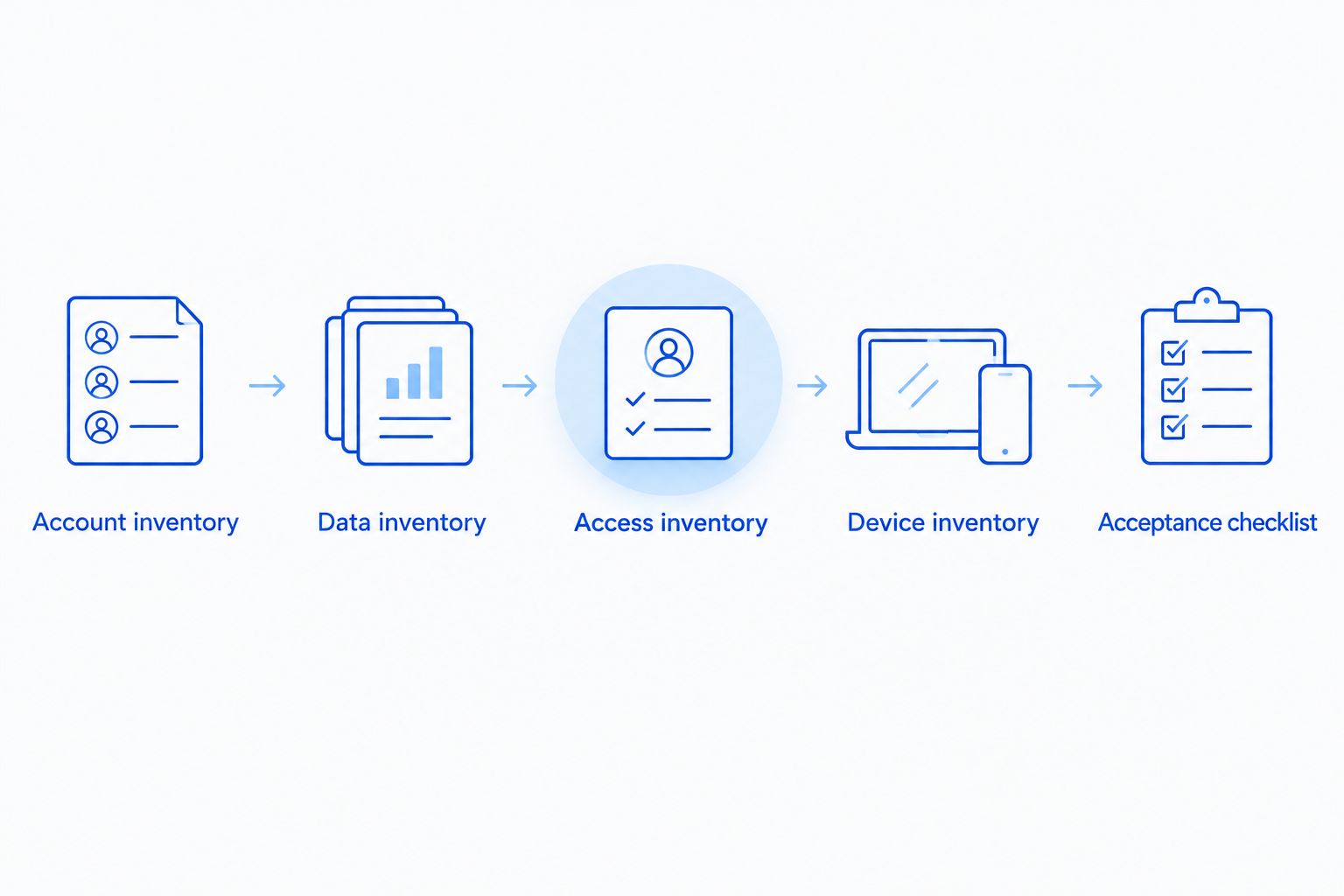
What should you prepare before requesting a quote?
Give each provider the same information. A usable inventory reduces ambiguity and lets you challenge omissions before approving the work.
1. Account inventory
List active employees, shared mailboxes, group addresses, aliases, and accounts belonging to departed staff. Mark who owns each address and whether its history must remain accessible.
Do not delete an account just because nobody signs into it regularly. First check whether it receives invoices, website messages, or account-recovery emails.
2. Data inventory
Record mailbox sizes from the current administration system and identify any local archives. Ask employees where they keep older messages rather than assuming everything is stored online.
Separate essential records from material that can stay in a documented archive. Make that a business decision before migration work begins, with any recordkeeping requirements checked by the appropriate adviser.
3. Access inventory
Confirm who controls the domain registration, DNS settings, existing email administration, and destination Microsoft 365 administration. Record the responsible person without putting passwords in an ordinary email thread.
A provider needs an agreed access process. Ask how temporary access will be granted, recorded, and removed after the work.
4. Device inventory
List the computers, phones, and mail applications employees use. Include shared workstations and devices used by owners who work away from the office.
Identify who will configure them and help staff sign in. A proposal that covers data transfer but leaves device setup to employees should say so plainly.
5. Acceptance checklist
Define what “finished” means before approving the project. Include sending and receiving messages, finding historical mail, opening shared mailboxes, and checking calendar access where included.
Assign someone in your business to approve the results. The provider can complete technical checks, but employees must confirm that their agreed working requirements are met.
What should a 2026 migration agreement include?
A useful agreement describes outcomes, exclusions, and ownership. Read it as an operating plan, not just an authorization to start work.
Ask for written answers to these questions:
- Which accounts and data types are included?
- What is excluded, and who handles those exclusions?
- Who changes mail-routing settings and verifies delivery?
- What happens if a transfer fails or the changeover needs to pause?
- Who reconnects employee devices and business applications?
- How are problems reported, and when does project support end?
- Who retains administrator access and documentation?
Include security setup in the discussion. Agree on administrator access and employee sign-in protection before the changeover; use the guide to connect two-factor authentication to business email and files to prepare your questions.
Keep the signoff practical. An employee successfully sending a message does not prove that shared permissions, historical records, or application-generated mail work as agreed.
Does Microsoft 365 licensing include email migration?
Microsoft 365 licensing and migration work are separate scope items. Do not treat a license purchase as proof that someone will move old messages, configure devices, or support the changeover.
Ask the provider to identify the licensing arrangement and migration responsibilities separately. If a proposal combines them, request a written explanation of what each part covers.
Will everything move from the old email system?
Only treat explicitly listed data as included in the migration. Messages, contacts, calendars, local archives, and shared permissions need separate checks because transfer capabilities depend on the source and migration method.
Ask for a sample validation process before approving the full move. If something cannot transfer through the selected method, agree on an alternative or an exclusion before the changeover.
Can you switch email without interrupting work?
An email changeover needs a disruption plan, not a promise of uninterrupted work. Schedule the switch around your business, tell employees what to expect, and identify how they should report problems.
Ask how the provider will test incoming mail, outgoing mail, and connected applications. Keep access to the old environment until the agreed checks and recordkeeping decisions are complete.
Local managed IT support in North Carolina
TechConnect NC provides managed IT support, backups, help desk assistance, and remote support for small businesses. Discuss your email inventory and the support you need after the move rather than requesting an undefined “email transfer.”
The offices are at 5720 US 70 Bus Hwy, Suite B, Clayton, NC 27520, and 10A Falls Avenue, Granite Falls, NC 28630. These locations give businesses around Johnston County and the Foothills a local contact for discussing IT needs.
Local support does not replace a written project scope. Ask TechConnect NC to confirm the work, responsibilities, and handoff before you authorize a 2026 migration.
FAQ
What's included in the cost to migrate email to Microsoft 365?
The included work depends on the written migration scope. Ask for separate coverage of planning, data transfer, account setup, mail-routing changes, employee devices, testing, and follow-up support.
Can I get an accurate migration quote from my mailbox count alone?
Mailbox count alone does not describe the full migration. Archives, calendars, shared access, connected applications, and device setup also need to be scoped.
Does buying Microsoft 365 move my old email automatically?
Buying Microsoft 365 does not by itself complete your email migration. Assign responsibility for transferring existing data, changing mail routing, and checking employee access.
Do shared mailboxes and aliases need to be included in the quote?
Shared mailboxes and aliases need to be included in the inventory and addressed in the quote. Ask how addresses, permissions, and historical messages will be handled.
Should I cancel my old email service as soon as new mail arrives?
Do not cancel the old service solely because new messages arrive in Microsoft 365. Complete the agreed data checks, dependency checks, and recordkeeping decisions first.
Can we migrate business email ourselves?
You can manage the migration internally if your team has the required access and technical skills. Your team must also own testing, troubleshooting, device setup, and employee assistance.
What should I ask before approving a 2026 email migration?
Ask for a written inventory, exclusions, changeover plan, acceptance checklist, and support handoff. Confirm who controls administrator access after the project ends.
One last thing
Check the devices that send email but never open an inbox. A scanner, website contact form, or business application can depend on the old email configuration even after every employee has moved.
For your 2026 migration, put those connections on the acceptance checklist. Do not close the project until each included connection has an owner and a recorded test result.
Related guides
- How to choose between break-fix and managed IT support
- How long it takes to migrate a small business to new IT support
- How to keep business data safe without an in-house IT team
Planning an email move? Call or text TechConnect NC at 919-737-5442 to discuss your current setup, migration scope, and ongoing IT support needs.


