
A small-business move to new IT support takes as long as it takes to transfer administrative access, verify backups, establish support coverage, and test the systems your employees use. Set the handover date after those checks, not before them. Moving email, files, or business applications adds separate migration work; changing who supports existing systems does not automatically require moving your data.
- How long does it take to migrate a small business to new IT support? Base the schedule on verified handover tasks.
- Separate the IT support handover from email, file, and application migrations.
- Verify business-owned administrative access and restore a backup before retiring the outgoing provider’s access.
- TechConnect LLC provides managed business IT support for businesses across North Carolina.
How long does it take to migrate a small business to new IT support?
Build the timeline around completed tasks rather than an assumed number of days. A signed agreement establishes a business relationship; it does not prove that the incoming provider can access your network, restore your files, or help employees.
For a 2026 transition, ask the incoming provider to map these steps to dates, owners, and acceptance checks. The guide to switching IT support providers covers the related handover question.
- Define the scope. Identify which computers, accounts, locations, applications, and backup systems the new provider will support. List exclusions alongside the included work.
- Verify access. Confirm that authorized business representatives control the administrative accounts and account-recovery methods. Test access rather than accepting a password list as proof.
- Check recovery. Review backup coverage and restore a representative file to a safe location. Record anything that needs repair before the handover.
- Transfer support responsibilities. Agree who handles employee requests, existing tickets, urgent incidents, and third-party vendor calls during the transition.
- Test business workflows. Check sign-in, email, shared files, printing, remote access, and the applications your business actually uses. Test from representative employee accounts.
- Close the handover. Remove outgoing-provider permissions when the replacement access and support arrangements are verified. Document unresolved work and assign an owner.
Your migration is complete when the incoming provider can support the agreed environment and the business accepts the handover. Installing a remote-support tool alone is not that finish line.
Why this matters
An early handover date creates a problem if the incoming provider lacks access to a critical system. A vague completion date creates a different problem: you cannot tell whether unfinished work belongs to onboarding or ongoing support.
Separate those responsibilities in writing. Your 2026 transition plan should identify what must work at handover, what remains unchanged, and what improvement projects come later.
Support handover: keep existing systems in place
A support-only handover changes the people and tools responsible for your existing environment. It does not, by itself, require a new email platform, new computers, or a move to different file storage.
Best for: businesses satisfied with their current systems that need a different support provider. Keeping systems in place limits the number of changes employees must learn during the handover. The limitation is equally clear: transferring support does not fix every existing performance, security, or reliability problem.
Ask the incoming provider to identify immediate blockers separately from recommended improvements. A missing administrative account blocks support; an optional hardware refresh belongs on a different work list unless you explicitly include it.
Your acceptance checklist should reflect the existing environment. Verify that staff can perform their usual work and that the incoming provider can manage the systems included in the agreement.
Support plus system changes: schedule separate projects
Changing support while also replacing computers, moving files, or changing email introduces additional work. Each change needs its own access checks, preparation, testing, and recovery plan.
Best for: businesses that have already decided specific systems need replacement or relocation. Combining the work gives you a coordinated plan. The drawback is that a delayed application or data transfer can hold up an otherwise ready support handover.
Use this comparison when deciding what belongs in your 2026 migration scope:
| Transition option | Best for | Main advantage | Main limitation | Completion evidence |
|---|---|---|---|---|
| Support handover only | Businesses keeping current systems | Separates provider change from system changes | Existing technical problems still need attention | Access, support coverage, backups, and workflows verified |
| Support plus system changes | Businesses with agreed replacement or relocation projects | Coordinates support and technical changes | More dependencies require separate testing | Handover checks plus acceptance of each system change |
Do not call an email migration part of basic onboarding unless the written scope says it is. The same rule applies to replacing a server, moving shared files, or rebuilding employee computers.
Ask for separate completion criteria even when the projects share a calendar. That lets you distinguish “the new provider is supporting us” from “the new file system is ready.”
Why an IT support migration timeline varies
The schedule depends on the work required to reach an accepted handover. These factors belong in your planning discussion because each creates a specific dependency:
- Administrative access: missing credentials, incorrect permissions, or recovery methods controlled by someone outside the business need resolution before management access is dependable.
- Documentation: an accurate device list, network information, application list, and vendor contacts give the incoming provider a usable starting point. Missing records require discovery.
- Backup condition: an untested backup needs verification. Failed restores or uncovered business data need corrective work before you treat recovery as ready.
- Migration scope: retaining systems requires different tasks from transferring email, replacing computers, or moving business files.
- Employee and vendor availability: testing requires people who understand the workflows and, where applicable, outside vendors who control application access.
- Existing faults: unstable computers, unresolved malware, or broken network access need a defined owner. Keep those repairs visible rather than hiding them inside “onboarding.”
Ask the provider to identify which dependencies control the proposed date. “Waiting for access to the backup account” is an actionable explanation; “onboarding is in progress” is not.
What should you prepare before the new provider starts?
Prepare a business-owned handover record before your 2026 transition begins. Store sensitive information securely and share it through an agreed secure method, not a general email thread.
System inventory
List the computers, network equipment, shared storage, business applications, and accounts included in support. Identify where employees work and which systems they rely on to complete customer-facing tasks.
Include devices that are not always in the office. A remote employee’s laptop still needs a support owner, access arrangements, and an agreed way to receive help.
Account ownership
Identify who controls email administration, domain registration, file storage, backups, network equipment, and relevant application accounts. Confirm that a business representative can recover access without relying solely on the outgoing provider.
Do not confuse access with ownership. A technician being able to sign in does not establish that your business controls the account’s recovery email or authorization process.
Backup evidence
Record what is backed up, where the backup is held, and who can restore it. Ask for a restore check that demonstrates recovery without overwriting working business data.
Keep the result with the handover record. A dashboard showing a completed backup job is useful, but a successful restore answers the more important question: can you retrieve the files?
Open work
List unresolved support tickets, known faults, planned changes, and important vendor contacts. Identify anything that affects payroll, billing, customer appointments, or other time-sensitive work.
Assign responsibility before the handover. An existing problem does not disappear because you have changed providers, and an unassigned ticket invites confusion.
How do you switch support without an avoidable gap?
Keep support responsibility explicit through the transition. Employees need to know whom to contact, while both providers need to know which changes they are authorized to make.
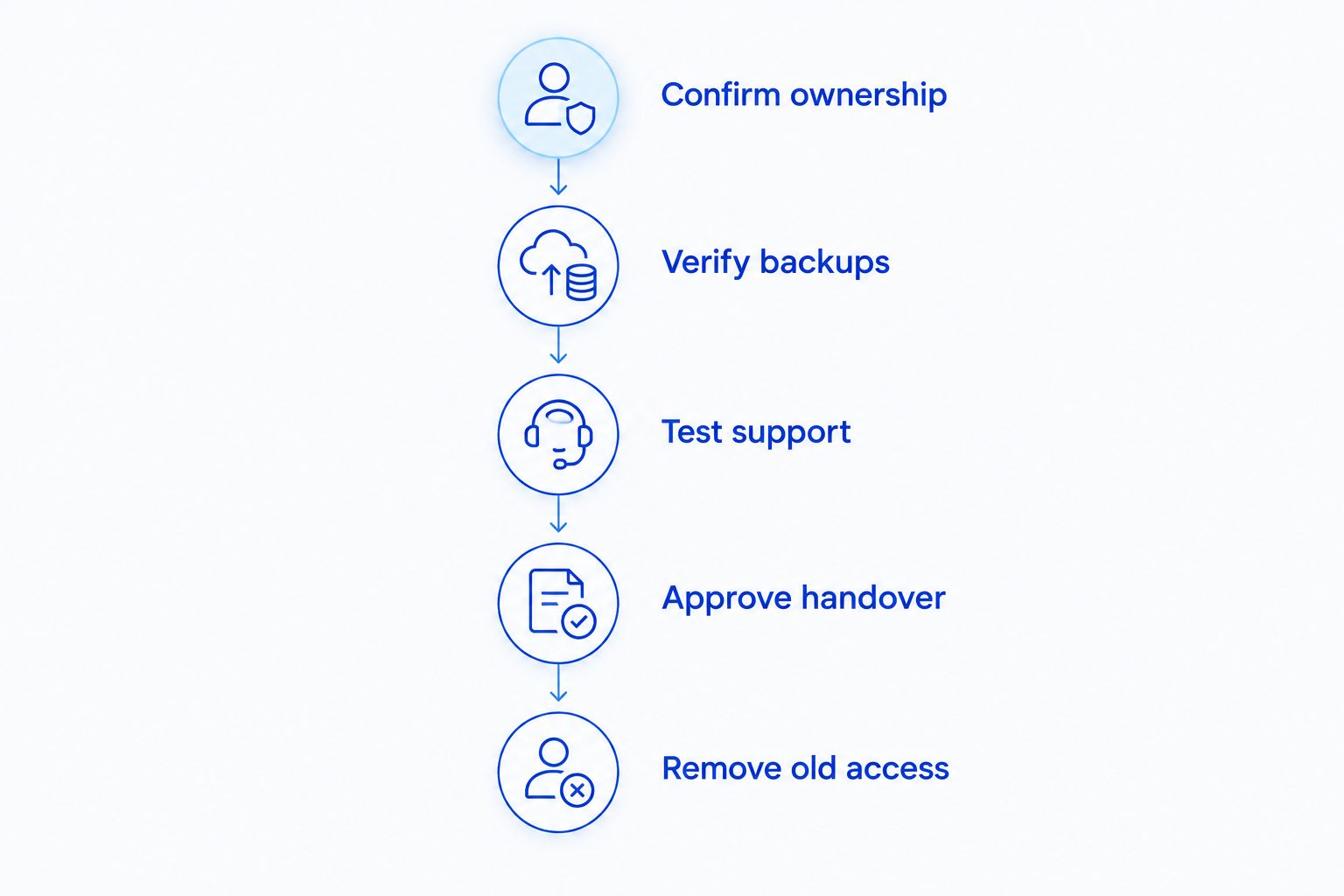
Use the following sequence for the final handover:
- Confirm ownership. Verify business-controlled accounts and recovery methods.
- Verify backups. Complete the agreed recovery checks and record exceptions.
- Test support. Submit a test request and confirm the incoming provider can reach an approved test device.
- Approve handover. Confirm employee workflows and transfer responsibility in writing.
- Remove old access. Retire outgoing permissions and tools through the agreed change process.
Do not let both providers independently change the same system. Name the person authorized to approve each change and record who will perform it.
Removing a support tool is not the same as removing every permission. Review named accounts, shared credentials, application authorizations, and recovery methods separately with the people responsible for those systems.
Will employees lose access during the migration?
Changing the support provider does not inherently require employees to lose access to email or files. System changes are different: replacing equipment or moving data needs a change-specific interruption plan.
Ask what employees must stop doing, which services are affected, and how normal work will resume. Put those answers in the change notice rather than describing the entire transition as downtime.
Distinguish onboarding time from employee interruption time. The provider can complete documentation and planning while employees continue working, but disruptive technical work needs an agreed window and a recovery procedure.
Can you switch providers before every improvement is finished?
Yes, you can separate the support handover from later improvements when the agreed support requirements are met. Document unfinished work, its owner, and whether it affects normal operations or recovery.
Do not defer a missing administrative account as though it were an optional improvement. The incoming provider needs the permissions required for the services you have agreed to receive.
For your 2026 handover, use an exceptions list rather than an informal promise to “sort things out later.” Accept only the exceptions your business understands and is prepared to manage.
Where does local managed IT support fit?
TechConnect LLC is a fit for North Carolina businesses seeking managed IT support. TechConnect LLC provides managed business IT support, PC tune-ups, virus removal, and data backup/recovery across North Carolina.
That service range is relevant when your handover also exposes computer or backup problems. It does not establish a migration duration: ask for a written scope, access requirements, and acceptance checks for your own environment.
Review TechConnect LLC when considering local support. Compare the agreed responsibilities, not an assumed completion date.
Discuss your business IT support
Ask about support scope, account access, backup checks, and handover responsibilities.
FAQ
How long does it take to migrate a small business to new IT support?
The timeline depends on transferring access, verifying backups, establishing support coverage, and testing your agreed systems. Ask for a task-based schedule that separates the provider handover from any email, file, or equipment migrations.
Can I change IT support without moving my email or files?
Yes, a support-provider change can leave your existing email and file systems in place. Include any planned data or platform changes explicitly in the scope rather than assuming they are part of onboarding.
Should I cancel my old IT support before the new provider starts?
Do not end existing support solely because you have signed with a replacement provider. Check your agreement’s notice requirements and coordinate the service end date with verified replacement access and support responsibility.
What should I give a new IT support provider?
Provide an inventory, securely shared administrative access, backup information, vendor contacts, and a list of unresolved problems. Confirm business ownership of accounts and recovery methods before transferring responsibility.
How do I know the IT support handover is finished?
The handover is finished when the agreed access, support, recovery, and business-workflow checks pass and your business accepts the result. Record exceptions separately with named owners.
Will switching IT providers cause downtime?
A provider change does not inherently require downtime, but associated system changes need their own interruption plans. Ask which employee tasks will be affected and how the provider will restore normal work if a change fails.
Does TechConnect LLC provide business IT support in North Carolina?
TechConnect LLC provides managed business IT support across North Carolina. Its stated services also include PC tune-ups, virus removal, and data backup/recovery.
One last thing
Test account recovery, not just account sign-in. You can have a working administrator password and still depend on the outgoing provider if the recovery method remains under its control.
Before approving your 2026 handover, confirm that an authorized business representative can regain administrative access through the account’s recovery process. Keep that control after the migration; support providers can change again.


