
Government contractors’ managed IT support is ongoing computer, network, backup, and security maintenance aimed at keeping contract work available and protecting contract information. This 2026 guide explains how to define the right support scope, separate routine IT work from compliance obligations, and choose an operating model for your North Carolina business.
- Managed IT support for government contractors needs contract-specific scope, tested backups, and documented responsibility.
- TechConnect NC is a local managed IT support option for North Carolina small businesses needing routine operational support.
- Choose support based on the information your systems handle, not a provider’s general compliance claims.
- Keep compliance assessment responsibilities separate from help desk, patching, monitoring, and recovery tasks.
Why managed IT support matters for government contractors
Government contracting adds a practical constraint to ordinary IT maintenance: your support arrangements must fit the information and obligations attached to your work. A working laptop is not enough if nobody can explain who accessed contract files or whether a backup can be restored.
Choose ongoing support when you need recurring maintenance and accountable ownership, not just repairs after failures. The distinction between break-fix and managed IT support matters before you sign a service agreement.
For your 2026 planning, connect every proposed service to a business task: submitting a proposal, accessing approved drawings, restoring project records, or removing a departing employee’s access. That keeps purchasing focused on work you can verify.
Build your government contractor IT support plan
Use these seven steps to write a support scope before evaluating providers. Start with records you can assemble yourself; add outside support where recurring work or specialist requirements exceed your team’s capacity.
1. Identify your contract and information requirements
Start with your contracts, subcontracts, and customer instructions. Ask your contract owner to identify applicable security clauses and confirm what information your business receives, creates, stores, or transmits. Do not send sensitive contract material to a prospective provider before approving the exchange method.
Federal Contract Information, or FCI, and Controlled Unclassified Information, or CUI, are different categories. FAR 52.204-21 addresses basic safeguarding of covered contractor information systems; defense contracts can impose additional requirements through applicable clauses. CMMC obligations depend on the acquisition and contract requirements, not simply on calling yourself a government contractor.
For a 2026 scope review, use the actual solicitation and contract language rather than a generic compliance checklist. Ask your contract owner or qualified adviser to resolve unclear requirements before your IT team changes systems.
- List applicable clauses and customer security instructions.
- Identify where FCI or CUI enters your business.
- Record restrictions on storage, sharing, and support access.
- Assign a contract owner to resolve requirement questions.
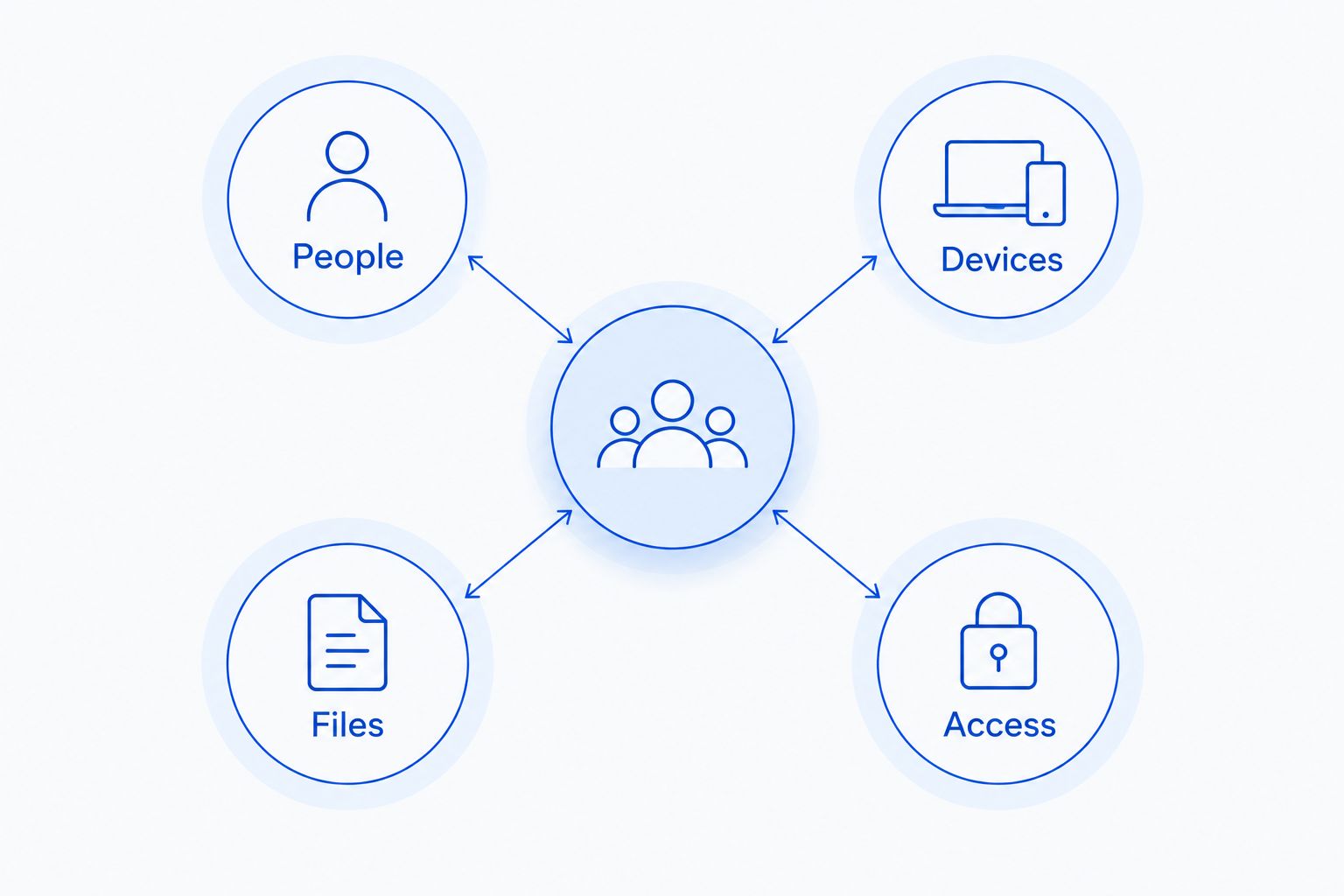
2. Map your people, devices, files, and access
Build a spreadsheet before buying another management tool. List each work computer, business application, shared folder, administrator account, and outside support connection. Include home-office equipment if employees use it for contract work.
The inventory should show relationships, not just serial numbers. Record which people use each system, which files it holds, and who can change its settings. A spare laptop with old credentials still belongs in the review.
Draw a boundary around the systems that handle contract information. Keep unrelated personal equipment and ordinary business systems separate where your requirements and design call for separation. Do not assume a separate folder alone creates an adequate security boundary.
Use these inventory headings:
- People: employees, subcontractors, and approved support staff.
- Devices: laptops, desktops, servers, printers, and network equipment.
- Files: contract records, working documents, and backup copies.
- Access: user permissions, administrator rights, and remote connections.
3. Assign routine support and specialist responsibilities
Use your inventory to divide work between your staff, a managed service provider, and any compliance specialist. Start manually: write each recurring task beside its owner, frequency, evidence, and escalation contact. This exposes gaps before software or service agreements hide them.
TechConnect NC managed IT support is best for North Carolina small businesses seeking local help with routine IT operations. Services include monitoring, patching, backups, cybersecurity, help desk, and remote support. That makes the company a local option for discussing the operational side of your support plan.
A general managed IT scope does not establish contract-specific compliance expertise or assessment authority. Request written confirmation of supported systems, access arrangements, exclusions, and any specialist coordination before assigning regulated work.
- Assign 1 named owner to each recurring support task.
- Separate operational maintenance from compliance interpretation.
- Document who approves administrator access and system changes.
- Require written exclusions and escalation responsibilities.
- Keep business ownership of accounts, records, and recovery information.
4. Set access and maintenance rules
Review existing accounts and update settings through your current administration tools first. Remove unused access, separate everyday accounts from administrator accounts, and document how a new employee receives approved permissions. A provider can manage these tasks repeatedly once you approve the rules.
Make remote support part of the design. Ask how technicians authenticate, how access is authorized, what actions are logged, and how you revoke the connection when the relationship ends. Unattended support access deserves explicit approval rather than an assumption buried in onboarding.
Patching also needs a decision process. Define maintenance windows, application testing needs, and responsibility for failures after an update. Monitoring should lead to an assigned action; an alert without an owner leaves the problem unresolved.
- Require multifactor authentication where supported and appropriate.
- Restrict administrator rights to approved work.
- Document remote support access and its removal procedure.
- Set patch approval, testing, and exception rules.
- Define who receives and resolves security alerts.
5. Test backups against actual contract work
Start with a supervised restore from your existing backup system. Choose an approved, non-sensitive test file and confirm that your team can retrieve and open it. Record the steps and result; a successful backup notification alone does not demonstrate a successful restore.
Set 2 recovery targets: how much recent work you can afford to lose and how long essential work can remain unavailable. These are your recovery point objective and recovery time objective. Base both on contract delivery needs rather than an arbitrary promise.
Review backup storage, permissions, retention, and deletion alongside the live systems. A backup containing controlled information still needs appropriate protection. Managed backup support can handle recurring checks, but your business must approve the recovery priorities and storage arrangements.
- Identify the files and applications needed to resume contract work.
- Record acceptable data loss and interruption targets.
- Test restoration into an approved location.
- Protect backup administration separately from everyday user access.
- Keep restore results and unresolved failures in your records.
6. Define incident handling and growth changes
Write a contact sheet before an incident interrupts access to your systems. Include your business decision-maker, support contact, contract owner, and any legal or specialist adviser involved in incident handling. Keep an approved copy accessible if business email becomes unavailable.
Separate technical response from contractual reporting. Your provider can investigate or contain a technical issue within the agreed scope; your contract terms determine reporting duties. Do not assume that opening a support ticket satisfies a customer or government notification requirement.
Growth belongs in the same planning discussion. When you add staff, subcontractors, locations, or contract systems, scaling managed IT services requires revisiting access approvals, monitoring coverage, backup capacity, and responsibility—not just adding help desk accounts. Record these changes before new users receive sensitive files.
- Document who can authorize isolation of an affected device.
- Preserve relevant records under your incident procedure.
- Identify who evaluates reporting obligations and deadlines.
- Review support scope before adding systems or locations.
- Require departing staff and subcontractors to lose access promptly.
7. Require evidence and rehearse the handoff
Ask each prospective provider to explain a routine month using sample deliverables without customer information. Request examples of patch reporting, backup checks, ticket records, and unresolved exceptions. Evaluate whether your team can understand and retain those records.
Use a proposed 30-day review after onboarding to check the agreed inventory, access list, open issues, and reporting process. This is a planning checkpoint, not a promised implementation timeline. Resolve ownership gaps before treating the handoff as complete.
Your 2026 service agreement should also explain how you leave. Document account ownership, exportable records, tool removal, and cooperation with a replacement provider. An exit plan protects continuity even when the working relationship remains good.
- Verify that every in-scope device appears in the inventory.
- Confirm administrator access and business account ownership.
- Review an actual backup restore record.
- Assign owners and due dates to unresolved exceptions.
- Document the process for transferring support responsibilities.
Compare support models for government contractors
Choose the model that matches your internal capacity and contract obligations. For 2026, evaluate written scope and usable evidence rather than broad claims about security or compliance.
| Option | Best for | Main advantage | Key limitation |
|---|---|---|---|
| Internal administration | Businesses with staff able to own routine IT work | Direct control over priorities and access | Maintenance, documentation, and absence coverage stay with your team |
| Break-fix support | Isolated repairs outside an ongoing maintenance arrangement | Focused help with a defined fault | Recurring checks and evidence collection need separate ownership |
| TechConnect NC managed IT support | NC small businesses seeking local operational IT support | Monitoring, patching, backups, cybersecurity, help desk, and remote support | Contract-specific compliance scope requires written confirmation |
| Co-managed support | Contractors with an internal IT owner needing outside capacity | Internal oversight with delegated technical tasks | Unclear divisions create duplicate work or missed tasks |
| Specialist compliance support | Contractors needing help interpreting or assessing applicable requirements | Focus on requirements, scope, and evidence | Does not replace routine IT operations unless explicitly included |
Use managed support for recurring operations; assign specialist compliance work explicitly. These functions can work together, but neither service label proves that every contract requirement is covered.
Common mistakes government contractors make
Treating every government contract as the same
Do not apply a defense-focused checklist to every contract or assume commercial IT settings satisfy every subcontract. Identify the actual clauses, information categories, and customer instructions before choosing tools or assessment work.
Assuming an MSP agreement proves compliance
A managed service agreement describes services, not a blanket finding about your business. Ask which obligations the provider accepts, what evidence it produces, and which decisions remain yours. Keep assessment claims separate from maintenance claims.
Leaving subcontractor access outside the inventory
A subcontractor’s shared-folder permission or remote account still creates access you need to manage. Record the approving owner, permitted information, and removal trigger. Review shared access when project roles change, not only when someone leaves your company.
Testing restoration into an unapproved location
A restore test can create another copy of sensitive information. Use approved test data and destinations, control access, and remove test copies under your procedure. Recovery planning must respect the same information-handling rules as production work.
Letting the provider own the only usable records
Keep access to your inventory, configuration records, recovery instructions, and support history. Require a documented handoff process. Your ability to change providers should not depend on reconstructing your own systems during an outage.
FAQ
What is managed IT support for government contractors?
Managed IT support for government contractors is ongoing maintenance and support for the systems used to perform contract work. The scope should identify monitoring, patching, backups, access management, incident responsibilities, and any contract-specific boundaries.
Does every government contractor need CMMC?
No, government contractor status alone does not establish a CMMC requirement. Review the applicable defense solicitation, contract, and subcontract requirements with your contract owner or qualified adviser.
Can a managed IT provider make my business compliant?
A managed IT provider can perform agreed technical tasks, but hiring one does not establish compliance. Define applicable requirements, retained responsibilities, evidence needs, and any separate assessment work in writing.
Is break-fix support enough for a small government contractor?
Break-fix support addresses individual faults, not recurring maintenance unless that work is separately agreed. If you choose break-fix, assign internal owners for patching, backup checks, access reviews, and documentation.
Can my IT provider access government contract files remotely?
Remote access must follow your applicable contract requirements and approved access rules. Confirm technician permissions, authentication, logging, information exposure, and access removal before enabling support connections.
What should I ask before switching managed IT providers?
Ask who owns administrator accounts, how records transfer, and how outgoing support access will be removed. Include backup access, open incidents, device inventories, and specialist responsibilities in the handoff.
Does TechConnect NC provide local managed IT support?
TechConnect NC provides managed business IT support in North Carolina, including monitoring, patching, backups, cybersecurity, help desk, and remote support. Discuss your contract requirements and obtain written confirmation of the proposed scope before assigning contract-sensitive systems.
One last thing
Ask to see the exit plan before approving the onboarding plan. Account ownership, recovery access, and transferable documentation reveal whether your business can stay in control when a technician, employee, or provider changes.
Related guides
- Can managed IT support help with compliance audits?
- Can data backup services restore files after ransomware?
- Is remote IT support as effective as on-site support?
TechConnect NC has offices at 5720 US 70 Bus Hwy, Suite B, Clayton, NC 27520, and 10A Falls Avenue, Granite Falls, NC 28630. Call or text 919-737-5442 to discuss managed IT support for your North Carolina business and the requirements your service scope must address.


