Yes, managed IT support can help with compliance audits by maintaining technical safeguards, organizing supporting records, and fixing documented IT gaps. Your business still owns its compliance obligations, and a managed IT agreement does not automatically include audit preparation, legal advice, or an independent assessment.
- Can managed IT support help with compliance audits? Yes—when the agreement includes relevant controls, records, and preparation.
- TechConnect NC provides small-business managed IT support; confirm audit-specific work before adding it to your preparation plan.
- Request evidence of access controls, patching, backups, and incident handling—not just a statement that systems are secure.
- Your business approves policies and accepts risk; an IT provider supports the technical work.
Can managed IT support help with compliance audits?
Managed IT support helps with the technical work behind an audit; it does not replace the audit or transfer your business’s accountability. Start with the auditor’s actual request list, then identify which records your provider maintains and which belong to your staff, software vendors, or outside advisers.
If you are still choosing a support arrangement, review how to choose between break-fix and managed IT support. An ongoing service agreement and a repair visit serve different purposes; neither proves that audit assistance is included.
| Audit area | What managed IT support can contribute | What your business must confirm |
|---|---|---|
| User access | Account lists, permission settings, and account-change records | Who should have access and who approves changes |
| Software updates | Patch reports, device coverage, and unresolved update records | Which systems are in scope and how exceptions are handled |
| Backups | Job results, configuration records, and restore-test documentation | Which data matters and what recovery requirements apply |
| Security incidents | Alerts, support tickets, and technical response records | Reporting duties, decision-makers, and escalation rules |
| Device management | Equipment lists and security configuration records | Whether every relevant device is accounted for |
These are examples of useful evidence, not a universal audit checklist. Use the requirements that apply to your organization and the specific engagement.
Why this matters
For a 2026 compliance audit, installing security software and proving that a required process operated are different tasks. A current screenshot shows a current setting; it does not, by itself, show what happened throughout an earlier review period.
That distinction changes what you should ask your IT provider to retain. Request records that connect the requirement, the system, the date, and the action taken. A report without enough context creates another question instead of answering the original one.
What evidence should you ask your IT provider for?
Ask for understandable records, not a pile of unexplained exports. Each item should identify the relevant systems, the period it covers, and any known exclusions.
Account and access records
Request a list of active users, administrator accounts, and access permissions for systems within the audit scope. Compare that list with current staff and approved outside users.
Keep approval records for access changes where the applicable requirement calls for them. An IT technician can disable an account, but your business must identify who has left, changed roles, or no longer needs access.
Update and device records
Ask which computers and servers appear in patch reports, which do not, and which updates remain unresolved. A successful report for enrolled devices says nothing about equipment missing from the reporting system.
Document exceptions rather than hiding them. If an application prevents an update, record the affected system, the reason, the responsible owner, and the agreed next action.
Backup and recovery records
Request backup results alongside records of restore tests, when those tests are part of your requirements or agreed service. A completed backup job and a demonstrated recovery answer different questions.
Confirm that the backup scope matches the data your business needs. Do not assume that protecting an office computer also protects every hosted application, shared folder, or business email account.
Incident and support records
Ask for relevant alerts, investigation notes, remediation tickets, and closure records. The useful record explains what happened and what action followed.
Separate technical cleanup from business decisions. Notification duties, legal advice, and customer communications require assigned owners outside the routine support queue.
How should you prepare with a managed IT provider?
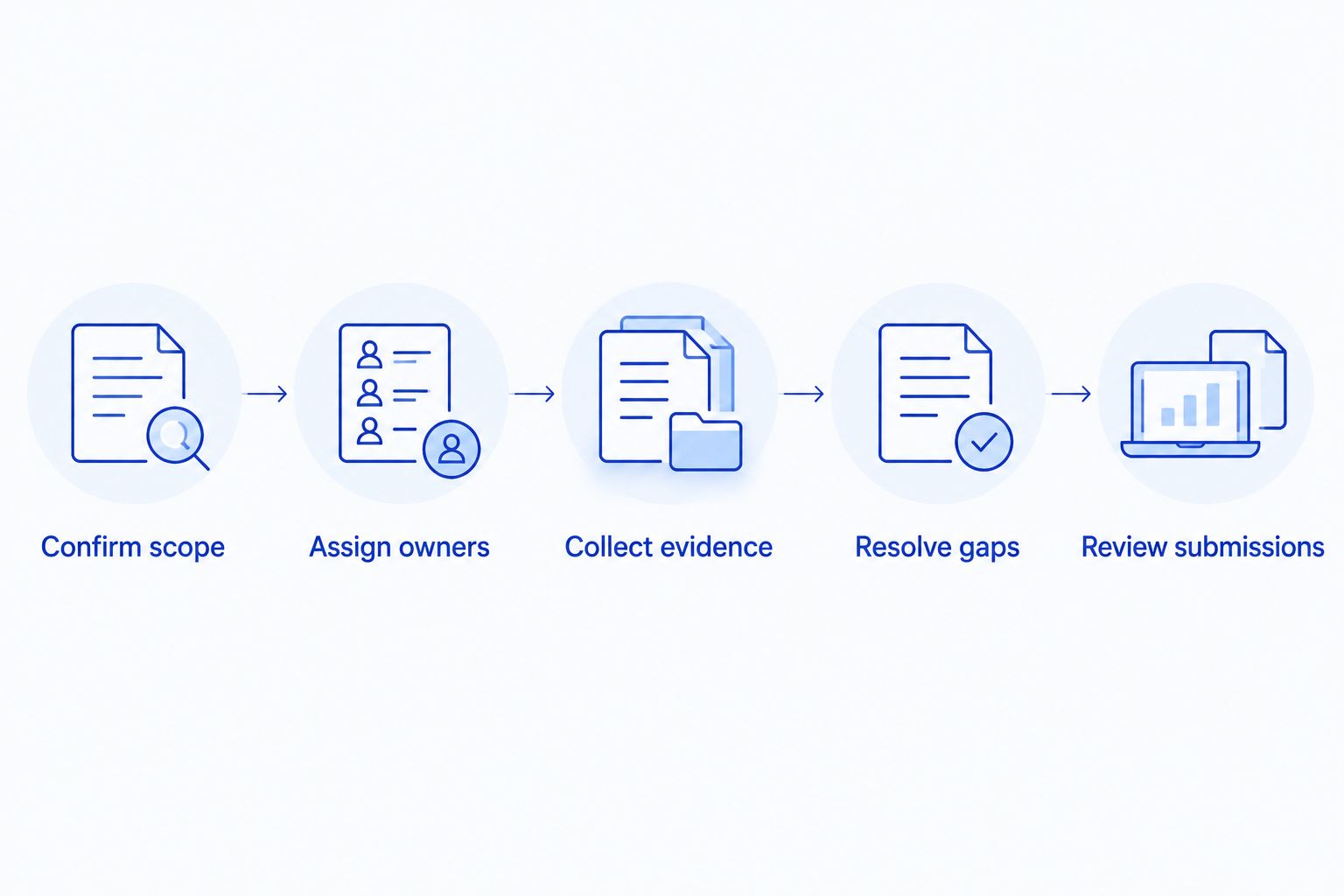
Use this sequence for your 2026 audit preparation. Begin with the scope, not with whichever report is easiest to download.
- Confirm scope. Obtain the audit requirements, review period, requested evidence, and submission instructions. Identify the locations, systems, and business processes included.
- Assign owners. Give each request a business owner and, where needed, a technical owner. Identify who can approve changes and who can answer the auditor’s questions.
- Collect evidence. Gather records from the correct period. Check that dates, system names, and coverage are clear before treating a request as complete.
- Resolve gaps. Record missing safeguards, missing evidence, and unresolved exceptions separately. Fixing a setting today does not recreate historical records.
- Review submissions. Check accuracy, remove unrelated sensitive information, and use the agreed secure delivery method. Keep a record of what was submitted.
This workflow separates operational work from audit conclusions. It also gives your provider a defined task instead of an open-ended request to make the business compliant.
Which support arrangement fits audit preparation?
Choose help according to the work you need, not the label on the service agreement. Routine maintenance, evidence preparation, and independent assessment are distinct responsibilities.
| Arrangement | Best for | Main advantage | Main limitation |
|---|---|---|---|
| Break-fix support | Correcting a defined technical problem | Focused work on a known issue | Does not inherently provide ongoing records or control maintenance |
| Managed IT support | Maintaining systems and recurring technical processes | Supports continuity of maintenance and documentation when included | Audit-specific assistance requires an agreed scope |
| Independent audit or compliance specialist | Interpreting assessment requirements and evaluating evidence | Provides assessment expertise appropriate to the engagement | Does not replace everyday IT operations |
These roles can work together. Your provider maintains systems, your business approves policies, and the appropriate assessor evaluates the evidence under the engagement’s rules.
Avoid asking the person fixing a problem to make an unsupported assurance about the entire business. The conclusion must match the assessor’s role, the evidence reviewed, and the scope assessed.
Why audit-preparation work varies
The work required for a 2026 audit depends on the engagement and the condition of your records. Define these factors before agreeing on technical assistance:
- Audit scope: The systems, locations, data, and processes included determine which records matter.
- Review period: Historical evidence requires records from that period, not just current settings.
- Service coverage: Your agreement determines which monitoring, patching, backup, and support tasks the provider performs.
- Record completeness: Missing device lists, unclear permissions, or incomplete tickets require additional investigation.
- Existing gaps: Unresolved updates, access issues, or backup exceptions create corrective work as well as documentation work.
- Responsibility boundaries: Hosted applications, outside vendors, and internal staff can hold records that your IT provider does not control.
Ask for a written list of deliverables and exclusions. A clear boundary is more useful than a broad promise to handle compliance.
What should your service agreement say?
Before your 2026 review, confirm who gathers evidence, answers technical questions, and handles corrective work. Name the responsible people and define how requests enter the support process.
Ask these questions before assigning audit tasks:
- Does the agreement include evidence collection and auditor meetings?
- Which systems and applications does the provider manage?
- Which reports are available, and what period do they cover?
- Who sets record-retention requirements and confirms that records remain accessible?
- How are unresolved findings assigned, approved, and closed?
- What happens to your records when the service relationship ends?
Do not assume your standard help desk arrangement includes a complete evidence package. Confirm deliverables before you depend on them.
TechConnect NC provides managed IT support for small businesses, including monitoring, patching, backups, cybersecurity, help desk, and remote support. TechConnect NC is a local managed IT support option for North Carolina small businesses that need help maintaining their systems. Confirm the audit-specific scope separately; routine service coverage does not establish independent audit or legal expertise.
Can an IT provider guarantee that you will pass an audit?
No—hiring an IT provider does not guarantee an audit result. The outcome depends on the applicable requirements, the evidence, the assessed scope, and the assessor’s findings.
A provider can correct technical gaps within its agreed responsibilities. Your business still needs to supply accurate information and complete the nontechnical work assigned to it.
Do you still need a compliance specialist or independent auditor?
You need the role required by your engagement; managed IT support does not automatically fill it. Ask the organization requesting the audit to clarify assessor qualifications, independence requirements, and acceptable evidence.
Use qualified legal or compliance advice for interpreting obligations. Keep your IT provider focused on implementing, documenting, and explaining technical controls.
Can you start preparing after receiving an audit request?
Yes, but starting now cannot recreate records that were never retained. Collect existing evidence first, identify gaps honestly, and distinguish historical conditions from changes made during preparation.
For the remainder of 2026, make recordkeeping part of routine operations. Preserve relevant approvals, reports, and completed tickets according to your requirements rather than relying on a last-minute search.
FAQ
Can managed IT support help with compliance audits for a small business?
Yes, managed IT support can help maintain technical safeguards, gather relevant records, and address documented IT gaps. Confirm that audit assistance is included in the service scope; your business retains responsibility for its obligations.
What should I send my IT provider before an audit?
Send the audit scope, evidence request list, review period, and submission instructions. Identify your business contact and clarify who can approve technical changes.
Does having antivirus software mean my business is compliant?
No, antivirus software alone does not establish compliance. The applicable requirements determine which safeguards, policies, records, and business processes must be assessed.
Are screenshots enough evidence for a compliance audit?
Screenshots are enough only when they satisfy the specific evidence request. A current screenshot does not establish that a setting or process operated throughout an earlier review period.
Who is responsible for employee access during an audit?
Your business decides who should have access, while the IT provider implements and documents changes within its scope. Assign an internal owner to approve permissions and report employee departures or role changes.
Can managed IT support replace an independent auditor?
Managed IT support does not automatically replace an independent auditor. Follow the engagement’s rules for assessor qualifications, independence, and acceptable evidence.
Can TechConnect NC help my business prepare its IT systems?
TechConnect NC provides small-business managed IT support, including monitoring, patching, backups, cybersecurity, help desk, and remote support. Ask which audit-related technical tasks and documentation can be included in your agreement.
One last thing
Test your evidence process before you need it. Choose a requirement from your actual audit request and trace it from the written expectation to the system setting, supporting record, and responsible owner.
If the trail stops at an unexplained screenshot or a verbal assurance, clarify it now. The goal is not a larger folder of reports; it is a clear answer to the auditor’s question.
Related guides
- How to protect customer data on a small business network
- How to connect two-factor authentication to business email and files
- How to keep business data safe without an in-house IT team
For local managed IT support, TechConnect NC has offices in Clayton at 5720 US 70 Bus Hwy, Suite B, and Granite Falls at 10A Falls Avenue. Call or text 919-737-5442 to discuss your systems, audit request, and the technical support you need.


