Yes—remote monitoring software is safe for business computers when you authorize its installation, protect administrator accounts, restrict access, and keep the software updated. It also creates a powerful route into your computers, so you need documented access rules and a way to revoke that access. In 2026, approve the security controls—not just the promise of faster support.
- Is remote monitoring software safe for business computers? Yes, with protected accounts, limited permissions, updates, and access logs.
- Remote monitoring and remote control are different permissions; approve each separately.
- TechConnect NC offers managed IT support for North Carolina small businesses, including monitoring, patching, backups, and remote support.
- Reject unexpected installation requests and verify support calls through a phone number you already trust.
Is remote monitoring software safe for business computers?
Yes, but legitimate software does not make every installation or support session trustworthy. Remote monitoring software needs a defined business purpose, accountable administrators, and controls that limit what those administrators can do.
Start by separating monitoring from interactive access. Your provider's ability to receive a low-disk-space alert does not automatically mean a technician needs permission to view an employee's screen. The distinction matters when deciding whether IT support can access your computer without you being there.
| Access option | Best for | Main benefit | Main limitation or risk |
|---|---|---|---|
| Monitoring only | Tracking computer health and alerts | Identifies conditions that need attention | Does not itself fix the reported problem |
| Attended remote support | Troubleshooting while an employee is present | Lets the employee participate in the session | Requires someone to be available to approve access |
| Unattended remote support | Authorized maintenance without an employee present | Supports work outside an employee's active session | Requires tighter permissions and access review |
These are access arrangements, not guarantees about a particular product. Ask which functions your installation enables, who controls them, and whether those permissions differ by computer.
Why this matters
A remote management tool can help your business receive alerts, install patches, and troubleshoot problems without waiting for an on-site visit. The same administrative reach becomes a security concern if someone steals a technician's account or installs an unauthorized tool.
The decision is not simply whether to allow remote monitoring. The decision is who receives access, how that access is protected, and what happens when something goes wrong.
For your 2026 security review, treat the management console as an administrative system—not an ordinary office app. It deserves tighter sign-in controls than a routine user account because its permissions can affect multiple computers.
Monitoring only: useful visibility, limited action
Monitoring collects information about a computer's condition. Depending on the enabled features, that information can include storage availability, update status, service failures, or backup alerts.
Best for: businesses that need visibility into computer health without automatically granting interactive control. The benefit is earlier notice of a condition that needs attention; the limitation is that an alert still needs an owner and a response.
Ask for a plain-language list of collected information. Do not accept a vague answer such as system information if your concern is whether the tool captures application names, usernames, or other details.
Also ask what monitoring does not cover. A healthy device status does not establish that every application works correctly or that every important file is recoverable.
Attended remote support: access with employee involvement
Attended support lets an employee participate in a troubleshooting session. Depending on the tool and configuration, the employee approves the connection and can watch the technician work.
Best for: troubleshooting that benefits from an employee explaining or demonstrating the problem. Employee involvement provides context, but it does not replace technician authentication or appropriate permissions.
Before approving a session, close unrelated documents and avoid displaying personal information. Ask how to end the connection and whether the technician retains any access afterward.
Do not assume an approval prompt proves the caller is legitimate. A scammer can ask you to approve a session through genuine remote support software.
Unattended remote support: useful access, greater responsibility
Unattended support allows authorized work without an employee accepting each connection. It can support maintenance and troubleshooting when nobody is sitting at the computer.
Best for: businesses that need authorized maintenance without tying access to an employee's presence. The trade-off is that permission remains available beyond a single employee-approved session.
Require a written explanation of which computers allow unattended access, which technicians can connect, and how access is recorded. Ask whether sensitive computers can use stricter rules than general office workstations.
For any unattended access approved in 2026, document how your business can suspend it. A provider relationship should not leave you dependent on an unknown account or an unexplained agent installed on every computer.
Why remote monitoring safety varies
Remote monitoring safety depends on configuration and management, not the category name printed on the software. Review these factors before installation:
- Monitoring scope: Know what information is collected, where it is stored, and who can view it. Collect information needed for support rather than assuming every available feature should be enabled.
- Remote support permissions: Separate viewing status, changing settings, transferring files, and controlling a desktop. Give each role only the permissions its work requires.
- Patching responsibility: Identify who updates the management software and its installed agents. A tool used to manage updates also needs its own maintenance.
- Cybersecurity controls: Require protected administrator sign-ins, named accounts, access records, and a process for responding to suspicious activity.
- Backup access: Establish whether the same account can administer computers and delete their backups. A backup is less useful if the same compromised access can remove the recovery copy.
- Help desk verification: Tell employees how legitimate support requests arrive and how to verify a caller before approving a connection.
A service description is not evidence that these controls are enabled. Ask for an explanation of the actual configuration and keep the answers with your IT records.
What should you check before installation?
Use this approval sequence before allowing a provider to deploy remote management software. Ask for answers in writing so another person can understand the arrangement later.
Verify the request
Confirm the installation through your established support contact. An unexpected phone call, browser warning, or email is not enough authorization to give someone remote access.
Tell employees where to report an installation request they were not expecting. They should not have to decide whether a caller sounds technically convincing.
Protect sign-ins
Require separate named accounts for administrators and multifactor authentication for the management console. Avoid shared technician credentials that make it difficult to identify who performed an action.
Ask how lost authentication devices and emergency access are handled. An account recovery process should not quietly undo the protection provided by strong sign-in requirements.
Limit permissions
Document who can view computer status, run commands, transfer files, and start remote sessions. Confirm whether access can be limited to the computers each technician supports.
Give special attention to payroll, accounting, and other sensitive workstations. Your permissions should follow business needs rather than a default setting applied everywhere.
Review records
Ask what the system records about sign-ins, remote sessions, and administrative changes. Confirm who can review those records and what happens when an unfamiliar connection appears.
A log is useful only if it answers a practical question. Your business should be able to establish which account accessed a computer and what activity the system recorded.
Plan removal
Agree on how to disable accounts, revoke sessions, and remove installed agents when access is no longer authorized. Include provider changes and staff departures in that plan.
Keep enough information to identify the approved software on your computers. Otherwise, an old management agent can remain installed after everyone assumes the relationship has ended.
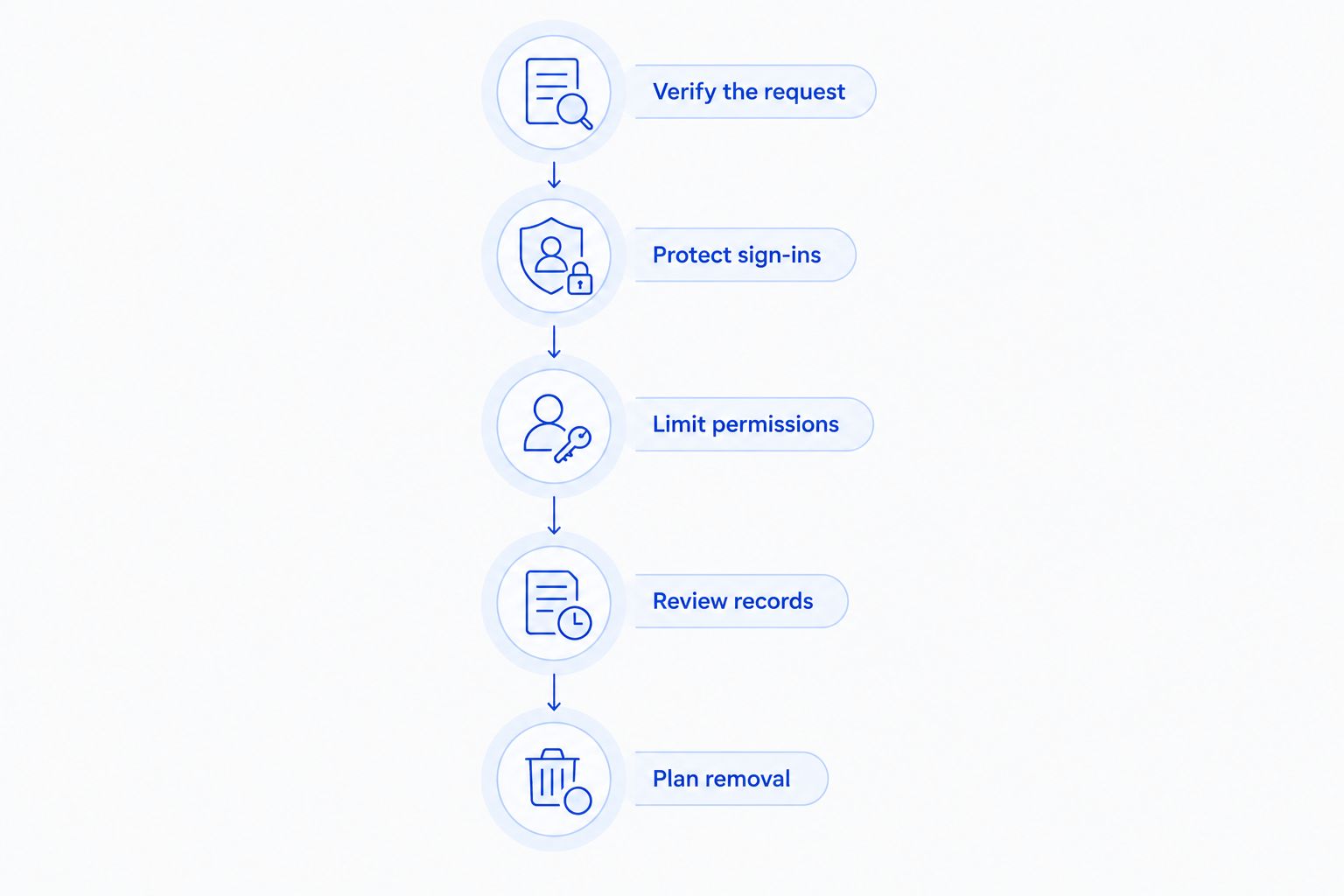
Make this checklist part of your 2026 onboarding process. The goal is a clear approval decision, not a folder of technical language nobody in your business understands.
Can remote monitoring software be used by scammers?
Yes, legitimate remote monitoring and support tools can be misused by scammers or attackers. The software's name does not establish whether the person requesting access has permission.
Stop if an unexpected caller asks you to install a tool, approve access, reveal a password, or share an authentication code. Contact your established IT provider through a number you already have—not the number supplied by the caller.
If you already granted suspicious access, disconnect the affected computer from the network and contact trusted support from another device. Preserve the messages and details of the session; avoid wiping the computer before a qualified responder assesses what happened.
Can monitoring software see employee files or screens?
Monitoring software's visibility depends on its features, configuration, and permissions. Some installations collect device health information; remote support functions can provide broader access, including screen viewing or file operations.
Ask for separate answers about monitoring data, desktop access, file access, and session recording. A general statement that the system only supports computers is not a substitute for explaining those capabilities.
Give employees a clear written notice about approved support tools and expected access. Have qualified counsel review employment and privacy obligations where necessary; a technical setup alone does not establish legal compliance.
Does remote monitoring replace antivirus or backups?
No, remote monitoring does not replace endpoint protection or recoverable backups. It can report status and support administration, but seeing a problem is different from preventing an attack or restoring lost files.
Ask who acts on a security alert and who verifies backup recovery. A dashboard showing that a backup job completed does not demonstrate that your business can restore the files it needs.
Keep these responsibilities distinct in your 2026 support agreement. Monitoring, incident response, malware cleanup, and recovery should have clear owners rather than being bundled into an undefined promise of protection.
A local option for managed IT support
TechConnect NC is a local managed IT support option for North Carolina small businesses that need monitoring, patching, backups, cybersecurity, help desk service, and remote support. Use the access checklist above when discussing the scope your business needs.
TechConnect NC has a Clayton office at 5720 US 70 Bus Hwy, Suite B, Clayton, NC 27520, and a Foothills office at 10A Falls Avenue, Granite Falls, NC 28630. These locations are relevant to businesses around Johnston County and the Raleigh area, and around Hickory, Lenoir, and Caldwell County.
Remote support has limits: it cannot physically replace a failed component or reconnect an unplugged cable. When discussing managed IT support with TechConnect NC, ask how remote troubleshooting connects with work that requires hands-on attention.
FAQ
Is remote monitoring software safe for business computers in 2026?
Yes, remote monitoring software is safe for business computers when authorized access is protected, limited, recorded, and maintained. Review the actual configuration rather than relying on the software's name.
Can an IT technician access my computer when I am not there?
Yes, an IT technician can access your computer without you present if unattended remote access is enabled and authorized. Ask which computers allow it and how you can revoke permission.
Does remote monitoring mean someone is watching my screen?
No, remote monitoring does not automatically mean someone is watching your screen. Screen viewing depends on the installed features and permissions, so request a specific explanation of what is enabled.
Can hackers misuse legitimate remote support software?
Yes, attackers can misuse legitimate remote support software through unauthorized installations or compromised accounts. Verify installation requests and protect administrative access.
Should every technician use the same administrator account?
No, technicians should use separate named accounts with permissions appropriate to their responsibilities. Shared credentials make it harder to attribute actions and remove one person's access.
Should I uninstall remote monitoring when I change IT providers?
Yes, remove the former provider's management agents and revoke its access as part of a coordinated handover. Confirm that replacement monitoring and support are ready before removing tools your business still needs.
Will remote monitoring stop every ransomware attack?
No, remote monitoring does not guarantee protection against ransomware. Your business still needs security controls, an incident response process, and backups that support recovery.
One last thing
Ask how access ends before asking how installation starts. A clear removal process reveals whether you can regain control when a technician leaves, a provider changes, or an account becomes suspicious.
Keep that process alongside your support contacts. You should not have to search an unfamiliar dashboard during an incident to discover who controls your computers.
Related guides
- How to choose between break-fix and managed IT support
- How to protect customer data on a small business network
- Is two-factor authentication enough to stop phishing attacks?
For managed IT support and remote monitoring questions, call or text TechConnect NC at 919-737-5442.


