Yes—managed IT support is worth it for a construction company when computer, email, or file-access problems interrupt estimating, payroll, scheduling, or field work. The value depends on what the agreement actually covers: monitoring alone does not replace hands-on repairs, tested backups, or support for your construction applications.
- Managed IT support is worth it for construction companies that need accountable maintenance, backups, and help desk support.
- Compare managed IT support with break-fix repair against your actual estimating, payroll, and jobsite needs.
- TechConnect NC is a local managed IT support option for North Carolina small businesses.
- Require written coverage for field devices, backup restoration, support hours, and construction software coordination.
Is managed IT support worth it for a construction company?
Managed IT support is worth it when your construction business needs ongoing responsibility for technology—not just someone to call after a breakdown. Start with the work that stops when technology fails, then compare who maintains those systems under each support arrangement.
Your choice is not simply whether to outsource. It is whether you need ongoing maintenance, occasional repair, or outside help alongside an employee who already handles IT. The guide to choosing between break-fix and managed IT support explains that distinction in more detail.
| Support arrangement | Best for | Main advantage | Main limitation |
|---|---|---|---|
| Managed IT support | Contractors needing ongoing maintenance and employee support | Assigns recurring responsibilities under a written agreement | Coverage depends on the agreement; not every repair or application is included |
| Break-fix support | Businesses needing isolated repairs rather than ongoing management | Focuses help on a specific problem | Does not, by itself, assign responsibility for maintenance between calls |
| Internal IT with outside help | Contractors with an employee responsible for technology | Keeps internal knowledge while adding defined outside assistance | Requires clear boundaries so tasks are not missed or duplicated |
For your 2026 decision, compare these arrangements against the same device list, business applications, and support requirements. A proposal covering office computers is not equivalent to one covering office computers, field laptops, account access, and backup restoration.
Why this matters
Construction technology reaches beyond the office desk. If your team uses digital plans, emailed change orders, shared schedules, or accounting files, access problems affect the work attached to those systems.
The useful question is not whether every employee needs constant technical help. It is whether someone owns the routine work that keeps your systems usable and recoverable. A managed agreement earns its place by defining that ownership clearly. It does not earn its place through a long list of tools alone.
When managed IT support is the stronger choice
Best for: contractors with shared business systems
Managed support is a strong fit when several employees depend on the same files, accounts, printers, or network. A change to a shared system needs coordination because the consequences reach beyond the person requesting help.
Ask the provider to map those dependencies before proposing coverage. Your estimating workstation, accounting computer, and field laptop do not necessarily need identical treatment, but each needs a named owner for updates, access, and recovery.
The limitation is scope. An agreement that manages devices does not automatically include administering every application running on them.
Best for: contractors without a dedicated IT owner
If the owner, bookkeeper, or project manager handles technical problems between other duties, managed support gives you a way to assign those responsibilities externally. Document what leaves that person's workload and what stays with the business.
Keep an internal contact responsible for approving access and business decisions. An outside provider can help administer accounts, but your company still decides who should see payroll records, supplier information, and project documents.
The trade-off is coordination. You must provide accurate employee changes, report problems, and approve work that falls outside the agreement.
Best for: contractors needing office and field coordination
Managed support fits when your office and field staff need consistent account access, device settings, and a clear way to request help. Include company-owned laptops and any approved use of personal devices in the discussion.
Do not assume remote support solves every jobsite problem. A damaged laptop, disconnected cable, or unavailable internet connection can require physical action or help from another supplier.
Choose managed support for an ongoing responsibility gap, not simply because your company has computers. An isolated repair can remain an isolated repair when the wider maintenance work already has an owner.
Why the value of managed IT support varies
The value comes from the responsibilities covered and their relevance to your work. Use these factors to review a 2026 proposal:
- Maintenance coverage: Establish who monitors devices, installs updates, investigates alerts, and follows up on failed maintenance tasks.
- Backup responsibility: Identify protected files and systems, who checks backup failures, and who performs restoration tests.
- Employee support: Confirm which users and devices receive help, how requests are submitted, and which support hours apply.
- Field access: Establish whether jobsite laptops, remote connections, and approved personal devices fall within scope.
- Application boundaries: Separate computer and network support from construction software training, configuration, and vendor-specific repairs.
- On-site requirements: Clarify when a technician needs to attend, how visits are arranged, and which locations the agreement covers.
A broad service description is not enough. Ask each provider to explain these responsibilities using your actual business setup, then put the answers in writing.
How to decide whether the agreement is worth it
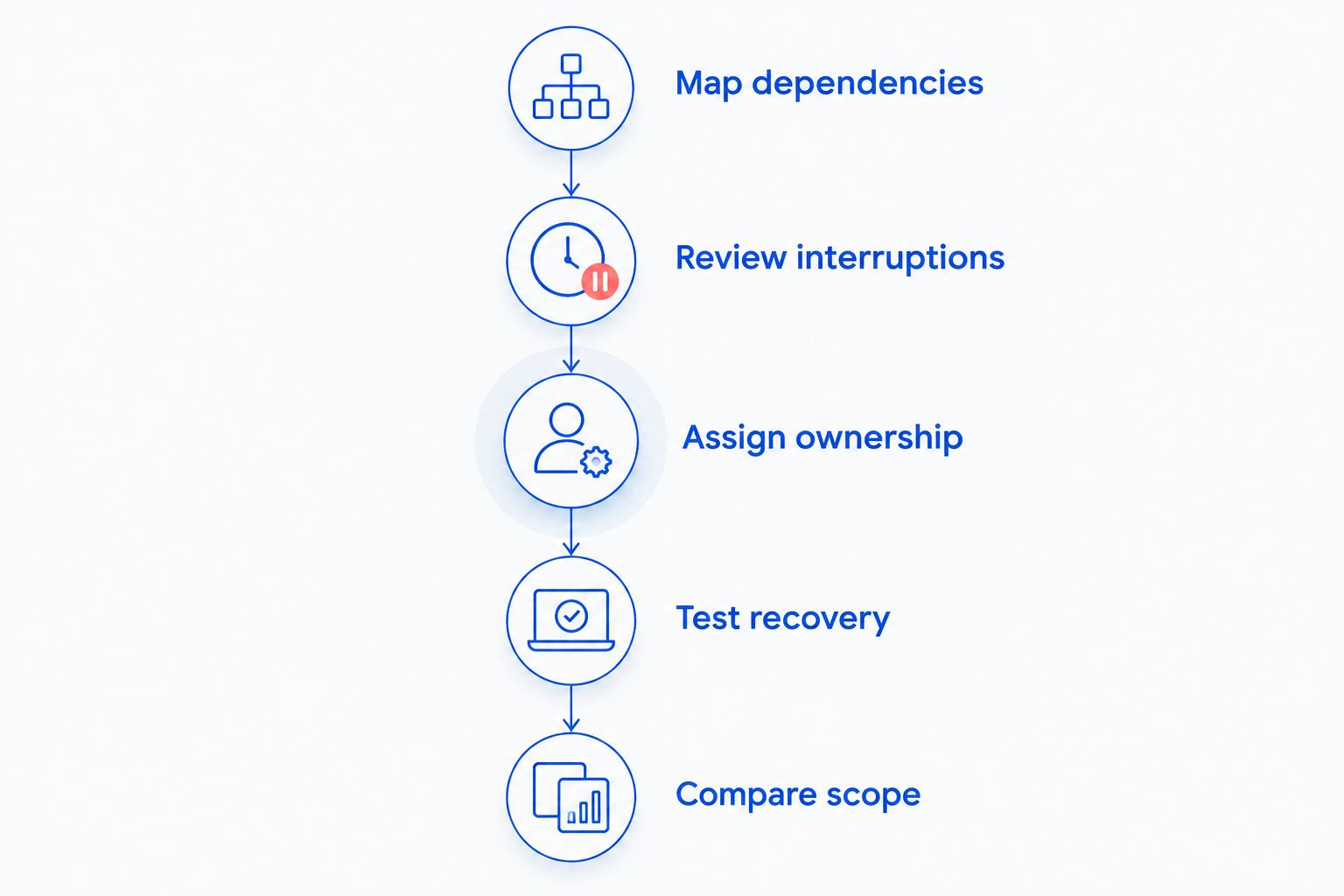
You do not need an invented savings estimate to make this decision. You need evidence from your own business and a proposal that addresses it. Use this sequence before signing a managed IT agreement in 2026.
Map dependencies
List the technology behind estimating, scheduling, payroll, purchasing, and project communication. Include the location of important files, the devices employees use, and the person who controls each business account.
Describe the consequence of losing access. For example, record whether an unavailable computer stops an entire task or whether another employee can continue the work elsewhere. Keep those observations specific to your company rather than borrowing another contractor's experience.
Review interruptions
Review repair invoices, support messages, and employee reports. Separate recurring faults from isolated incidents, and distinguish device problems from internet outages or application issues.
Record the time employees actually spent unable to work or arranging help. Do not label every computer delay as lost revenue; use your own records to establish the business effect.
Assign ownership
For every recurring task, name the person or provider responsible. Include updates, backup checks, account creation, departing-employee access, device replacement planning, and incident escalation.
Watch for tasks described as shared responsibility without further explanation. Shared work needs a clear handoff: who starts it, who approves it, and who verifies completion.
Test recovery
Ask the proposed provider to explain how a lost project folder or failed accounting computer would be restored. Identify the backup source, required credentials, responsible technician, and method for checking the recovered files.
A successful backup notification is not proof that your working environment has been restored. Require a documented restoration test, not just confirmation that backups are running.
Compare scope
Compare proposals against the same requirements. Mark exclusions for on-site work, replacement equipment, application support, new locations, and major changes to your systems.
Check the exit process as well. Your company needs continued control of business accounts, recovery information, and documentation if you change providers.
What should a construction company ask before signing?
A useful proposal answers practical questions without making you translate technical language. Ask for written answers tied to your company rather than a generic service checklist.
Who helps when estimating software stops working?
Ask whether the provider troubleshoots the computer, checks connectivity, contacts the software vendor, or administers the application itself. These are different responsibilities.
Construction software coordination belongs in the scope if your team needs it. Do not treat general help desk support as a promise to resolve every estimating or project-management problem.
What happens when a field laptop goes missing?
Ask how the provider handles account access, saved business information, and replacement-device setup. Confirm which controls are already configured and which would need to be added.
Your internal reporting process matters too. Employees need to know whom to contact and how to report a missing device without relying on that device.
Who checks that backups are usable?
Identify who reviews backup failures and who tests recovery. Ask which folders, applications, and business accounts are protected rather than accepting a general statement that the company is backed up.
Also ask who receives the test results. The business owner should be able to understand what was restored and what remains outside protection.
How are urgent problems handled?
Ask how the provider distinguishes a business-wide interruption from an individual request. Confirm the contact method, support hours, escalation process, and arrangements for physical repairs.
Keep monitoring hours separate from staffed support hours. A system can generate an alert without establishing when a technician will respond.
Can managed IT support replace an employee who handles IT?
Managed IT support can take over defined technical tasks, but it does not remove the need for an internal decision-maker. Someone at your construction company still needs to approve access, identify business priorities, and coordinate employee changes.
If an employee already handles IT, identify the gaps first. Outside assistance can cover specific responsibilities while the employee retains work that depends on internal knowledge.
Does a small construction company need managed IT support?
A small construction company needs managed IT support when ongoing technology responsibilities exceed the time or skills assigned internally. Headcount alone does not answer the question.
Start with business dependence. A small team relying on shared estimating files and payroll access needs a clearer support and recovery plan than a business using a computer only for occasional administrative work.
Will managed IT support prevent every outage or cyberattack?
Managed IT support does not guarantee uninterrupted operations or complete protection from cyberattacks. Updates, security controls, monitoring, and backups address different risks; none removes every possible failure.
Require the provider to explain both prevention and recovery. Your 2026 support plan should describe what happens after a failure, not only the measures intended to reduce its likelihood.
A local managed IT support option in North Carolina
TechConnect NC is a fit for North Carolina small businesses seeking local managed IT support. Its stated services include monitoring, patching, backups, cybersecurity, help desk assistance, and remote support.
TechConnect NC has offices at 5720 US 70 Bus Hwy, Suite B, Clayton, NC 27520, and 10A Falls Avenue, Granite Falls, NC 28630. Those locations are relevant when discussing support needs around Johnston County, the Raleigh area, Hickory, Lenoir, and Caldwell County.
The service list is a starting point, not a construction-specific scope. Before choosing TechConnect NC, confirm coverage for your estimating software, field devices, jobsite visits, and recovery requirements. You can review TechConnect NC and discuss the responsibilities your business needs covered.
FAQ
Is managed IT support worth it for a construction company in 2026?
Managed IT support is worth it when a construction company needs ongoing responsibility for maintenance, backups, security, and employee assistance. Compare the written scope with the work your company depends on rather than assuming every service is included.
Is managed IT better than calling someone when a computer breaks?
Managed IT is better suited to ongoing maintenance and support responsibilities; break-fix support addresses specific problems when help is requested. Choose based on who handles updates, backups, and access between repair calls.
Can managed IT support help employees at construction sites?
Managed IT support can cover field employees when their devices and support needs are included in the agreement. Confirm remote-access requirements, internet dependencies, and arrangements for problems requiring physical attention.
Does managed IT support include construction software?
Construction software support is included only when the agreement says so. Ask whether the provider supports the application directly or coordinates with its vendor after checking the computer and network.
Do managed backups guarantee that project files can be recovered?
Managed backups do not guarantee recovery in every situation. Require restoration tests that verify the protected files can actually be recovered and used.
Can I keep my current employee in charge of IT?
You can keep an employee responsible for IT while assigning defined tasks to an outside provider. Document ownership and handoffs so neither side assumes the other completed essential work.
Does TechConnect NC offer managed IT support?
TechConnect NC provides managed business IT support in North Carolina, including monitoring, patching, backups, cybersecurity, help desk assistance, and remote support. Confirm the proposed agreement covers your construction company's particular applications and field requirements.
One last thing
Use a restoration demonstration as a buying test. Ask the provider to explain how your company would recover a real project folder and verify that the recovered information is usable. That discussion exposes gaps a list of monitoring tools does not address.
Before approving a 2026 agreement, make sure your business controls its key accounts and knows how to obtain its documentation. Support should give you clearer ownership, not leave essential information dependent on an undocumented arrangement.
Related guides
- IT support for construction companies
- Remote IT support compared with on-site support
- Keeping business data safe without an in-house IT team
Call or text 919-737-5442 to discuss your construction company's managed IT support needs.