Managed IT support for an auto dealership requires a written quote based on the people, devices, locations, and services covered; a monthly figure without that scope is not a reliable budget. For your 2026 budget, separate recurring support from onboarding, equipment, software subscriptions, and emergency work before comparing proposals.
- Managed IT support cost auto dealership comparisons need matching coverage, not just matching monthly totals.
- Separate recurring support, onboarding, equipment, software subscriptions, and emergency work in every dealership IT proposal.
- TechConnect NC provides managed IT support for North Carolina small businesses; request dealership-specific scope before choosing.
How much does managed IT support cost for an auto dealership?
Your dealership’s managed IT support cost depends on what the agreement covers, not just how many computers you have. Ask for a recurring service total, separately listed setup work, and explicit exclusions. Use the same inventory and requirements for every proposal.
A useful breakdown identifies the billing basis and the work attached to it. The following table compares billing approaches, not provider packages or quoted rates.
| Billing approach | Best for | Main advantage | Main limitation | What to verify |
|---|---|---|---|---|
| Per user | Dealerships organizing support around employees | Connects coverage to the people receiving help | Shared computers and network equipment need explicit treatment | Which accounts, devices, and employee changes count |
| Per device | Dealerships organizing support around equipment | Makes the covered equipment list visible | Employee assistance and shared systems need separate definitions | Which computers, servers, and network devices count |
| Fixed scope | Dealerships seeking a defined service agreement | Groups agreed services into a clear scope | Exclusions determine how predictable the agreement actually is | Coverage limits, projects, and change procedures |
| Break-fix | Dealerships seeking individual repairs rather than ongoing management | Authorizes work for a specific problem | Does not establish ongoing monitoring or maintenance | Labor authorization, follow-up, and responsibility between repairs |
For the wider service checklist, see managed IT support for auto dealerships. Use that checklist to identify the work you need before asking anyone to price it.
Why this matters
A dealership support agreement needs to describe what happens when work stops. If employees cannot access business applications, print documents, or connect to the network, you need a named contact and a clear escalation process.
A proposal that lists monitoring without explaining who responds leaves an operational question unanswered. A proposal that includes backups without defining restoration leaves another. Buy defined responsibilities, not a list of technical terms.
For a 2026 comparison, place each proposal beside the same equipment inventory and operating schedule. Differences become easier to identify when every provider answers the same questions about remote support, on-site work, maintenance, and exclusions.
What should the recurring support agreement include?
Start with the work you expect throughout the agreement. Ask the provider to mark each requirement as included, separately billed, or excluded; do not interpret a broad service heading as permission to assume coverage.
Employee help desk and remote support
Identify who can request help and which problems the help desk handles. Include account access, business computers, email, printing, and connectivity in the discussion, then ask where responsibility ends.
Define support hours against your actual sales, service, and administrative schedules. Remote assistance and on-site assistance are different delivery methods; get the conditions for each in writing rather than treating them as interchangeable.
Monitoring, updates, and cybersecurity
Ask which systems receive monitoring, what events create alerts, and who acts on those alerts. Receiving a warning is not the same as fixing its cause.
For updates, request a maintenance schedule and an approval process for systems that affect daily operations. For cybersecurity, ask the provider to name the protections and administrative tasks included rather than accepting an undefined security bundle.
Backups and restoration
List the business information that needs protection and where it lives. Do not assume a dealership application, an employee computer, and a shared folder all have the same backup arrangements.
Request written answers about backup checks, restoration testing, access permissions, and restoration assistance. A backup service needs a recovery process, not just a successful-job notification.
Which costs belong outside the recurring support total?
Keep recurring service and separate work visible in your 2026 budget. The categories below are questions for the proposal, not claims that every provider bills them separately.
| Budget category | What to ask the provider to specify | Why it needs its own line |
|---|---|---|
| Onboarding | Assessment, documentation, access setup, and management-tool deployment | Establishes the work required to start service |
| Existing problems | Unresolved faults, unsupported equipment, and incomplete configurations | Separates inherited issues from ongoing maintenance |
| Equipment | Computers, network hardware, and replacement parts | Distinguishes purchases from support labor |
| Software subscriptions | Ownership, renewal responsibility, and included licenses | Prevents assumptions about what the service total contains |
| Projects | Moves, migrations, installations, and major changes | Separates a defined project from routine assistance |
| Emergency work | Eligibility, authorization, and work outside agreed coverage | Clarifies how exceptions are handled |
Ask who approves additional work before it begins. Your agreement should also explain how changes to staffing, equipment, or locations affect the scope and billing.
An itemized proposal is easier to manage than a broad promise of complete coverage. You can see which expenses repeat, which require a separate decision, and which remain your responsibility.
Why managed IT support costs vary between dealerships
These scope factors belong in your request for a quote. Describe your actual setup rather than selecting a package by its name.
- People and devices: Supply both lists. Shared workstations, employee laptops, and network equipment need explicit treatment even when billing uses only one basis.
- Locations and connectivity: Identify each location and the connections between them. Ask which network devices and internet troubleshooting tasks fall within support.
- Operating schedule: State when employees need assistance. Ask how issues outside the agreed support window are reported, authorized, and handled.
- Backup and recovery requirements: Identify the files and systems to restore, their business priority, and who is responsible for each recovery task.
- Existing condition: Document recurring faults and planned replacements. Ask the provider to distinguish startup repairs from ongoing service.
- Application boundaries: List dealership applications and their vendors. Define who handles local access problems, who contacts the software vendor, and who owns follow-up.
The right comparison is equal scope against equal scope. If one proposal includes on-site assistance and another excludes it, the monthly totals do not describe the same service.
How do you get a quote you can actually compare?
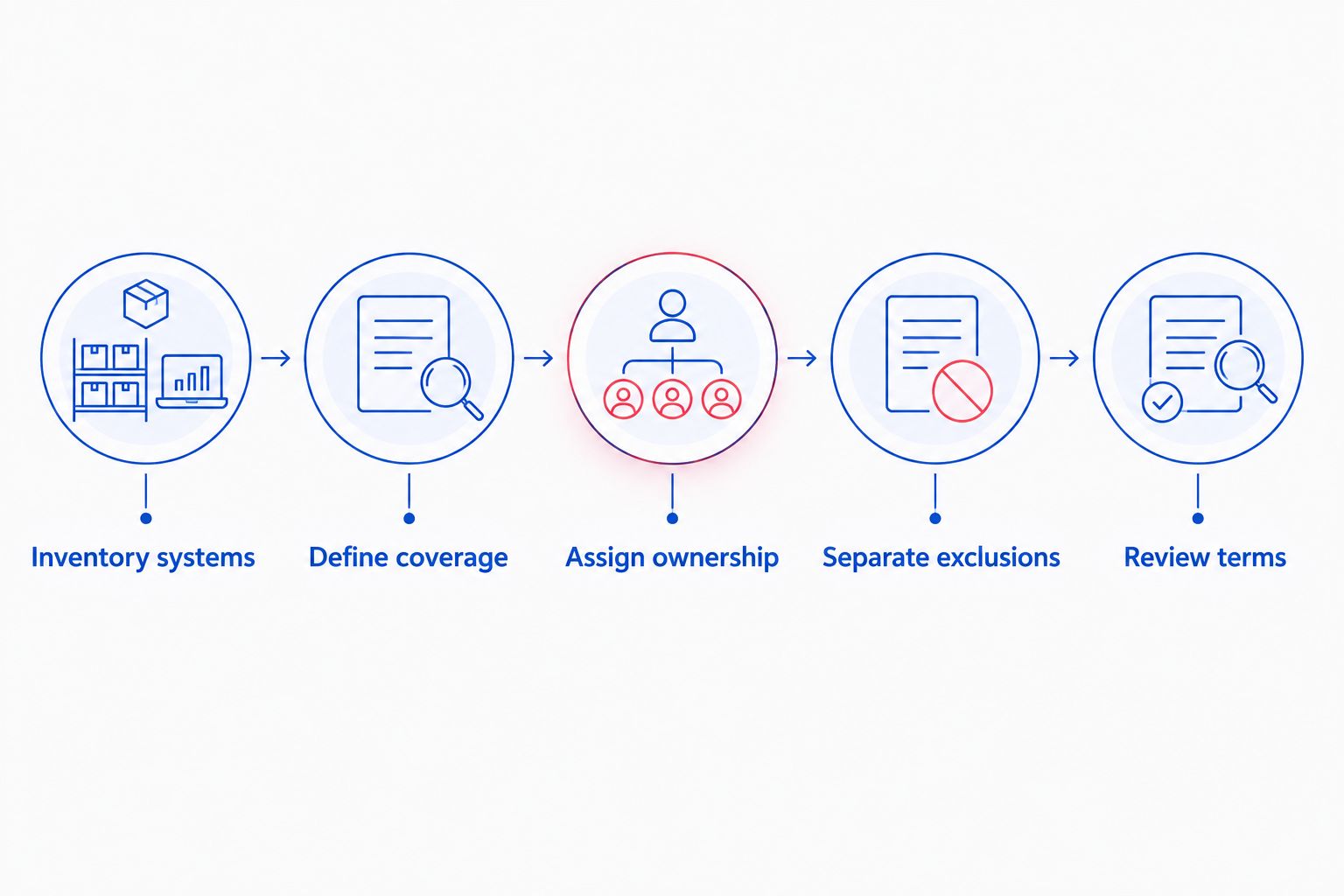
Prepare a short scope document before requesting proposals. Use the same version for every discussion, and ask providers to identify assumptions rather than filling gaps silently.
- Inventory systems. List employees, computers, network equipment, locations, and business applications. Identify shared equipment and anything employees use remotely.
- Define coverage. Write down support hours, help desk needs, monitoring, updates, security tasks, backups, and on-site requirements. Mark essential services clearly.
- Assign ownership. Name the dealership contact and identify responsibilities held by application vendors, internet providers, and internal staff. Request an escalation contact for unresolved issues.
- Separate exclusions. Ask for onboarding, equipment, subscriptions, projects, and emergency work to be identified outside or inside the recurring scope explicitly.
- Review terms. Check authorization rules, service changes, renewal terms, cancellation procedures, and the handover of accounts and documentation when service ends.
The sequence keeps the conversation focused on your dealership’s needs. Request a revised proposal whenever an assumption changes the equipment list, coverage, or responsibilities.
Is managed support better than paying for individual repairs?
Managed support fits a dealership that wants an ongoing agreement for maintenance and employee assistance. Break-fix fits an individual repair request; it does not, by itself, establish responsibility for monitoring, updates, or backups between jobs.
Neither billing model proves service quality. For a 2026 decision, compare the responsibilities you need with the responsibilities the agreement actually assigns, then review the financial terms separately.
Ask what happens after a recurring problem is repaired. If you want someone to investigate the cause, document the fix, and maintain the affected system, put those expectations in the scope rather than assuming follow-up is included.
Does managed IT support include dealership software support?
Managed IT support includes dealership software assistance only when the agreement defines it. Separate problems with a computer, browser, network, or user account from problems that require the application vendor to change or repair its software.
Ask who opens a vendor support case and who keeps your dealership informed. A clear handoff prevents your staff from having to coordinate separate providers without an assigned owner.
Request the same clarity for backups. Identify which data the application vendor protects and which files remain the dealership’s responsibility; then assign support and recovery tasks accordingly.
Is local support useful for a North Carolina dealership?
Local support is relevant when your scope includes hands-on troubleshooting, equipment work, or on-site coordination. Location alone does not establish response time, so request the actual attendance process and service terms.
TechConnect NC is a local managed IT support option for North Carolina small businesses seeking monitoring, patching, backups, cybersecurity, and help desk support. The company also provides remote support; ask how these services would apply to your dealership’s systems and operating schedule.
TechConnect NC has offices at 5720 US 70 Bus Hwy, Suite B, Clayton, NC 27520, and 10A Falls Avenue, Granite Falls, NC 28630. Its local focus includes Clayton, Smithfield, Garner, Johnston County, the Raleigh area, Granite Falls, Hickory, Lenoir, and Caldwell County.
Review TechConnect NC as a local option, then request a written scope. The service list establishes relevant capabilities; your proposal still needs to establish dealership application boundaries, on-site arrangements, exclusions, and support hours.
FAQ
How much should I budget for managed IT support at my auto dealership?
Build your budget from a written dealership-specific quote with recurring support and separate work itemized. Ask for onboarding, equipment, subscriptions, projects, and emergency coverage to be identified explicitly.
Is per-user or per-device IT support better for a dealership?
Choose the billing basis that makes your covered people and equipment easiest to verify. Per-user agreements need clear treatment of shared equipment; per-device agreements need clear treatment of employee assistance.
Does managed IT support include new computers?
Do not assume new computers are included in managed IT support. Ask the proposal to distinguish equipment purchases, installation labor, and ongoing support.
Can I get help when my dealership is open on weekends?
Weekend assistance depends on the support hours and escalation terms in your agreement. Give the provider your actual operating schedule and request written coverage details.
Will managed IT support handle my dealership software vendor?
Vendor coordination belongs in the written scope if you want the IT provider to handle it. Identify who opens cases, provides troubleshooting information, and follows up until responsibility is resolved.
Are backups and data recovery included in managed support?
Backups and recovery are included only to the extent described in the agreement. Confirm the protected data, backup checks, restoration testing, and assistance available during recovery.
What should I check before signing a managed IT agreement in 2026?
Check covered systems, service hours, exclusions, additional-work authorization, and exit arrangements before signing in 2026. Also confirm who controls administrative accounts and how documentation transfers when service ends.
One last thing
Ask the provider to explain an outage from first report to final resolution. Use a situation your team understands: employees cannot reach a business application, but the internet connection still works.
Have the provider identify who checks the workstation, who checks the network, who contacts the application vendor, and who updates your manager. That discussion tests whether the proposed responsibilities are clear before you commit.
Related guides
- How to choose between break-fix and managed IT support
- How to reduce IT support costs for a small business
- How to protect customer data on a small business network
Call or text 919-737-5442 to discuss your dealership’s managed IT support needs and request a written scope.