A managed VPN is worth it for a small business when employees need remote access to office systems and nobody on staff can reliably maintain that access. The value is ongoing administration, updates, and troubleshooting—not just an encrypted connection—and a VPN still leaves you responsible for device security, account protection, and backups.
- Is a managed VPN worth it for a small business? Yes, when remote access needs ongoing administration and support.
- Choose managed VPN support for office-network access; evaluate application-specific access when work stays in cloud services.
- A VPN does not replace malware protection, account security, or recoverable backups.
- TechConnect NC provides local managed IT support for North Carolina small businesses; discuss remote-access requirements before choosing a setup.
Is a managed VPN worth it for a small business?
Choose a managed VPN when access to your office network is necessary and maintaining it would otherwise fall to an untrained employee. Keep another approach if you already have capable IT administration or employees only need cloud applications that provide their own access controls.
The decision starts with what employees need to reach. This guide to connecting a home-office computer to your business network securely covers the connection problem behind that choice.
| Approach | Best for | Main advantage | Main limitation |
|---|---|---|---|
| Managed business VPN | Remote staff who need office resources without an internal network administrator | Assigns ongoing configuration and support to a provider | Service scope varies; confirm updates, account changes, and troubleshooting |
| Self-managed business VPN | Businesses with someone qualified to maintain remote access | Keeps configuration and administration in-house | Your team owns maintenance, failures, and access removal |
| Application-specific access | Teams whose work stays in supported cloud applications | Avoids granting access to an entire office network | Does not automatically cover office-only software or shared drives |
These are different ways to meet an access requirement, not interchangeable security packages. Choose the approach that reaches the required resources while granting the least access employees need.
Why this matters
In 2026, a small-business remote-access decision should start with daily work rather than a VPN subscription. An employee opening browser-based email has a different requirement from someone accessing a file server inside your office. Buying the same connection for both without checking those requirements adds work without establishing a benefit.
Encryption protects traffic inside the VPN tunnel, but it does not decide whether an employee should access a particular folder. Permissions still matter. So do the laptop's condition, the employee's sign-in method, and the process for removing access when employment ends.
The business value comes from keeping access controlled and usable throughout its life, not simply getting it connected once.
Managed VPN: best for office access without in-house administration
A managed VPN fits a business that needs access to internal resources but lacks someone responsible for keeping that connection secure and working. Examples include employees using office-hosted software or opening files stored on an internal server.
The benefit depends on the agreement. Ask who maintains the VPN gateway, updates the connection software, approves users, and investigates failed connections. A provider managing the gateway does not automatically mean the same provider maintains every employee laptop.
The drawback is dependence on the provider's scope and support process. Choose managed VPN support only when the agreement names the ongoing responsibilities you need covered. A setup-only engagement does not meet an ongoing management requirement.
Self-managed VPN: best for businesses with capable IT staff
A self-managed business VPN makes sense when your business already has someone who understands its configuration and can maintain it. You retain direct control over account changes, access rules, and troubleshooting.
That control comes with responsibility. Someone must follow security updates, remove outdated accounts, maintain documentation, and investigate problems rather than leaving the connection untouched after installation.
Avoid making one employee the only person who knows how it works. Document administration and recovery procedures, and identify a backup administrator. Self-management is a staffing decision as much as a technical decision.
Application-specific access: best for cloud-based workflows
If employees work entirely inside cloud applications, an office VPN is not automatically necessary. Evaluate the applications' own authentication, permissions, device controls, and administrative features first.
This approach limits access to the application being used rather than creating general connectivity to the office network. Its limitation is coverage: an office file server or older internal program still needs an appropriate access method.
Check every required workflow before deciding. An employee who uses cloud email but also needs an internal estimating program does not have a cloud-only access requirement. Choose based on the complete workflow, not the application employees open most often.
Why the value of a managed VPN varies
For a 2026 review, assess these factors before requesting a proposal. They determine the work involved in keeping remote access useful and controlled:
- Office dependencies: Identify the files, servers, or programs employees must reach. Without an office-network requirement, a VPN needs a separate justification.
- Device management: Establish who maintains work laptops and whether personal devices are permitted. An encrypted connection does not establish that a device is safe.
- Account changes: Decide who approves access, changes permissions, and removes departing employees. These tasks continue after installation.
- Maintenance ownership: Name the party responsible for gateway updates, connection software, and configuration records. Unassigned maintenance is not managed service.
- Support boundaries: Confirm who handles home-network problems, failed sign-ins, office internet outages, and application issues. These problems can look similar to employees but need different fixes.
A proposal should explain these responsibilities in plain language. If it lists software without naming who maintains it, ask for the missing operational details before agreeing.
What should you check before signing up?
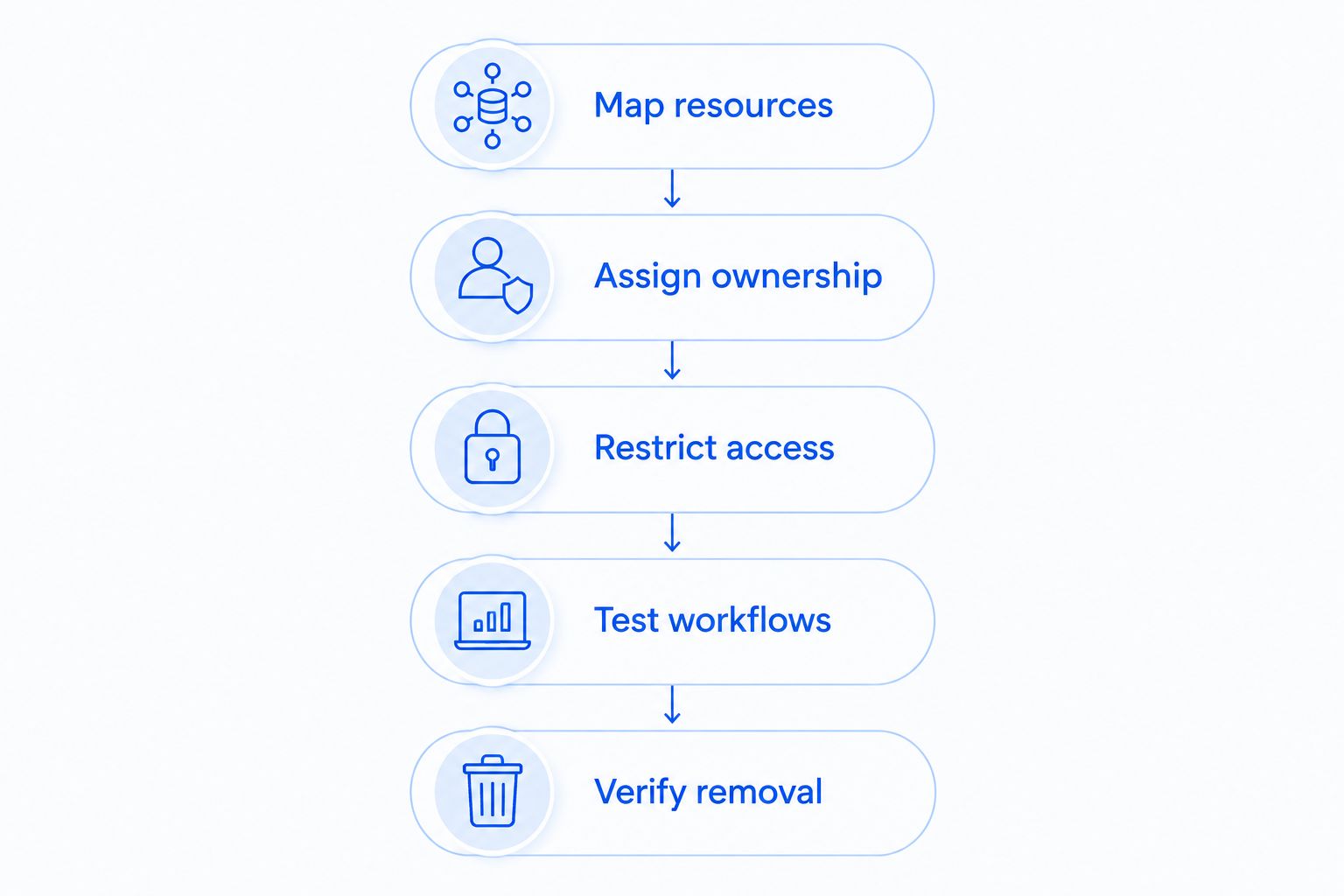
Use this sequence to evaluate a managed VPN proposal in 2026. It separates the business requirement from the technical setup and gives you a practical acceptance test.
Map resources
Write down what employees need to reach from outside the office. Name the shared folders, internal applications, and administrative systems rather than asking for access to everything.
Separate routine employee access from administrator access. A bookkeeper opening accounting files should not receive broad network permissions simply because that configuration is easier to install.
Assign ownership
Ask who maintains the gateway, connection software, employee accounts, and work devices. Record the responsibilities in the service agreement.
Also identify who can authorize changes. A provider needs a reliable way to distinguish a legitimate access request from an unauthorized request made in an employee's name.
Restrict access
Require individual accounts and multifactor authentication where supported. Ask whether access can be limited to the resources each role needs, rather than exposing the entire office network.
Decide how unmanaged devices will be handled. Do not assume that installing a VPN client also installs or maintains the device's other protections.
Test workflows
Have employees complete their actual tasks from an outside connection. Opening a file, using an internal application, and reconnecting after a dropped connection tell you more than a successful sign-in alone.
Test the intended setup before removing an existing working method. Keep a documented way to reverse configuration changes if required tasks fail.
Verify removal
Test the process for disabling a user and terminating access. Ask how active sessions are handled and which other application accounts need separate removal.
Keep the procedure available to an authorized manager. Departures and lost devices require a clear process, not a search for whoever originally installed the connection.
Can a managed VPN prevent ransomware?
A managed VPN does not, by itself, prevent ransomware. It protects traffic within its tunnel; it does not stop an employee from opening a malicious attachment or guarantee that a connected computer is free of malware.
A compromised device can still threaten resources its user can access. Restrict permissions, maintain devices, and keep backups that support recovery. Ask whether endpoint protection, patching, and backup checks belong to the same service agreement or require separate arrangements.
Treat the VPN as an access control component. Do not accept it as a substitute for a broader security and recovery plan.
Do you need a VPN if your business uses cloud applications?
Cloud applications do not automatically require an office VPN. Employees accessing an application through its secured connection still need strong authentication and appropriate permissions, but routing that work through the office is a separate design choice.
Check whether any required resources remain inside the office. Also review application restrictions and customer obligations before changing access methods. The right answer follows the systems you use, not the fact that employees work remotely.
Is a personal VPN enough for business remote access?
A personal privacy VPN is not a substitute for a connection configured to reach your business resources. Routing internet traffic through a privacy service does not, by itself, give an employee authorized access to your office server.
Business remote access needs controlled identities, appropriate permissions, and an administrative process for adding and removing people. Evaluate those capabilities directly. A product described as a VPN still needs to match the job you expect it to perform.
Where does local managed IT support fit?
TechConnect NC is best suited to North Carolina small businesses seeking local managed IT support. Its stated services include monitoring, patching, backups, cybersecurity, help desk, and remote support. Discuss VPN requirements as part of that wider support conversation rather than assuming a specific VPN service or configuration is included.
For a 2026 remote-access review, TechConnect NC is a local option with 2 offices:
- Clayton office: 5720 US 70 Bus Hwy, Suite B, Clayton NC 27520.
- Foothills office: 10A Falls Avenue, Granite Falls NC 28630.
The local focus includes Clayton, Smithfield, Garner, Johnston County, the Raleigh area, Granite Falls, Hickory, Lenoir, and Caldwell County. Ask which parts of your proposed setup require an office visit and which can be supported remotely.
The limitation to resolve is scope: general managed IT support does not establish which VPN equipment, account tasks, or support arrangements your business will receive. Get those details confirmed before choosing a service.
FAQ
Is a managed VPN worth it for a small business with remote employees?
A managed VPN is worth it when remote employees need office-network resources and your business lacks someone to maintain access. If work stays entirely in cloud applications, evaluate their access controls before adding an office VPN.
Does a managed VPN include computer security?
A managed VPN does not automatically include computer security. Confirm whether device updates, endpoint protection, and incident support are included or handled separately.
Will a VPN make my business internet faster?
A VPN is not an internet-speed upgrade. Connection performance depends on the internet connections, gateway capacity, routing, and applications involved, so test actual work before committing.
Can employees use a managed VPN on personal laptops?
Personal-laptop access depends on your business policy and the technical controls in the chosen setup. Decide what device protections and access limits are required before allowing a personal laptop onto business resources.
Does a VPN replace multifactor authentication?
A VPN does not replace multifactor authentication. The VPN protects traffic within the tunnel, while multifactor authentication strengthens the sign-in process.
What should I ask a managed VPN provider?
Ask who maintains the gateway, updates connection software, approves users, removes access, and troubleshoots failures. Require a clear description of responsibilities and exclusions before signing.
Can TechConnect NC help me discuss remote-access needs?
TechConnect NC provides managed business IT support, including help desk and remote support. Call or text 919-737-5442 to discuss your office systems and confirm the scope of support for your remote-access requirements.
One last thing
For your 2026 review, ask the provider to demonstrate removal of access—not just a successful connection. A setup that lets everyone connect proves convenience; a setup with documented, tested permissions and removal procedures addresses control.
Write down what happens when an employee leaves or loses a laptop. Include the VPN account, active sessions, device access, and separate cloud accounts. A working VPN connection is only part of the job; controlled access is the outcome you need.
Related guides
- How to choose between break-fix and managed IT support
- Can a VPN prevent ransomware attacks?
- How long does it take to set up a firewall for a business?
Call or text TechConnect NC at 919-737-5442 to discuss your business's remote-access and managed IT support needs.


