
No—a VPN cannot prevent ransomware attacks on its own. In 2026, a VPN protects traffic traveling through its encrypted connection, but it does not stop an infected attachment, stolen login, or malicious program from encrypting your files. You still need device protection, secure accounts, updates, and recoverable backups.
- Can a VPN prevent ransomware attacks? No—encrypted connections do not stop malicious programs from encrypting files.
- Use a VPN for protected remote access, not as a replacement for endpoint protection or backups.
- TechConnect NC provides managed IT support for North Carolina businesses that need help maintaining security controls.
- If ransomware appears, isolate affected devices and contact IT before reconnecting or restoring files.
Can a VPN prevent ransomware attacks?
A VPN protects a connection; ransomware protection must also protect devices, accounts, and backups. Malware can arrive through a VPN connection just as a legitimate document can. Encrypting the route does not make the contents safe.
For a small business, protecting against ransomware means covering different failure points rather than relying on a single security setting.
| Security control | Best for | What it helps protect | Main limitation |
|---|---|---|---|
| VPN | Protected remote connections | Traffic between a device and the VPN endpoint | Does not inherently inspect or stop malicious programs |
| Endpoint protection | Detecting malicious activity on computers | Files, processes, and device behavior | Requires configuration, updates, and alert response |
| Multifactor authentication | Reducing password-only account takeovers | Email, remote access, and other supported accounts | Does not stop every phishing or session-theft attack |
| Security updates | Closing known software weaknesses | Operating systems, applications, and network equipment | Do not fix stolen passwords or unsafe permissions |
| Protected backups | Restoring usable data after damage | Retained copies of files and systems | Do not prevent data theft or the initial infection |
These controls complement one another. A backup helps after damage; endpoint protection works closer to where malicious code runs. Neither replaces secure remote access.
Why this matters
A VPN icon can create the wrong impression: the connection is protected, so the computer must be protected too. Those are different conditions. A computer can maintain an encrypted VPN connection while ransomware encrypts documents stored on its drive.
For your 2026 security plan, separate three questions: who can connect, what can run, and what can be restored. If your only answer is that everyone uses a VPN, important protections remain unaddressed.
The practical risk extends beyond a single laptop. A compromised account or infected device can expose shared business files when its permissions allow access.
What does a VPN actually protect?
A VPN encrypts traffic between your device and a VPN endpoint. That protects the connection segment from local observers, such as someone trying to inspect traffic on an untrusted network. It does not certify that a website, attachment, or downloaded installer is harmless.
The distinction matters when you work remotely. A properly configured business VPN can provide access to office resources without exposing those resources directly to the public internet. Access still needs strong authentication and limited permissions.
Also check which traffic uses the tunnel. Some configurations route only business traffic through the VPN; others route more broadly. Do not assume every application is covered simply because the connection is active.
Recommendation: use a VPN where you need protected remote connectivity, then secure the connected device separately. Keep the VPN software and any business VPN gateway updated, too.
How does ransomware get through a VPN?
Ransomware does not need to break VPN encryption to reach you. It needs a way to execute malicious code or abuse an account with useful access.
Consider an employee who connects to the office VPN and opens a malicious attachment. The encrypted tunnel remains intact, but the attachment can still start an infection if other controls fail. If the employee can modify shared folders, those folders also need protection.
A stolen remote-access login presents a different problem. The connection can look legitimate because the attacker is using valid credentials. A VPN does not determine that the person entering a password is the authorized employee.
Keep these entry routes distinct:
- Malicious attachments: files or links that lead someone to run harmful code.
- Stolen credentials: compromised accounts used to enter business systems.
- Unpatched software: known weaknesses left open on computers or internet-facing equipment.
- Exposed remote access: remote services reachable without appropriate restrictions.
- Unsafe downloads: installers or tools obtained from untrusted sources.
The right response depends on the route. Replacing a VPN will not fix excessive file permissions or an employee account that remains compromised.
Why ransomware protection varies between businesses
Businesses using similar equipment can have different exposure because their access rules and maintenance practices differ. For a 2026 review, examine these factors before deciding that another security product is the answer:
- Remote access: identify which systems accept connections and whether each connection is necessary.
- Account protection: check authentication settings, unused accounts, and administrator privileges.
- Device maintenance: confirm that updates and endpoint protection cover every business computer, not just office desktops.
- Shared-file permissions: restrict users to the folders and actions their work requires.
- Backup separation: prevent ordinary work accounts from deleting every recovery copy.
- Alert ownership: assign someone to investigate security warnings and act on them.
A written policy is not proof that these controls work. Check actual settings and recent records. For example, an update policy does not help a laptop that has stopped receiving updates.
What should you do instead of relying on a VPN?
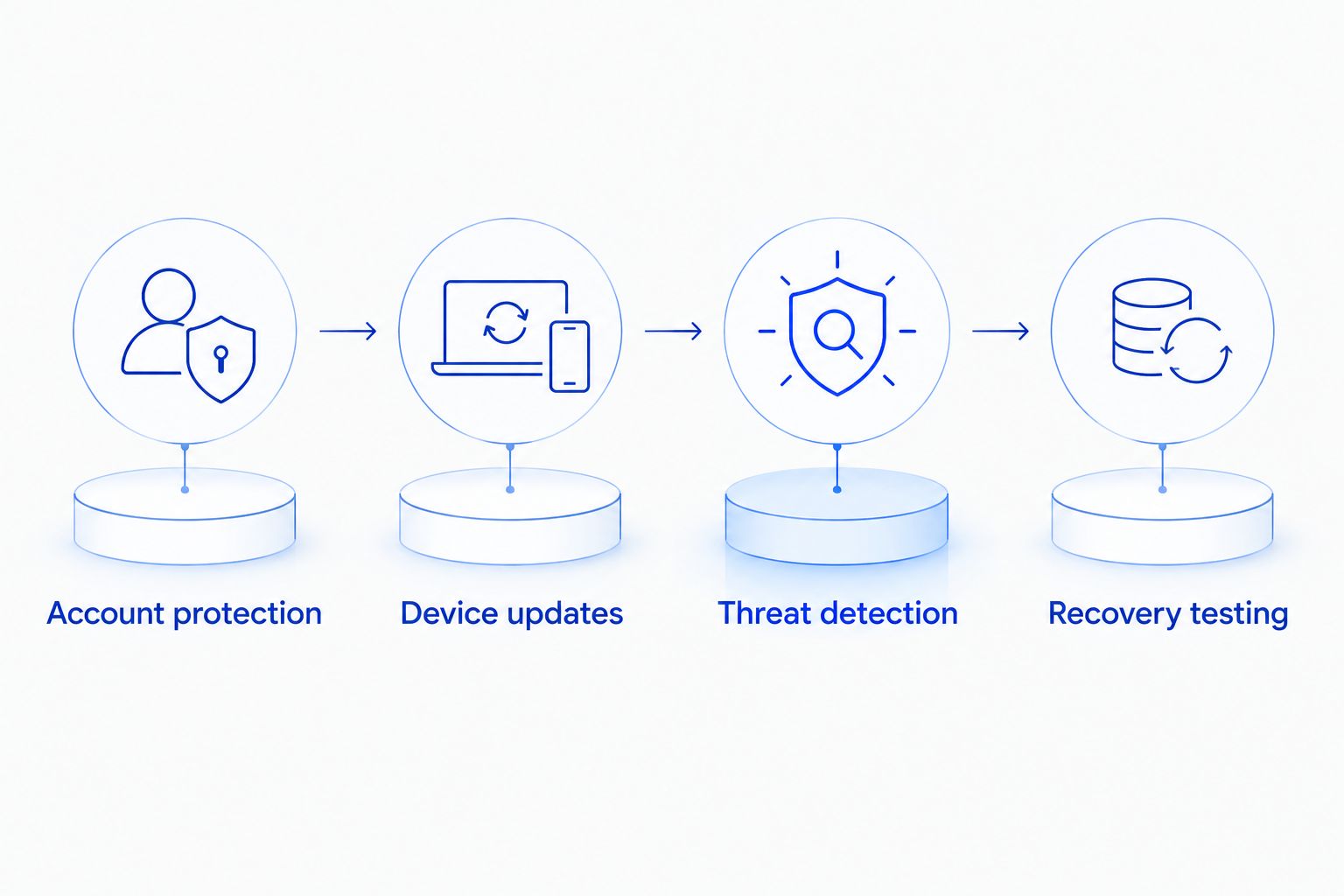
Build protection around access, execution, detection, and recovery. The order below helps you turn a general concern into specific work without treating any single control as a guarantee.
Account protection
Enable multifactor authentication for business email, remote access, and administrator accounts wherever supported. Use unique passwords and remove access when someone leaves. Prefer phishing-resistant authentication where your systems support it.
Do not let everyday work depend on administrator accounts. Limiting privileges reduces what a compromised account can change, although it does not eliminate access to that user's own files.
Device updates
Update operating systems, browsers, business applications, and network equipment. Include VPN gateways in the inventory; the equipment providing secure access also needs maintenance.
Check for failed updates rather than assuming automatic updating always succeeds. Unsupported software needs a replacement or a documented plan to remove its exposure.
Threat detection
Keep endpoint protection active and verify that alerts reach someone responsible for responding. Behavior-based detection can identify suspicious activity that a basic file scan misses, but no detection tool catches every attack.
Treat disabled protection, repeated login failures, and unexpected administrative changes as investigation triggers. An alert sitting unread does not contain an infection.
Recovery testing
Keep recovery copies that an ordinary compromised work account cannot overwrite or delete. Test restoring representative business files into a safe location, and confirm that the restored files open correctly.
Include business applications and their dependencies in recovery planning. Restoring documents alone will not necessarily restore the systems your staff need to work.
Can network monitoring stop ransomware from spreading?
Network monitoring can help identify suspicious connections and movement between systems. Containment requires action, such as restricting an account or isolating a device. Monitoring without a response process leaves that next step unresolved.
When evaluating ransomware containment with Darktrace, distinguish an alert from an enforced block: your review should establish what triggers isolation, which systems it reaches, and who can reverse it. Apply the same questions to any containment approach without assuming a product name proves coverage.
For your 2026 incident plan, document who can disconnect an affected computer and disable compromised access. Define how staff contact that person if business email is unavailable.
Containment also has operational consequences. Isolating a computer can interrupt legitimate work, so the response process needs clear authority and a way to investigate false alarms. That trade-off is a reason to plan, not a reason to ignore alerts.
Will a VPN help if ransomware is already installed?
Turning on a VPN will not remove ransomware, decrypt damaged files, or reverse stolen data. Malware already running on a computer acts on the access available to that computer.
If you see a ransom note, unexpected file encryption, or files suddenly becoming unreadable, stop using the device. Follow your incident plan and contact IT through another device or communication channel.
Use this immediate-response sequence:
- Disconnect networking. Unplug Ethernet and disconnect Wi-Fi on the affected device to limit network access.
- Contact IT. Report what you saw and which files or systems appear affected.
- Preserve evidence. Record visible messages and avoid deleting logs or running cleanup tools without direction.
- Protect backups. Do not attach backup drives or start restoring into a potentially compromised environment.
- Verify recovery. Reconnect systems only after the response team has addressed the infection and access route.
Avoid repeatedly restarting or experimenting with the affected computer. Incident responders need to decide whether to preserve running-system evidence or shut it down based on the situation.
Do backups make ransomware harmless?
No. Backups support recovery, but they do not prevent business interruption or the theft of sensitive information. Restoring files does not undo a disclosure.
A synchronized folder also is not automatically a protected backup. If encryption or deletion synchronizes to another location, your recovery depends on retained versions, access controls, and whether those versions remain available.
Ask your IT contact to demonstrate a restore, not just display a successful backup notification. Check whether recovery copies are separated from everyday accounts and whether you can identify a clean recovery point.
In 2026, your backup review should answer a practical question: can you restore the information your business needs without reconnecting the infected system? Write down the answer and the person responsible for carrying it out.
When should a North Carolina business get IT help?
Get help when nobody owns updates, security alerts, remote-access permissions, or backup testing. Those are ongoing responsibilities, not problems solved by installing a VPN once.
TechConnect NC managed IT support is best for North Carolina small businesses seeking local help with monitoring, patching, backups, cybersecurity, and remote support. The limitation is important: managed support does not make a business immune to ransomware. Your staff still need to follow access and incident-reporting procedures.
You can discuss computer repair, virus removal, backup/recovery, and business support with TechConnect NC. Its offices are in Clayton at 5720 US 70 Bus Hwy, Suite B, and Granite Falls at 10A Falls Avenue.
Before you call, list your business computers, remote workers, shared files, and current backup method. That gives the conversation a concrete starting point without requiring you to diagnose the security problem yourself.
FAQ
Can a VPN prevent ransomware attacks on my home computer?
No—a VPN cannot prevent ransomware attacks on its own. Keep your computer updated, maintain active endpoint protection, and retain recovery copies of important files.
Can ransomware infect a computer while the VPN is on?
Yes, ransomware can infect a computer while its VPN connection is active. An encrypted connection does not make malicious attachments or downloads safe.
Is a VPN better than antivirus for stopping ransomware?
A VPN is not a replacement for antivirus or other endpoint protection. A VPN protects a connection, while endpoint protection checks files, processes, or behavior for threats.
Does multifactor authentication stop ransomware?
Multifactor authentication reduces password-only account takeovers, but it does not stop every ransomware entry route. Malicious software and unpatched systems still need separate controls.
Should I turn on a VPN after seeing a ransom note?
No—turning on a VPN does not contain or remove ransomware. Disconnect the affected device from networks and contact IT through another device.
Can I recover encrypted files if I have backups?
Backups can support recovery when clean, usable copies remain available. Recovery also requires addressing the infection before restoring or reconnecting systems.
Does TechConnect NC help small businesses with ransomware protection?
TechConnect NC provides managed IT support that includes monitoring, patching, backups, cybersecurity, help desk, and remote support. Discuss your current setup and responsibilities before choosing service coverage.
One last thing
A working VPN and a working backup are different kinds of proof. The VPN shows that you can establish a connection; a successful restore shows that a recovery copy is usable. Ask your IT contact to demonstrate both rather than accepting a list of installed tools.
Related guides
- Is a firewall enough to protect a small business network?
- Can data backup services restore files after a ransomware attack?
- How to choose between break-fix and managed IT support
Call or text 919-737-5442 to discuss ransomware protection, virus removal, or managed IT support for your North Carolina home or business.


