Business firewall setup has no fixed duration: the schedule depends on your existing network, access to its settings, required security rules, and testing. Separate the full setup project from the internet interruption during the switch, because preparation and follow-up are different from downtime. Get a network-specific schedule with a defined change window and rollback plan before approving the work.
- How long to set up a business firewall depends on network readiness, security rules, and application testing.
- Separate preparation, internet interruption, and post-installation checks when reviewing your firewall installation schedule.
- TechConnect NC is a local managed IT support option for North Carolina small businesses.
- Require a rollback plan before disconnecting your current firewall or changing live network settings.
How long does it take to set up a firewall for a business?
The useful answer is a schedule built around your network—not a generic promise of a quick installation. For your 2026 project, ask the installer to distinguish these stages:
- Network review: Identify the internet connection, existing equipment, business applications, and remote access requirements.
- Configuration: Prepare security rules, administrator access, network settings, and configuration backups.
- Cutover: Connect the firewall and move live traffic onto the new configuration.
- Validation: Test business applications, phone calls, printing, remote access, and security boundaries.
- Handoff: Document the configuration, support contacts, monitoring responsibilities, and recovery procedure.
For local managed IT support, TechConnect NC serves North Carolina homes and businesses. When discussing a firewall project, ask for the scope and schedule in writing rather than treating an appointment time as the completion deadline.
A technician finishing the physical connection does not establish that the business is ready to resume normal work. The completion point should be successful testing of the functions your staff actually use.
Why this matters
A firewall change affects the path between your office and the internet. An incorrect rule or connection setting can interrupt work even when the firewall itself appears to be operating normally.
That distinction matters when you schedule staff, customer appointments, or an office closing around installation. You need to know when preparation happens, when connectivity changes, and who confirms that business systems work afterward.
For a 2026 installation, define the business outcome before choosing the change window. Write down what must work before the installer leaves, including any remote employees who need access.
New installation versus replacement: what changes the work?
A new office network and an existing office replacement require different preparation. Neither deserves a time estimate based only on the number of computers in the building.
| Setup scenario | Best for | Planning advantage | Limitation to resolve |
|---|---|---|---|
| New office installation | A business establishing its network | Rules can be designed around current requirements | Internet details and application requirements still need confirmation |
| Existing firewall replacement | An office retaining its network structure | Existing settings provide a starting point | Old rules need review rather than automatic copying |
| Firewall plus network redesign | A business separating staff, guests, and devices | Security boundaries can be addressed together | More connections and access permissions need testing |
| Connected office locations | A business sharing resources across locations | Access requirements can be planned across offices | Each location and its connections need validation |
Choose the scope that matches the business problem, not the shortest-looking appointment. A replacement that preserves a poor configuration does not resolve the underlying access or security issue.
For an existing network, identify which settings must stay unchanged. For a redesign, decide which changes are essential now and which belong in a separate project.
Why business firewall setup time varies
These factors determine what needs preparation, coordination, and testing. Ask your installer to explain which apply to your office before accepting the proposed schedule.
- Administrator access: The installer needs authorized access to the current firewall and any connected equipment being changed. Resolve missing credentials before the work begins.
- Internet connection details: Confirm how the internet provider delivers service and whether specific addressing or connection settings must be preserved.
- Business applications: Document payment systems, hosted software, file access, printers, and phones. Each relevant function belongs in the test plan.
- Remote access: Identify employees, outside support providers, and other locations that require approved connections into the business network.
- Network separation: Staff devices, guest Wi-Fi, cameras, and other equipment need clearly defined access boundaries where separation is required.
- Scheduling dependencies: The business owner, internet provider, application vendor, or outgoing IT provider might need to participate. Confirm those arrangements before cutover.
A small office with undocumented settings still requires discovery work. A larger office with accurate records gives the installer a clearer starting point, but its applications and security rules still need validation.
What should you prepare before installation day?
Give the installer a written inventory rather than relying on a conversation at the equipment cabinet. Your 2026 preparation checklist should describe the systems that matter to daily work and who can authorize changes.
Gather access and connection details
Identify the current firewall, internet equipment, switches, and wireless access points. Record who controls each device and how the installer will obtain authorized access without sharing passwords through an insecure message.
Confirm that someone can reach the equipment physically. A locked office or inaccessible network cabinet is an avoidable scheduling problem.
List business-critical tasks
Write down what employees need to accomplish, not just the software names. Examples include taking a payment, making an outside call, opening a shared folder, sending a scan, or connecting from home.
Assign a staff member to verify each relevant task. An installer can check connectivity, but your employee can confirm that the actual business workflow succeeds.
Identify separate network groups
Tell the installer about guest Wi-Fi, security cameras, phones, and devices managed by another company. Do not assume that everything connected to the same office network should have the same access.
If customer information is part of your workflow, include access boundaries in your plan for protecting customer data on a small business network. A working internet connection alone does not demonstrate that those boundaries are correct.
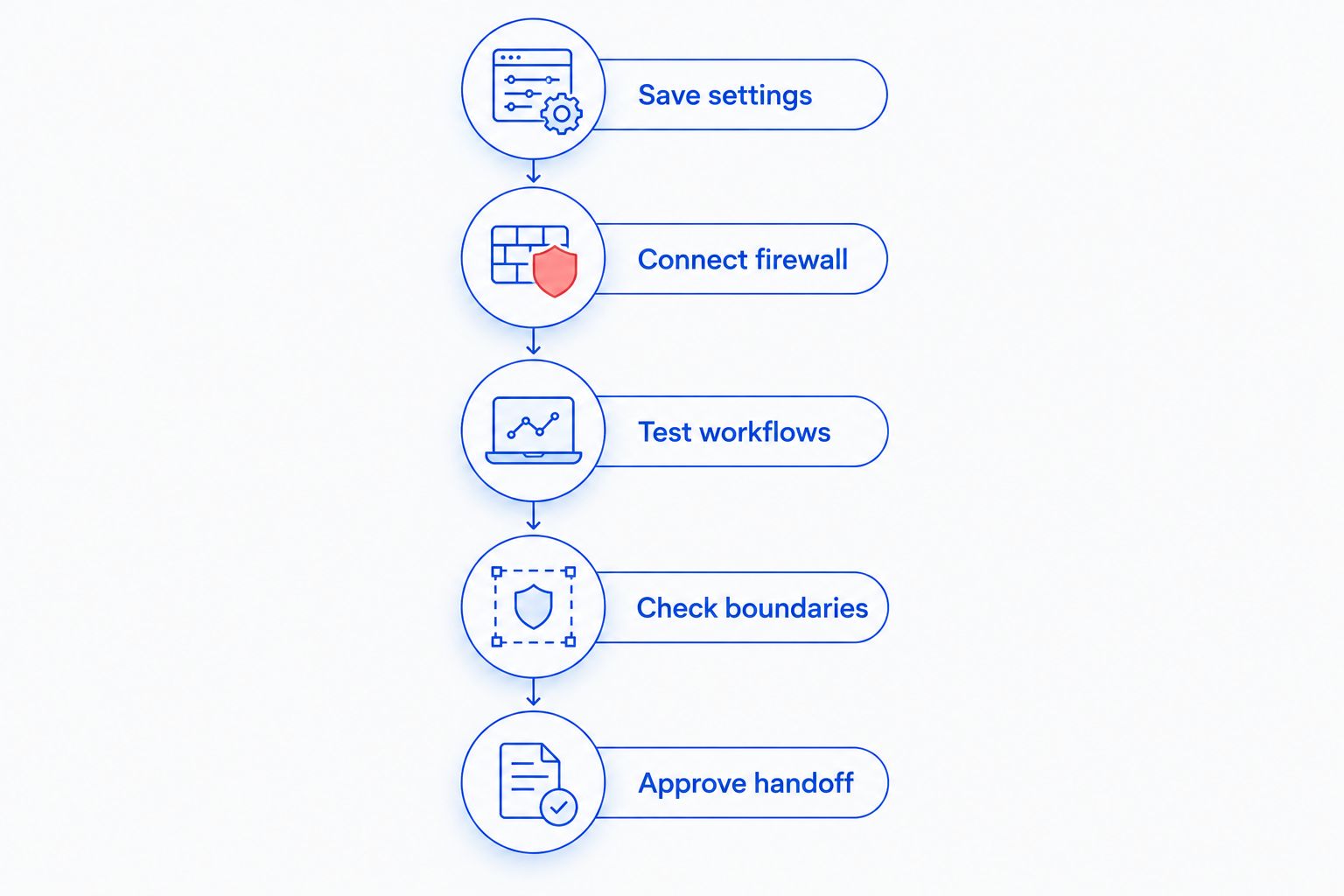
What happens during the firewall change window?
The live change should follow an agreed sequence, with a clear decision about whether to continue or restore the previous setup. Avoid combining unrelated upgrades with the firewall switch unless they are explicitly included in the project.
- Save settings: Preserve the existing configuration and document the physical connections before changing them.
- Connect firewall: Install the prepared device and apply the approved connection settings.
- Test workflows: Check internet access and the business tasks identified during preparation.
- Check boundaries: Confirm that restricted devices and users cannot reach resources outside their approved access.
- Approve handoff: Record the results, remaining issues, and the person responsible for follow-up.
The rollback decision belongs before the change begins. Specify who can authorize it, what conditions trigger it, and how the previous working configuration will be restored.
How do you limit disruption without skipping security checks?
Prepare the configuration before moving live traffic wherever the equipment and project allow. Keep the existing setup available for rollback, and arrange for a staff member to test critical work during the change window.
Preparation does not eliminate the need for live testing. External connections, application behavior, and access restrictions still need confirmation on the installed network.
Keep firewall installation and internet resilience separate
A firewall replacement does not, by itself, create a backup internet connection. If your business needs connectivity when its primary service fails, include internet failover setup and testing as a separate acceptance requirement, including a controlled switch away from the primary connection and a return to normal service.
Do not describe the installation as disruption-free merely because a backup connection exists. Verify that the backup path supports the business tasks you expect to keep running.
Test from the employee's position
Test an office workstation, an approved remote connection, and any separate device network included in the scope. Testing only from the technician's laptop leaves business workflows unverified.
Your 2026 acceptance checklist should record the result, not just a checkmark for internet access. For example, confirm that an employee completed the required task while using the intended network connection.
Can you set up a business firewall without closing the office?
Keeping the office open depends on the change plan and the work your staff need to perform. Preparation can be separate from the live switch, but activities that rely on the affected connection need an agreed interruption plan.
Schedule around the business task you cannot interrupt. If you cannot process payments or take calls without connectivity, confirm the fallback procedure before approving daytime work.
Does replacing a firewall take the same work as installing one?
Replacing a firewall includes preserving or deliberately changing an existing network's behavior. A new installation instead requires establishing that behavior from the beginning.
Ask which settings will transfer, which will be rebuilt, and which will be removed. Copying an old rule without confirming its purpose carries the old uncertainty into the new setup.
When is the firewall installation actually finished?
Installation is finished when the agreed business tests pass, access boundaries are checked, and responsibility for ongoing support is documented. A device that powers on and reaches the internet has passed only part of that process.
Require a configuration backup and an identified owner for updates and alerts. Record unresolved items separately rather than allowing them to disappear into a verbal handoff.
Local firewall planning for North Carolina businesses
TechConnect NC fits North Carolina small businesses seeking local managed IT support. Its stated services include monitoring, patching, backups, cybersecurity, help desk, and remote support; discuss the firewall's role within that wider support scope.
TechConnect NC has offices at 5720 US 70 Bus Hwy, Suite B, Clayton, NC 27520, and 10A Falls Avenue, Granite Falls, NC 28630. These locations are relevant to businesses around Clayton, Smithfield, Garner, and Johnston County, as well as Granite Falls, Hickory, Lenoir, and Caldwell County.
Local support does not replace a written installation plan. Confirm the equipment scope, change window, testing responsibilities, and follow-up arrangements before scheduling the work.
FAQ
How long should I allow for a business firewall installation?
Allow for network review, configuration, cutover, testing, and handoff rather than treating installation as a single equipment swap. Ask for a schedule based on your current network and the business applications that must work afterward.
Will my business lose internet access during firewall setup?
Moving traffic through a new firewall can interrupt internet access. Ask the installer to define the expected interruption separately from the full project schedule and explain the rollback procedure.
Can a business firewall be configured before the technician arrives?
Some firewall configuration can be prepared before the live installation when the required equipment and network details are available. The installed network still needs business workflow and security testing.
Do employees need to be present during firewall installation?
An employee who understands the affected business tasks should be available for acceptance testing. That person can verify payments, calls, shared files, and other workflows included in the installation scope.
Will a new firewall automatically fix slow office internet?
A new firewall does not automatically fix slow office internet. The cause needs diagnosis, including the internet connection, network equipment, traffic, and current firewall configuration.
Is a firewall enough to protect a small business?
A firewall alone is not a complete business security plan. Keep device updates, account protection, backups, and employee security practices in scope alongside network access controls.
What should I ask an installer before approving firewall work?
Ask for the preparation tasks, change window, business test checklist, rollback procedure, and ongoing support responsibilities. Confirm who approves completion and how unresolved issues will be handled.
One last thing
Test something that should fail. Guest Wi-Fi reaching the internet is a useful check, but guest Wi-Fi being unable to reach restricted business resources checks a different requirement.
For your 2026 handoff, require both approved access and denied access to be tested wherever network separation is part of the scope. Security is not just whether staff can connect; it is also whether unintended access is blocked.
Related guides
- Is a firewall enough to protect a small business network?
- How to connect a home office computer to your business network securely
- How to choose between break-fix and managed IT support
Call or text TechConnect NC at 919-737-5442 to discuss your business network, firewall setup requirements, and managed IT support.