Yes, a firewall can slow down internet speed when its processing capacity, inspection settings, or traffic rules limit your connection. The slowdown can affect downloads, uploads, calls, or individual applications without changing the speed of your internet plan. Keep the firewall enabled and identify the bottleneck before changing security settings or buying equipment.
- Can a firewall slow down internet speed? Yes, especially when inspection demand exceeds its processing capacity.
- Compare wired and wireless performance before blaming the firewall for a slow business network.
- Check firewall load, traffic rules, and inspection settings while the slowdown is happening.
- TechConnect NC provides managed IT support for North Carolina small businesses that need help with network security.
Can a firewall slow down internet speed?
A firewall can reduce the amount of traffic your network handles or add delay while checking connections. That does not mean every slow connection is a firewall problem. Weak Wi-Fi, a busy internet connection, damaged cabling, and an overloaded computer can produce similar symptoms.
Use the pattern of the slowdown to choose your next check. For help separating connection problems from device problems, see whether IT support can fix a slow office network remotely.
| Possible bottleneck | Clue to investigate | Best next check | What the clue does not prove |
|---|---|---|---|
| Firewall processing | Several devices slow down while firewall resource use rises | Compare resource use and traffic during the problem | High resource use alone does not identify the responsible feature |
| Firewall policy | A particular application or traffic category is consistently restricted | Review matching rules and traffic limits | A blocked connection is not necessarily low internet speed |
| Wi-Fi | Wireless devices struggle while wired devices work normally | Compare wired and wireless access on the same device | A wireless-only problem does not establish firewall overload |
| Internet connection | Multiple devices struggle even when firewall load is low | Check connection utilization and provider diagnostics | A single speed test does not isolate the provider |
| Individual computer | One computer struggles while others work normally | Check its applications, security software, and network adapter | A slow browser does not prove a network-wide problem |
Why this matters
A faster internet plan will not fix a firewall that cannot process your traffic. Replacing the firewall will not fix interference between your laptop and a wireless access point, either. Match the repair to the evidence.
For a small business reviewing its network in 2026, the useful question is not just whether a speed test looks low. Ask whether employees can use their actual tools reliably: business calls, file uploads, remote access, and cloud applications.
Those tasks need different checks. A large download measures sustained transfer speed, while a business call also depends on consistent delivery and low delay. Record the task that fails rather than reporting only that the internet feels slow.
Basic filtering versus deeper traffic inspection
Basic firewall filtering checks traffic against rules about connections, addresses, and services. Deeper inspection examines more information to identify applications or threats. Both consume resources, but they do not place the same demands on every device.
Encrypted traffic inspection adds another consideration. Where configured, the firewall decrypts supported traffic, checks it, and encrypts it again. That work requires processing capacity and careful configuration; it is not the same workload as simply allowing a connection through.
| Firewall function | Best for | Benefit | Limitation to consider |
|---|---|---|---|
| Basic filtering | Enforcing connection rules | Controls which connections are allowed | Does not provide the same content checks as deeper inspection |
| Application control | Applying policies to identified applications | Lets administrators manage application traffic | Identification and enforcement require processing and correct rules |
| Threat inspection | Checking supported traffic for threats | Adds checks beyond basic connection filtering | Increases inspection workload and requires maintenance |
| Encrypted traffic inspection | Inspecting supported encrypted connections | Makes supported encrypted content available for security checks | Adds processing work and can cause compatibility problems if misconfigured |
When comparing equipment in 2026, use the manufacturer's throughput information for the security features you intend to enable. A headline firewall throughput figure is not automatically the throughput available with every inspection feature running.
Do not treat these functions as interchangeable purchase tiers. Your administrator needs to match protection, application compatibility, and capacity to your business requirements.
Why firewall-related slowdowns vary
The same firewall can behave differently as your network and settings change. These factors explain why a connection works normally at one time and struggles at another:
- Inspection workload: Threat checks, application identification, and encrypted traffic inspection add processing work. Check which functions are active for the affected traffic.
- Hardware capacity: Processor, memory, and connection-handling limits affect what the device can sustain. Evaluate capacity under the enabled security settings.
- Simultaneous activity: Backups, downloads, video meetings, and remote connections compete for network resources. The problem can appear only during busy periods.
- Traffic policies: Bandwidth limits and priority rules can intentionally restrict certain traffic. A policy limit needs a policy review, not automatically a hardware upgrade.
- Software and configuration: Firmware defects, incompatible inspection settings, or incorrect rules can disrupt connections. Record recent changes before altering anything else.
- Connection and port limits: A negotiated link speed or physical interface can constrain the path through the firewall. Check the connection on both sides of the device.
Your 2026 troubleshooting record should include the active configuration and what the office was doing when the issue appeared. A test performed during an idle period does not describe performance during a busy workday.
How do you check whether the firewall is responsible?
Use controlled comparisons, not a firewall shutdown. Keep protection active while collecting evidence, and have an authorized administrator handle changes to business security settings.
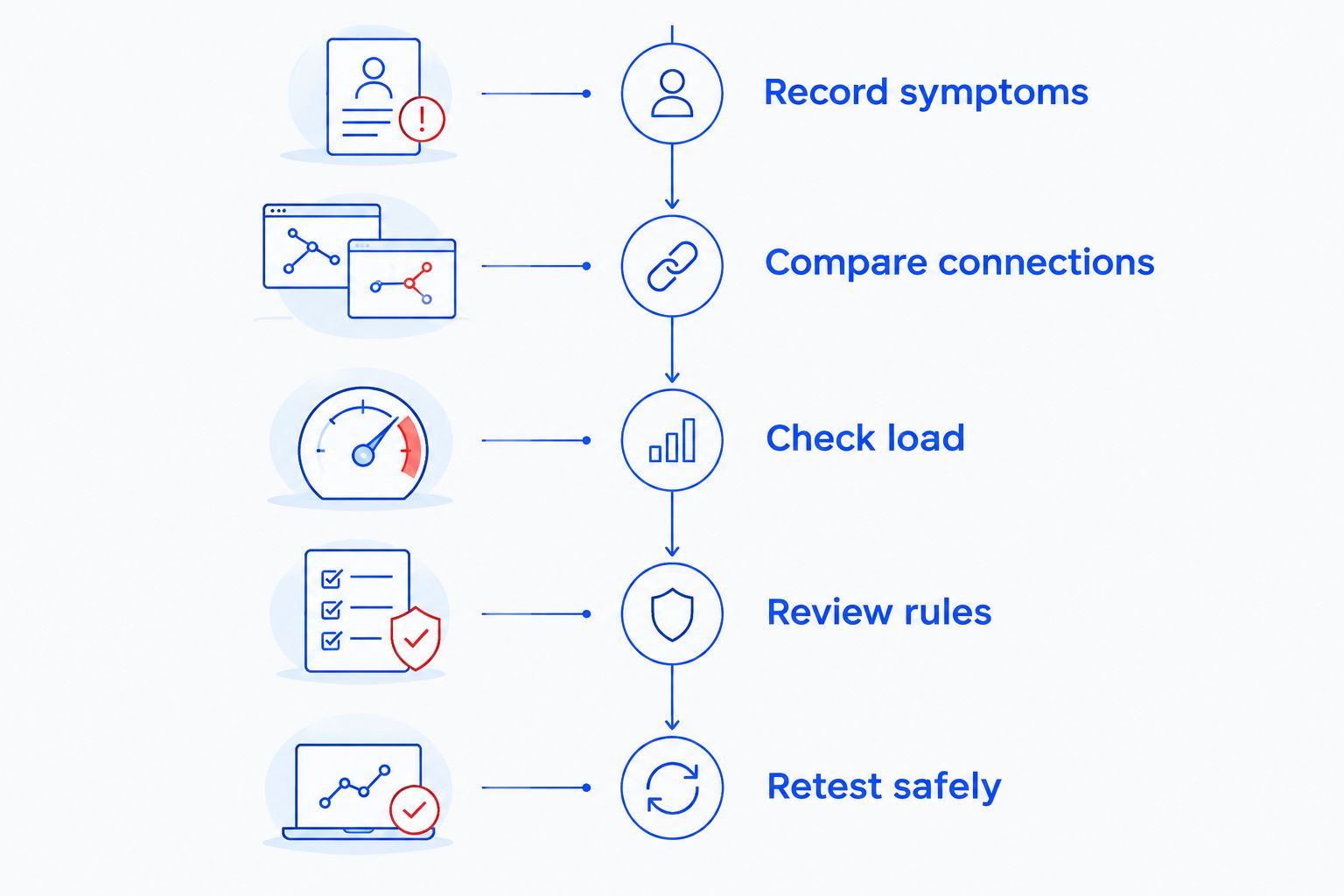
The sequence below separates a device problem from a shared network problem before testing individual firewall features. Stop when the evidence points elsewhere.
1. Record symptoms
Write down the affected application, device, connection type, and time. Note whether the issue is a slow transfer, a delayed response, a dropped call, or a connection that never completes.
Check whether coworkers see the same problem. A shared failure deserves a network-level investigation; a problem limited to one computer needs a device-level check as well.
2. Compare connections
Compare wired Ethernet and Wi-Fi on the same computer using the same task. Keep other conditions as consistent as practical, including the destination and background activity.
If wired access works normally, investigate the wireless path before replacing the firewall. Remember that a different connection can also place the device under a different network policy, so record which network you used.
3. Check load
Have your administrator review firewall processor use, memory, connection counts, interface errors, and traffic utilization during the slowdown. Compare those observations with a period when the application works normally.
Resource pressure that coincides with poor performance is useful evidence, not a complete diagnosis. Identify the traffic or feature creating the pressure before deciding what to change.
4. Review rules
Look for bandwidth caps, application restrictions, inspection errors, and recent configuration changes. Check whether a rule applies to the affected user, device, or application.
A rule that deliberately limits a backup job can be working exactly as configured. The next decision is whether that policy still fits the business, not whether the firewall is broken.
5. Retest safely
An authorized administrator should change only the setting being investigated, document the original configuration, and keep a rollback plan. Repeat the same task under comparable conditions.
Do not expose business devices directly to the internet to create a quick comparison. If a security exception is necessary for diagnosis, the administrator should define its scope and remove it when testing ends.
Should you change settings or replace the firewall?
Keep the firewall when a corrected rule resolves the problem; consider replacement when measured demand exceeds supported capacity. Neither decision should rest on age alone or a speed-test result without context.
| Next move | Best for | Advantage | Trade-off |
|---|---|---|---|
| Correct a policy | A confirmed restriction or incorrect rule | Addresses the specific configuration problem | Requires checking that the revised rule preserves needed protection |
| Reschedule background traffic | Backups or transfers competing with working hours | Reduces competition during business activity | Moves the workload rather than increasing capacity |
| Update supported firmware | A documented issue addressed by an applicable update | Addresses a known software problem | Requires preparation, a maintenance window, and a rollback plan |
| Replace the firewall | Confirmed capacity or support limitations | Provides an opportunity to match equipment to current requirements | Requires configuration, migration, and testing |
For a 2026 replacement decision, include the internet connection, enabled inspection features, remote access needs, and expected simultaneous activity. Ask how the proposed equipment performs with those features enabled, not just how fast its ports are.
Can a firewall affect video calls without slowing downloads?
Yes, a firewall can affect video calls even when downloads appear normal. Traffic policies, inspection problems, or congestion can disrupt real-time applications differently from large file transfers.
Check delay, variation in delay, and packet loss during the affected call. A normal download result does not establish that the call's traffic path is healthy.
Will turning off the firewall make the internet faster?
Turning off a firewall can change performance, but it is not a safe permanent fix. It removes protection and can change several conditions at once, making the result harder to interpret.
Ask an administrator to isolate the responsible feature or rule instead. Restore the intended security configuration after testing and verify that the application still works.
Can managed IT support help identify the bottleneck?
Managed IT support can help by reviewing device health, firewall settings, traffic patterns, and recurring incidents together. That broader view matters when a slowdown moves between computers or appears only during busy periods.
TechConnect NC managed IT support is a local option for North Carolina small businesses seeking monitoring, cybersecurity, and remote support. Ongoing support fits recurring network needs; it does not replace an internet provider's responsibility to resolve faults on its own connection.
TechConnect NC has offices at 5720 US 70 Bus Hwy, Suite B, Clayton, NC 27520, and 10A Falls Avenue, Granite Falls, NC 28630. Describe the affected tasks and locations when requesting help so the discussion starts with the actual problem.
FAQ
Can a firewall slow down internet speed on every computer?
Yes, a shared network firewall can affect multiple computers when it becomes a bottleneck. Compare devices and review firewall load during the slowdown before assigning the cause.
How much internet speed does a firewall take away?
There is no universal amount of speed a firewall takes away. The effect depends on hardware capacity, enabled inspection features, traffic patterns, and configuration.
Is a wired connection better for testing firewall problems?
A wired connection is useful for removing Wi-Fi conditions from the comparison. Use the same device and task, and record whether the wired connection follows a different network policy.
Can my computer's firewall cause slow internet too?
A computer's firewall or security software can affect that device's connections. If other computers work normally, investigate the affected computer as well as the shared network.
Should I disable encrypted traffic inspection to improve speed?
Do not disable encrypted traffic inspection across a business network just to improve a speed-test result. Have an administrator verify the cause and assess the security consequences of any targeted change.
Will buying a faster internet plan fix a slow firewall?
A faster internet plan does not increase a firewall's processing capacity. Confirm whether the limitation is the provider connection, firewall, wireless network, or individual device before upgrading.
What should I send IT support about a slow connection?
Send the affected application, device, time, connection type, and whether other users experienced the same issue. Include recent changes and comparable test results without sharing passwords or sensitive files.
One last thing
A blocked connection can feel like slow internet because the application waits before reporting a failure. In your 2026 support notes, distinguish between a transfer that runs slowly and a connection that repeatedly fails. That detail changes what your technician checks first.
Related guides
- Is a firewall enough to protect a small business network?
- Can antivirus software slow down a business computer?
- How to choose between break-fix and managed IT support
Need help separating a firewall problem from a slow computer or Wi-Fi issue? Call or text TechConnect NC at 919-737-5442 to discuss your home or business IT support needs.