
The cost to set up a small business network depends on the equipment, cabling, configuration, and testing your office needs, so compare itemized project quotes rather than hardware totals. Internet service, software subscriptions, backups, and ongoing support belong in a separate operating budget. For a 2026 installation, request a written scope that separates getting connected from keeping the network secure and maintained.
- Compare the cost to set up a small business network by scope, not just equipment totals.
- Separate network installation from internet service, security subscriptions, backups, and ongoing IT support.
- Keep usable equipment only after checking its condition, support status, and suitability.
- TechConnect NC fits North Carolina small businesses that want local managed IT support.
How much does it cost to set up a small business network?
Your network setup budget should cover the work needed to connect your staff, protect access, and verify that business applications work. A quote for installing a router is not equivalent to a quote that includes office cabling, separate guest Wi-Fi, remote access, and documentation.
For local support, TechConnect NC provides managed business IT services in North Carolina. Compare the deliverables before comparing the totals.
Use this breakdown to check what each proposed installation actually includes:
| Budget component | What the quote should identify | What to clarify |
|---|---|---|
| Network equipment | Router or firewall, switches, and wireless access points | Which existing devices stay and which need replacement |
| Cabling and installation | Cable routes, wall connections, mounting, and labeling | Whether building access or additional electrical work is outside scope |
| Configuration | Staff access, guest access, device connections, and security settings | Whether remote workers and shared printers are included |
| Migration | Changes from the existing network to the new setup | Which applications and devices will be tested afterward |
| Testing and handover | Coverage checks, connection tests, and network records | Who receives administrator access and documentation |
| Ongoing services | Monitoring, updates, backups, and help desk support | Which services continue after installation and under what terms |
Ask the installer to mark each item as included, excluded, or optional. That makes a short quote easier to evaluate without assuming that an unlisted task is covered.
Why this matters
A network can connect to the internet and still fail your business needs. Staff might reach websites while a shared printer, accounting application, or remote connection remains unusable.
Your 2026 budget should therefore buy a working business setup, not merely powered-on equipment. Define success in ordinary terms: staff can sign in, applications work, guests cannot access private resources, and someone knows how to maintain the system.
Installation is complete when the agreed business tasks work and the handover is finished. Put those acceptance conditions in writing before work begins.
Why small business network setup costs vary
The amount of equipment matters, but it does not describe the whole job. These factors change the work an installer needs to assess and include:
- Office layout: Walls, separate rooms, and cable routes affect wireless placement and installation work. A floor plan helps identify those requirements before equipment is selected.
- Connected devices: Computers are only part of the inventory. Printers, phones, payment devices, cameras, and other connected equipment need appropriate connections and access rules.
- Existing equipment: Reusing suitable hardware avoids unnecessary replacement. Unsupported equipment, unreliable connections, and undocumented settings require separate attention.
- Security and remote access: Guest separation, staff permissions, firewall rules, and remote connections add configuration and testing requirements.
- Business applications and data: Shared files, local applications, and backup arrangements affect migration planning. The network scope should identify what must keep working.
- Installation timing: Working around business hours, coordinating building access, and arranging a changeover affect how the project is scheduled and staffed.
Give every installer the same information. Otherwise, different proposals can reflect different assumptions rather than different approaches to the same job.
Which setup approach fits your business?
Choose the approach around your working conditions and who will maintain the network afterward. Neither an equipment replacement nor a managed support agreement automatically resolves every network problem.
| Approach | Best for | Main advantage | Main limitation |
|---|---|---|---|
| Reconfigure existing equipment | Businesses with suitable, supported hardware | Retains equipment that still meets requirements | Does not fix physical faults or missing capabilities |
| Replace and install equipment | Offices with unsuitable hardware or changing connection needs | Allows equipment selection around the intended setup | Requires migration planning and checks for connected devices |
| Installation with ongoing managed support | Businesses that want an outside team handling agreed maintenance tasks | Assigns responsibility for continuing support | Coverage depends on the agreement; exclusions still need review |
Keep equipment because it meets the requirements, not simply because it turns on. Ask for the reason behind each replacement and each proposed reuse.
For ongoing care, TechConnect NC provides managed IT support including monitoring, patching, backups, cybersecurity, help desk, and remote support. Confirm which services belong in your agreement and which installation tasks are separate; a service list is not a substitute for a project scope.
What should a network assessment cover?
Before requesting a final proposal, prepare a basic inventory and a description of how your business works. You do not need technical drawings to explain where staff sit, which applications matter, or where connections fail.
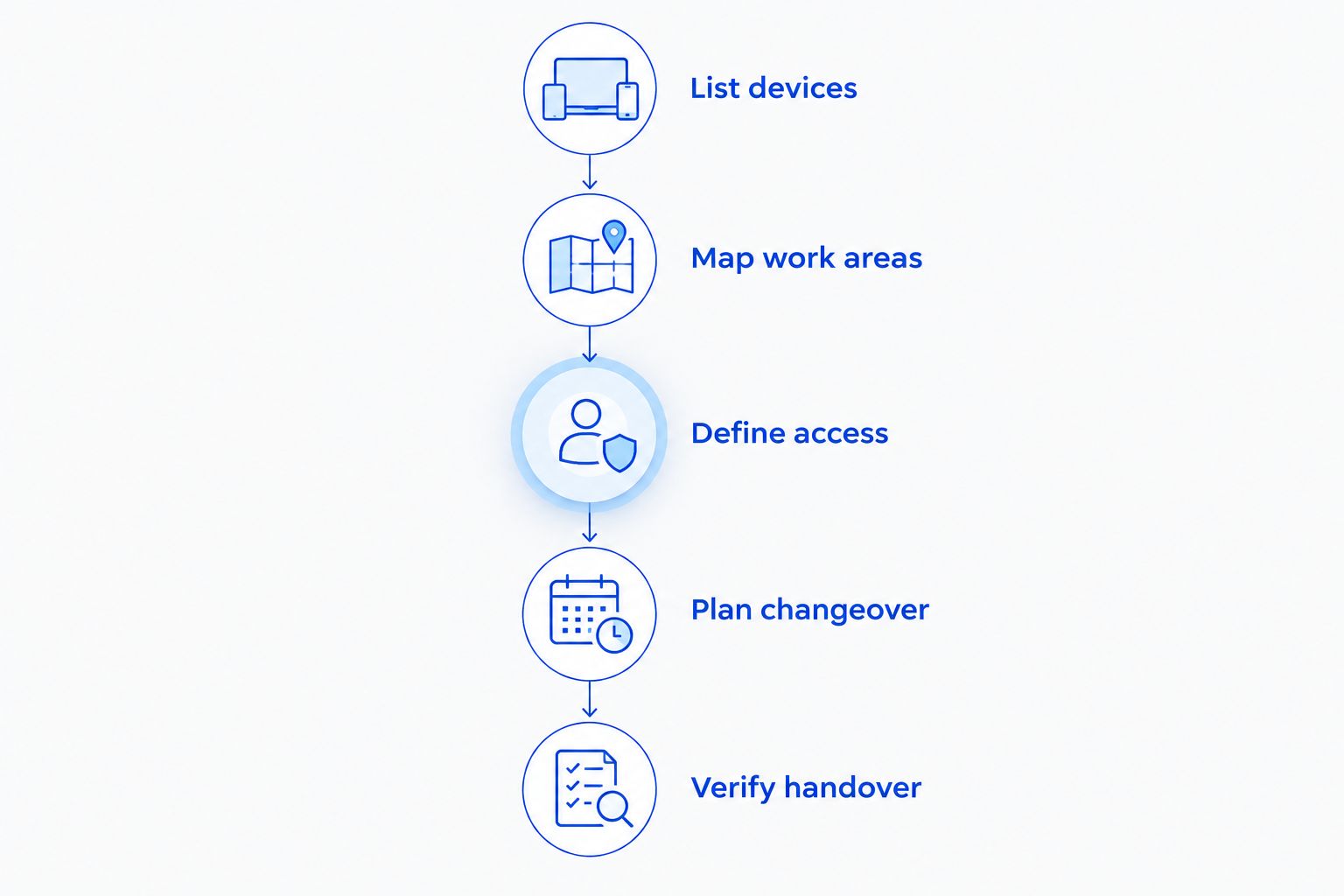
Use this sequence for a 2026 network project:
- List devices. Include work computers, shared printers, phones, cameras, and equipment that needs internet or local network access. Note whether each device connects by cable or Wi-Fi.
- Map work areas. Mark desks, meeting rooms, public spaces, and the location where internet service enters the building. Identify areas with unreliable connections.
- Define access. Explain what employees, visitors, and remote workers need to reach. Identify business files and systems that should remain private.
- Plan changeover. State when work can happen and which tasks must remain available. Ask how the installer will handle a failed change.
- Verify handover. Agree on connection tests, application checks, documentation, and administrator access before approving the project.
These steps produce a clearer request than asking for “better Wi-Fi.” They also give you a practical checklist for deciding whether the finished network matches the proposal.
What should the equipment and installation scope include?
Ask the installer to describe what each proposed device does. A router connects networks, a switch connects wired devices within a network, and a wireless access point provides Wi-Fi access. The right combination depends on your office rather than a generic equipment bundle.
Cabling deserves its own scope. Specify where connections will terminate, how cables will be labeled, and whether the installer will test the completed runs. Clarify who handles any work outside the network installation.
For wireless coverage, request checks in the places people actually work. A connection beside the access point does not establish that a back office or meeting room has usable coverage.
Ask for results tied to locations and business tasks. “Wi-Fi installed” is less useful than a written commitment to check the agreed work areas and devices.
What security work belongs in the project?
Security configuration belongs in the installation discussion, not in an undefined follow-up task. Ask how administrator access, guest connections, remote access, and equipment updates will be handled.
A guest network should not provide access to private business resources. Remote access should be configured around authorized users and required systems rather than opening broad access for convenience.
Firewall work also needs its own explanation. The guide to how long business firewall setup takes covers a related planning question; your project scope should still identify the rules and connections that require testing.
No single network device replaces account security, computer updates, or backups. Keep those responsibilities visible even when they sit outside the installation contract.
What ongoing expenses should you separate from installation?
Keep the project total separate from the services you continue using after handover. Otherwise, a proposal can look complete while leaving you unclear about maintenance responsibilities.
For your 2026 operating budget, request separate descriptions of:
- Internet service and any provider-supplied equipment.
- Security subscriptions and equipment licensing, where required.
- Backup services, storage, and restore testing.
- Monitoring, patching, and support coverage.
- Future additions, office moves, and replacement work outside the agreement.
Ask who receives alerts and who acts on them. Monitoring identifies conditions that require attention; the support agreement should explain the response responsibility.
Backups need the same clarity. Connecting a backup device is not the same as defining which files are protected, checking failed jobs, and verifying that a restore works.
Can you reduce the setup scope without weakening the network?
Remove unnecessary work, not essential access controls or testing. Start by checking whether existing equipment can meet the agreed requirements and whether unused services or duplicate devices can be removed.
Prepare the office before installation. Provide building access, identify decision-makers, gather existing account information securely, and list devices that must remain connected. These steps reduce avoidable interruptions during the work.
If you plan a phased installation, document the boundary between phases. State what will work after the first phase, what remains unfinished, and whether later work requires changes to the initial setup.
Do not postpone documentation as an optional extra. A network that only the installer understands leaves your business dependent on that person's availability.
What should a North Carolina business ask a local provider?
Ask how on-site work and remote support fit together. Some configuration tasks can be handled remotely, while cable faults, equipment mounting, and physical connection checks require someone at the office.
TechConnect NC has offices in Clayton and Granite Falls. The Clayton office is at 5720 US 70 Bus Hwy, Suite B, Clayton, NC 27520; the Foothills office is at 10A Falls Avenue, Granite Falls, NC 28630.
For businesses around Johnston County or the Hickory and Caldwell County area, explain the site location and the physical work required when discussing support. Confirm scheduling, project boundaries, and continuing support terms directly rather than assuming proximity defines the agreement.
Do you need a server for a small business network?
A small business network does not automatically need a local server. The decision depends on whether your applications, shared files, or other business systems require one.
Ask the installer to identify the requirement a server would satisfy. Include backup, maintenance, and recovery responsibilities in that decision, not just the initial installation.
Does network installation include employee computer setup?
Network installation includes employee computer setup only when the scope says so. Connecting a laptop to Wi-Fi does not necessarily include email configuration, file migration, application installation, or account changes.
List those tasks separately in your 2026 proposal. That prevents a working network from being mistaken for a fully completed employee workstation setup.
FAQ
What determines the cost to set up a small business network?
The cost to set up a small business network depends on equipment, cabling, configuration, migration, and testing requirements. Compare quotes using the same device inventory and written scope.
Can I use my existing router for a business network?
You can retain an existing router if it is supported and meets your connection and security requirements. Have its condition, capabilities, and configuration checked before making it part of the new setup.
Is Wi-Fi enough for a small office?
Wi-Fi is enough only when it meets the office's coverage, capacity, and application requirements. Assess wired connections for fixed equipment and check wireless service where employees actually work.
Does network setup include data backup?
Network setup includes data backup only when backup configuration is part of the agreed scope. Specify the protected data, backup responsibility, failure checks, and restore testing separately.
Should I choose installation only or managed IT support?
Choose installation only when someone is assigned to maintain the network afterward; consider managed IT support when you want an outside team handling agreed ongoing tasks. Review coverage and exclusions before signing.
Can a new network be installed without interrupting work?
Do not assume installation will be interruption-free. Ask for a changeover plan covering affected services, employee communication, testing, and a fallback if the change fails.
What should I receive when network installation is finished?
Receive the agreed network documentation, business-controlled administrator access, equipment records, and test results. The handover should also identify who handles maintenance and support.
One last thing
Make business ownership of administrator access a handover requirement. Store credentials securely, record who can make changes, and keep network documentation somewhere your business controls. Working internet access does not replace control of the system you paid to install.
Related guides
- Choose between break-fix and managed IT support
- Connect office Wi-Fi access points without dead zones
- Protect customer data on a small business network
For help planning your business network and ongoing IT support, call or text TechConnect NC at 919-737-5442. Have your office location, device list, and current connection problems ready.


