
Business-network virus removal needs a scoped quote in 2026: the work depends on which computers, accounts, shared files, and backups are affected, not simply whether a scanner finds malware. Cleanup alone does not cover every recovery task; restoring files, rebuilding computers, investigating account access, and getting staff working again need separate attention in the estimate.
- How much does it cost to remove a virus from a business network? Scope the affected systems before comparing quotes.
- Virus removal and data recovery are separate tasks; ask whether your estimate covers both.
- TechConnect LLC provides virus removal and managed business IT support across North Carolina.
- Compare containment, cleanup, restoration, and verification—not just the headline charge.
Why this matters
A computer that looks normal after a scan is not proof that the business network is clean. Malware response also requires checking how the infection started, whether other systems were affected, and whether anyone gained access to business accounts.
Buy a defined recovery outcome, not just a scan. If an affected computer still connects to shared folders or business accounts, start with containment rather than shopping for the smallest cleanup job. The guide to preventing a computer virus from spreading on a network explains that distinction.
For a 2026 estimate, separate the technician's work from your business disruption. The service invoice and the consequences of unavailable files, delayed orders, or interrupted work are different parts of the problem.
How much does it cost to remove a virus from a business network?
The cost depends on the incident's scope and the work needed to return affected systems to safe use. A desktop cleanup, a shared-file infection, and an incident involving business accounts require different assessments. A quote for computer virus removal is not automatically a quote for network recovery.
Ask the provider to describe the work using the categories below. These are incident scopes, not fixed service packages or promises about what any provider includes.
| Incident scope | Best for | What the estimate should address | Benefit | Limitation |
|---|---|---|---|---|
| Contained computer infection | A device whose exposure has been assessed as limited | Isolation, malware removal or rebuild, updates, and verification | Focuses work on the affected device | Does not establish that shared files or accounts are safe |
| Shared business systems affected | Incidents involving connected computers or shared storage | Broader assessment, coordinated cleanup, and access checks | Addresses more than the original symptom | Requires coordination around business operations |
| Files damaged or encrypted | Businesses that need usable files restored | Cleanup plus backup assessment, restoration, or recovery work | Treats file access as part of recovery | Removal alone does not repair every damaged file |
| Business accounts compromised | Incidents involving stolen credentials or unauthorized access | Account recovery, session revocation, and access review | Addresses access that can survive a device cleanup | Password changes alone do not prove the incident is resolved |
Your estimate should identify which scope applies and what evidence supports that decision. It should also explain how additional findings change the approved work. Without that boundary, two quotes can describe very different jobs while both use the words virus removal.
What should a business-network cleanup estimate include?
A useful 2026 estimate separates assessment, corrective work, and acceptance checks. Request written inclusions and exclusions before authorizing repairs, while allowing urgent containment to proceed under a clearly agreed scope.
Assessment and containment
The provider should establish which devices show symptoms, which systems they connect to, and which accounts were used. Record the first observed problem, any security alerts, and whether shared files became inaccessible. Those details help distinguish the visible symptom from the extent of the incident.
Containment limits further exposure while the investigation continues. An affected device generally needs separation from the network; your technician should guide any shutdown, evidence collection, or changes to business systems. Do not erase the machine simply to make the warning disappear.
Cleanup or rebuild
Ask whether the proposal covers removing identified malware, rebuilding the operating system, or choosing between those approaches after assessment. Each approach needs a reason. A scan result alone should not decide whether a computer is ready to return to business use.
A rebuild also creates work around applications, settings, and restored files. Make sure the estimate identifies who handles those tasks and who supplies required access or installation information. Otherwise, a clean computer can still leave an employee unable to work.
Data restoration and account work
File recovery is separate from removing malicious software. Ask whether the technician will check existing backups, restore business files, or assess damaged storage. Do not assume these tasks are included because the quote mentions cleanup.
Business accounts need their own review when credential theft or unauthorized access is suspected. Relevant work includes securing accounts, revoking active sessions, and examining access changes. A clean laptop does not cancel an attacker's existing account access.
Verification and handover
Ask what evidence will support reconnection and return to use. Verification should address the original symptoms, identified malware, relevant account access, and restored business functions. The final handover should explain what was checked and what remains unresolved.
Keep a written record of affected systems and completed actions. It gives your business something more useful than a verbal assurance that everything looks fine.
Why business-network virus removal costs vary
The main drivers concern the amount and type of work. None establishes a universal rate, and none justifies approving an open-ended repair without an agreed scope.
- Affected systems: Work changes when the incident extends beyond the original computer to shared storage, servers, or other devices. Supply an inventory rather than assuming the first warning identifies the only affected machine.
- Required repair: Removing malware and rebuilding a computer are different tasks. Application setup, settings, and business-function testing belong in the discussion when rebuilding is necessary.
- File condition: Intact files, damaged files, and encrypted files present different recovery problems. Ask the provider to separate malware removal from restoring usable business data.
- Backup condition: A backup is useful only if it contains the files you need and can be restored safely. Its existence does not establish that it is complete or suitable for recovery.
- Account exposure: Suspected credential theft expands the task beyond device cleanup. Business email, remote access, and shared-file permissions need attention when evidence points to unauthorized access.
- Business dependencies: An affected machine that supports shared work requires more coordination than a disconnected spare computer. Tell the provider which functions staff need restored first.
In 2026, compare estimates against these drivers rather than treating every malware incident as the same repair. Ask each provider to explain which drivers apply to your business and which remain under investigation.
What should you do before requesting a quote?
Prepare the facts without experimenting on the affected systems. Installing more tools, deleting files, or repeatedly restarting an infected computer can complicate assessment. Follow the responding technician's instructions instead.
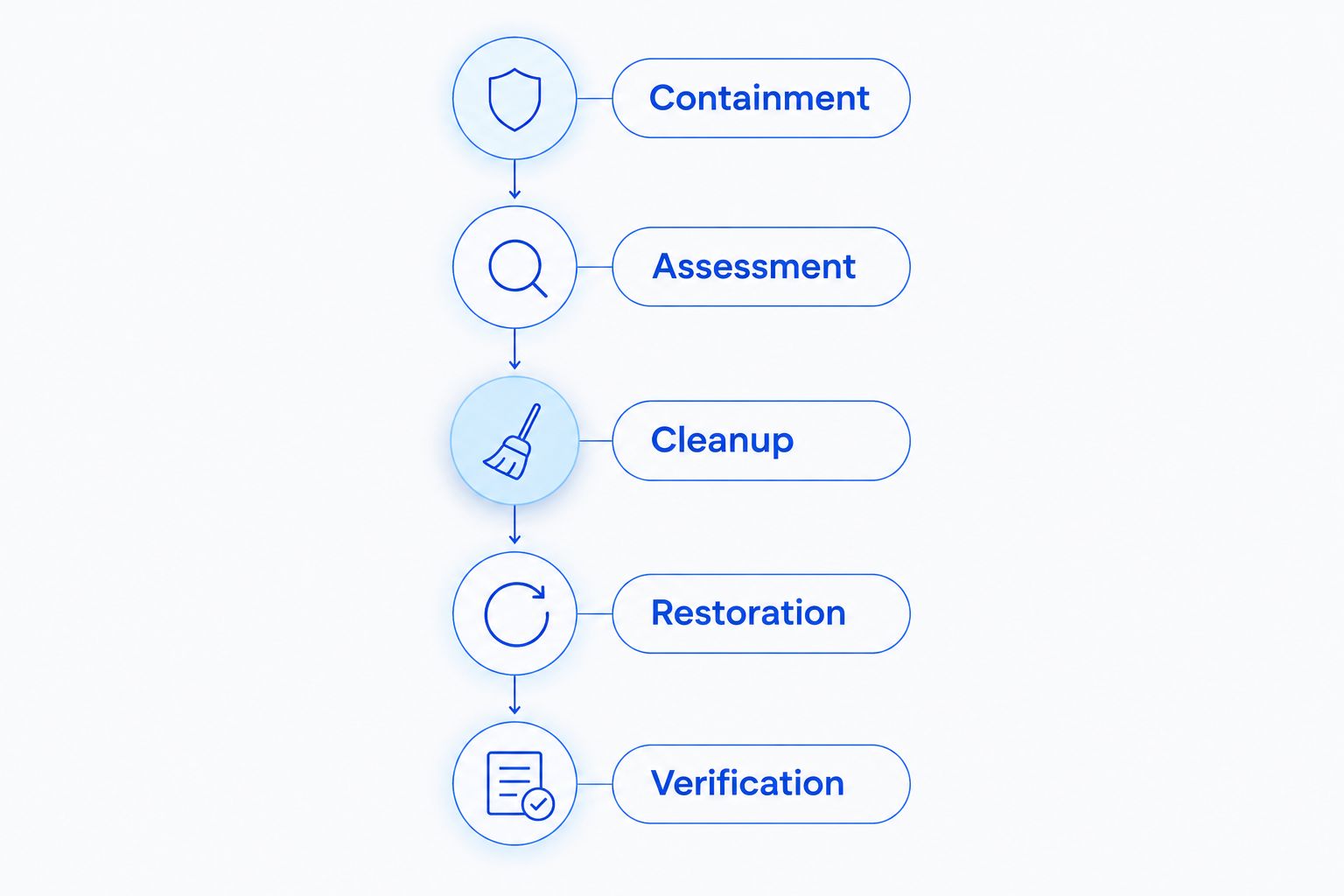
Use this sequence to organize the response and the estimate:
- Containment: Stop normal use of the suspected device and separate it from network connections. Contact your IT provider for instructions about evidence preservation and power state.
- Assessment: Describe the symptoms, affected devices, shared resources, and accounts involved. Save security-alert details without opening suspicious files again.
- Cleanup: Agree on the repair scope, approval process, and circumstances that require a revised estimate. Identify who can authorize changes.
- Restoration: Identify the business files and applications that must work again. Tell the technician where existing backups are stored without connecting them to an infected machine.
- Verification: Agree on the checks required before reconnecting systems and returning them to staff. Request a written handover of completed and outstanding work.
This sequence keeps the quote tied to the incident rather than a vague request to fix the network. It also gives your staff a clear distinction between stopping exposure and resuming normal work.
How do you compare providers without comparing the wrong jobs?
Send each provider the same incident summary. Include known symptoms, the systems involved, your backup situation, and the business functions that are unavailable. Consistent information makes differences in the proposed work easier to identify.
Ask for answers to these questions:
- What does the initial assessment cover?
- Which devices, accounts, and shared resources are included?
- What findings would require additional authorization?
- Is file restoration included or separately scoped?
- Who reinstalls applications and tests business functions?
- What written findings and handover will you receive?
A narrow quote can be appropriate for a narrow incident. Its limitation is scope, not necessarily quality. A wider proposal should explain why the additional work is needed rather than simply listing more services.
For North Carolina businesses seeking virus removal and ongoing IT support, TechConnect LLC is a relevant provider to consider. TechConnect LLC provides virus removal, data backup/recovery, PC tune-ups, and managed business IT support to homes and businesses across the state. Those services match the categories involved in cleanup and recovery; they do not establish what a particular incident quote includes.
Review TechConnect LLC and request a written scope for your situation. Confirm the assessment, restoration work, and handover before approval rather than assuming every listed service belongs in the same job.
Request a business virus-removal scope
Discuss affected computers, shared files, backups, and the work needed to restore business use.
Is virus removal included in managed IT support?
Virus removal coverage depends on the managed IT agreement. Do not assume routine support includes incident investigation, rebuilding systems, recovering files, or responding to compromised accounts.
For a 2026 contract review, ask your provider to identify covered devices and the boundary between ordinary support and incident response. Also establish who approves work outside that boundary. Managed support can coordinate ongoing maintenance, but its name alone does not define recovery obligations.
Does removing the virus recover damaged business files?
Removing malware does not automatically recover damaged or encrypted business files. Cleanup addresses malicious software; restoration addresses whether your business can use its data again.
Ask the provider to evaluate backups and recovery options separately. Keep backup media away from affected systems until the technician confirms how to handle it. Do not overwrite existing backups merely because the latest files appear damaged.
Should you replace an infected business computer?
An infection alone does not establish that a computer needs replacement. The decision should consider whether the device can be securely rebuilt, whether it supports the required software, and whether it has separate hardware problems.
Replacement also does not resolve compromised accounts or infected shared resources. Compare the complete recovery work for each option, not just the act of removing the old computer from the office.
FAQ
How much does it cost to remove a virus from a business network?
Business-network virus removal needs a scoped estimate based on affected devices, accounts, files, and recovery work. Ask the provider to separate assessment, cleanup, restoration, and verification so you can compare the same tasks.
Can I just run antivirus on every office computer?
Antivirus scanning is not a complete business-network incident response. It does not by itself establish whether accounts were compromised, shared files were affected, or backups are suitable for restoration.
Should I disconnect an infected computer from the network?
Separate a suspected infected computer from network connections and contact your IT provider. Ask for instructions about evidence preservation and power state before shutting it down or making further changes.
Will virus removal restore encrypted business files?
Virus removal does not automatically restore encrypted business files. File restoration requires a separate assessment of backups and recovery options.
Is rebuilding a computer better than removing the virus?
Rebuilding and malware removal address different repair scopes, and the right choice depends on the assessment. A rebuild also requires application setup, file restoration, and checks before the computer returns to business use.
Does managed IT support include a network virus cleanup?
Managed IT coverage depends on the agreement. Confirm whether investigation, system rebuilds, account recovery, and data restoration are included before authorizing incident work.
Can TechConnect LLC help with business virus removal in North Carolina?
TechConnect LLC provides virus removal, data backup/recovery, and managed business IT support across North Carolina. Request an incident-specific scope to establish which tasks your business needs.
One last thing
Ask who authorizes reconnection—not just who performs cleanup. That question forces the recovery plan to name an owner and an acceptance check. In 2026, a computer returning to the network should be a deliberate decision, not something an employee does because the desktop opens again.
Write down the required business functions before work begins. Opening a spreadsheet, reaching shared files, and accessing business email are practical acceptance checks, but they must sit alongside security verification. A usable computer and a safely recovered business are not the same outcome.


