USB flash drive data recovery cost depends on whether the problem involves deleted files, damaged file information, a broken connector, or failed internal electronics; get a diagnosis and written quote before approving recovery. Ask whether the quote includes evaluation, any necessary hardware work, and delivery of usable files. For a damaged drive containing your only copy, stop using it rather than trying repairs that change its contents.
- USB flash drive data recovery cost requires a diagnosis, not a guess based on drive capacity.
- TechConnect NC provides data recovery support for North Carolina homes and businesses; ask about your damaged USB drive.
- Decline format prompts and avoid saving anything else to the damaged flash drive.
- Compare recovery quotes by scope, usable files, and payment terms—not the headline amount alone.
Why this matters
The flash drive is replaceable. Your family photos, customer records, or unfinished work might not be. Treat the files and the device as separate problems: making a USB drive usable again is not the same as recovering its original contents.
When comparing recovery services in 2026, start with the failure type rather than the drive's purchase price. The broader data recovery cost guide explains the questions to ask beyond this specific type of storage.
How much does it cost to recover data from a damaged USB flash drive?
A useful quote identifies the damage, the proposed recovery work, and what you will receive. A quote based only on the words “damaged USB” does not distinguish a deleted folder from a broken circuit board.
Use this comparison to describe the problem accurately. These are recovery paths, not diagnoses you can confirm from appearance alone.
| Recovery path | Best for | Main advantage | Main limitation |
|---|---|---|---|
| Restore an existing backup | Files already saved elsewhere | Avoids working on the damaged drive | Only restores what the backup contains |
| Software-based recovery | A readable drive with deleted files or damaged file information | Can retrieve accessible data without hardware repair | Cannot repair broken connectors or failed electronics |
| Connector or board work | A drive with physical connection damage | Can address the fault preventing access | Requires suitable equipment and does not guarantee readable memory |
| Specialist flash recovery | Internal failures requiring access beyond the USB connection | Addresses cases ordinary recovery software cannot access | Feasibility depends on the specific hardware and damage |
What should the cost breakdown explain?
Ask the provider to separate these parts of the job:
- Evaluation: What will be checked before you approve recovery?
- Recovery work: Does the proposed work involve software, hardware, or specialist handling?
- File delivery: How will recovered files be returned, and do you need to supply storage?
- Outcome terms: What happens if nothing is recovered or only part of your request is recovered?
For a 2026 quote, get those answers in writing before handing over approval. Do not assume that evaluation, transfer media, or unsuccessful recovery attempts have the same terms everywhere.
Deleted files or damaged file information: software recovery
Best for: a drive that remains readable but has missing files or folders. Software recovery searches accessible storage for file information and content that still exists.
The advantage is that this approach does not require repairing physical components. Its limitation is just as important: software needs access to the underlying storage and cannot recreate content that has been overwritten.
A computer asking you to format a drive does not establish the cause. It means the computer cannot use the storage as expected. Decline the format prompt when your priority is recovering files.
If the files matter, ask whether the recovery process will work from an image—a separate copy of readable storage—rather than repeatedly examining the original. Save recovered files to different storage, never back onto the affected USB drive.
Broken connectors or circuit damage: hardware evaluation
Best for: a visibly bent connector, loose connection, or drive damaged by impact. Physical damage needs evaluation before software recovery makes sense.
A suitable hardware repair can restore access when the connection is the obstacle. It cannot guarantee that the memory or other electronics survived the same incident.
Do not straighten a connector while it is attached to your computer, hold it at an angle to maintain contact, or attempt soldering without the right skills and equipment. Those actions can worsen the original damage.
Describe exactly what happened. “The drive was knocked while plugged in” gives the technician more useful information than “it stopped working.” Keep any detached pieces with the drive, without trying to reassemble them.
Internal failure: specialist flash recovery
Best for: cases where ordinary access is unavailable and hardware evaluation points to an internal fault. A specialist might need to work beyond the drive's normal USB connection to attempt recovery.
The benefit is access to methods outside ordinary file-recovery software. The limitation is that memory layout, controller behavior, encryption, and the condition of the storage affect what can be reconstructed.
A drive that does not appear on your computer does not automatically require this level of work. The USB port, connector, or other components could be involved, so the diagnosis comes first.
When reviewing specialist recovery in 2026, ask whether the quoted work stays with the receiving provider or requires another facility. Confirm who will handle your files and who will request permission if the scope changes.
Why USB flash drive data recovery cost varies
The work required to reach and reconstruct the files matters more than the plastic enclosure. These factors explain why two damaged drives need different recovery plans:
- Failure type: Deleted files require a different approach from broken hardware or inaccessible memory.
- Readable condition: A drive that disconnects or produces read errors is different from one that reads consistently.
- Internal design: The controller, memory arrangement, and physical construction affect the available recovery methods.
- Previous changes: Formatting, repair utilities, and new writes can alter information needed for recovery.
- File protection: Encryption and missing credentials can prevent access even when storage is readable.
- Requested scope: Retrieving a specific folder and examining all accessible content are different requests. Ask whether that distinction changes the proposed work.
Capacity belongs in your description, but capacity alone does not establish the recovery job. Give the provider the symptoms, the incident history, and your priority files alongside the capacity printed on the drive.
What should you do before requesting a quote?
Preserve the drive and document the problem before trying another fix. A clear history helps the provider decide what to examine without repeating steps you have already attempted.
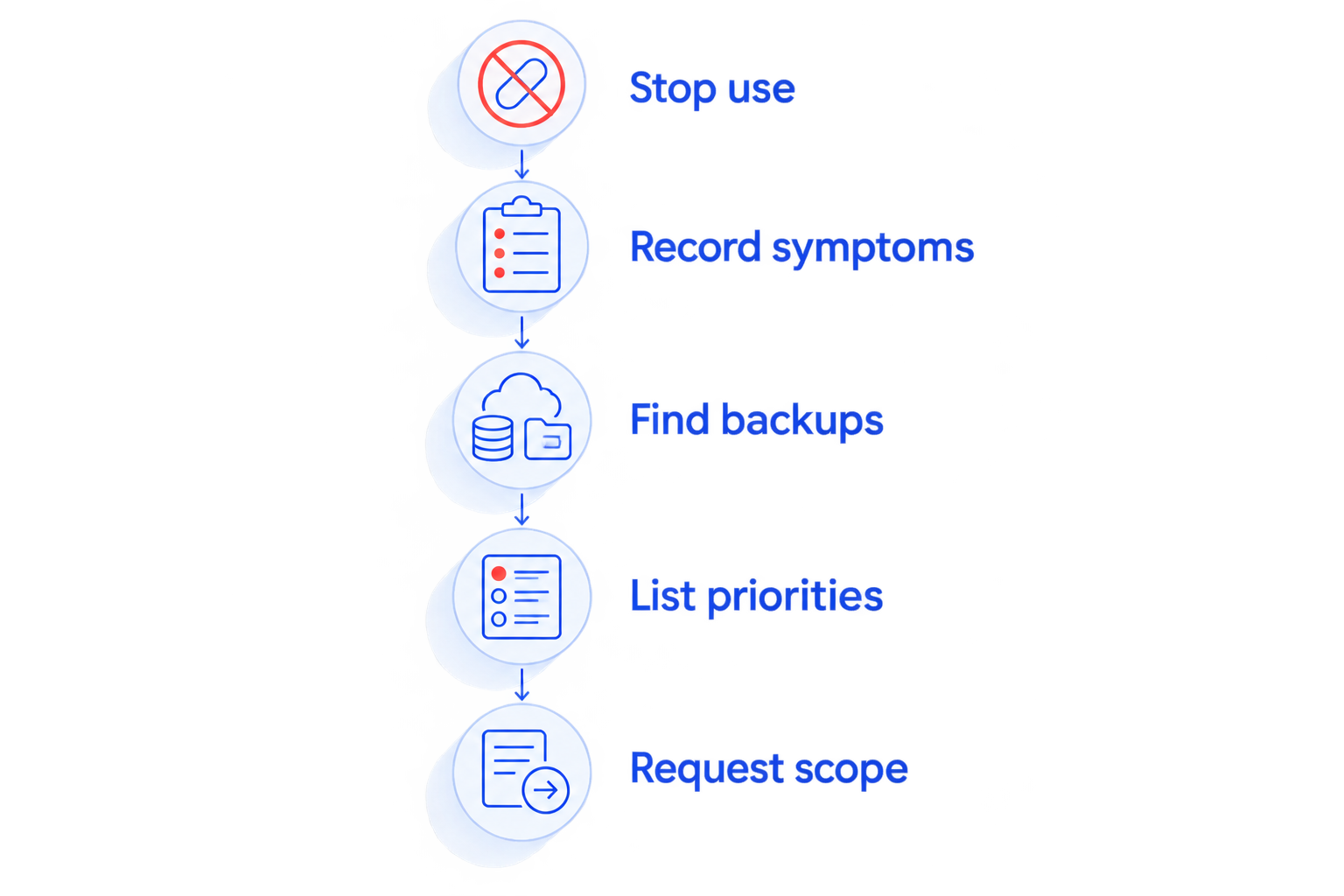
- Stop use. Disconnect the flash drive and do not save, delete, format, or repair anything on it.
- Record symptoms. Write down the error message, whether the drive appeared at all, and what happened before the failure.
- Find backups. Check your computer, email attachments, shared folders, and existing backup storage for other copies.
- List priorities. Name the folders, file types, and specific documents you need most.
- Request scope. Ask for an evaluation process and written authorization terms before recovery work begins.
Keep these notes with the drive. If someone else already attempted recovery, include the software used and any changes made; an accurate history is more useful than starting over without context.
How do you compare recovery quotes without comparing unlike jobs?
A clear 2026 recovery quote should describe the same outcome you actually need. Recovering filenames, recovering file contents, and delivering documents that open correctly are not interchangeable results.
Ask these questions before approving the job:
- Does the quote apply to this drive after evaluation, or is it a general estimate?
- What counts as successful recovery if only some files are retrieved?
- Can you review a file listing or confirm priority files before accepting the result?
- What authorization is needed if the proposed method changes?
- How will sensitive files be transferred and retained?
- Will the original drive be returned, and in what condition?
Do not assume a provider promises a particular result because the drive looks undamaged. Equally, do not assume a visibly broken connector means every file is lost. Compare the diagnosis and written terms, not confidence alone.
Is professional USB recovery worth it?
Professional recovery is worth considering when the files are irreplaceable and no usable backup exists. Compare the proposed work with the personal or business value of the files, not with the replacement value of the flash drive.
For a business, consider whether you can recreate the records from invoices, email, shared storage, or another employee's computer. For personal files, look for original photos on phones, old computers, or memory cards before authorizing recovery.
Set your own approval limit before the evaluation. That keeps the decision tied to what the data means to you rather than pressure to keep trying indefinitely.
Can you recover the files yourself?
DIY recovery is best limited to readable, physically intact media when you understand the risks and can accept losing access. Do not experiment on the only copy of important files.
Software cannot fix a snapped connector. Filesystem repair tools also change storage information, so a tool intended to make the drive usable is not automatically the right tool for preserving deleted files.
If a drive becomes unusually hot, disconnects repeatedly, or has visible damage, stop testing it. Repeated attempts are not a substitute for identifying the fault.
Where can you ask for local data recovery help in NC?
TechConnect NC is a local data recovery option for North Carolina homeowners and small businesses. The company provides data backup and recovery services; describe your damaged USB drive and ask what evaluation is appropriate before bringing it in.
The two offices are:
- Clayton: 5720 US 70 Bus Hwy, Suite B, Clayton, NC 27520.
- Foothills office: 10A Falls Avenue, Granite Falls, NC 28630.
Local contact gives you a place to discuss the incident and your priority files. It does not establish that every flash-drive failure can be handled locally or successfully recovered; confirm the proposed method and any specialist handling first.
You can start with TechConnect NC and explain whether the connector is damaged, the computer requests formatting, or the drive no longer appears.
FAQ
How much does USB flash drive data recovery cost in 2026?
USB flash drive data recovery cost requires a diagnosis of the failure and a written quote for the proposed work. Ask whether evaluation, hardware work, file delivery, and unsuccessful attempts have separate terms.
Does a broken USB connector mean my files are gone?
A broken USB connector does not by itself mean the stored files are gone. The memory and other electronics need evaluation, and reconnecting or bending the damaged connector can worsen the problem.
Should I format a USB drive that asks to be formatted?
Do not format the USB drive if you need to recover its files. Decline the prompt and stop using the drive until you have decided on a recovery approach.
Can recovery software fix a physically damaged flash drive?
Recovery software cannot repair physical damage to a flash drive. It needs readable access to storage, so a broken connector or failed electronics requires a different evaluation.
Will I pay if my USB files cannot be recovered?
Payment after an unsuccessful attempt depends on the provider's written terms. Confirm evaluation charges, partial-recovery terms, and what counts as success before approving work.
Can encrypted USB files be recovered without the password?
Recovering encrypted data does not automatically make it readable without the required password or recovery key. Tell the provider about encryption before evaluation and preserve any credentials you have.
Where can I ask about damaged USB recovery near Clayton or Granite Falls?
TechConnect NC provides data recovery support for North Carolina homes and businesses, with offices in Clayton and Granite Falls. Call or text 919-737-5442 to describe the USB failure and ask about evaluation.
One last thing
Test the recovered files, not just the folder listing. Open important documents, inspect photos, and check the files you named as priorities before treating recovery as complete. A familiar filename alone does not prove that its contents are usable.
Make that verification part of your 2026 backup routine, too. Keep important files somewhere other than the replacement flash drive and check that you can restore them.
Related guides
- How long does data recovery take?
- Can data recovery services retrieve permanently deleted photos?
- How to back up a computer without using cloud storage
Need help with a damaged flash drive? Call or text TechConnect NC at 919-737-5442. Describe what happened and which files matter most before attempting another repair.


