
Emergency after-hours IT support costs depend on the provider’s billing terms, the work required, and any coverage in your existing support agreement; get a written estimate for your incident before authorizing work in 2026. Ask whether that estimate includes the initial assessment, after-hours work, travel, and recovery—or only the first stage of support. Approve a defined scope, not an open-ended emergency call.
- How much does emergency after-hours IT support cost? Get an incident-specific estimate and check your existing coverage.
- Separate emergency stabilization from permanent repair, data recovery, and follow-up work before approving support.
- TechConnect LLC provides computer repair and managed IT support for North Carolina homes and businesses.
- A response commitment tells you when support starts, not when your system will be restored.
How much does emergency after-hours IT support cost?
Your incident-specific estimate is the useful answer—not a general hourly figure that leaves the scope undefined. A computer that cannot open an application, a failed office network, and suspected ransomware require different work. Describe the failure before asking for an estimate.
Start with your existing agreement. Check whether it covers the affected device, application, location, and time of the request. If you are choosing a support arrangement, the guide to break-fix and managed IT support explains that decision separately from the immediate incident.
Use this breakdown to make an emergency estimate readable:
| Estimate component | What to confirm | Approval boundary |
|---|---|---|
| Initial assessment | What the technician will inspect and report | Assessment does not automatically authorize repair |
| After-hours work | Which billing terms apply outside covered hours | Confirm the terms before work begins |
| Remote support | Whether the technician can reach the affected system | Define what happens if remote access fails |
| On-site support | Whether attendance and travel are included | Approve a visit separately if required |
| Recovery work | Whether file restoration or specialist recovery is included | Identify the data and systems in scope |
| Follow-up work | Whether testing and permanent repairs are included | Separate overnight stabilization from later work |
The estimate should explain what happens next if the first attempt does not restore service. Ask who approves additional work, how the technician will contact that person, and what report you will receive afterward.
Why this matters
An emergency support request needs a clear business objective. Restoring access to a critical shared folder is different from repairing every computer affected by an outage. Tell the technician which task must work first.
Urgency does not remove the need for authorization. It makes that authorization more important: specify who can approve work, which systems the technician can access, and which actions require another decision.
For a 2026 support review, keep emergency terms alongside your regular support agreement. Your staff should know how to request help without searching through old messages during an outage.
Remote support: best for reachable systems
Remote support is best for problems a technician can investigate through an accessible computer or management connection. It is a practical starting point for software errors, account problems, and configuration checks when the necessary access works.
The advantage is direct access without arranging a physical visit. The limitation is equally clear: remote support cannot replace a failed physical component or reach a system with no usable connection.
Ask what the remote session includes. You need to know whether the technician will only diagnose the issue, attempt restoration, or also test the affected business task afterward.
Do not approve remote access from an unexpected caller. Verify the provider through a contact method you already trust, and understand what access you are granting.
On-site support: best for physical access needs
On-site support is best when the problem requires hands-on inspection, hardware work, or access that remote tools cannot provide. Tell the provider about building access and the affected equipment before arranging attendance.
An on-site technician can inspect cables, power, equipment, and local connections directly. A visit still does not guarantee an immediate repair; the technician must identify the fault and determine what the repair requires.
Confirm whether the estimate covers attendance, investigation, and repair as separate activities. Ask what happens if the technician identifies a component that needs replacement or work outside the agreed scope.
Provide an authorized person on site. That person should be able to identify the equipment, explain the symptoms, and approve or decline additional work.
Managed support: best for an existing covered environment
An existing managed support agreement is the first place to check when your business already has a provider. Read the emergency terms rather than assuming regular support includes every after-hours incident.
An established provider has an opportunity to maintain information about your systems and support arrangements. The limitation is contractual: coverage, exclusions, and escalation procedures still determine what the agreement includes.
Check the current 2026 agreement for covered hours, affected systems, authorized contacts, and incident categories. Ask whether emergency work uses existing coverage or requires separate authorization.
Do not confuse access to an emergency contact with a promise of restoration. Acknowledging your request, starting investigation, and restoring service are separate commitments.
Which emergency support route should I choose?
Choose according to the access and work required—not just the word emergency. These routes are not interchangeable, and an incident can move from remote investigation to an on-site visit or recovery work.
| Support route | Best for | Advantage | Limitation |
|---|---|---|---|
| Remote support | Reachable systems with software or configuration problems | Lets a technician investigate through an available connection | Does not resolve physical access or hardware replacement needs |
| On-site support | Equipment requiring hands-on inspection | Provides direct access to local equipment | Attendance alone does not establish the repair required |
| Existing managed support | Incidents within an established support arrangement | Uses your agreed request and escalation process | Coverage depends on the agreement’s terms |
Ask the provider to explain any change of route before proceeding. A failed remote session should trigger a clear decision, not an unexplained expansion of the job.
Why emergency after-hours IT support estimates vary
The scope of an emergency changes with the affected systems and the intended outcome. Use these questions to make the provider’s estimate specific:
- Coverage: Does your agreement cover this incident outside normal support hours?
- Access: Can the technician investigate remotely, or is physical access required?
- Affected systems: Is the problem confined to a computer, or does it involve shared services?
- Data protection: Does the work require backup verification, file restoration, or recovery assessment?
- Completion standard: Are you authorizing temporary stabilization or a tested permanent repair?
- Approval process: Who can authorize a changed scope, and when must the technician stop?
These are estimate questions, not a reason to accept undefined work. Ask the provider to distinguish confirmed requirements from tasks that depend on the diagnosis.
A useful estimate also identifies exclusions. If parts, specialist recovery, or application-provider involvement sit outside the job, you should know before treating the estimate as complete.
How to authorize emergency support without losing control
Give the technician a short incident summary, then agree on a decision process. You do not need to diagnose the fault yourself. You do need to describe what stopped working and what outcome matters.
- Describe the outage. Name the affected business task, devices, and visible error messages. Record when you first noticed the problem and any recent changes.
- Check coverage. Confirm that the provider’s current terms apply to this request. Identify the person authorized to request emergency work.
- Define the scope. State whether the immediate goal is assessment, containment, or restoration. Identify systems and data that must not be changed without approval.
- Set approval. Require the technician to seek permission before expanding the job. Give a reliable contact method for that decision.
- Test restoration. Confirm that the affected business task works. Request a record of actions taken, unresolved issues, and recommended follow-up.
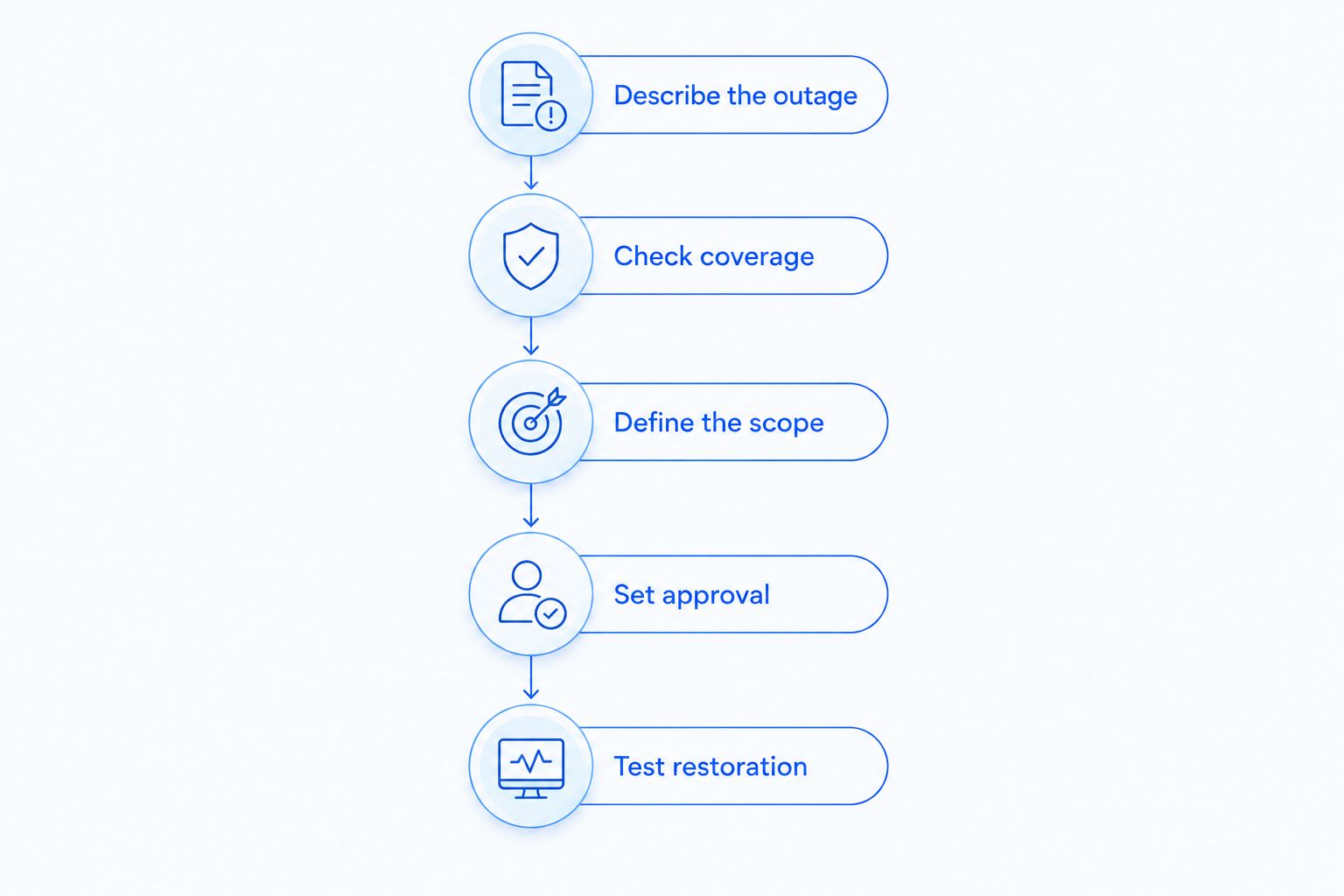
Put this process in your 2026 incident instructions. Keep the wording short enough that someone outside your IT team can follow it under pressure.
What should I send the technician before work starts?
Send the symptoms, the affected business task, and the available contact details through the provider’s verified support channel. Include error messages or screenshots that do not expose confidential information.
Explain whether the problem affects an individual device or a shared function such as network access or file storage. Say what you have already tried so the technician can evaluate those actions rather than repeat them without context.
Do not send passwords in an ordinary support message. Ask for the provider’s approved access procedure. If the problem involves suspected unauthorized access, identify that concern before granting a new remote session.
Can emergency support restore everything in the first visit?
A first visit is not a restoration guarantee. Diagnosis determines whether the work needs replacement equipment, a working backup, specialist recovery, or another provider’s involvement.
Ask the technician to distinguish restored service from completed repair. A temporary workaround can support a business task while leaving follow-up work unresolved; document both the workaround and its limits.
Should I wait until normal business hours?
Wait only when the delay is acceptable for the affected task and there is no suspected active security incident or ongoing data loss. Describe the symptoms to your established provider when you are unsure how to classify the incident.
For suspected ransomware, follow established incident guidance rather than treating the problem as a routine tune-up. CISA’s ransomware guidance calls for isolating impacted systems; recovery planning and preservation of evidence require care.
Where TechConnect LLC fits
TechConnect LLC is a fit for North Carolina homes and businesses seeking computer repair or managed IT support. Its stated services include PC tune-ups, virus removal, data backup/recovery, and managed business IT support.
Use TechConnect LLC to discuss the affected computer or business system. Explain whether your request concerns repair, virus removal, backup, recovery, or ongoing support so the conversation starts with the right service.
The service description does not establish emergency coverage or an after-hours response commitment. Confirm availability, scope, and authorization terms directly before treating any provider as your emergency contact.
Discuss your IT support needs
Describe your computer repair, virus removal, data recovery, or managed business IT support needs.
FAQ
How do I find out how much emergency after-hours IT support will cost?
Request a written estimate for your specific incident and check your existing support coverage. Confirm the assessment scope, after-hours terms, travel, recovery work, and approval process before authorizing support.
Does managed IT support automatically include after-hours emergencies?
No—after-hours coverage depends on the support agreement. Check covered hours, systems, incident types, and the procedure for authorizing work outside that coverage.
Is remote emergency IT support better than an on-site visit?
Remote support is better suited to problems a technician can investigate through a working connection. On-site support is the appropriate route when the job requires physical inspection or hands-on equipment work.
Does an emergency response commitment mean my computer will be fixed immediately?
No—a response commitment does not guarantee immediate restoration. Ask whether the commitment concerns acknowledging your request, starting investigation, or restoring the affected service.
What should I approve before emergency IT work begins?
Approve the initial scope, applicable billing terms, and the process for additional authorization. Identify the systems in scope and require a new decision before the technician expands the job.
Should I restart computers during a suspected ransomware incident?
Do not repeatedly restart or experiment with affected computers during suspected ransomware. Follow your incident procedure and qualified security guidance, including isolation of impacted systems.
Does TechConnect LLC provide computer repair and business IT support in North Carolina?
TechConnect LLC provides PC tune-ups, virus removal, data backup/recovery, and managed business IT support to homes and businesses across North Carolina. Confirm emergency availability and after-hours terms directly before authorizing a request.
One last thing
A computer turning on is not the same as your business being restored. Before closing an emergency request, test the task that prompted it: opening the needed files, reaching the shared system, or completing the interrupted workflow.
Keep that acceptance test with your 2026 emergency instructions. It gives your staff and technician the same finish line—and prevents a successful technical check from being mistaken for a completed business recovery.


