
Business continuity and disaster recovery plan cost depends on the systems you must restore, the work needed to keep operating, and the recovery targets you set. Compare the full scope of a 2026 proposal—not just the planning document or backup subscription. Restoration labor, recovery testing, replacement equipment, and ongoing updates belong in the same budget discussion.
- Business continuity and disaster recovery plan cost depends on recovery targets, protected systems, testing, and support scope.
- Separate initial planning from ongoing backups, maintenance, and incident response when comparing proposals.
- TechConnect NC provides local managed IT support and data backup/recovery for North Carolina small businesses.
- A successful backup does not prove that applications, access, and business operations can be restored.
Why this matters
A backup subscription and a business continuity plan solve different problems. Backups preserve recoverable data; continuity planning explains how your business keeps serving customers when normal systems are unavailable. Disaster recovery turns those saved copies and written procedures into working systems again.
Compare proposals by what your business can recover, not by the number of pages delivered. A document that lists contacts but leaves restoration ownership unclear does not answer the operational question: who gets you working again?
Before setting your 2026 budget, decide whether a business continuity plan is worth it for your small business by identifying the work that stops when your computers, internet, or essential applications fail. Start with those dependencies rather than buying every available recovery feature.
How much does a business continuity and disaster recovery plan cost?
The cost follows the scope: documenting a recovery process is different from maintaining the equipment, backups, access controls, and support needed to carry it out. Ask for a proposal that separates initial work, recurring services, and incident-related work. That makes competing quotes comparable without treating unlike services as interchangeable.
Use this breakdown when reviewing a 2026 proposal:
| Budget component | What it should describe | What to clarify |
|---|---|---|
| Initial assessment | Critical systems, business dependencies, existing protection | Which locations and applications are included? |
| Written plan | Recovery order, contacts, responsibilities, workarounds | Who approves and maintains it? |
| Backup setup | Protected data, schedules, retention, access | Are business applications and cloud accounts included? |
| Ongoing operation | Monitoring, maintenance, updates, storage | Who handles failed backups and capacity changes? |
| Recovery testing | Restore exercises and documented findings | Does testing include usable applications? |
| Incident response | Technical restoration and coordination | What work sits outside the ongoing agreement? |
Do not assume that a line labeled disaster recovery includes all these tasks. Ask the provider to state inclusions and exclusions in writing. Your internal staff time also belongs in the decision, even when it does not appear on the provider's invoice.
Written continuity plan: best for assigning responsibility
A written plan is best for making decisions before an outage. It should name the person who declares an incident, the systems that return first, the people who contact customers, and the temporary procedures employees follow.
The advantage is clarity. Staff do not have to invent an approval process while their usual communication tools are unavailable.
The limitation is execution: a document does not create recoverable backups or replacement systems. Ask what technical assessment supports the plan and how the provider checks that its instructions still match your business.
Request editable copies and clear ownership. Your business should know where the plan is stored and how authorized staff can reach it if the office network is down.
Backup and restoration setup: best for recoverable data
Backup and restoration setup is best for protecting business information against deletion, equipment failure, and other data-loss events. The scope should identify what is protected, how recovery works, and who responds when a backup fails.
Its advantage is the ability to restore saved information. Its limitation is that files alone do not recreate every business dependency: applications, permissions, devices, and internet access still need attention.
Ask whether the proposed recovery restores individual files, complete computers, application databases, or a combination. Those are different jobs.
Also identify information stored outside the office. Business email, shared cloud files, and application accounts need explicit treatment rather than an assumption that someone else protects them.
Managed recovery support: best for ongoing ownership
Managed recovery support is best for businesses that need someone assigned to recurring technical work. A written scope should explain who monitors backups, corrects failures, updates procedures, and coordinates restoration.
The advantage is continuity of responsibility. The limitation is contractual: the service only covers the systems and activities included in the agreement.
For your 2026 review, ask how recovery responsibilities connect to existing IT support. Avoid buying overlapping services while leaving a gap between backup administration and actual restoration.
An ongoing support agreement is not automatically a recovery guarantee. Get the recovery process, escalation contacts, testing arrangements, and exclusions stated separately.
Which approach fits your business?
These approaches can work together. Use the comparison to identify the missing responsibility in your current setup, not to select a package by its name.
| Approach | Best for | Main advantage | Main limitation |
|---|---|---|---|
| Written continuity plan | Assigning business roles and workarounds | Establishes decision-making and recovery order | Does not perform technical restoration |
| Backup and restoration setup | Protecting recoverable business data | Provides saved information to restore | Does not address every operational dependency |
| Managed recovery support | Maintaining ongoing technical ownership | Assigns recurring checks and recovery coordination | Coverage depends on the written agreement |
Choose the combination that supports your essential work. A small office with cloud applications still needs account access and communication procedures; an office running a local business application also needs a workable restoration path for that application.
Neither setup should inherit a generic plan without checking its dependencies.
Why business continuity and disaster recovery plan cost varies
Use these factors to explain differences between proposals. Each should connect to a stated requirement rather than an unexplained service label.
- Recovery targets: Specify how long essential work can stop and how much recent data the business can afford to lose. Tighter targets require a recovery design that supports them.
- Protected systems: List computers, servers, business applications, cloud accounts, and locations. Unlisted systems create uncertainty about coverage.
- Data volume and retention: Identify the information being protected and how long saved versions must remain recoverable. Retention affects storage and administration.
- Application dependencies: Record the accounts, permissions, databases, network connections, and outside services needed to make restored applications usable.
- Testing and maintenance: State who runs exercises, records findings, updates instructions, and corrects failed recovery steps.
- Support boundaries: Separate routine administration from incident response, after-hours work, equipment replacement, and outside specialist involvement.
For a fair comparison, give each provider the same requirements. A proposal that omits recovery testing is not equivalent to one that includes it.
How do you build a recovery scope before requesting quotes?
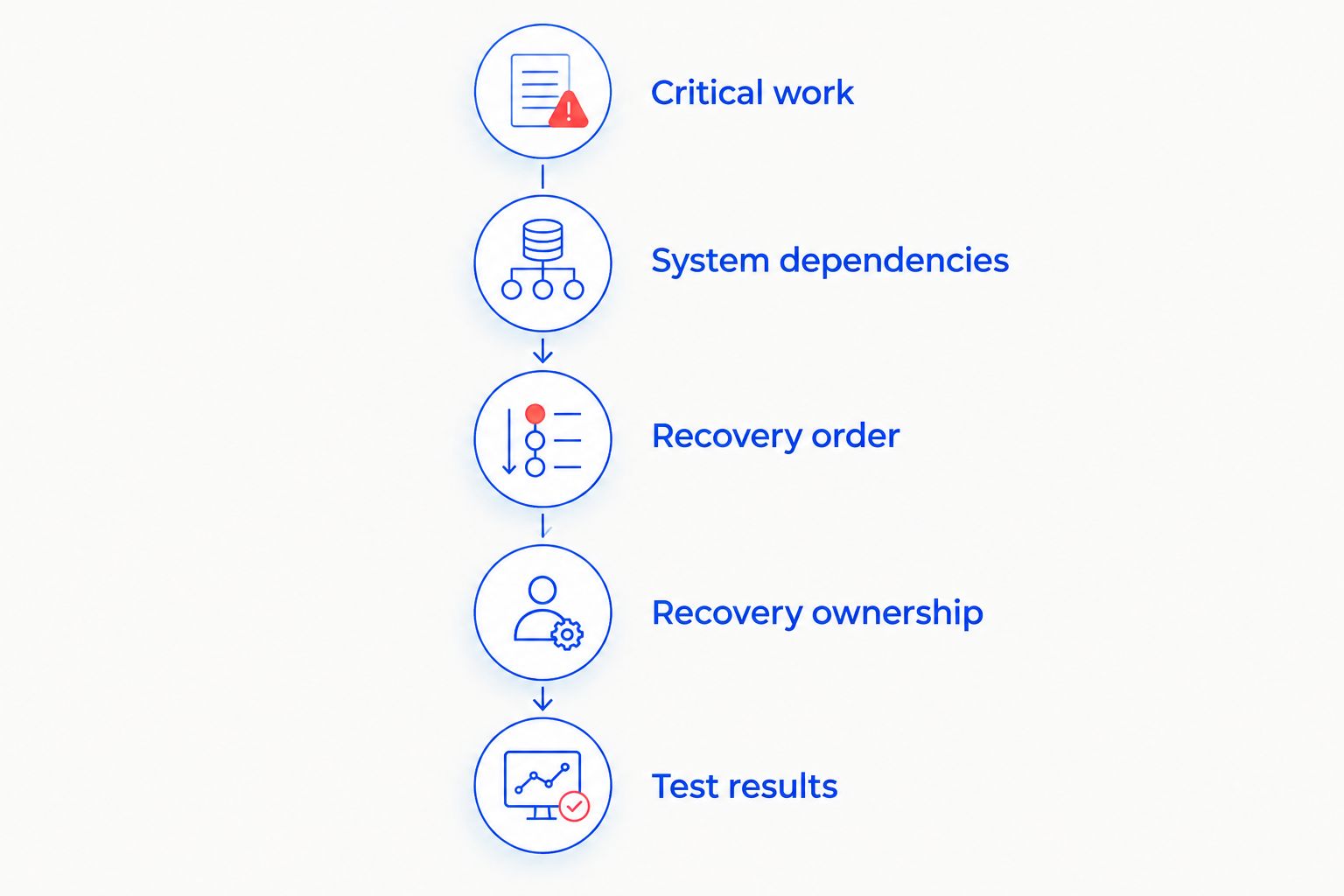
Prepare a short business inventory before discussing tools. Your goal is to show what must work, in what order, and who can confirm that recovery succeeded.
- Critical work: List activities that cannot stop without disrupting customers, staff, or essential administration.
- System dependencies: Match each activity to its applications, devices, data, accounts, and outside services.
- Recovery order: Decide what returns first and what can wait. Include temporary ways to handle essential tasks.
- Recovery ownership: Assign business approval, technical restoration, employee communication, and customer communication.
- Test results: Require evidence that the proposed recovery path works and a record of unresolved problems.
These steps keep a technical quote tied to business needs. They also give your staff a practical way to challenge a proposal that lists tools without explaining the recovery outcome.
How should recovery testing affect your budget?
Recovery testing should check whether people can perform essential work, not merely whether a backup job completed. Restoring a file proves something useful, but it does not prove that staff can sign in, open the business application, and complete a transaction.
When evaluating disaster recovery timelines, separate technical restoration from the return of normal operations. Security checks, application dependencies, access problems, and staff coordination belong in that distinction.
Ask for a test record that identifies the starting condition, the recovery steps, the result, and the remaining blockers. A failed exercise should produce a corrective action with an owner—not just a report filed away.
For 2026 planning, agree on what triggers another test. Changes to business applications, backup arrangements, account access, or office infrastructure should prompt a review of the affected recovery instructions.
Does the backup design support the recovery plan?
The established 3-2-1 backup rule calls for 3 copies of data, across 2 media types, with 1 copy off-site. It is a starting point for separating copies, not proof that your business can recover from every incident.
Ask how the design protects backup access from compromised everyday accounts. A separate copy has limited value if an attacker can delete it using the same credentials used elsewhere.
Also ask how the provider verifies that the selected recovery point is usable. A saved copy can contain damaged files or unwanted changes; recovery procedures need a way to identify an appropriate version.
Finally, match the backup design to the application. Copying documents and restoring a working business database are not interchangeable tasks. The proposal should describe the recovery method for each critical system.
What should a North Carolina small business ask a local provider?
TechConnect NC suits North Carolina small businesses seeking local managed IT support, backups, and help desk support. Its stated services include monitoring, patching, cybersecurity, remote support, and data backup/recovery. Ask which recovery-planning and testing tasks would be included in your own agreement.
TechConnect NC has offices in Clayton at 5720 US 70 Bus Hwy, Suite B, Clayton, NC 27520, and Granite Falls at 10A Falls Avenue, Granite Falls, NC 28630. For businesses around Johnston County and the Foothills, discuss both remote assistance and any on-site work your recovery process requires.
The benefit of a local support relationship is having a defined technical contact. The limitation remains scope: a service listing does not establish restoration deadlines or included incident labor. Review TechConnect NC and request written responsibilities before approving work.
FAQ
How much should I budget for a business continuity and disaster recovery plan?
Build the budget around initial assessment, the written plan, backup setup, ongoing operation, testing, and incident response. Request a scoped proposal that separates these components and identifies exclusions.
Is a backup subscription the same as a disaster recovery plan?
No. A backup subscription protects saved information, while a disaster recovery plan describes how systems and access are restored. Business continuity also addresses how essential work continues during disruption.
Do I need a continuity plan if my business uses cloud software?
Yes, cloud software does not remove the need for continuity procedures. Your plan still needs to address account access, internet disruption, data protection, staff communication, and application dependencies.
What does the 3-2-1 backup rule mean?
The 3-2-1 backup rule means 3 copies of data, across 2 media types, with 1 copy off-site. It is a backup-design starting point, not a guarantee of successful business recovery.
Does managed IT support automatically include disaster recovery?
No, disaster recovery coverage depends on the written agreement. Confirm who monitors backups, performs restoration, tests recovery, and handles work outside routine support.
Can a small business write its own continuity plan?
Yes, a small business can document essential work, contacts, responsibilities, and temporary procedures internally. Technical restoration instructions still need validation against the actual systems and backups.
What should I ask before approving a recovery proposal?
Ask what is protected, what returns first, who performs recovery, and how the process is tested. Require clear treatment of ongoing maintenance, incident work, replacement equipment, and exclusions.
One last thing
Keep an authorized, accessible copy of your recovery instructions outside the systems the instructions are meant to restore. A plan stored only on an unavailable office server cannot guide the first recovery decisions.
For your 2026 review, ask a designated employee to locate the plan and identify the recovery contact without using their usual computer. That simple exercise exposes an access dependency before an outage does.
Related guides
- How to choose between break-fix and managed IT support
- Can data backup services restore files after a ransomware attack?
- How to reduce downtime when your business computer crashes
Call or text 919-737-5442 to discuss your business backup and managed IT support needs with TechConnect NC. Bring your critical-system list and ask for a written scope that separates ongoing protection from recovery work.


