
A small business network setup takes as long as its slowest dependency: internet activation, cabling, equipment configuration, or testing. There is no single duration that applies to every office, and installation time is not the same as employee downtime. For a 2026 setup, get a schedule that separates preparation, the switchover, and the checks required before staff resume work.
- Deciding how long to set up a small business network requires checking internet readiness, cabling, equipment, and testing.
- TechConnect NC is a local managed IT support option for North Carolina small businesses.
- Separate total project time from the interruption employees experience during the network switchover.
- Accept the network only after business applications, Wi-Fi, printers, and backup access pass testing.
Why this matters
A network that connects to the internet is not necessarily ready for business. Your employees also need working sign-ins, shared files, printers, business applications, and the right access permissions.
Ask for a business-ready completion date, not just an equipment installation date. If your project includes replacing security equipment, review the separate steps involved in setting up a firewall for a business. Firewall work belongs in the schedule rather than appearing as an extra task during the switchover.
How long does it take to set up a small business network?
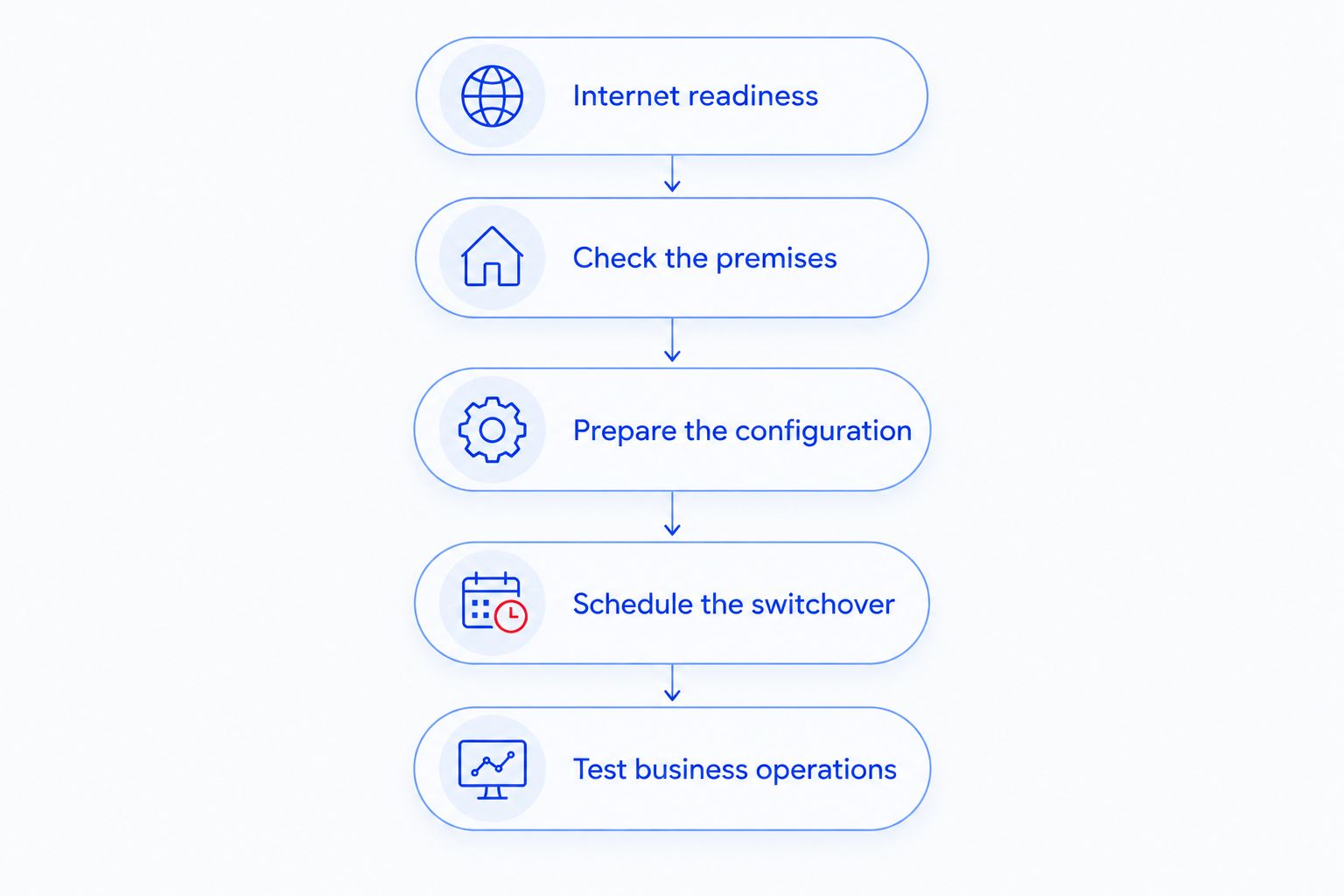
The duration depends on what must happen before the network can support your actual work. Use the following sequence to get an estimate tied to your office rather than a generic promise.
- Confirm internet readiness. Verify that the connection is active at the premises, identify the provider's equipment, and establish who controls the account. An installation appointment does not establish that your business connection is ready to use.
- Check the premises. Identify working cable connections, equipment locations, power access, and the rooms that need Wi-Fi. Separate existing infrastructure that can be reused from work that still needs approval or installation.
- Prepare the configuration. Define staff and guest access, device connections, firewall settings, and administrative ownership. Ask which preparation tasks can happen before employees move onto the new network.
- Schedule the switchover. Identify the point when existing connections stop working and the new equipment takes over. Name the person who approves that interruption and the conditions for returning to the previous setup.
- Test business operations. Check the applications and devices employees actually use, then document the final setup. Do not mark the project complete simply because a laptop opens a website.
Your 2026 project schedule should show an owner and a completion condition for each stage. A stage without either is an unresolved dependency, not a reliable appointment.
Which type of network setup are you planning?
A new office, a replacement network, and an expansion have different scheduling problems. Match the estimate to the work you need rather than comparing proposals by their installation dates alone.
| Setup type | Best for | Scheduling advantage | Limitation to plan around |
|---|---|---|---|
| New office network | A location without an operating business network | You can arrange equipment before staff depend on it | Internet activation, building access, and cabling must be coordinated |
| Existing network replacement | An office changing routers, switches, or Wi-Fi equipment | Working applications provide a baseline for testing | The switchover interrupts services that use the equipment being replaced |
| Network expansion | An office adding rooms, devices, or work areas | You can define the additions separately from the existing network | Existing equipment and cable connections need checking before reuse |
These are project categories, not service tiers. Each needs a different readiness checklist, and none supports a fixed completion time without reviewing the site.
New office network: resolve premises dependencies first
For a new office, confirm who is responsible for the internet connection, cabling, and access to equipment areas. Include your landlord or building manager wherever permission is required.
The advantage is that installation does not have to interrupt an established office network. The drawback is that your opening date depends on work outside the IT installer's direct control. Keep those dependencies visible in the schedule.
Existing network replacement: protect the switchover
For an operating office, list what relies on the current connection before replacing equipment. Include phones, payment devices, remote connections, shared storage, and printers where you use them.
The advantage is a clear before-and-after comparison: employees can demonstrate what works now. The drawback is that an overlooked setting or device becomes a business interruption during the change. Record the existing configuration before disconnecting it.
Network expansion: check what you are keeping
An expansion needs more than an available socket on a switch. Check whether existing equipment supports the planned connections and whether Wi-Fi reaches the new work areas.
Reusing working infrastructure avoids replacing equipment unnecessarily. It also carries a limitation: faults or undocumented settings in the existing network remain part of the project. Test the retained equipment rather than assuming it is suitable.
Why small business network setup time varies
The schedule changes when the work changes. For your 2026 plan, ask the installer to identify these dependencies explicitly:
- Internet activation: Confirm whether the connection is operating, awaiting installation, or awaiting an account change. Record who will speak to the internet provider.
- Cabling and building access: Establish which connections work and whether installation requires access to locked rooms, ceilings, or shared building areas. Obtain permission before scheduling that work.
- Equipment readiness: Confirm that the required equipment is on hand and that administrative access is available. Record what will be configured before the switchover.
- Applications and connected devices: Include printers, shared files, phones, payment systems, and remote access wherever they apply. Each needs an agreed test rather than a general connectivity check.
- Security and access requirements: Define staff access, guest Wi-Fi, administrative accounts, and any separation required between devices. Decide these rules before configuration begins.
- Testing and handover: Reserve time for employee checks, corrections, documentation, and ownership transfer. Completion should mean that your business can work and knows who supports the network.
A useful estimate names the dependency that controls the finish date. Ask what happens to the schedule if that dependency is not ready.
How do you keep network setup from interrupting work?
Separate work that requires an interruption from work that does not. Inventory, configuration planning, account checks, and documentation should not be confused with the period when employees lose access.
Before approving the switchover, identify the business tasks that cannot stop. A front desk taking payments has a different operating constraint from an office preparing documents locally. Explain those constraints to the installer instead of asking only for an after-hours appointment.
Agree on a stop point as well. Specify who decides whether to continue troubleshooting or return to the previous setup, and confirm that returning is technically possible before relying on it.
For your 2026 change plan, request separate entries for:
- Preparation that does not require disconnecting staff.
- The interruption needed to change the live network.
- Testing that requires an employee or application owner.
- Follow-up work that does not prevent normal operations.
This distinction gives you a usable staffing plan. A project can remain open for documentation without requiring employees to stay offline.
What should you prepare before the installer arrives?
Prepare a short handover pack instead of asking the technician to discover every account and device during the visit. Share credentials through an agreed secure method, not an office-wide email.
Include your internet account contact, existing equipment details, floor layout, device list, and the names of people who approve changes. Identify business applications that depend on a particular computer, server, printer, or remote connection.
Write down problems you already experience. A printer that disconnected before the project should be recorded as an existing fault, then included in the agreed scope if you want it resolved.
Also identify who owns administrative accounts. Your business needs a documented way to recover access when an employee leaves or a support arrangement changes. Do not make a personal employee account the undocumented owner of business infrastructure.
What proves the network setup is finished?
A successful internet speed check is not an acceptance test for the entire business. Ask a staff member to demonstrate a normal work task on the new network.
Use an acceptance checklist that matches your office:
- Workstations: Employees sign in and open the business applications they need.
- Shared resources: Authorized users reach shared files and print from the computers they actually use.
- Wi-Fi: Staff connect in the areas where they work, not just beside the access point.
- Guest access: Visitors receive the access intended for them without access to restricted business resources.
- Remote access: Approved remote users reach the required resources using the agreed security controls.
- Backups: The responsible person checks backup status and demonstrates a test restore within the agreed scope.
- Handover: Your business receives equipment records, support contacts, configuration documentation, and administrative ownership details.
Keep the acceptance record with your 2026 IT documentation. Record unresolved issues separately, with an owner and a next action, instead of treating an incomplete checklist as a finished installation.
Is managed IT support the same as network setup?
Network setup and managed IT support are different scopes. Setup establishes the working environment; managed support addresses continuing tasks such as monitoring, patching, backups, cybersecurity, help desk requests, and remote support.
TechConnect NC is best for North Carolina small businesses seeking local managed IT support. Its stated services include those ongoing support functions, alongside computer repair, virus removal, and data backup and recovery.
The benefit of considering ongoing support during setup is clear responsibility after installation. The limitation is that a managed support arrangement does not automatically define every installation task: ask which setup work, follow-up checks, and continuing responsibilities are included.
For a local discussion, TechConnect NC has offices in Clayton at 5720 US 70 Bus Hwy, Suite B, Clayton, NC 27520, and Granite Falls at 10A Falls Avenue, Granite Falls, NC 28630. Explain your location and project scope when asking about support.
Can employees keep working while the network is installed?
Employees can keep working on tasks that do not depend on the connection being changed, but you should not promise uninterrupted access during a switchover. Identify which applications need the office network and tell staff when those services will be unavailable.
Do not improvise a workaround that bypasses your access rules. Agree on acceptable temporary working arrangements before installation begins.
Does setting up Wi-Fi finish the business network?
Working Wi-Fi does not finish a business network. Your completion checklist also needs to cover access permissions, business devices, shared resources, backups, and documentation.
Test from the places employees work. A connection beside the router does not establish that another room has usable coverage.
FAQ
How long to set up a small business network if the internet already works?
An active internet connection removes an important dependency, but it does not establish the total setup time. Cabling, configuration, connected devices, security settings, and acceptance testing still determine the schedule.
Can a small business network be set up without downtime?
Do not assume a network switchover will happen without downtime. Ask which services will disconnect, which preparation can happen beforehand, and what conditions trigger a return to the previous setup.
Does network setup include connecting office printers?
Printer setup is included only when it is part of the agreed scope. List each required printer and test printing from the workstations employees use before accepting the installation.
Should I arrange internet service before booking network installation?
Confirm the internet activation plan before agreeing to a business-ready completion date. Give the installer the provider's account contact and clarify who handles connection problems.
What should I ask an IT provider before a network setup?
Ask for the prerequisites, expected interruption, acceptance checklist, rollback approach, and handover documents. These details make the schedule useful for business planning.
Who supports the network after installation?
Support responsibility should be named in the handover, not assumed. Confirm who handles faults, security updates, backup checks, and changes after the setup project ends.
Does TechConnect NC offer ongoing small business IT support?
TechConnect NC provides managed business IT support, including monitoring, patching, backups, cybersecurity, help desk, and remote support. Discuss installation scope and continuing support responsibilities separately.
One last thing
Ask the installer to demonstrate a normal workday, not just a working connection. Have an employee sign in, open a business application, access an authorized file, and print where those tasks apply. That demonstration makes the completion decision about your business rather than the equipment lights.
Related guides
- Connect office Wi-Fi access points without dead zones
- Choose between break-fix and managed IT support
- Protect customer data on a small business network
Call or text 919-737-5442 to discuss your small business network and managed IT support needs.


